
Hello! Welcome to the fifth lesson in our course on iteration and asynchronous programming in Python.
Introduction
In our last lesson, we introduced generator functions, establishing that they use the yield keyword to produce a sequence of values lazily. We contrasted this with regular functions that return a single, complete result. The key takeaway was that generators pause their execution and preserve their state, making them highly memory-efficient.
Today, we will dissect that "pause and resume" mechanism. The learning outcome for this lesson is to trace the execution of a generator function to describe how its state is suspended and resumed. We will move from the "what" to the "how," examining the precise flow of control between a generator and the code that consumes it. This detailed understanding is crucial, as the core principle of suspending and resuming execution is the foundation upon which Python's asyncio framework is built.
The Generator Execution Cycle
When you call a generator function, its code does not run. Instead, a generator object is returned. This object is an iterator that encapsulates the function's code and its execution state. The code only runs when you advance the iterator, typically by calling next() on it (which for loops do automatically).
Let's trace this step-by-step with a simple example.
def simple_generator():
    print("-> Generator started")
    yield 1
    print("-> Generator resumed")
    yield 2
    print("-> Generator finished")

# 1. Create the generator object
gen = simple_generator()
print(f"Generator object created: {gen}")

# 2. First next() call
print("Calling next() for the first time...")
value1 = next(gen)
print(f"Yielded value: {value1}")

# 3. Second next() call
print("\nCalling next() for the second time...")
value2 = next(gen)
print(f"Yielded value: {value2}")

# 4. Third next() call
print("\nCalling next() for the third time...")
try:
    next(gen)
except StopIteration:
    print("Caught StopIteration, as expected.")
The output of this code is:
Generator object created: <generator object simple_generator at 0x...>
Calling next() for the first time...
-> Generator started
Yielded value: 1

Calling next() for the second time...
-> Generator resumed
Yielded value: 2

Calling next() for the third time...
-> Generator finished
Caught StopIteration, as expected.
Let's break down the execution trace:
gen = simple_generator(): The function is called, but no code inside it executes. A generator object is created and returned.next(gen): Control jumps into thesimple_generatorfunction. It executes line by line until it hitsyield 1.- At
yield 1, two things happen:- The value
1is sent out to the caller (and assigned tovalue1). - The function's execution is suspended. Its entire state is frozen.
- The value
next(gen)again: Control jumps back into the generator, resuming execution immediately after theyield 1statement. Theprint("-> Generator resumed")line runs, followed byyield 2.- At
yield 2, the process repeats: the value2is sent out, and the function is suspended again. next(gen)a final time: Execution resumes afteryield 2. The finalprintstatement runs. The function then reaches its end, so it automatically raises aStopIterationexception to signal that it is exhausted.
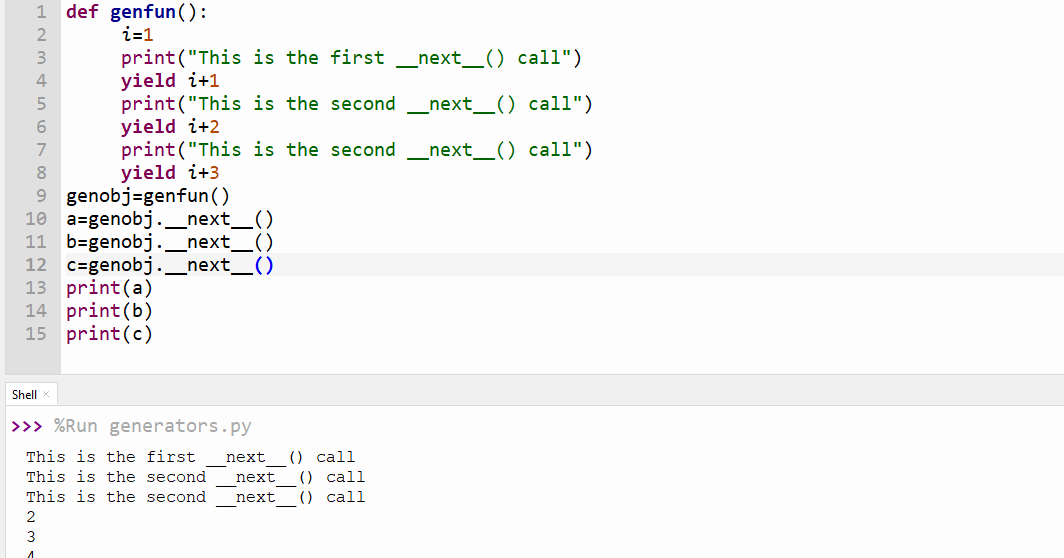
This image provides another clear, annotated example of this exact process.
What State is Preserved?
When we say the generator's "state" is preserved, we mean more than just its local variables. The Python runtime freezes the entire execution frame.
To understand this more deeply, please read the following brief explanation.
A Rudimentary Introduction to Generator and Yield in Python
This article, 'A Rudimentary Introduction to Generator and Yield in Python', provides a precise and detailed definition of what it means for a generator's state to be saved.
Read the section titled 'The yield Statement'. Focus on the paragraph that begins 'More concretely (and verbosely)...'. It explains exactly what is saved: local variables, the instruction pointer, and the evaluation stack.
As the text explains, the preserved state includes:
- Local variables: Any variables defined within the generator's scope retain their values.
- The instruction pointer: This is an internal pointer that keeps track of where in the code the execution was paused. When resumed, execution continues from this point.
- The internal evaluation stack: Any temporary values or ongoing computations are also saved.
This is analogous to how an operating system performs a context switch, saving the complete state of a process or thread so it can be perfectly restored later.
Tracing Execution in a for Loop
While calling next() manually is instructive, the most common way to consume a generator is with a for loop. The loop handles the next() calls and the StopIteration exception for you.
The following image provides an excellent, detailed trace of a generator being consumed by a for loop.

By following the numbered steps in the image, you can see the interplay:
- The
forloop starts, implicitly creating the generator object. - It calls
next()on the object. - The generator runs until it yields the first odd number (
1). - The
forloop receives the value1and executes its body (print(i)). - The loop repeats, calling
next()again, resuming the generator to get the next value (3), and so on.
Interleaved Execution: A Glimpse into Concurrency
The suspend/resume capability of generators allows for an interesting pattern: interleaving the execution of multiple generators. This provides a powerful mental model for the cooperative multitasking that we will explore in asyncio.
The following video clip demonstrates this by running two generators "in parallel" using zip.
Python Generators 1: Functions that yield, suspend, and resume
This clip from 'Python Generators 1' by Sebastiaan Mathôt uses print statements to make the suspend-and-resume cycle of two alternating generators explicit.
Watch from 08:45 to 10:22. Observe how the cats and mice generators take turns executing. Each time one yields, it pauses, and the other one gets a chance to run. The presenter explicitly calls this a 'resume suspend cycle' and links it to coroutines and async/await.
As you saw, the zip function pulls one value from the cats generator (which then pauses), then one from the mice generator (which then pauses), and repeats. This alternation is possible only because each generator saves its state upon yielding. This is the fundamental mechanism of cooperative multitasking: functions voluntarily yield control to allow other functions to run.
Advanced State Manipulation with send()
So far, we've seen yield as a statement that produces a value. However, yield is actually an expression. This means it can also receive a value when the generator is resumed. This is done using the generator.send() method.
This feature allows for bidirectional communication, where the calling code can influence the generator's internal state while it's running.
A Rudimentary Introduction to Generator and Yield in Python
Let's return to 'A Rudimentary Introduction to Generator and Yield in Python' to see how send() works. This demonstrates a more advanced form of state management.
Read the section 'Adding send'. Pay close attention to the line received = yield count. This shows yield being used as an expression. Trace how calling gen.send(5) passes the value 5 back into the generator, which is then assigned to received, altering the generator's subsequent behavior.
Let's analyze the key interaction from that example:
def count_up_to(max: int):
    count = 1
    while count <= max:
        # The 'yield' expression pauses, sends 'count' out,
        # and when resumed via send(), receives a value here.
        received = yield count
        if received is not None:
            count = received # Modify state based on sent value
        else:
            count += 1

gen = count_up_to(10)
print(next(gen))      # Starts generator, yields 1. 'received' is None.
print(gen.send(5))    # Resumes generator, sending 5 in. 'received' becomes 5.
                      # 'count' is set to 5. Loop continues, yields 5.
The send() method provides a powerful way to inject data into a generator at the exact point it was paused, directly demonstrating the dynamic nature of its state.
Conclusion
In this lesson, we have meticulously traced the execution flow of generator functions. We've seen how they are not run like normal functions but are controlled via an iterator protocol that suspends and resumes their execution.
Key Takeaways:
- Calling a generator function creates a generator object but does not execute its code.
- Execution begins with the first
next()call and runs until ayieldstatement is encountered. - The
yieldkeyword pauses the function, saves its entire execution frame (local variables, instruction pointer), and passes a value back to the caller. - Subsequent
next()calls resume execution immediately after the lastyield. - A
forloop automates this process of callingnext()and handling theStopIterationexception. - The
send()method allows for bidirectional communication, enabling the caller to modify the generator's internal state.
Next Up:
Now that we have a solid grasp of how generators manage their state to produce values lazily, we are ready to explore one of their most powerful applications. In the next lesson, we will write a generator for an infinite sequence and demonstrate how to consume a finite portion of it. This will highlight the profound memory benefits of the "evaluate-on-demand" model we've detailed today.
Can't find a good explanation? Sign up and we'll make it for you
Sign up