
Hello again. In the previous lesson, you used typed variables and constants to represent game state and fixed rules: enemy health, pistol ammunition, melee damage, and the one-bullet reward. You also used expressions such as enemy_health -= MELEE_DAMAGE to change that state.
Today you will put those operations into functions: named pieces of code that perform one focused job. This is how a combat script grows from a list of test lines into understandable game logic. You will write functions that accept information through parameters, call them with arguments, and either perform an action or return a calculated value to the code that called them.
Functions give game logic a name
A function is a reusable block of instructions with a descriptive name. Instead of repeatedly writing the same calculation, you define it once and call it wherever it is needed.
For example, imagine that melee damage can be modified by a multiplier. Rather than scattering this calculation throughout the script:
var damage: int = MELEE_DAMAGE * 2
you can give the calculation a name:
func calculate_melee_damage(base_damage: int, multiplier: int) -> int:
	return base_damage * multiplier
This function says:
funcbegins a function declaration.calculate_melee_damageis the function’s name.base_damageandmultiplierare inputs the function expects.: intafter each input states that it must be a whole number.-> intstates that the function sends a whole-number result back.- The indented
returnline calculates and supplies that result.
The function declaration defines the job. It does not run the job by itself. To run it, you call the function:
var swing_damage: int = calculate_melee_damage(MELEE_DAMAGE, 2)
Here, MELEE_DAMAGE and 2 are the values supplied to the function. They are called arguments. Inside the function, those values are temporarily available under the parameter names base_damage and multiplier.
For this call, the function evaluates:
and returns 50. That returned value is stored in swing_damage.
A useful way to distinguish the terms is:
| Term | Where it appears | Example |
|---|---|---|
| Parameter | In the function definition | base_damage: int |
| Argument | In the function call | MELEE_DAMAGE |
| Return value | Sent back by return | base_damage * multiplier |
Parameters are local variables. They exist only while their function is running. This is similar to the local variable you created inside _ready() in the previous lesson: it is not available everywhere in the script.
Functions | Godot GDScript Tutorial | Ep 13
Watch “Functions | Godot GDScript Tutorial | Ep 13” from Godot Tutorials for a compact visual explanation of function structure, parameters, and returned values.
Watch function syntax to see how func, parentheses, colons, and indentation form a function. Continue with parameters for the distinction between defining an input and supplying a value when calling the function. Finish with return values, focusing on how a declared return type constrains what a function may send back.
Two kinds of functions: actions and calculations
Not every function needs to produce a value.
Some functions perform an action: alter game state, play an effect, or print debugging information. For example, awarding a bullet changes the player’s ammunition:
func award_pistol_bullets(amount: int) -> void:
	pistol_bullets += amount
The return type void means “this function returns no value.” Its job is the state change, not a calculation for its caller to store.
Call it as a standalone instruction:
award_pistol_bullets(KILL_REWARD_BULLETS)
After that call, pistol_bullets has increased by one.
Other functions perform a calculation and return its result:
func health_after_damage(current_health: int, damage: int) -> int:
	return current_health - damage
This function does not change enemy_health itself. It receives a health value, calculates a new number, and gives that number back. The caller decides what to do with it:
enemy_health = health_after_damage(enemy_health, 25)
That assignment matters. This call by itself calculates a value but discards it:
health_after_damage(enemy_health, 25)
The enemy’s stored health would remain unchanged because nothing saves the returned result.
This separation is useful. A calculation function such as health_after_damage() is easy to read and reuse. Later, when you build the reusable Health component, its take_damage() function will combine a calculation with game actions such as updating health, emitting events, and responding to death.
A visual example of a returned value
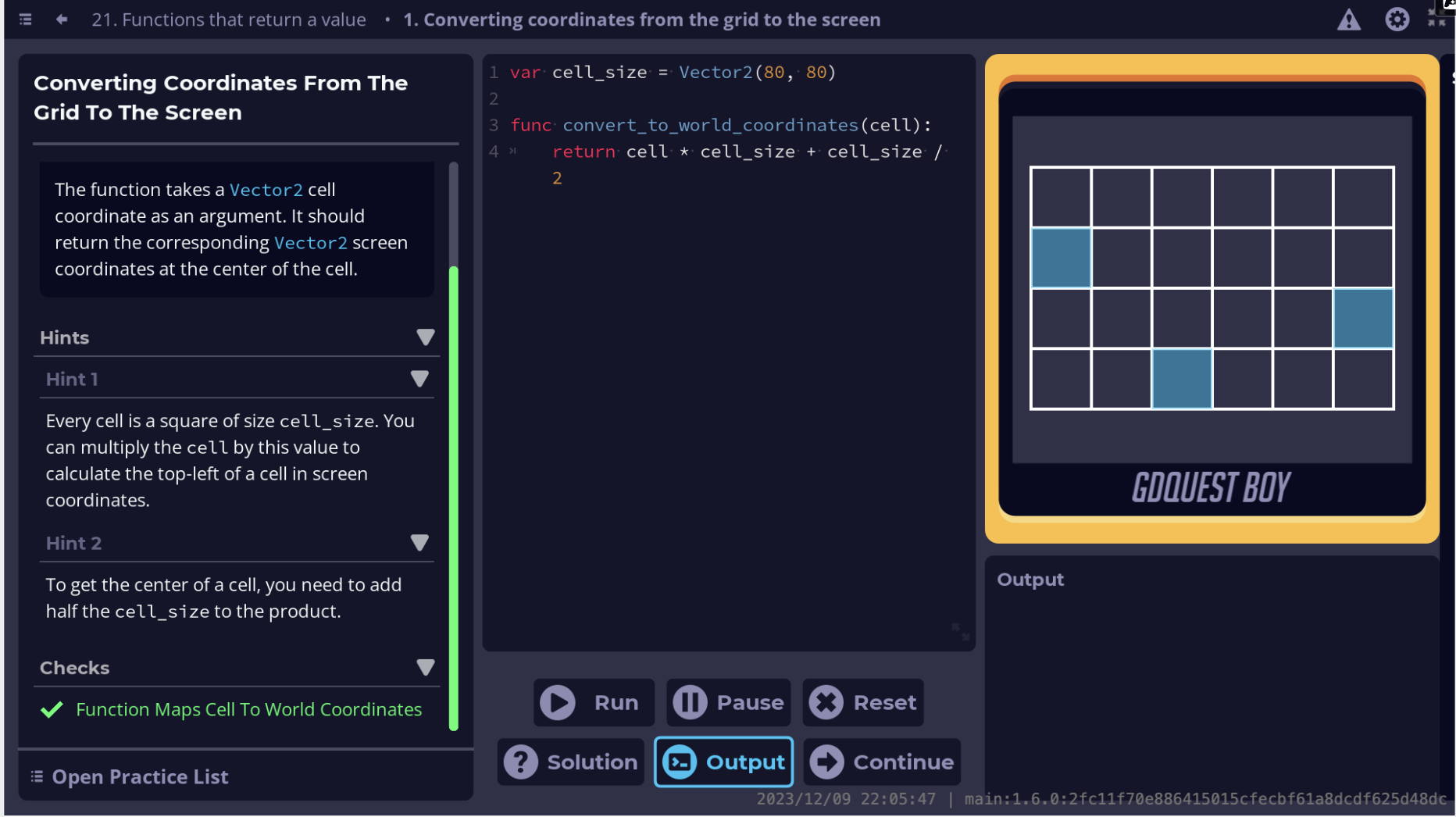
The coordinate example uses Vector2 values rather than integers, but the function pattern is the same:
- Receive an input through a parameter.
- Calculate using that input.
- Return a useful result.
For now, focus on the pattern rather than the grid mathematics. You will work with vectors much more deeply when constructing the 3D arena and player movement.
Add combat functions to arena.gd
Open scripts/arena.gd. Keep the constants and variables from the previous lesson, but replace _ready() and add the three functions below it.
extends Node3D


const MELEE_DAMAGE: int = 25
const KILL_REWARD_BULLETS: int = 1

var enemy_health: int = 60
var pistol_bullets: int = 0


func _ready() -> void:
	print("Enemy health before attack: ", enemy_health)
	print("Pistol bullets before reward: ", pistol_bullets)

	var normal_damage: int = calculate_melee_damage(MELEE_DAMAGE)
	var heavy_damage: int = calculate_melee_damage(MELEE_DAMAGE, 2)

	print("Normal melee damage: ", normal_damage)
	print("Heavy melee damage: ", heavy_damage)

	enemy_health = health_after_damage(enemy_health, heavy_damage)
	award_pistol_bullets(KILL_REWARD_BULLETS)

	print("Enemy health after heavy attack: ", enemy_health)
	print("Pistol bullets after reward: ", pistol_bullets)


func calculate_melee_damage(base_damage: int, multiplier: int = 1) -> int:
	return base_damage * multiplier


func health_after_damage(current_health: int, damage: int) -> int:
	return current_health - damage


func award_pistol_bullets(amount: int) -> void:
	pistol_bullets += amount
Save the script, run the scene with F6, and inspect the Output panel. You should see results equivalent to:
Enemy health before attack: 60
Pistol bullets before reward: 0
Normal melee damage: 25
Heavy melee damage: 50
Enemy health after heavy attack: 10
Pistol bullets after reward: 1
Notice how _ready() now reads almost like a short description of a combat test:
- Calculate normal and heavy melee damage.
- Apply the heavy damage result to enemy health.
- Award the configured bullet reward.
- Print the updated state.
The detailed arithmetic lives in named functions below. Godot allows this ordering: _ready() can call functions that appear later in the same script.
Default parameter values
Look closely at this function header:
func calculate_melee_damage(base_damage: int, multiplier: int = 1) -> int:
The parameter multiplier has a default value of 1. Therefore, both calls below are valid:
var normal_damage: int = calculate_melee_damage(MELEE_DAMAGE)
var heavy_damage: int = calculate_melee_damage(MELEE_DAMAGE, 2)
In the first call, Godot uses the default multiplier of 1. In the second, the supplied 2 replaces the default.
Default parameters are useful when one input is common but can occasionally vary. Required parameters must come first, and optional parameters belong at the end of the parameter list. Otherwise, Godot could not reliably tell which argument belongs to which parameter.
GDScript reference — Godot Engine (stable) documentation in English
Read the official Godot GDScript reference to reinforce the exact syntax for required parameters, optional parameters, typed inputs, return types, and void.
In the Functions section, begin with the paragraph stating that parameters are required by default. Read parameters and return values, including the code examples between those sentences. Pay particular attention to the placement of default values, the return type after the parameter list, and the rule that a function declared to return a value must actually return a compatible value.
Make function contracts clear with types
The type hints in function signatures are a contract between the function and its callers.
func health_after_damage(current_health: int, damage: int) -> int:
	return current_health - damage
This contract says:
- Supply two integers.
- Expect an integer back.
That clarity lets Godot catch mistakes before you run the scene. For example, this is invalid because "high" is text, not an integer:
var remaining_health: int = health_after_damage(enemy_health, "high")
Likewise, a function declared with -> int cannot return a String:
func incorrect_damage() -> int:
	return "25"
And a void function cannot return a meaningful value:
func award_pistol_bullets(amount: int) -> void:
	pistol_bullets += amount
	return pistol_bullets
Use void when the function’s purpose is an action. Use a specific return type when the caller needs a result.
Names should describe the job
Use snake_case for GDScript function names, just as you have used for variable names:
func calculate_melee_damage() -> int:
	return 25
A good function name usually begins with a verb:
| Function name | Implied responsibility |
|---|---|
calculate_melee_damage() | Compute a damage number |
award_pistol_bullets() | Change ammunition state |
health_after_damage() | Compute remaining health |
play_hit_effect() | Trigger presentation feedback |
take_damage() | Apply damage to a health-owning object |
Avoid vague names such as do_stuff() or test(). Later, when your player, enemies, weapons, health component, HUD, and encounter controller each contain functions, precise names will make the code navigable.
Deliberate test changes
Make these small edits one at a time, run the scene, then restore the working code:
- Change the heavy multiplier from
2to3. The returned heavy damage should become 75, so the test enemy health becomes . This is expected from the current calculation; preventing negative health will require conditional logic in a later lesson. - Remove
, 2from the heavy-damage call. Both damage values should become 25 because both calls use the default multiplier. - Temporarily change
calculate_melee_damage()to return"50". Godot should identify the mismatch with its declaredintreturn type.
These tests demonstrate why typed signatures are valuable: the editor can point to broken contracts immediately instead of leaving a hidden bug for a later combat encounter.
Key takeaways
A function defines a named, reusable job:
func function_name() -> void:
	# Instructions belong here
Parameters receive inputs, while arguments are the actual values you supply when calling a function:
func calculate_melee_damage(base_damage: int, multiplier: int) -> int:
	return base_damage * multiplier

var damage: int = calculate_melee_damage(25, 2)
Use -> void for functions that perform an action, such as awarding ammunition. Use a specific return type such as -> int when a function calculates and sends a value back. A returned value only affects your game state when you store or otherwise use it.
Next, you will use conditional statements to select different behavior from game-state values—for example, deciding what should happen when health reaches zero or ammunition is empty.
Can't find a good explanation? Sign up and we'll make it for you
Sign up