Introduction
In the previous lesson, we constructed the Scheduler, the "brain" of our inference engine. It orchestrates the flow of requests through the system, deciding which ones to run at each iteration to maximize GPU utilization. We defined its core logic, but left a critical piece as an abstraction: the CacheManager, which was responsible for memory allocation via placeholder methods like can_allocate, allocate, and free.
Today, we will replace that abstraction with a concrete and powerful implementation: the PagedKVCacheManager. This lesson directly addresses the learning outcome: integrating the paged KV cache manager into the engine's memory management and execution loop.
We will first understand the "why" behind paged attention, then implement its core data structures, and finally wire the complete manager into our Scheduler and the data pipeline for our ModelExecutor. This will solidify the memory backbone of our engine, moving us one giant step closer to a production-grade serving system.
1. The Problem: Memory Fragmentation and Waste
In high-concurrency serving, managing the KV cache is a major challenge. A naive approach of pre-allocating a contiguous block of memory for each request's maximum possible length is extremely wasteful. Most requests don't use the full context, and this static allocation leads to significant memory fragmentation, severely limiting the number of concurrent requests you can serve.
Paged attention, popularized by vLLM, solves this by borrowing a classic concept from operating systems: virtual memory and paging.
To build a strong mental model, let's watch a segment from the vLLM team at Anyscale. They provide a clear explanation of the memory issues in traditional KV cache management and introduce paged attention as the solution.
Fast LLM Serving with vLLM and PagedAttention
This video provides an excellent conceptual overview of the memory fragmentation problem and how paged attention addresses it by drawing a parallel to virtual memory.
Please watch the segment from 03:57 to 09:54. Pay close attention to: The three types of memory waste described: internal fragmentation, reservation, and external fragmentation. How paged attention partitions the KV cache into fixed-size, non-contiguous blocks. The roles of logical vs. physical blocks and the 'block table' data structure that maps between them.
As the video explains, the key is to decouple the logical sequence of tokens from their physical storage in memory. This allows the system to manage a pool of standardized, fixed-size memory "pages" (we'll call them blocks) and allocate them on demand, eliminating external fragmentation and minimizing internal waste.
2. The Building Blocks of Paged Attention
Now, let's translate this concept into code. Our paged KV cache system will be built on three fundamental data structures:
KVCacheBlock: Represents a single, physical block of memory on the GPU. It's the "page" in our analogy. It holds the key and value vectors for a small, fixed number of tokens (e.g., 16).BlockPool: Manages the global pool of allKVCacheBlocks. Its most important job is to maintain a queue of free blocks that can be allocated to new or growing requests.BlockTable: This is the per-request "page table". It's a list that maps the logical block indices of a request's sequence to the physicalKVCacheBlocks allocated from theBlockPool.
The article "Inside a Fast LLM Inference Server" provides wonderfully clear, simplified Python classes for these components. We'll use them as the foundation for our implementation.
LLM Inference: Inside a Fast LLM Inference Server
To ground our implementation, let's study these core data structures. This article provides a clean, conceptual implementation in Python that we can adapt for our engine.
Please read the Python code blocks in the 'Paged Attention' section that define the KVCacheBlock, BlockPool, and BlockTable classes. We will implement these three classes as the building blocks of our manager.
Here are the classes, which you should now add to your project. Note that we are modeling the logic; the actual KVCacheBlock would correspond to a slice of a large tensor on the GPU.
from collections import deque
from dataclasses import dataclass
from typing import List


# A simplified representation of a physical memory block
@dataclass
class KVCacheBlock:
    block_id: int
    block_size: int


    # In a real system, this would be a pointer to a GPU memory region.
    # Here, we just track the ID.


# Manages the global pool of physical blocks
class BlockPool:
    def __init__(self, num_blocks: int, block_size: int):
        self.block_size = block_size


        # The actual blocks (could be indices into a large GPU tensor)
        self.blocks = [KVCacheBlock(i, block_size) for i in range(num_blocks)]


        # A queue of available block IDs for fast allocation
        self.free_queue = deque(range(num_blocks))

    def allocate_block(self) -> KVCacheBlock:
        if not self.free_queue:
            raise RuntimeError("Out of KV blocks (GPU memory exhausted).")
        block_id = self.free_queue.popleft()
        return self.blocks[block_id]

    def free_block(self, block: KVCacheBlock):
        self.free_queue.append(block.block_id)

    def get_num_free_blocks(self) -> int:
        return len(self.free_queue)


# Per-request mapping from logical block numbers to physical blocks
class BlockTable:
    def __init__(self):
        self.logical_to_physical: List[KVCacheBlock] = []

    def __len__(self):
        return len(self.logical_to_physical)

    def append(self, block: KVCacheBlock):
        self.logical_to_physical.append(block)

    def get_physical_block_ids(self) -> List[int]:
        return [b.block_id for b in self.logical_to_physical]
3. Implementing the PagedKVCacheManager
With these building blocks, we can now create the PagedKVCacheManager. This class will encapsulate the logic for allocating, freeing, and tracking memory for all requests in the system. It will expose the simple API that our Scheduler needs.
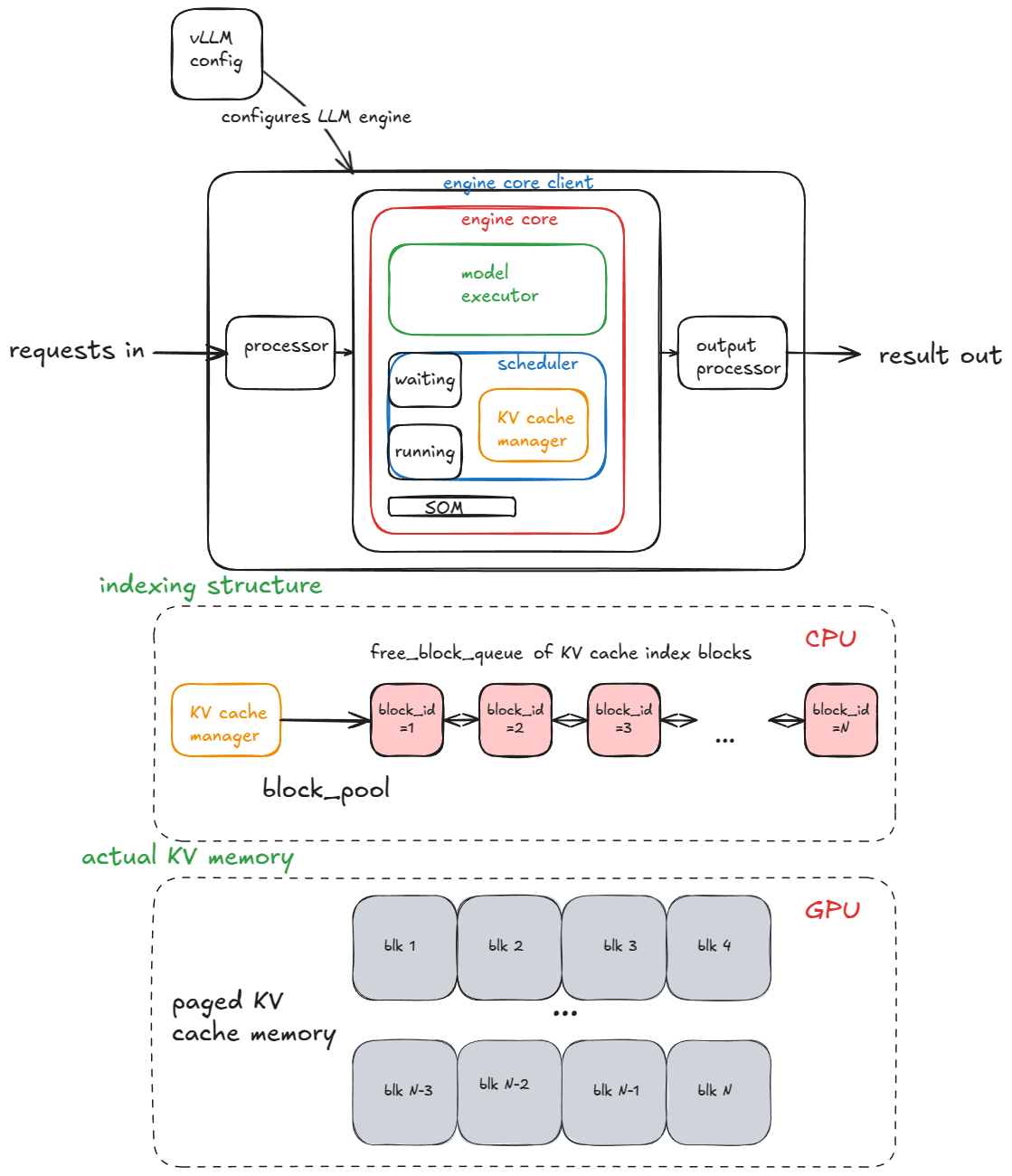
The manager's logic is detailed in several parts of the "Inside vLLM" article, which describes how the scheduler allocates slots and how requests are cleaned up.
Inside vLLM: Anatomy of a High-Throughput LLM Inference System
Let's examine how a production system like vLLM uses these concepts. This article describes the allocation and deallocation process, which we will mirror in our PagedKVCacheManager.
Please read the end of the 'Generate function' section (on postprocessing and cleanup) and the 'Scheduler' section (on allocate_slots). Note how finishing a request returns its blocks to the free_block_queue and how new requests have blocks allocated from that same pool.
Now, let's implement the PagedKVCacheManager class. It will contain our BlockPool and a dictionary to store the BlockTable for each active request.
import math

class PagedKVCacheManager:
    def __init__(self, num_blocks: int, block_size: int):
        self.block_pool = BlockPool(num_blocks, block_size)
        self.block_size = block_size


        # A dictionary to hold the block table for each ongoing request
        self.request_block_tables = {}

    def _get_num_required_blocks(self, num_tokens: int) -> int:
        return math.ceil(num_tokens / self.block_size)

    def can_allocate(self, num_tokens: int) -> bool:
        """Checks if there are enough free blocks to accommodate a sequence of num_tokens."""
        required_blocks = self._get_num_required_blocks(num_tokens)
        return self.block_pool.get_num_free_blocks() >= required_blocks

    def allocate(self, request_id: str, num_tokens: int):
        """Allocates KV cache blocks for a request."""
        if request_id not in self.request_block_tables:
            self.request_block_tables[request_id] = BlockTable()

        block_table = self.request_block_tables[request_id]


        # Calculate how many NEW blocks are needed
        current_blocks = len(block_table)
        current_token_capacity = current_blocks * self.block_size

        new_tokens = num_tokens
        if current_token_capacity > 0:


            # This is for a decode step, where tokens are added one by one
            new_tokens = 1

        required_total_tokens = len(block_table.logical_to_physical) * self.block_size + new_tokens
        required_total_blocks = self._get_num_required_blocks(required_total_tokens)

        num_new_blocks = required_total_blocks - current_blocks

        for _ in range(num_new_blocks):
            block = self.block_pool.allocate_block()
            block_table.append(block)

    def free(self, request_id: str):
        """Frees all blocks associated with a finished request."""
        if request_id not in self.request_block_tables:
            return

        block_table = self.request_block_tables.pop(request_id)
        for block in block_table.logical_to_physical:
            self.block_pool.free_block(block)

    def get_block_table(self, request_id: str) -> List[int]:
        """Returns the physical block IDs for a request."""
        return self.request_block_tables[request_id].get_physical_block_ids()
4. Integration with the Engine Loop
Now for the final and most important step: integrating our PagedKVCacheManager into the Scheduler and the ModelExecutor's input pipeline.
Updating the Scheduler
In the last lesson, our _schedule method had placeholder calls like self.cache_manager.can_allocate(req, prompt_len). We'll now replace them with calls to our concrete implementation. The scheduler's decisions are now directly constrained by the real availability of physical memory blocks.
Here is the updated _schedule method in your Scheduler class:
# In your Scheduler class...
def _schedule(self):
    """
    Selects requests for the next batch, now using the PagedKVCacheManager.
    """
    current_token_budget = self.max_token_budget
    scheduled_requests = []


    # --- Stage 1: Prioritize running (decode) requests ---
    next_running_queue = []

    for req in self.running_queue:
        if current_token_budget >= 1:


            # For decode, we only need to check if we can add one more token,
            # which may or may not require a new block.
            # Our allocate logic handles this.
            num_new_blocks_needed = self._get_num_new_blocks(req, 1)

            if self.cache_manager.block_pool.get_num_free_blocks() >= num_new_blocks_needed:
                self.cache_manager.allocate(req.request_id, 1) # Allocate for 1 new token
                scheduled_requests.append(req)
                current_token_budget -= 1
                next_running_queue.append(req)
            else:


                # Not enough memory, preempt or pause (for now, just keep waiting)
                next_running_queue.append(req)
        else:
            next_running_queue.append(req)

    self.running_queue = next_running_queue


    # --- Stage 2: Schedule new (prefill) requests from the waiting queue ---
    while self.waiting_queue and current_token_budget > 0:
        req = self.waiting_queue[0]
        prompt_len = len(req.prompt_token_ids)

        if prompt_len <= current_token_budget:


            # Check if Cache Manager has enough free blocks for the whole prompt
            if self.cache_manager.can_allocate(prompt_len):
                req = self.waiting_queue.popleft()

                self.cache_manager.allocate(req.request_id, prompt_len)

                self.running_queue.append(req)
                scheduled_requests.append(req)
                current_token_budget -= prompt_len
            else:
                break # Not enough memory
        else:
            break # Request too long for budget

    return scheduled_requests


# Helper method in Scheduler
def _get_num_new_blocks(self, request, num_new_tokens):
    block_table = self.cache_manager.request_block_tables.get(request.request_id)
    if not block_table:
        return math.ceil(num_new_tokens / self.cache_manager.block_size)

    current_tokens = (len(block_table) - 1) * self.cache_manager.block_size + (request.get_len() % self.cache_manager.block_size or self.cache_manager.block_size)
    new_total_tokens = current_tokens + num_new_tokens

    required_blocks = math.ceil(new_total_tokens / self.cache_manager.block_size)
    return required_blocks - len(block_table)
Similarly, your _postprocess method should now call self.cache_manager.free(req.request_id) when a request is finished.
Updating the Execution Pipeline
The ModelExecutor needs to know where to write the computed KV values for each token. This "where" is defined by the block tables. The _prepare_batch method (which you likely have in your Scheduler or a helper class) must now fetch the block table for each request and include it in the batch passed to the executor.
# In your Scheduler class or a helper...
def _prepare_batch(self, scheduled_requests):


    # ... (code to prepare input_ids, positions, etc.)

    block_tables = []
    for req in scheduled_requests:
        block_tables.append(self.cache_manager.get_block_table(req.request_id))


    # The batch passed to the executor now contains the block tables
    batch = {
        "input_ids": ...,
        "positions": ...,
        "block_tables": block_tables,


        # other metadata...
    }
    return batch
This block_tables tensor is the critical piece of information the custom paged attention kernel on the GPU uses to correctly fetch and store KV values from the non-contiguous physical blocks.
Conclusion
In this lesson, you have implemented the memory management core of our inference engine. You transformed an abstract concept into concrete, working code, creating a system that can efficiently manage GPU memory for a high number of concurrent requests.
Key Takeaways:
- The
PagedKVCacheManagersolves memory fragmentation and waste by decoupling logical token sequences from physical memory, using a system of blocks, pools, and tables analogous to OS paging. - The manager's API (
can_allocate,allocate,free) provides a clean interface for theScheduler, whose decisions are now grounded in the actual availability of memory blocks. - The
BlockTablefor each request is the crucial piece of metadata passed to theModelExecutor. It enables the paged attention kernel to work with non-contiguous memory, which is the key to the entire optimization.
Preview of the next lesson:
So far, our cache manager allocates blocks for a request but doesn't handle any form of sharing. A huge source of redundant computation in production is processing the same prompt prefixes (e.g., system prompts) over and over. Paged attention elegantly enables a solution called prefix caching (or Radix Attention). In the next lesson, you will extend our PagedKVCacheManager to implement prefix caching, allowing multiple requests to share the physical KV cache blocks for common prefixes, further boosting memory efficiency and throughput.