
Welcome to the next lesson in our exploration of binary search. In our previous session, we developed a powerful template for lower-bound search, allowing us to find the first element in a sorted array that is greater than or equal to a target. This moved us beyond searching for exact matches into the more general problem of finding a boundary.
Today, we'll complete this foundational toolkit by learning its counterpart: upper-bound search. Our goal is to implement a search for the first position that is strictly greater than a target value. This seemingly small change—from >= to >—unlocks another large set of problems and, when combined with lower-bound search, forms a robust pattern for handling ranges and counts in sorted data.
From Lower Bound to Upper Bound: A Single Character Change
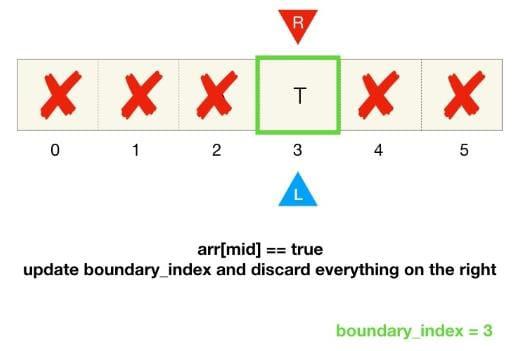
Let's start by recalling the core of our lower-bound search template. We reframed the problem as finding the first True value in a conceptual boolean array derived from a condition like nums[mid] >= target.
The template was:
- Initialize
left,right, and aboundary_index. - Loop while
left <= right. - Calculate
mid. - If the condition at
midisTrue(nums[mid] >= target), we have a potential answer. We store it (boundary_index = mid) and search for an even earlier one to the left (right = mid - 1). - If the condition is
False, the answer must be to the right (left = mid + 1).
Now, what if we want to find the upper bound—the index of the first element strictly greater than the target?
Consider the array [2, 5, 5, 8, 10] and a target of 5.
- The lower bound (first element
>= 5) is at index 1. The conditionx >= 5yields[F, T, T, T, T]. - The upper bound (first element
> 5) is at index 3. The conditionx > 5yields[F, F, F, T, T].
Notice the structure is identical: a block of False followed by a block of True. Our goal is still to find the index of the first True. The only thing that changed was the condition itself. This means we can use the exact same binary search template as before, just by modifying the condition from >= to >.
This is a powerful illustration of why thinking in patterns is so effective. Rather than memorizing three different algorithms (exact, lower-bound, upper-bound), you learn one flexible template and adapt its condition.
A Practical Example: Find Smallest Letter Greater Than Target
Let's apply this pattern to a concrete problem: LeetCode 744. Find Smallest Letter Greater Than Target. Given a sorted array of characters and a target character, we need to find the smallest character in the array that is larger than the target. This is a textbook upper-bound search problem.
The AlgoMonster article on this problem provides an excellent, in-depth explanation. We'll use it to guide our implementation.
744. Find Smallest Letter Greater Than Target - In-Depth Explanation
This article will walk you through solving an upper-bound search problem from start to finish. It demonstrates how to define the condition, apply the template, and handle edge cases.
First, read the section Defining the Feasible Function to see how the problem is mapped to our ...FFFTTT... pattern. Next, study the sections on the Binary Search Template and the full TypeScript implementation. Compare this code to the lower-bound function from our last lesson. Notice how similar they are. Finally, review the "Common Pitfalls" section, paying close attention to pitfall #3, Wrong Feasible Condition. This part crystallizes the difference between lower- and upper-bound searches.
Here is the core logic from the resource, adapted into a general-purpose findUpperBound function. Notice its structure is identical to the findLowerBound function from our previous lesson.
/**
 * Finds the index of the first element in a sorted array
 * that is strictly greater than the target.
 * @returns The index of the first element > target, or array length if all are smaller or equal.
 */
function findUpperBound(nums: number[], target: number): number {
    let left = 0;
    let right = nums.length - 1;
    let boundary_index = nums.length; // Default to length if not found

    while (left <= right) {
        const mid = left + Math.floor((right - left) / 2);

        // The ONLY change from lower-bound is here: > instead of >=
        if (nums[mid] > target) {
            // This is a potential answer. Store it and look for an earlier one.
            boundary_index = mid;
            right = mid - 1;
        } else {
            // The answer must be to the right.
            left = mid + 1;
        }
    }
    return boundary_index;
}
By simply changing >= to >, we have created a new, powerful tool.
An Alternative View: The Insertion Point
Another way to think about lower and upper bounds comes from Python's standard library, which has functions named bisect_left and bisect_right. This framing is less about finding a value and more about finding an insertion point.
- Lower Bound (
bisect_left): Find the insertion point fortargetto maintain sorted order, placing it before any existing elements of that value. - Upper Bound (
bisect_right): Find the insertion point fortargetto maintain sorted order, placing it after any existing elements of that value.
The mCoding video "Binary Search - A Different Perspective" offers a brilliant explanation of this concept. It shows how a subtle change in the comparison logic allows you to find either the "left" or "right" insertion point.
Binary Search - A Different Perspective | Python Algorithms
This video provides a complementary mental model for binary search. It focuses on finding where to insert an element, which naturally leads to the distinction between lower and upper bounds.
Watch the segment from this clip where the narrator explains the difference between finding the insertion point for the "first seven" versus the "last seven". This corresponds directly to our lower-bound and upper-bound concepts.
The key insight from the video is that both searches can be framed as "finding the first false value," just with a different boolean condition:
- To find the lower bound (insertion point before existing
targets), the condition isx < target. The first element that is not less than the target is your answer. - To find the upper bound (insertion point after existing
targets), the condition isx <= target. The first element that is not less than or equal to the target is your answer.
Let's check this logic. "The first element that is not less than or equal to the target" is just another way of saying "the first element that is strictly greater than the target." The two models are equivalent, so you can use whichever one feels more intuitive to you.
Tying It All Together: Finding Ranges
With both findLowerBound and findUpperBound in your toolkit, you can now solve many range-based problems with ease. Let's revisit LeetCode 34. Find First and Last Position of Element in Sorted Array.
How can we find the first and last 5 in [2, 5, 5, 8, 10]?
-
Find the first position: This is simply the lower bound.
const first = findLowerBound(nums, 5);// Returns index 1. -
Find the last position: This is slightly more clever. The upper bound gives us the index of the first element greater than
5, which is index 3. The element just before that must be the last5.const last = findUpperBound(nums, 5) - 1;// Returns 3 - 1 = index 2.
This two-function approach is clean, reusable, and less error-prone than trying to write a custom search for the "last occurrence". It demonstrates the power of composing simple, robust building blocks.
For context, the NeetCode video on this problem (which we saw in the last lesson) uses a different, also valid, technique. It uses a "right-biased" search to find the last occurrence directly. The method we've outlined here (upper_bound - 1) is more aligned with standard library implementations (like in C++ or Python) and follows naturally from the > vs >= distinction.
Conclusion
In this lesson, we completed our foundation of boundary-finding binary searches. You now have a unified template that can solve three distinct problems with only a minor change to the condition.
Here are your key takeaways:
- Upper-bound search finds the first element strictly greater than a target (
> target). - It uses the same template as lower-bound search. The only difference is the comparison operator. This consistency is key to avoiding bugs and building confidence.
- Upper bound can be conceptualized as finding the insertion point for a target that comes after all existing instances of that target.
- By combining
findLowerBoundandfindUpperBound, you can efficiently find the start and end of a range of values in a sorted array.
In our next lesson, we'll take our binary search skills to the next level by applying them to a more complex data structure: a rotated sorted array. You'll see how to adapt the core logic of dividing the search space even when the array isn't perfectly sorted from end to end.
Can't find a good explanation? Sign up and we'll make it for you
Sign up