
Welcome to the course. This first module establishes the foundations that make later AWS design decisions intelligible: where resources live, who is responsible for securing them, how requests travel, and how to work safely in a new account.
In this lesson, you will build a location-and-scope mental model for AWS. By the end, you should be able to look at a service or architecture diagram and distinguish:
- an AWS Region from an Availability Zone (AZ);
- an edge location from either of those;
- a Regional, zonal, and global resource or service;
- the resilience and latency implications of each choice.
This distinction appears constantly in SAA-C03 scenarios. Many questions are really asking: What is the failure boundary? Where does this resource exist? And where should traffic or data be placed?
Start with the AWS geography model
AWS operates infrastructure worldwide, but it is not one undifferentiated “cloud.” It is deliberately divided into independently operated geographic and fault-isolation boundaries.
A useful hierarchy is:
| Term | What it is | Main design purpose |
|---|---|---|
| Region | A separate geographic area, such as us-east-1 or eu-west-1 | Data residency, broad geographic isolation, service placement |
| Availability Zone | An isolated location within one Region, containing one or more data centers | High availability within a Region |
| Edge location | A point of presence near users, primarily used to serve or accelerate traffic | Lower latency for global users |
| Data center | A physical facility containing infrastructure | Component of an AZ, not normally a deployment choice you make |
AWS gives you direct choices at the Region and, for some resources, AZ level. You do not choose an individual AWS data center. Similarly, you generally do not deploy application servers directly to edge locations.
AWS Global Infrastructure Overview - Regions, Availability Zones, Edge Locations and more
Watch “AWS Global Infrastructure Overview - Regions, Availability Zones, Edge Locations and more” from Digital Cloud Training for a concise visual overview. Its emphasis on concepts rather than changing infrastructure counts is appropriate for both architecture work and the certification exam.
Watch Regions and AZs to establish the top-level geography and the purpose of placing a workload in more than one AZ. Then watch AZ structure, focusing on the fact that a subnet belongs to one AZ and an AZ can contain multiple data centers. Finish with edge locations and the final reminder that exact counts are not exam material.
Do not memorize the current number of Regions, AZs, or edge locations. Those figures change. Memorize the boundary each term represents and what it permits you to do.
Regions: the primary placement and isolation boundary
An AWS Region is a separate geographic area. Examples include us-east-1 (US East, Northern Virginia), us-west-2 (US West, Oregon), and eu-west-1 (Europe, Ireland).
When you create most AWS resources, you select a Region. If you create a resource in one Region, changing the Region selector in the AWS Management Console can make it appear to “disappear.” It has not disappeared; you are simply viewing a different Region.
For example:
- An Amazon VPC created in
eu-west-1is separate from a VPC inus-east-1. - A database created in
us-west-2is not automatically duplicated in Europe. - An Amazon S3 bucket is created in a specific Region, even though its bucket name is globally unique.
- Resources and data are not automatically replicated across Regions merely because they are in the same AWS account.
This is a crucial distinction: an AWS account is not a Region. One account can own resources in many Regions, and each Region has its own inventory of Regional resources.
AWS Regions and Availability Zones
Read the AWS documentation “AWS Regions and Availability Zones.” It provides the official definitions and, importantly, explains why Regions and AZs are deliberately isolated.
Begin with the opening overview, from the global infrastructure definitions. Then read the section titled “Regions,” especially the explanation of Regional resources. Continue through the section titled “Availability Zones,” focusing on AZ isolation and multi-AZ deployment.
Choosing a Region
Architects select a Region by evaluating requirements, usually in this order:
-
Data residency, sovereignty, and compliance
Laws, contracts, or organizational policy may require particular data to remain in a country or geographic area. This can constrain the choice before cost or latency enter the discussion. -
Proximity to users, systems, and data
Locating a workload nearer to its users generally lowers network latency. A workload used mainly in Europe should not be placed in a distant Region merely because an engineer happens to work elsewhere. -
Service and feature availability
Not every AWS service, instance type, or newly launched capability is available in every Region. Check that the required services and features exist in the intended Region. -
Cost
Prices can differ by Region. Cost matters, but it should not override legal, security, resilience, or latency requirements. -
Resilience strategy
A multi-Region deployment provides more geographic separation than a single-Region design. It also introduces additional replication, routing, operational, and cost complexity. For most ordinary high-availability workloads, deploying across multiple AZs in one Region is the initial design baseline.
A Region is therefore both a business decision and a technical boundary. It affects legal obligations, user experience, service choices, recovery options, and cost.
Availability Zones: resilience inside a Region
Every Region contains multiple Availability Zones. An AZ is one or more discrete data centers with independent power, networking, and connectivity, housed in separate facilities.
The important design principle is not merely that AZs are “different buildings.” AWS designs them as meaningful fault-isolation boundaries. A serious issue affecting one AZ should not normally make resources in another AZ unavailable.
At the same time, AZs within a Region are connected by low-latency, high-bandwidth, redundant networking. That makes it practical to distribute an application across AZs without treating them as distant, independent sites.
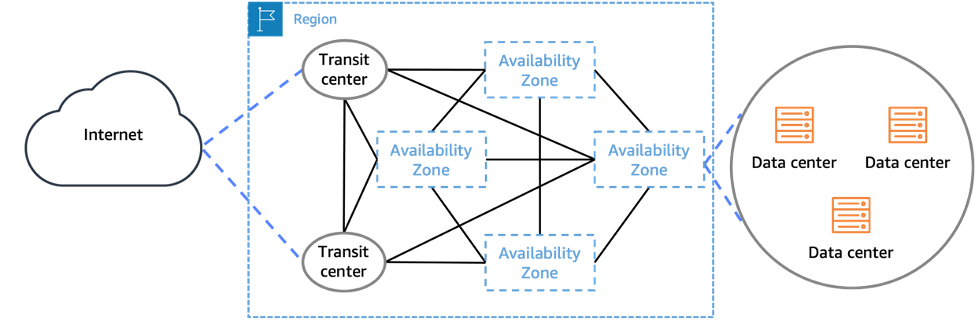
What you place in an AZ
Some AWS resources are zonal: they belong to one particular AZ.
Common examples include:
- an EC2 instance;
- an Amazon EBS volume;
- a VPC subnet.
For instance, an EC2 instance runs in one AZ, and an EBS volume must be in the same AZ as the EC2 instance that attaches to it. A subnet also belongs to exactly one AZ. Later, when designing a VPC, you will create separate subnets for separate AZs rather than trying to stretch one subnet across them.
Other services are described as Regional, even when they use AZs under the hood. This is why scope must be read carefully. A VPC spans a Region, but the subnets inside it are zonal. A load balancer can be configured across multiple AZs, even though you manage it as a Regional service.
The multi-AZ availability pattern
Consider a simple web application in one Region:
- If every application server runs in one AZ, an AZ failure can take down the whole application tier.
- If the application has servers in at least two AZs and can route traffic only to healthy servers, one AZ can fail while the other continues serving requests.
- The database and data tier must also be designed appropriately; spreading web servers alone does not make the entire system highly available.
This is the basic idea behind a multi-AZ architecture. It is not a backup strategy and does not automatically create a second Region. It is an availability design within one Region.
Exam cue: “High availability” without a requirement for geographic disaster recovery often points first to a multi-AZ design. “Survive a Regional outage” requires a multi-Region strategy.
One subtle AWS detail is worth retaining for future multi-account work: AZ names such as us-east-1a are not guaranteed to refer to the same physical AZ in two different accounts. AWS maps names independently to balance capacity. If physical alignment matters across accounts, use the AZ ID rather than assuming matching letter suffixes mean matching facilities.
Edge locations: bring delivery closer to users
An edge location is part of AWS’s global points-of-presence network. Its primary job is to reduce latency between users and services, especially through services such as Amazon CloudFront, a content delivery network (CDN).
An edge location is not a miniature Region and not an AZ. You generally do not place an EC2 instance or an RDS database at an edge location. Instead, you use edge infrastructure to serve cached content or improve traffic delivery nearer to users.
CloudFront illustrates the model clearly:
- A user requests an object, such as an image, video segment, JavaScript file, or download.
- CloudFront directs the request to an appropriate edge location.
- If that edge location has a valid cached copy, it responds locally.
- If the object is not cached or has expired, CloudFront retrieves it from the origin. The origin might be an S3 bucket, a load balancer, or an HTTP server.
- CloudFront can cache the fetched object and deliver it to the user.

The key benefit is that frequently requested content need not traverse the full distance from a distant origin for every user request. A user in one geography can receive cached content from nearby edge infrastructure while the application origin remains in its selected Region.
Edge locations therefore address delivery latency and scale, whereas AZs address availability within a Region.
Do not overstate what CloudFront does. It can reduce load and improve performance, but it does not eliminate the need to design a resilient origin. A cache miss, a dynamic request, or an expired object may still require the origin infrastructure to respond.
Regional, zonal, and global: classify the resource, not just the brand name
A frequent source of AWS confusion is treating every AWS service as either wholly “Regional” or wholly “global.” The more accurate question is:
What is the scope of this particular resource or operation?
Use this working classification:
| Scope | Meaning | Representative examples |
|---|---|---|
| Zonal | Created in, or tied to, one AZ | EC2 instance, EBS volume, subnet |
| Regional | Created and managed in one Region | VPC, most databases, S3 bucket, Lambda function |
| Global | Not created independently in each Region; operates across AWS’s global infrastructure or account partition | IAM, AWS Organizations, Route 53 public hosted zones, CloudFront |
Most AWS resources you will build are Regional. This has an operational consequence: your console Region selector, CLI configuration, SDK Region setting, infrastructure template settings, and resource ARNs all matter.
A necessary correction: Amazon S3 is Regional
Amazon S3 can look global because bucket names use a global namespace: no two accounts can create the same bucket name in the same AWS partition. But an S3 bucket is created in a specific AWS Region, and the data in it is stored in that selected Region unless you explicitly configure replication.
Therefore, do not choose “S3 is global” in an exam scenario when the question is about where bucket data resides, where it is created, or how it must be replicated for cross-Region recovery.
Common global services
A few important services are commonly treated as global:
- AWS Identity and Access Management (IAM) manages identities and permissions for the account. You do not create a separate IAM user for each Region.
- AWS Organizations manages multiple AWS accounts and organizational policies.
- Amazon Route 53 public DNS resolves public DNS names globally.
- Amazon CloudFront uses globally distributed edge infrastructure to deliver content.
- AWS Global Accelerator routes traffic using AWS global infrastructure.
“Global” does not mean that every part of the service is immune to all Regional behavior. AWS distinguishes between:
- the control plane, used to create, update, delete, and configure resources; and
- the data plane, used when the configured service actually handles traffic, authorization, DNS resolution, or content delivery.
For several global services, the configuration control plane operates from a single AWS Region, while the operational data plane is distributed globally or regionally. This distinction matters when designing recovery procedures: a healthy application should not need to create or reconfigure core dependencies during an outage.
Global services - AWS Fault Isolation Boundaries
Read the relevant parts of the AWS Fault Isolation Boundaries whitepaper to refine the simple “global service” label into a more useful architecture concept: globally distributed operation can coexist with a concentrated control plane.
In the opening section titled “Global services,” read the definition of global services. Then read the section “Global services in the edge network,” noting CloudFront and Route 53 as examples. Finish with the section “Global services summary,” especially the control plane and data plane summary. Focus on the design implication: avoid making emergency recovery depend on creating or modifying global-service configuration.
For now, retain the practical version:
- Regional means you need to select the Region and plan explicitly for cross-Region copies or recovery.
- Zonal means you must distribute the workload across AZs to withstand an AZ failure.
- Global means the service is not separately created per Region, but you should still understand where configuration and runtime operations occur.
Reading an architecture scenario correctly
Suppose a company has customers in Europe and hosts a photo-sharing application.
A sensible initial architecture interpretation might be:
- Select a European Region based on customer proximity, data residency, required services, and cost.
- Run the application in at least two AZs within that Region so a single AZ failure does not take down the service.
- Store static photos in an S3 bucket in that Region.
- Use CloudFront to cache and deliver popular photos through edge locations close to users.
- Use Route 53 public DNS to direct users to the application’s public endpoint.
- Use IAM for access control across the account rather than managing distinct users per Region.
Notice the different decisions involved:
| Requirement | Relevant scope or service |
|---|---|
| Meet EU data-location requirements | Region |
| Remain online through one facility-level failure | Multiple AZs |
| Deliver frequently accessed photos quickly worldwide | CloudFront edge locations |
| Give users a stable internet name | Route 53 public DNS |
| Control access to AWS resources | IAM |
| Recover from the loss of the entire European Region | Multi-Region architecture and replication |
This is the core architectural habit: translate a requirement into the AWS boundary that addresses it. Proximity points toward Region or edge delivery; local fault tolerance points toward multiple AZs; geographic disaster recovery points toward multiple Regions; account-wide identity points toward IAM.
Exam-focused recognition cues
When you encounter wording like the following, use the associated interpretation:
| Scenario wording | Likely interpretation |
|---|---|
| “Users experience high latency when downloading static files globally.” | CloudFront and edge locations |
| “The application must remain available if one data center location fails.” | Deploy across multiple AZs |
| “Data must remain in a particular country or geography.” | Region selection |
| “The solution must survive a complete Regional outage.” | Multi-Region design, not merely multi-AZ |
| “The EC2 instance does not appear in the console.” | Check the selected Region |
| “Apply permissions consistently for the AWS account.” | IAM, a global service |
| “Copy S3 data to another geography for recovery.” | Explicit cross-Region replication; it is not automatic |
Avoid these traps:
-
Trap: “More AZs means more Regions.”
Correction: AZs are inside one Region. -
Trap: “An edge location is an AZ near the user.”
Correction: An edge location is part of the global edge network, primarily for delivery and caching. -
Trap: “Multi-AZ protects against a full Region failure.”
Correction: Multi-AZ protects against an AZ-level failure; multi-Region is needed for Regional failure scenarios. -
Trap: “Global means data is everywhere by default.”
Correction: Global scope and data replication are different concepts. Regional resources are not automatically copied across Regions.
You should now be able to distinguish the major AWS infrastructure boundaries:
- A Region is an isolated geographic area where most resources are created.
- An Availability Zone is an isolated location within a Region; use multiple AZs for high availability.
- An edge location is part of AWS’s global edge network, used mainly to reduce delivery latency through services such as CloudFront.
- Most AWS resources are Regional; some individual resources are zonal; a smaller set of services, such as IAM, Route 53 public DNS, and CloudFront, are global.
- Cross-Region replication and recovery require deliberate design. They are not automatic.
Next, you will apply the AWS shared responsibility model to EC2, managed databases, and serverless services. The Region and service boundaries learned here will help you identify what AWS operates and what remains the customer’s responsibility.
Can't find a good explanation? Sign up and we'll make it for you
Sign up