
Good to see you again. In the previous lesson, you established a single path for failures through a Node.js service: preserve the original error as a cause, add meaningful context at a boundary, and let centralized middleware log it safely. Streams need the same discipline, because they are EventEmitters and can fail independently of the request or job that created them.
This lesson focuses on a common production task: processing a file or other large source without first loading it all into memory. You will learn what backpressure is, why a writable stream’s write() result matters, and why pipeline() is the default choice for a reliable stream workflow. Expect about 40 minutes.
1. Streams keep memory tied to the working set, not file size
Consider an export archive that is several gigabytes. This is unsafe:
import { readFile, writeFile } from "node:fs/promises";
import { gzipSync } from "node:zlib";

const source = await readFile("project-export.ndjson");
const compressed = gzipSync(source);

await writeFile("project-export.ndjson.gz", compressed);
The code is short, but memory consumption scales with the whole input plus intermediate output. A few concurrent exports can exhaust a container’s memory limit even when each request or job is individually valid.
A stream instead processes a sequence of chunks. A readable stream obtains chunks from a source, optional transform streams modify them, and a writable stream persists or sends them onward. Node can begin work before the entire input is available and can avoid retaining chunks that have already been processed.
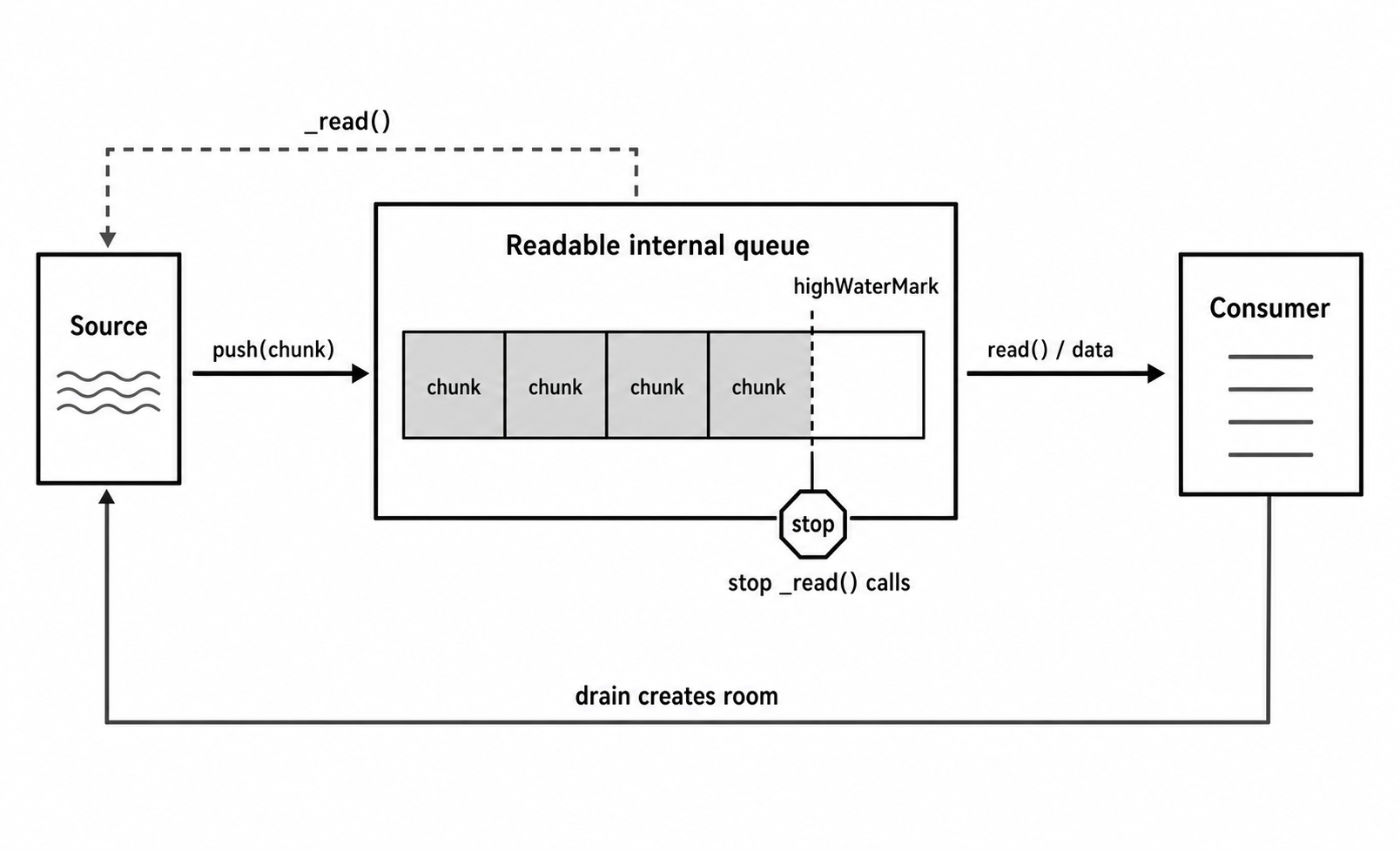
The crucial problem is that source and consumer rarely operate at the same speed:
- A file can be read from disk faster than a compressed output can be written.
- A network request body can arrive faster than an application can validate and store records.
- A transform can be slower than both its input and output because it performs CPU work.
Without flow control, excess data accumulates somewhere, usually in process memory. Backpressure is the agreement that a slow consumer can temporarily slow the producer.
Read the selected sections of Node.js Learn’s How To Use Streams. They introduce the memory model, explain why pipeline() is preferred in production, and connect async iteration to backpressure.
How To Use Streams | Node.js Learn
Read “What are Node.js Streams?” and “Why use Streams?” first for the mental model. Then focus on “pipeline,” “Async Iterators,” and the closing discussion of backpressure and object mode.
In “What are Node.js Streams?” and “Why use Streams?”, read the stream model. Focus on the distinction between incremental chunks and loading a complete dataset. In “How to operate with streams,” find the “pipeline” subsection. Read the pipeline discussion, including its failure behavior. Then read the “Async Iterators” subsection, especially the async iteration explanation. Finally, in “Object mode,” read the object mode and backpressure notes.
A stream is not automatically the best abstraction. If data is already a small in-memory object, adding a stream introduces unnecessary lifecycle and error-handling complexity. Use streams when data is large, arrives gradually, must be forwarded gradually, or should not be retained in full.
2. The backpressure contract: write() returning false
A writable stream buffers data because the actual destination may be temporarily busy. Its highWaterMark is the threshold at which Node signals that the buffer has enough queued work.
The key contract is:
const canContinue = destination.write(chunk);
truemeans it is acceptable to write another chunk now.falsemeans the writable accepted this chunk, but its queue is sufficiently full that the producer must not send more yet.- The writable later emits
"drain"when it is ready for production to resume.
highWaterMark is a flow-control threshold, not a promise that a stream will use exactly that much memory. Total process memory also includes source buffers, transform buffers, application allocations, and concurrent jobs. It is therefore a parameter to measure and tune carefully, not a value to increase merely to make pauses less frequent.
For ordinary byte streams, buffering is measured in bytes. In objectMode, it is measured in objects. A highWaterMark of 16 object records can be harmless for small audit events but substantial if each “object” contains a large imported row.
This is the unsafe manual pattern:
source.on("data", (chunk) => {
  destination.write(chunk);
});
It ignores the return value from write(). If destination is slower, the source continues adding chunks to the writable queue. The program may still appear correct in a local test, but memory grows with the backlog under a slow disk, slow network, or overloaded downstream system.
Watch this short implementation walkthrough from Node JS - Writable Streams & Backpressure by Web Dev Journey. It makes the concrete pause-and-resume protocol visible.
Node JS - Writable Streams & Backpressure
Watch the manual flow-control example to see exactly why write() returning false is a signal to pause the readable and wait for the writable’s drain event.
Watch the manual protocol. Pay attention to the sequence: check the return value from write(), stop the source after false, and resume only after drain.
When you own the read/write loop directly, an async iterator gives a relatively readable implementation:
import { once } from "node:events";
import { finished } from "node:stream/promises";
import type { Readable, Writable } from "node:stream";
import { toError } from "../application/shared/to-error.js";

export async function copyWithFlowControl(
  source: Readable,
  destination: Writable,
): Promise<void> {
  // Start observing completion and errors immediately.
  const destinationDone = finished(destination);

  try {
    for await (const chunk of source) {
      const canContinue = destination.write(chunk);

      if (!canContinue) {
        await once(destination, "drain");
      }
    }

    destination.end();
    await destinationDone;
  } catch (cause: unknown) {
    const error = toError(cause);

    source.destroy(error);
    destination.destroy(error);

    // Ensure the completion promise is observed after destruction.
    await destinationDone.catch(() => undefined);

    throw error;
  }
}
There are two forms of flow control here:
for await...ofconsumes the readable incrementally instead of accumulating chunks in an array.- Waiting for
"drain"prevents the loop from outpacing the writable.
This is useful knowledge when integrating a stream API that requires custom behavior. But it is not the default implementation to reach for when connecting standard Node streams. Managing all stream errors, completion, and cleanup correctly by hand is easy to get wrong.
3. Use pipeline() for production stream chains
For the standard “source, transform, destination” shape, use pipeline() from node:stream/promises.
Suppose your project-management capstone creates a large NDJSON export and needs to archive it. Compression is streaming-safe because gzip operates on bytes; it does not require the entire file in memory.
// src/infrastructure/files/gzip-export.ts

import { createReadStream, createWriteStream } from "node:fs";
import { pipeline } from "node:stream/promises";
import { createGzip } from "node:zlib";

export async function gzipExport(
  inputPath: string,
  outputPath: string,
  signal?: AbortSignal,
): Promise<void> {
  await pipeline(
    createReadStream(inputPath),
    createGzip(),
    createWriteStream(outputPath),
    { signal },
  );
}
pipeline() provides the behavior you want by default:
- It connects each stage while respecting backpressure.
- It forwards stream failures to the returned promise.
- If one stage fails, it destroys the other stages rather than allowing them to continue independently.
- It resolves only after the output has completed, so a job should not mark an export as successful before
await pipeline(...)finishes. - It accepts an
AbortSignal, connecting this lesson to the cancellation work from earlier in the module.
At a meaningful application boundary, translate a failure into your existing error vocabulary while preserving the root cause:
try {
  await gzipExport(tempExportPath, archivePath, signal);
} catch (cause: unknown) {
  throw new AppError({
    code: "EXPORT_ARCHIVE_FAILED",
    message: "Could not create the project export archive",
    context: {
      operation: "createProjectExport",
    },
    cause,
  });
}
Add EXPORT_ARCHIVE_FAILED to your AppErrorCode union. The central error handler from the previous lesson can then log the outer operation name and the original filesystem, compression, or cancellation error chain.
A subtle point: pipeline() cleans up stream resources, but it cannot decide your product-level cleanup policy. For example, a failed archive may leave a partial output file. A robust export implementation typically writes to a temporary path and only renames it to its final name after the pipeline succeeds. On failure, it removes the temporary artifact. That is an application-level invariant, not something the stream module can infer.
Why not just use .pipe()?
This is valid for a quick experiment:
source.pipe(gzip).pipe(destination);
It does arrange backpressure between connected streams. The problem is failure handling: if gzip emits an error, the source and destination do not automatically receive the coordinated cleanup behavior that pipeline() provides.
For production code, treat the choice this way:
- Use
pipeline()for a complete stream chain that should succeed or fail as one unit. - Use async iteration when your application must inspect or process each chunk or record directly.
- Use a manual
write()and"drain"loop only when you must bridge a custom producer and writable destination.
4. Chunks are not necessarily records
A file stream yields byte chunks, typically Buffer values. A chunk boundary has no business meaning.
For example, an NDJSON line can be divided across two chunks:
Chunk 1: {"projectId":"p1","name":"Hel
Chunk 2: ios"}
Or one chunk can contain many complete lines. Therefore, this is not a correct general NDJSON parser:
// Incorrect for arbitrary chunk boundaries
for await (const chunk of source) {
  const records = chunk.toString("utf8").split("\n");
  // ...
}
For structured large-file imports, the usual design is:
- A byte-readable source such as
createReadStream. - A streaming parser that retains incomplete input between chunks.
- An object-mode transform that validates or normalizes one parsed record at a time.
- A destination that writes records in bounded batches or sends them onward through another backpressure-aware API.
The parser is responsible for handling boundaries. The transform is responsible for application logic. Keep those responsibilities separate, just as you separated transport, application, and infrastructure in earlier lessons.
An object-mode transform can express a synchronous record transformation clearly:
import { Transform } from "node:stream";
import { toError } from "../application/shared/to-error.js";

type AuditRecord = {
  actorId: string;
  action: string;
  occurredAt: string;
};

export const redactAuditRecord = new Transform({
  objectMode: true,

  transform(record: AuditRecord, _encoding, callback) {
    try {
      callback(null, {
        ...record,
        actorId: `user:${record.actorId}`,
      });
    } catch (cause: unknown) {
      callback(toError(cause));
    }
  },
});
For asynchronous work inside a transform, do not call its callback until that work has finished. Calling the callback is the transform’s declaration that it is ready for additional input. Starting unlimited asynchronous operations and immediately calling the callback recreates the same unbounded-backlog problem at the application layer.
A practical review checklist for a large-data workflow is:
- Does it avoid
readFile,response.text(), or collecting all records in an array? - Does every direct
write()check forfalseand wait for"drain"? - Does a standard chain use
await pipeline(...)rather than disconnected.pipe()calls? - Are stream errors observed at the owning boundary and retained as causes?
- Are chunk boundaries handled correctly for formats such as CSV, JSON Lines, or multipart uploads?
- Does object-mode concurrency remain intentionally bounded?
- Are partial output files or partially completed business operations cleaned up according to an explicit policy?
Key takeaways
Streams let a Node.js service process data incrementally, so memory is tied to active buffers rather than the entire file or payload.
- Backpressure occurs when a consumer cannot keep up with a producer.
writable.write(chunk) === falsemeans pause further writes and wait for"drain".highWaterMarkis a buffering threshold, not a performance knob to raise without measurement.for await...ofis a readable and backpressure-aware way to consume a readable stream.- Prefer
await pipeline(source, transform, destination)for ordinary production stream chains because it coordinates flow control, failures, and resource cleanup. - Preserve stream failures as causes in your application errors, and remember that stream cleanup does not automatically implement business cleanup such as deleting partial artifacts.
- Treat raw byte chunks and domain records as different layers; parsing must handle boundaries between chunks.
Next, you will move from one operation’s lifecycle to the service lifecycle: implementing graceful startup and shutdown for a Node.js HTTP service.
Can't find a good explanation? Sign up and we'll make it for you
Sign up