
Hello again. In the previous lesson, you calculated with numbers, assembled strings, and converted values into useful types. Now we give those values a decision-making role: Python can evaluate a question as True or False, then run different code depending on the result.
By the end of this lesson, you will be able to write conditions such as “is this score at least 80?” or “does this user have both requirements?” and use if, elif, and else to select the appropriate action. This is the foundation of control flow: deciding which parts of a program run.
Comparisons produce Boolean answers
A comparison asks Python to compare two values. Its result is always a Boolean value: True or False.
temperature = 46

print(temperature < 50)
print(temperature == 46)
print(temperature != 46)
Output:
True
True
False
Here are the comparisons you will use most often:
| Operator | Question it asks | Example | Result |
|---|---|---|---|
== | Are the values equal? | 5 == 5 | True |
!= | Are the values different? | 5 != 5 | False |
> | Is the left value greater? | 8 > 3 | True |
< | Is the left value smaller? | 8 < 3 | False |
>= | Is the left value greater or equal? | 8 >= 8 | True |
<= | Is the left value smaller or equal? | 8 <= 7 | False |
The distinction between = and == is essential:
score = 83      # Assign 83 to score
score == 83     # Compare score with 83
A single = stores a value in a variable. Double == asks whether two values are equal. Inside a condition, writing if score = 83: is a syntax error because Python expects a question, not an assignment.
Comparisons also work with strings:
language = "Python"

print(language == "Python")
print(language == "python")
print(language != "Java")
Output:
True
False
True
String comparisons are exact: capitalization matters. "Python" and "python" are different strings.
Because comparisons need compatible types, convert number-like text before making a numerical decision. This connects directly to the type conversions from the last lesson:
score_text = "83"
score = int(score_text)

print(score >= 80)
If you compared score_text >= 80 directly, Python would raise a TypeError: one side is text and the other is a number.
This short visual explanation introduces Boolean values, comparisons, and their relationship to conditional code.
Python Booleans and Conditionals - Visually Explained
Watch “Python Booleans and Conditionals - Visually Explained” by Visually Explained to see how a comparison becomes a Boolean result and how that result controls a program’s behavior.
Start with Boolean comparisons to connect numerical questions with True and False. Continue with if blocks, focusing on the colon and indentation, then watch the else branch to see how Python handles a false condition.
if: run code only when a condition is true
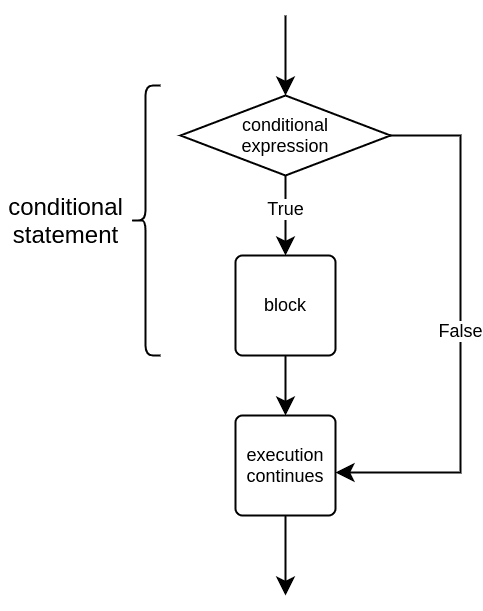
An if statement evaluates a condition. When that condition is True, Python runs the indented block beneath it. When it is False, Python skips that block.
temperature = 46
is_cold = temperature < 50

if is_cold:
    print("Wear a jacket.")

print("Weather check complete.")
Output:
Wear a jacket.
Weather check complete.
Python first calculates temperature < 50, producing True, and stores that result in is_cold. Since is_cold is true, the indented print() runs. The final print() is not indented, so it runs regardless.
Change the temperature and rerun the cell:
temperature = 55
is_cold = temperature < 50

if is_cold:
    print("Wear a jacket.")

print("Weather check complete.")
Output:
Weather check complete.
The conditional block was skipped, but execution did not stop. Python continued with the first line after the block.
Two syntax details are non-negotiable:
- The condition line ends with a colon,
:. - The block belonging to
ifis indented consistently, usually with four spaces.
A Boolean variable can be used directly as the condition:
is_member = True

if is_member:
    print("Member discount is available.")
This is clearer than writing if is_member == True:. The variable already represents a yes-or-no answer.
else and elif: choose one of several actions
Often a program should do something in either case, not merely take an action when a condition is true. An else block provides the default action when the if condition is false.
temperature = 55

if temperature < 50:
    print("Wear a jacket.")
else:
    print("No jacket needed.")
Output:
No jacket needed.
Exactly one of these blocks runs. Python does not run both.
Use elif—short for “else if”—when there are several possible categories. For example, this code assigns a letter grade, assuming score is a valid score from 0 to 100:
score = 83

if score >= 90:
    print("Grade: A")
elif score >= 80:
    print("Grade: B")
elif score >= 70:
    print("Grade: C")
elif score >= 60:
    print("Grade: D")
else:
    print("Grade: F")
Output:
Grade: B
Python checks the conditions from top to bottom:
- Is 83 at least 90? No.
- Is 83 at least 80? Yes, so it prints
Grade: B. - Python skips every remaining
elifandelsebranch.
The order matters. Put the most demanding threshold first. If score >= 60 came first, a score of 83 would meet that condition and incorrectly receive a D.
This pattern is more precise than writing several separate if statements, because an if/elif/else chain represents one mutually exclusive choice. Its first true branch wins.
The following portion of Corey Schafer’s tutorial reinforces both the first-match behavior of elif and the Boolean operators you will use next.
Python Tutorial for Beginners 6: Conditionals and Booleans - If, Else, and Elif Statements
Watch “Python Tutorial for Beginners 6: Conditionals and Booleans - If, Else, and Elif Statements” by Corey Schafer for a concise walkthrough of multiple branches and combined conditions.
Watch elif branches to observe how Python checks alternatives in sequence and stops after a matching branch. Then watch Boolean operators, focusing on the different requirements expressed by and, or, and not.
Combine questions with and, or, and not
A single comparison is useful, but many real decisions depend on more than one fact. Boolean operators combine or reverse Boolean values.
| Operator | Result is True when… | Example |
|---|---|---|
and | both conditions are true | age >= 18 and has_id |
or | at least one condition is true | day == "Saturday" or day == "Sunday" |
not | the following condition is false | not logged_in |
For an and condition, every requirement must hold:
is_staff = True
has_badge = False

if is_staff and has_badge:
    print("Access granted.")
else:
    print("Access denied.")
Output:
Access denied.
Although is_staff is true, has_badge is false. An and condition is true only if both sides are true.
For or, either condition is enough:
day = "Sunday"

if day == "Saturday" or day == "Sunday":
    print("Weekend")
else:
    print("Weekday")
Output:
Weekend
not reverses a Boolean value:
logged_in = False

if not logged_in:
    print("Please log in.")
else:
    print("Welcome back.")
Output:
Please log in.
Read if not logged_in: as “if the user is not logged in.” Since logged_in is False, its negation is True.
When a condition combines several ideas, parentheses make the intended meaning visible:
is_member = True
has_paid_plan = False
has_free_trial = True

can_use_feature = is_member and (has_paid_plan or has_free_trial)

if can_use_feature:
    print("Feature available.")
else:
    print("Feature unavailable.")
The parentheses say that a member may use the feature if they have either a paid plan or a free trial. Without parentheses, Python still follows defined precedence rules, but future readers—including you—may misread the condition. Clear grouping is preferable.
Build and inspect a decision rule
Let’s combine calculations, comparisons, Boolean operators, and branches in one small program. Imagine an online shop offers free shipping to members whose order total is at least 50.
order_total = 64.77
is_member = True

if order_total >= 50 and is_member:
    message = "Free shipping applied."
elif order_total >= 50:
    message = "Spend 50 or more, then join to receive free shipping."
else:
    message = "Add more items to reach the free-shipping threshold."

print(message)
Output:
Free shipping applied.
The first branch asks two questions:
order_total >= 50 and is_member
In this case:
64.77 >= 50     # True
is_member       # True
Since both parts are true, the first message is selected. The later branches are skipped.
Test the logic by changing only one value at a time:
order_total = 64.77
is_member = False
Now the first condition is false, but the elif condition is true. The message tells the customer that the spending threshold was met, but membership is missing.
Then try:
order_total = 35.00
is_member = True
Neither the if nor the elif condition is true, so the else branch handles the remaining case.
This habit—trying values near meaningful boundaries such as 49.99, 50.00, and 50.01—is a practical way to check whether a conditional expresses the policy you intended.
Key takeaways
Comparisons such as >=, ==, and != produce Boolean values: True or False. Remember that = assigns a value, while == compares values.
Conditional statements turn Boolean results into actions:
ifruns an indented block only when its condition is true.elseprovides the default action when the preceding condition is false.elifchecks further alternatives, and only the first true branch in anif/elif/elsechain runs.andrequires all combined conditions to be true.orrequires at least one condition to be true.notreverses a Boolean result.
You have now completed the Python foundations module. Next, you will begin working with lists: ordered collections that let one variable hold many related values.
Can't find a good explanation? Sign up and we'll make it for you
Sign up