Hello! Welcome to the second lesson in our module on Agentic AI Systems.
In our last lesson, we designed a basic agent architecture centered on the perception-action loop. We established that an agent's ability to act on its environment depends on having a set of "tools." Today, we will bridge the gap between that theoretical design and practical implementation.
Your learning outcome for this lesson is to implement function calling (tool use) to allow an LLM to interact with external APIs. This is the core mechanism that transforms a passive language model into an active agent capable of gathering information, interacting with other software, and taking actions in the digital world.
1. Why Do LLMs Need Function Calling?
A standard Large Language Model is a powerful text generator, but it has two fundamental limitations:
- Knowledge Cutoff: It only knows about the data it was trained on, which becomes outdated. It has no access to real-time information like today's weather, stock prices, or the latest news.
- Inability to Act: It cannot perform actions outside of generating text. It can't send an email, query a database, or execute code.
For an LLM to become the "brain" of an agent, we need a reliable way for it to access live data and trigger external actions. Early attempts involved complex prompt engineering to coax the model into generating structured output (like JSON), but this was often brittle and unpredictable.
The guide to structured outputs and function calling with LLMs
To understand the problem more clearly, let's start with a brief article that highlights the need for reliable, structured data from LLMs.
Please read the 'Introduction' and 'Why You Need Structured Outputs' sections. Focus on the problems caused by inconsistent LLM outputs and how function calling is presented as a primary use case for structured data.
Function calling solves this by providing a robust, model-native way for an LLM to signal its intent to use a tool. Instead of generating free-form text, the model is fine-tuned to output a structured JSON object that explicitly names the function to call and the arguments to use.
2. The Function Calling Workflow
The process of function calling is a concrete implementation of the perception-action loop we discussed previously. It's a multi-step conversation between your application and the LLM.
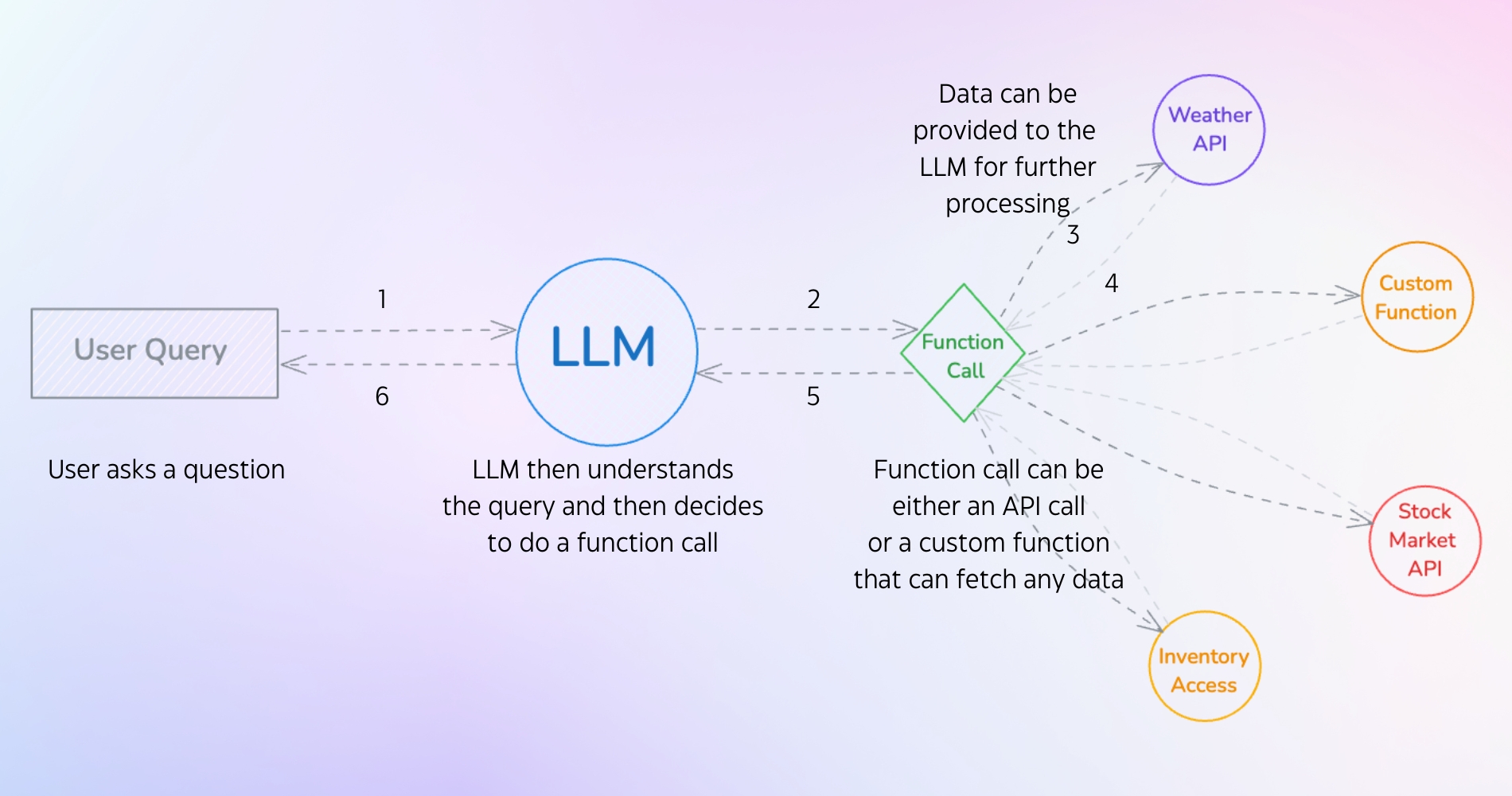
The workflow unfolds as follows:
- Define Tools & User Prompt: Your application sends the user's query to the LLM. Crucially, you also send a list of available "tools"—descriptions of functions the LLM can ask to call.
- LLM Plans an Action: The LLM analyzes the user's query and the available tools. If it determines that one of the tools can help answer the query, it doesn't answer directly. Instead, it outputs a special message containing a JSON object with the name of the function it wants to call and the arguments it has extracted from the query.
- Application Executes the Action: Your code receives this special message. You parse the JSON, identify the requested function (e.g.,
get_current_weather), and execute your actual Python function with the provided arguments (e.g.,city="Tokyo"). The LLM does not run the code; your application does. - Observe & Summarize: You take the return value from your function (e.g.,
"15°C and sunny") and send it back to the LLM in a new API call. This message informs the model about the result of the tool it asked to use. - LLM Generates Final Response: With the information from the tool, the LLM now has the context it needs to generate a natural language response for the user (e.g., "The weather in Tokyo is currently 15°C and sunny.").
LLM Function Calling - AI Tools Deep Dive
Let's watch a concise overview of this workflow. This video from Adam Lucek clearly breaks down the sequence of interactions.
Watch the segment from 02:08 to 03:12. Pay close attention to the flow diagram presented, as it perfectly visualizes the back-and-forth communication between your code and the model.
3. Implementation with the OpenAI API
Let's translate this workflow into Python code. We'll use the openai library to build an agent that can answer questions about currency exchange rates and search the internet.
3.1. Step 1: Defining the Tool Schemas
First, we need to describe our functions to the LLM. This is done using a specific JSON schema format. For each tool, you must provide:
type: Always"function".function: An object containing:name: The exact name of your Python function.description: A clear, natural language explanation of what the function does. This is the most important part, as the LLM uses this description to decide when to use the tool.parameters: A JSON schema object describing the function's arguments, including theirtypeand adescriptionfor each.
LLM Function Calling - AI Tools Deep Dive
The following video segment demonstrates how to create these JSON schemas for two example functions: get_exchange_rate and search_internet.
Watch from 03:12 to 05:50. Notice how the descriptions for the function and its parameters are written to be easily understood by the LLM.
3.2. Step 2-5: The Full Loop in Code
Now we'll implement the complete perception-action loop. This involves an initial API call to get the LLM's plan, executing the plan, and a second API call to get the final summary.
The process looks like this in Python:
-
First API Call:
- Define your list of
tools(the JSON schemas from the previous step). - Define your
messages(e.g., a user query like"How much is a dollar worth in Japan?"). - Call
client.chat.completions.createwith themodel,messages, and thetoolslist.
- Define your list of
-
Parse Response & Execute:
- The response will not contain a text message. Instead, it will have a
tool_callsattribute. - Iterate through the
tool_calls. For each one, get the functionnameandarguments. - Call your local Python function with these arguments.
- The response will not contain a text message. Instead, it will have a
-
Second API Call:
- Append the LLM's response (containing the
tool_callsobject) to yourmessageslist. - For each tool you executed, append a new message with
role="tool", thetool_call_id, and thecontent(the return value from your function). - Call
client.chat.completions.createagain with this updatedmessageslist. This time, the response will be a natural language answer for the user.
- Append the LLM's response (containing the
LLM Function Calling - AI Tools Deep Dive
This process can seem complex, but watching it in action makes it clear. This video provides a full, commented code walkthrough of the entire loop, from the first call to the final response, even handling multiple tool calls in a single user query.
Watch carefully from 05:50 to 12:43. This is the core of the lesson. Follow how the messages list is built up across the two API calls. The first call gets the plan, and the second call gets the final result after the tools have run.
Test your understanding!
Imagine you have a Python function def get_stock_price(ticker: str) -> float:. Write the JSON schema that you would include in the tools list to describe this function to an OpenAI model. Pay close attention to the description fields.
Show answer
{
    "type": "function",
    "function": {
        "name": "get_stock_price",
        "description": "Retrieves the current stock price for a given stock ticker symbol.",
        "parameters": {
            "type": "object",
            "properties": {
                "ticker": {
                    "type": "string",
                    "description": "The stock ticker symbol, e.g., 'AAPL' for Apple or 'GOOGL' for Google."
                }
            },
            "required": ["ticker"]
        }
    }
}
4. Robust and Scalable Tool Definition with Pydantic
Manually writing and maintaining JSON schemas is tedious and error-prone. Given your background in software engineering, you'll appreciate a more robust, programmatic approach. This is where Pydantic comes in.
Pydantic is a Python library for data validation and settings management using Python type annotations. You can define a Pydantic BaseModel to represent the arguments for your function, and Pydantic can automatically generate the corresponding JSON schema for you.
This approach has two major benefits:
- Single Source of Truth: Your Python function signature and the schema passed to the LLM are derived from the same Pydantic model. If you update the model, the schema updates automatically.
- Type Safety and Validation: When the LLM returns arguments, you can parse them directly into your Pydantic model, which automatically validates the data types and structure.
The guide to structured outputs and function calling with LLMs
Let's explore this superior method. The Agenta.ai guide provides a clear explanation of how Pydantic enhances schema generation.
Read the section 'How to define function calling'. Start from the subheading 'Enhancing Data Structure Validation with Pydantic' and read to the end of that section. Focus on how a Pydantic class with typed fields maps directly to a JSON schema.
The video below demonstrates this in practice, showing how to define a very complex send_email_campaign tool using a Pydantic model, making the schema generation trivial.
LLM Function Calling - AI Tools Deep Dive
Now, let's see Pydantic in action for a more complex function.
Watch from 14:45 to 20:00. Observe how a complex class with lists, optional fields, and dictionaries is easily converted into the required schema using model_json_schema() and how the LLM correctly populates all the fields.
5. Abstracting the Workflow with Frameworks
You may have noticed that the function calling format is specific to OpenAI. Other model providers like Anthropic (Claude) and Google (Gemini) also support function calling, but with slightly different API schemas. Writing provider-specific code for each can be cumbersome.
Frameworks like LangChain provide a standardized, model-agnostic interface for defining and using tools. You define your tool once, and LangChain handles the conversion to the appropriate format for whichever backend LLM you choose.
LLM Function Calling - AI Tools Deep Dive
This final video segment introduces how LangChain abstracts away the boilerplate code, allowing you to simply 'bind' tools to a model and invoke it.
Watch from 20:00 to the end. Focus on the key concepts: defining tools with decorators (@tool) or Pydantic models, and using .bind_tools() to attach them to an LLM object. This shows the high-level, production-ready way to implement agentic tool use.
Conclusion
In this lesson, you have moved from a theoretical concept of "tools" to a full, practical implementation of function calling. You now have the foundational skill to build AI agents that can break out of the LLM's confines and interact with the digital world.
Key Takeaways:
- Function calling is the mechanism that allows an LLM to request the execution of external functions, enabling it to access live data and perform actions.
- The workflow is a two-step API call process: the first call gets the LLM's plan (which tools to call), and the second call gets the final answer after the tools have been executed.
- Tool schemas, especially the
descriptionfields, are crucial for the LLM to understand what each tool does and when to use it. - Using Pydantic to define argument schemas is a best practice that ensures consistency and simplifies development.
- Frameworks like LangChain provide a higher-level, model-agnostic abstraction over the raw function calling APIs.
Preview of the Next Lesson:
We've given our agent "hands" by implementing tool use. However, its reasoning is still simple. In the next lesson, we will explore the ReAct (Reason + Act) prompting framework. This powerful technique enables an agent to "think out loud," combining chain-of-thought reasoning with actions to solve more complex, multi-step problems.