
Welcome back. In the previous lesson, you learned to define onboarding completion as a credible proof of customer value, not as a vendor checklist. That criterion now becomes a practical routing tool: it tells you how much coordination, expertise, and guidance the customer is likely to need to reach value.
This lesson focuses on choosing among self-service, low-touch, high-touch, and hybrid onboarding. The goal is not to assign service levels mechanically by company size or contract value. It is to select the minimum viable level of touch that gives a customer a credible path to the value milestone you agreed together—while remaining economically sustainable for the SaaS company.
Touch level is a service-design decision
“Touch” means the amount and type of intentional human involvement in onboarding. It includes live meetings, solution design, technical configuration help, training, project management, and strategic guidance.
A common segmentation shorthand maps large enterprises to high touch and smaller businesses to automated service:
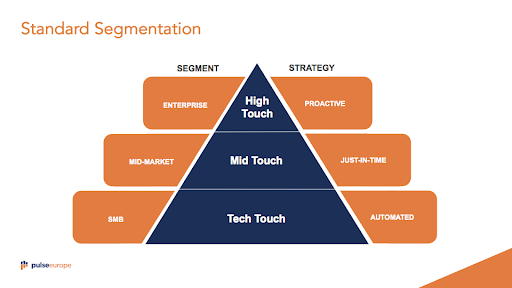
The image is useful as a first approximation. Enterprise accounts often have higher stakes, more stakeholders, and more dependencies. SMB accounts often need an efficient, repeatable path. But this pattern is not a rule:
- A large customer using a standardized, low-risk workflow may be well served by primarily digital onboarding after a brief setup phase.
- A small account with a difficult integration, a novel use case, or an urgent deadline may need temporary expert help.
- A high-touch service model for every difficult low-value account may be commercially impossible. That is not just a Customer Success problem; it may signal a product-design, packaging, or qualification problem.
The right question is therefore not:
“What segment is this customer in?”
It is:
“What level of guidance and coordination is required for this customer to reach the agreed value milestone reliably—and is that level economically justified?”
A concise way to frame the trade-off is:
“Value” here includes not only contract revenue, but also retention risk, expansion potential, strategic importance, reference potential, and the cost of a failed implementation.
Four onboarding models, defined clearly
Terminology varies across SaaS companies. Some teams use tech touch, digital, low touch, and self-service almost interchangeably. For this course, use the following distinctions.
| Model | Core design | Human involvement | Best fit |
|---|---|---|---|
| Self-service | The customer progresses independently through product guidance, documentation, templates, and support resources. | No planned human interaction; help is available on demand. | Simple, intuitive, repeatable journeys with low implementation risk. |
| Low-touch | Digital guidance is proactive and structured, supplemented by pooled or exception-based human help. | Limited: office hours, webinars, targeted outreach, or reactive support. | Mostly repeatable journeys with modest configuration or occasional friction. |
| High-touch | A named onboarding lead or team actively manages a tailored customer journey. | Frequent and planned: kickoff, working sessions, project coordination, tailored enablement. | Complex, high-risk, high-value, multi-stakeholder, or strategically important journeys. |
| Hybrid | Deliberately combines models across phases, workstreams, user groups, or risk signals. | Human help is concentrated where it changes the outcome. | Customers with a standardized core path but specific complex needs. |
The distinction between self-service and low-touch is particularly important.
A self-service customer may receive a welcome email, in-product checklist, contextual help, and automated reminders. But the company has not committed a human to intervene as part of the normal journey.
A low-touch customer may receive those same assets plus a scheduled group onboarding session, access to office hours, a pooled onboarding specialist, or targeted outreach if they miss a milestone. The experience remains scalable, but it is not entirely customer-led.
High-touch does not mean “more meetings.” It means that human expertise is assigned to risks or dependencies that automation cannot responsibly resolve: stakeholder alignment, workflow design, data validation, change management, custom configuration, or executive decision-making.
Use standardization and complexity before using ARR
The Gainsight article gives a practical framework for comparing engagement models. Its contract-value ranges and staffing ratios are useful reference points, but treat them as illustrative capacity patterns—not universal rules.
Creating Your First Tech Touch Customer Segment | Gainsight
Read Gainsight’s comparison of high-touch, mid-touch, low-touch, and tech-touch customer-success models. It is especially useful for separating account value from the more operational questions of standardization, complexity, and scalable capacity.
Under “High Touch, Mid Touch, Low Touch, and Tech Touch: Customer Success Models Compared,” read from the model comparison. Focus on the difference between dedicated, pooled, reactive, and automated engagement. Then, in “Your Tech Touch Playbook: Segmentation, Automation, and the Day 1 to 90 Sequence,” read the subsection “Which Accounts Belong in Tech Touch,” especially the assignment logic. Finish with “When Tech Touch Isn’t the Right Fit,” reading the limits of automation. Notice that stalled activation, heavy hands-on requirements, and ongoing friction are reasons to increase touch.
The central principle is:
ARR matters, but mainly because it constrains the service model the business can afford. It is a weak proxy for the work required to get a customer to value.
For example, a enterprise account could be low-touch after onboarding if its deployment is standardized and usage is stable. Conversely, an customer may genuinely need high-touch implementation support—but if that need is common, delivering one-to-one service may be unprofitable. The company may need a paid implementation package, stronger self-service product capabilities, a narrower ideal customer profile, or a different pricing model.
Assess the customer’s path to value
Your value-based completion criterion from the previous lesson is the starting point. Ask: what must be true before the customer can produce that proof of value?
Evaluate the account across six dimensions.
| Dimension | Signals for self-service or low-touch | Signals for high-touch or hybrid |
|---|---|---|
| Technical complexity | No integration, simple import, standard permissions, reversible setup. | Multiple integrations, SSO, security review, data migration, custom configuration. |
| Workflow complexity | One user can complete a known workflow with templates. | The customer must redesign a process, define policies, or coordinate handoffs. |
| Stakeholder complexity | A single administrator and a clear end user. | Multiple teams, executive sponsor, procurement, security, IT, and operational users. |
| Use-case standardization | A proven path fits most customers in the segment. | The use case is novel, ambiguous, regulated, or highly customer-specific. |
| Customer capability | The customer has time, expertise, and a committed owner. | The customer lacks expertise, has limited capacity, or has no effective champion. |
| Risk and business value | Failure has limited impact and recovery is straightforward. | Delay threatens renewal, compliance, a major launch, strategic value, or a large expansion opportunity. |
Notice that customer capability is part of the decision. An intuitive product does not automatically create a self-service journey if the customer has no one available to configure it, make decisions, or drive internal change.
Likewise, do not confuse “the customer asked for white-glove service” with “the customer needs high touch.” A request for frequent meetings may be a signal of uncertainty, poor sales expectation-setting, unclear ownership, or a product gap. Diagnose the need before committing scarce specialist capacity.
Choose the minimum viable touch level
A useful operating principle is:
Start with the least human-intensive model that can credibly reach the customer’s value-based completion criterion. Add touch where evidence shows it is necessary.
This avoids two opposite mistakes:
- Under-serving a complex customer to preserve capacity, then calling the resulting churn “lack of engagement.”
- Over-serving a simple customer with meetings and training that delay time-to-value and consume resources better used elsewhere.
Consider how the same SaaS company might route four accounts.
| Scenario | Value milestone | Main conditions | Recommended model | Why |
|---|---|---|---|---|
| A designer signs up for a visual-feedback tool at per month. | Creates a project, invites a collaborator, and receives the first feedback comment. | No integration; one user; immediate, familiar workflow. | Self-service | The path is short, repeatable, and low risk. Product guidance and searchable help should carry the journey. |
| An HR team buys a recruiting tool for annually. | Publishes a live job and moves the first candidate through the agreed hiring workflow. | CSV import; one HR administrator; standard templates; limited configuration. | Low-touch | Digital setup can handle most work, while a webinar, office hour, or pooled specialist reduces avoidable setup friction. |
| A regulated financial-services firm buys a compliance platform for . | Compliance lead runs the first audit-ready review using validated data and approved workflows. | SSO, security review, several data sources, legal and IT stakeholders, high consequence of error. | High-touch | The customer needs coordinated project management, technical expertise, governance, and tailored enablement. |
| A product-analytics customer adopts a largely standard solution but needs one complex warehouse integration. | Product team uses trusted event data in a live prioritization decision. | Standard product usage after setup; one technical dependency; different audiences need different guidance. | Hybrid | A specialist handles the integration; administrators receive guided enablement; everyday users follow self-service, role-based paths. |
The last case shows why hybrid should not mean “we have not made a decision.” It should mean that you have intentionally allocated human effort to the parts of the journey where it changes the probability of value.
Three useful hybrid designs
Hybrid onboarding can be designed in three distinct ways.
1. Phased hybrid: high touch first, low touch later
Use intensive support to resolve setup, integration, governance, or change-management needs. Once the customer has reached the initial value milestone and has a capable owner, transition them to scalable digital education, lifecycle communication, and signal-based outreach.
Example:
- Weeks 1–4: implementation lead runs integration, data validation, and tailored training.
- Weeks 5–8: customer runs the real workflow with milestone check-ins.
- After initial value: ongoing digital adoption campaigns, with a CSM or specialist engaged only when risk signals appear.
This is common when implementation complexity is high but the steady-state product workflow is repeatable.
2. Component hybrid: human support for difficult workstreams
Different workstreams have different complexity. Give humans the work that requires judgment; automate the work that is consistent.
Example for a cybersecurity platform:
- Security and IT teams receive live architecture and configuration support.
- Standard end users receive role-based in-app learning.
- Executives receive an automated adoption summary, with a strategic review only if adoption or risk signals warrant it.
3. Signal-based hybrid: escalate or de-escalate based on evidence
A customer may begin in a scalable model and receive added help only when signals indicate that the journey is failing. Conversely, a customer may begin high touch but move down once they become self-sufficient.
Useful escalation triggers include:
- no progress toward the first-value milestone by the expected date;
- integration, data-quality, or security blockers;
- repeated support tickets around the same workflow;
- no active champion or administrator;
- missed customer actions in the mutual plan;
- declining engagement after an initial setup burst;
- a change in scope, stakeholders, or business urgency.
A trigger should produce a defined response, not merely an alert. For example:
| Signal | Response |
|---|---|
| No data connected after seven days | Offer an integration clinic or assign a technical specialist. |
| Admin completes setup but end users do not begin the workflow | Schedule role-based group enablement and review change-management barriers. |
| Customer completes initial value milestone early | Reduce planned check-ins; shift to automated adoption guidance and ongoing success ownership. |
| Support volume signals persistent product friction | Move to higher-touch diagnosis; do not keep sending generic automated reminders. |
The principle from the Gainsight resource is worth retaining: segment first, automate second. Automation is powerful when it responds to meaningful lifecycle and behavioral signals. It becomes harmful when it is used to hide a journey that clearly requires human judgment.
Let customer signals refine, not replace, your routing decision
Customer preferences can help you tailor the journey, but they should not be your sole basis for assigning a model.
This short segment from Olly Rosewell offers an example of presenting customers with different setup paths and interpreting their selections as signals about how they want to engage.
SaaS Onboarding: How To Make Customers Fall In Love
Watch “SaaS Onboarding: How To Make Customers Fall In Love” by Olly Rosewell for a compact example of using setup choices to differentiate the onboarding experience.
Watch setup choices. Focus on the contrast between a fast, automated route and a more thorough route with additional contact points. Treat customer choice as one useful routing signal alongside objective factors such as integration complexity, stakeholder count, and risk.
A customer choosing a rapid path may value speed and autonomy. A customer choosing a detailed setup may be signaling a need for confidence, mastery, or support. But validate those signals through discovery and behavior:
- Did the customer connect the required data?
- Is a customer owner completing the intended workflow?
- Are they moving toward the completion criterion?
- Are they creating friction for themselves, or encountering genuine product and organizational barriers?
The model should adapt to evidence, rather than locking an account into its original segment indefinitely.
Turn the decision into an operational routing note
A strong onboarding leader can explain a model choice in a short, evidence-based statement. Record the decision in the CRM, customer plan, or onboarding workspace so Sales, Implementation, Support, and Customer Success work from the same assumptions.
Use this structure:
| Field | What to document |
|---|---|
| Initial value milestone | The value-based completion criterion for this customer or segment. |
| Selected model | Self-service, low-touch, high-touch, or hybrid. |
| Decision evidence | Complexity, stakeholder needs, customer capability, standardization, risk, and economics. |
| Minimum touch components | For example: guided checklist, group webinar, kickoff, technical specialist, or executive review. |
| Customer responsibilities | Named owner, required data, attendance, decisions, approvals, and internal change actions. |
| Escalation triggers | Conditions that add human support or specialist involvement. |
| De-escalation or transition rule | Conditions that move the customer to a more scalable ongoing model. |
For the product-analytics scenario, the routing note might say:
Model: Hybrid.
Reason: The warehouse integration and data validation require specialist support, but the core product workflow is standardized after trusted data is available.
Minimum touch: Technical implementation sessions for the integration; one role-based administrator workshop; in-product guidance for product managers.
Escalate if: Data validation misses the target date or no product manager uses the insights in the first prioritization meeting.
Transition: Move to low-touch adoption guidance once the customer has completed two successful planning cycles with a named internal owner.
That is more rigorous than saying, “This is a mid-market account, so give it mid-touch.”
Key takeaways
The onboarding model is not a prestige label and should not be determined by ARR alone. It is a deliberate choice about where to invest human attention so the customer can reach a real value milestone.
- Self-service fits simple, low-risk, repeatable paths where customers can succeed independently.
- Low-touch adds scalable, structured human help for mostly standardized journeys.
- High-touch is justified when coordination, technical complexity, stakeholder alignment, change management, or business risk require active human ownership.
- Hybrid concentrates human expertise on the complex parts of the journey while keeping repeatable work digital and scalable.
- The best model is the minimum viable touch level that can credibly get the customer to their agreed proof of value.
- Routing should be dynamic: use milestones, engagement, friction, and risk signals to escalate or de-escalate support.
Next, you will translate this model choice into clear cross-functional accountability by assigning responsibilities across Sales, Implementation, Product, Support, and Customer Success using a RACI matrix.
Can't find a good explanation? Sign up and we'll make it for you
Sign up