
Welcome to the final module of our course, "Performance, Testing, and Deployment." In our previous lessons, we built a robust security foundation for our application, culminating in the implementation of a strict Content Security Policy. With security addressed, we now turn our attention to ensuring the quality, correctness, and performance of our HTMX application, preparing it for a production environment.
Today, we will tackle a cornerstone of application quality: automated testing. Your learning outcome for this lesson is to write integration tests for HTMX endpoints that assert on returned HTML fragments using Supertest and a DOM parser.
In a React application, you might use tools like Jest and React Testing Library to render components in a simulated DOM and assert their state and behavior. The philosophy with HTMX is different. Since the server is responsible for rendering the UI (as HTML fragments), our most critical tests will run on the server, verifying that our endpoints produce the correct HTML for a given request. This approach provides fast, reliable feedback and is a perfect complement to the hypermedia architecture.
A Two-Tiered Testing Strategy
For a typical HTMX application, a pragmatic testing strategy involves two main layers:
- Server-Side Integration Tests: These are fast, browser-less tests that make HTTP requests directly to your Express routes. They verify that when a specific endpoint is called (e.g., with the
HX-Requestheader), it returns the expected HTML fragment with the correct data and structure. This is the core focus of today's lesson. - End-to-End (E2E) Browser Tests: These tests run in a real browser (using tools like Playwright or Cypress) to verify the full user interaction. They confirm that clicking a button correctly triggers an HTMX request and that the browser's DOM is updated as expected. While crucial for validating the complete user flow, these tests are slower and are typically run less frequently than integration tests.
By focusing on server-side integration tests, we can cover the vast majority of our application's logic quickly and efficiently.
Introducing the Tools: Supertest and Cheerio
To write our server-side tests in a Node.js environment, we'll use two popular libraries:
- Supertest: A library that makes it easy to test HTTP endpoints. It allows you to programmatically make requests to your Express application without needing to start a live server, which makes tests fast and self-contained.
- Cheerio: A fast, flexible, and lean implementation of core jQuery designed specifically for the server. It parses HTML and XML documents, allowing you to traverse and manipulate the resulting data structure with a familiar, jQuery-like API. We'll use it to inspect the HTML fragments returned by our server.
You can add these to your project's development dependencies with npm install -D supertest cheerio.
Testing Core HTMX Behavior: Full vs. Partial Responses
The fundamental behavior of an HTMX-aware server is its ability to distinguish between a standard page load and an AJAX request from HTMX. As we established in Module 2, this is done by checking for the HX-Request: true header. Our first set of tests should validate this exact logic.
The following resource provides a concise, complete example of an Express router for a "todos" list and the corresponding integration tests written with Supertest.
HTMX Testing Guide: Playwright and Server-Side Assertions (2026)
This guide from HelpMeTest provides a superb, practical example of setting up server-side tests for HTMX endpoints. It demonstrates how to test for the presence of the HX-Request header and how to assert the content of the returned fragments.
Please read the entire section under the heading Server Route Testing. Pay close attention to both the Express router code (todos.js) and the test file (todos.test.js). Notice how the tests use request(createApp()).get('/todos').set('HX-Request', 'true') to simulate an HTMX request and then make assertions on the response.
As you saw in the example, the tests perform two key checks for the GET /todos endpoint:
- When
HX-Request: trueis set, the response status is 200, the body contains list item tags (<li>), but it does not contain the full page boilerplate (<html>). - When the header is absent, the server renders the full page (the test for this is stubbed out, but the principle is clear).
These tests are a great start, but asserting on the response with expect(res.text).toContain(...) can be brittle. A small change in an attribute or whitespace could break the test. For more robust and precise assertions, we need to parse the HTML.
Robust Assertions with a DOM Parser
This is where Cheerio becomes invaluable. Instead of treating the server's response as a simple string, we can load it into Cheerio and use CSS selectors to inspect the structure and content, much like you would with jQuery or document.querySelector in the browser.
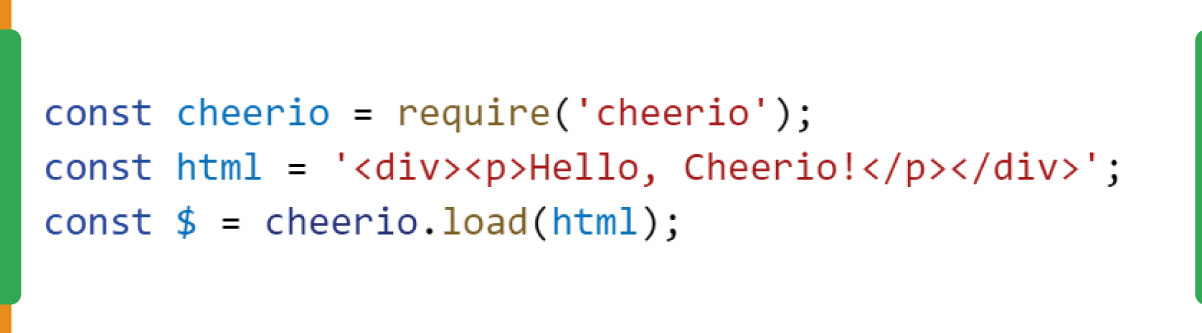
The idea of using a server-side DOM parser to test rendered HTML is a well-established pattern. The following resource, although framed around testing server-rendered templates in general, perfectly illustrates the technique we will use.
node.js - Mocha: How to test Express rendered views - Stack Overflow
This Stack Overflow answer provides a clear rationale and a code example for using Cheerio to make assertions on HTML rendered by an Express server. The principle applies directly to testing HTMX fragments.
Read the accepted answer, starting from the introduction and paying close attention to the code block that starts with it ('renders the index page', ...). This example shows how to combine supertest with cheerio to make specific assertions about the rendered content.
A Complete Test Case: Supertest + Cheerio
Now, let's combine these concepts to write a robust test for the POST /todos/:id/toggle endpoint from our LINK resource example. This endpoint toggles the done status of a todo item and returns the updated <li> fragment.
Our test will:
- Use
supertestto make aPOSTrequest to/todos/1/togglewith theHX-Requestheader. - Load the HTML response into
cheerio. - Use Cheerio selectors to verify that the returned fragment is structured correctly and reflects the updated state.
Here is what the test would look like. This integrates the power of Cheerio with the request-making ability of Supertest.
// In server/routes/todos.test.js
const request = require('supertest');
const express = require('express');
const cheerio = require('cheerio'); // Import cheerio
const todosRouter = require('./todos');

// ... (createApp function remains the same)

describe('POST /todos/:id/toggle', () => {
  it('returns the updated todo item HTML with correct structure', async () => {
    const res = await request(createApp())
      .post('/todos/1/toggle')
      .set('HX-Request', 'true');

    expect(res.status).toBe(200);

    // Load the response into Cheerio
    const $ = cheerio.load(res.text);

    // Assertions using Cheerio selectors
    const listItem = $('li#todo-1');
    expect(listItem.length).toBe(1); // Check that the root element exists

    // Check for the 'done' class
    expect(listItem.hasClass('done')).toBe(true);

    // Check that the checkbox is now checked
    const checkbox = listItem.find('input[type="checkbox"]');
    expect(checkbox.attr('checked')).toBe('checked');

    // Check that the hx-post attribute is still correct
    expect(checkbox.attr('hx-post')).toBe('/todos/1/toggle');

    // Check the text content
    expect(listItem.find('span').text()).toBe('Write tests');
  });

  it('returns 404 for a non-existent todo', async () => {
    const res = await request(createApp())
      .post('/todos/9999/toggle')
      .set('HX-Request', 'true');
    expect(res.status).toBe(404);
  });
});
This test is far more resilient to change than one based on string matching. It verifies the semantic structure of the response, confirming that your server is generating correct, well-formed hypermedia fragments. This gives you high confidence that the front end will behave as expected when it receives this fragment.
Conclusion
You now have a powerful and efficient strategy for testing the core logic of your HTMX application. By verifying your server's HTML output directly, you align your tests with the application's architecture, resulting in fast, reliable, and maintainable checks.
Key Takeaways:
- Test the Server Output: The primary testing focus for HTMX applications is on server-side integration tests that validate the correctness of the generated HTML fragments.
- Use Supertest for Requests: Supertest provides a clean, fluent API for making HTTP requests to your Express app in a test environment.
- Simulate HTMX with Headers: Always set the
HX-Request: trueheader in your tests to ensure you are testing the fragment-rendering logic paths. - Use Cheerio for Assertions: Parse the HTML response with Cheerio to make robust, specific assertions on the DOM structure, attributes, and content, avoiding the brittleness of simple string checks.
In our next lesson, we will continue our focus on production-readiness by exploring performance. Specifically, we'll learn how to configure server-side caching headers like ETag and Cache-Control to optimize the delivery of these fragments to the client.
Can't find a good explanation? Sign up and we'll make it for you
Sign up