
Welcome to the final lesson of your course on migrating from React to HTMX. In our previous lesson, we walked through the process of preparing and deploying your Express and HTMX application to a production environment. With your application now live, we can proceed to the crucial final step: quantifying the results of your migration effort.
Today, we will focus on how to measure and compare key performance metrics (latency, payload size, Core Web Vitals) of the deployed HTMX app against the original React baseline. For an engineer with your depth of experience, this is the vital validation phase. It's where we move from architectural theory to empirical data, proving the value of the hypermedia approach for the types of CRUD applications you're targeting. We won't be learning what these metrics are from scratch; instead, we'll focus on how the fundamental differences between React and HTMX manifest in them and how to interpret the results.
The Performance Landscape: Hypotheses and Metrics
Before we dive into measurement, let's establish our hypotheses based on the architectural differences we've discussed throughout this course.
- React (SPA model): Relies on a significant initial JavaScript payload to bootstrap the application. The browser renders a minimal HTML shell, then downloads, parses, and executes JavaScript to render the UI and fetch data from APIs.
- HTMX (Hypermedia model): Relies on a very small JavaScript library. The server sends fully-formed HTML, either as a full page or as fragments. The browser's primary job is to render HTML, not execute a large application bundle.
This leads to a few key predictions:
- Payload Size: The HTMX app's initial JavaScript payload will be orders of magnitude smaller than the React app's.
- Initial Load: The HTMX app will have a faster Time to First Contentful Paint (FCP) and Largest Contentful Paint (LCP) because the content is in the initial response.
- Interactivity: The HTMX app will become interactive almost immediately, whereas the React app will suffer from an "interactivity gap" during hydration, impacting Interaction to Next Paint (INP).
Let's gather the data to test these hypotheses.
Measuring Payload Size: The Most Obvious Win
The most direct and dramatic difference is in the amount of JavaScript shipped to the client. A typical React application, including react, react-dom, a router, and state management, can easily weigh between 200KB and 500KB (gzipped), or even more. HTMX is a single file, around 14KB.
This isn't just a theoretical number. The video "HTMX For React Developers in 10 Minutes" by Jack Herrington provides a quick, practical demonstration of this difference.
HTMX For React Developers in 10 Minutes
This short clip compares the network panel results for two functionally identical applications: one built with React, the other with HTMX.
Watch the comparison from this point. The key takeaway is the stark contrast in the total JavaScript downloaded for the initial page load.
The impact of this difference is profound, especially on mobile devices or slower networks. Less JavaScript means faster download times, but more importantly, less time spent by the browser parsing, compiling, and executing code, all of which are blocking activities on the main thread.
Measuring Latency and Initial Load Performance
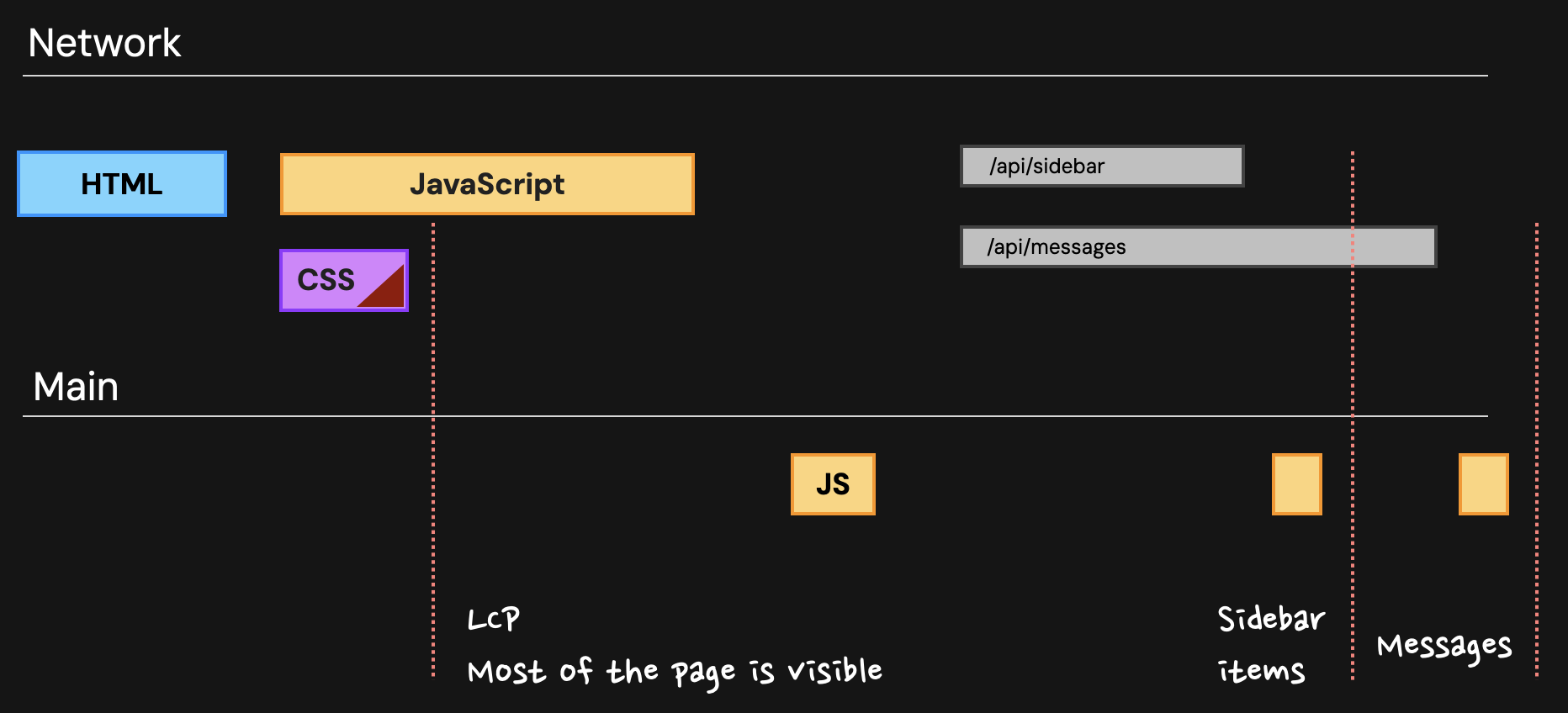
Payload size directly impacts the initial loading sequence. A client-side rendered React app has a distinctive multi-step waterfall:
- Fetch
index.html(often mostly empty). - Fetch JavaScript bundles (e.g.,
app.js,vendor.js). - Execute JavaScript.
- Fetch API data (e.g.,
/api/messages). - Render the UI.
In contrast, a server-side rendered HTMX application has a much simpler waterfall for the initial load:
- Fetch
index.html(containing the fully rendered content). - Render the UI.
The diagram below, showing a server-side rendering flow, illustrates how the initial HTML and CSS can lead to a visible page (and thus a good LCP) before all JavaScript has even finished executing and long before subsequent API calls are made.
The article "HTMX vs React—Performance and Architecture Deep-Dive" provides excellent, data-backed analysis of these loading patterns.
HTMX vs React—Performance and Architecture Deep-Dive - SoftwareSeni
This article dives into the hard numbers, comparing the performance of HTMX and various React rendering strategies.
Read the sections What are the real-world performance differences and How does initial page load performance compare. Pay close attention to the specific LCP timings reported for Client-Side Rendering (CSR) vs. Server-Side Rendering (SSR) and how they compare. Note the discussion on Time to First Byte (TTFB), which can be slightly slower for HTMX, but is more than compensated for by the dramatic improvement in FCP and LCP.
Comparing Core Web Vitals (CWV)
Core Web Vitals are Google's standardized metrics for user experience, directly affecting SEO rankings. Measuring them provides an objective way to evaluate if the migration improved the feel of your application.
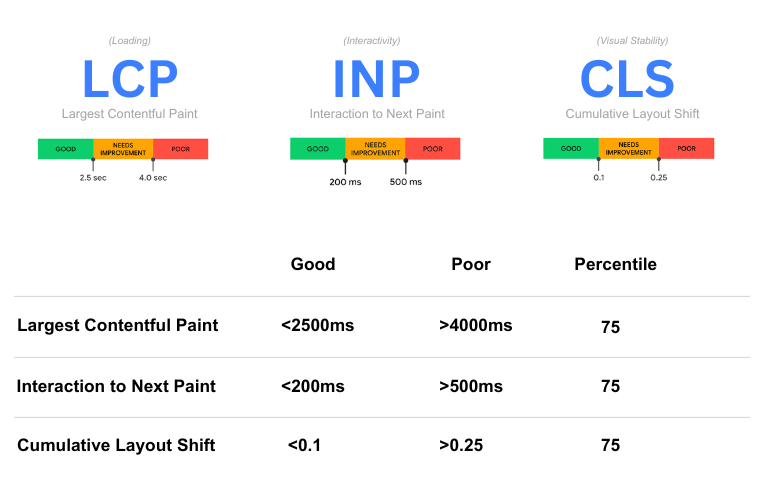
The video "Master Core Web Vitals in One Hour" from DebugBear is an exceptional, practical guide to diagnosing and fixing issues with these vitals. We will use it as a reference for how to perform a deep-dive analysis.
Largest Contentful Paint (LCP)
LCP measures loading performance. As we've established, HTMX has an architectural advantage here. The LCP element, usually a large image or block of text, is typically part of the initial HTML payload. In a React SPA, it often can't be rendered until JavaScript has executed and data has been fetched.
To go beyond theory and learn how to precisely identify and debug LCP issues in any application, the DebugBear video offers a masterclass.
Master Core Web Vitals in One Hour: The Ultimate Website Optimization Guide
This video provides a detailed workflow for identifying, debugging, and fixing LCP issues using browser DevTools and other professional tools.
Focus on the section that covers the LCP analysis workflow. Watch from the introduction of Lighthouse and PageSpeed Insights (initial analysis), through the detailed investigation using a waterfall chart and request chains (deep dive), to the implementation of fixes like preloading and image optimization (the fixes). This will equip you with a robust methodology to measure and validate LCP improvements on your own projects.
Interaction to Next Paint (INP)
INP measures responsiveness. This is where the "interactivity gap" of client-side frameworks becomes a measurable problem. An SSR React page can have a great LCP, but the buttons and inputs won't work until the JavaScript has been downloaded, parsed, and executed to "hydrate" the static HTML.
HTMX completely sidesteps this problem. Since it uses standard HTML elements and a minimal JS library that's ready almost instantly, the page is interactive as soon as it is visible.
The "Performance Deep-Dive" article explains this critical difference.
HTMX vs React—Performance and Architecture Deep-Dive - SoftwareSeni
This article clearly explains the concept of the interactivity gap and its impact on Core Web Vitals.
Read the section on Core Web Vitals implications, focusing on the paragraphs about FID/INP. Then, review the FAQ entry on the interactivity gap.
To see how to measure and debug INP in practice, we can again turn to the "Master Core Web Vitals" video. It demonstrates how to identify long tasks on the main thread that cause poor responsiveness—the very tasks that HTMX's architecture helps you avoid.
Master Core Web Vitals in One Hour: The Ultimate Website Optimization Guide
This section of the video explains what INP is, how to find slow interactions using Real User Monitoring (RUM) and DevTools, and how to fix them by offloading work from the main thread.
Watch the segment from the introduction to INP (diagnosing INP) through to the primary fix using web workers (the fix). This highlights the complexity required in a JS-heavy app to solve responsiveness issues that are often non-existent in a hypermedia-driven one.
Cumulative Layout Shift (CLS)
CLS measures visual stability. Both architectures can suffer from CLS if not handled carefully.
- React: Layout can shift as components render based on asynchronously fetched data.
- HTMX: Layout can shift if a swapped HTML fragment has different dimensions from the content it replaces.
The key to good CLS is reserving space for content before it loads, for example by setting explicit dimensions on images and containers. The techniques for this are universal.
Master Core Web Vitals in One Hour: The Ultimate Website Optimization Guide
This part of the video provides a practical guide to identifying and fixing common causes of CLS, such as unsized images and dynamically injected content.
Watch the segment on diagnosing CLS (diagnosing CLS) and the subsequent section on applying fixes (fixing CLS). These principles apply equally to both React and HTMX applications.
Summary of Performance Comparison
Based on our analysis, here is a summary of the expected performance differences between a typical React SPA and an HTMX application for a CRUD-style project.
| Metric | React SPA | HTMX Application | Why it Matters |
|---|---|---|---|
| JS Payload Size | Large (200-500KB+) | Tiny (~14KB) | Faster download, parse, and compile times, especially on mobile. |
| LCP | Slower, requires JS execution and data fetch. | Faster, content is in the initial HTML. | Better perceived loading speed and SEO ranking. |
| INP | Slower, subject to "interactivity gap". | Faster, no hydration step required. | Better user experience; the app feels responsive immediately. |
| CLS | Risk from async component rendering. | Risk from swapping fragments of different sizes. | Both require care, but the root causes differ. |
| Server Load | Lower (serves static assets and JSON). | Higher (renders HTML on each request). | HTMX offloads client work to the server. Manageable with caching. |
| Subsequent Navigation | Potentially faster (client-side routing). | Slower (server round-trip for each click). | React feels "snappier" after the initial load. |
Conclusion and Course Retrospective
In this final lesson, we have established a framework for quantitatively proving the performance benefits of migrating a CRUD application from React to HTMX. You now know how to measure and interpret the key differences in payload size, initial load times, and Core Web Vitals. For the applications you aim to migrate, the data will likely show a clear win for HTMX in terms of user-perceived performance and efficiency, especially for initial visits and on less-than-ideal network conditions.
Key Takeaways:
- Payload is paramount: HTMX's primary performance advantage stems from its radically smaller JavaScript footprint.
- Architecture dictates experience: HTMX's server-rendered model naturally optimizes for fast LCP and INP, avoiding the "interactivity gap" common in JS frameworks.
- Measurement is validation: Use tools like Lighthouse and the Chrome DevTools Performance panel to gather concrete data comparing your React baseline to your new HTMX application.
Congratulations on completing this comprehensive course. You began with the goal of planning a migration from React to HTMX. Over the past ten modules, you have journeyed from grasping the fundamental hypermedia mental model to building, securing, deploying, and now, measuring a production-ready application. You have a complete playbook to analyze your existing React projects, make informed migration decisions, and execute them with confidence.
The next step is to apply this knowledge to your own projects. Good luck.
Can't find a good explanation? Sign up and we'll make it for you
Sign up