
Hello. In the previous lesson, you practiced using documented Python tools rather than guessing function names: import a module, confirm a function’s contract, make a small known-input call, and inspect the result. That same discipline is the foundation of debugging. When code fails, the goal is not to randomly edit until the error disappears; it is to compare what Python actually did with what you expected it to do.
This is the final lesson in the Independent Python Foundations module. You will learn to distinguish syntax errors, runtime errors, and logic errors; read tracebacks as evidence; trace variable state through a small program; and verify behavior with deliberately chosen inputs. These habits will matter even more once your programs read files, transform data, and train models.
Three failure modes, three kinds of evidence
A bug is a defect in code or in the assumptions behind it. Python bugs often fall into these practical categories:
| Category | Does the code start running? | Main evidence | Typical cause |
|---|---|---|---|
| Syntax error | No | SyntaxError or IndentationError message | Missing colon, quote, parenthesis, or valid indentation |
| Runtime error | Yes, then it stops at a specific operation | Exception traceback | Invalid type, missing name, impossible operation, bad index |
| Logic error | Yes, and it may finish normally | Observed output disagrees with expected behavior | Incorrect condition, formula, ordering, or assumption |
The category determines your first move.
- With a syntax error, Python could not understand the structure of the code. Inspect the indicated line and nearby earlier lines.
- With a runtime error, Python understood the code but encountered a value or operation that was invalid at that moment. Read the traceback, then inspect the program state.
- With a logic error, Python followed your instructions faithfully, but those instructions did not represent the intended task. Define expected behavior and test inputs that can reveal the mistake.
A useful rule is: the visible failure location is evidence, not necessarily the original cause. A missing closing parenthesis can cause Python to complain on a later line. A division-by-zero error may occur on the return line, but the decision that produced a zero denominator may have happened much earlier.
Syntax errors: Python cannot parse the program
Python needs to parse a cell or script before it can execute it. A syntax error therefore prevents the code unit from running at all.
Consider this attempt to label a model score:
score = 0.84

if score >= 0.80
    label = "high priority"

print(label)
Python will report a message similar to:
SyntaxError: expected ':'
The if statement needs a colon after its condition:
score = 0.84

if score >= 0.80:
    label = "high priority"

print(label)
Common syntax mistakes in early Python work include:
- a missing colon after
if,elif,else,for,while,def, ortry; - unclosed or mismatched parentheses, brackets, quotes, or braces;
- indentation that does not form a valid block;
- a misspelled keyword, such as
elsinstead ofelse.
Read the position marker carefully
Python often repeats the relevant source line and marks where it noticed a problem with a caret (^) or other pointer. Treat that location as a starting point, not a guarantee that the exact character is wrong.
For example:
print("Ticket summary"
print("Complete")
The real problem is the missing closing parenthesis on the first line. Yet Python may only recognize that something is structurally wrong when it reaches the second print().
When diagnosing syntax:
- Read the exception type and message.
- Go to the stated line.
- Check the line just before it for an unfinished expression or block header.
- Count paired delimiters:
(),[],{}, and quotation marks. - Fix the first syntax error, then run again. Python may reveal another error that was previously unreachable.
Read the official Python Tutorial’s explanation of syntax errors and exceptions. It establishes an important distinction: a syntax message identifies where parsing failed, while an exception occurs only after code has begun executing.
In Section 8.1, “Syntax Errors,” read from the opening explanation through the paragraph about the missing colon. Focus on why the reported location may differ from the character that needs fixing. Then read Section 8.2, “Exceptions.” Start at the first paragraph that begins “Even if a statement…” and continue through the explanation of traceback context. Pay particular attention to the exception message structure: the final line tells you what happened, while the lines above provide context.
Runtime errors: use the traceback to reconstruct the failure
A runtime error occurs when Python starts executing valid code but reaches an operation it cannot complete. In Python, this is normally reported as an exception. For this lesson, focus on unhandled exceptions: they stop the current cell or script and display a traceback.
Here is a small operational-metrics example:
def completion_rate(completed_orders, total_orders):
    return completed_orders / total_orders

orders = {
    "completed": 42,
    "total": 0,
}

rate = completion_rate(orders["completed"], orders["total"])
print(rate)
The code has valid syntax. It begins execution, defines the function, builds the dictionary, and calls the function. It then fails when the function tries to divide by zero.
A simplified traceback looks like this:
Traceback (most recent call last):
  File "metrics.py", line 9, in <module>
    rate = completion_rate(orders["completed"], orders["total"])
  File "metrics.py", line 2, in completion_rate
    return completed_orders / total_orders
ZeroDivisionError: division by zero
Read a Python traceback from the bottom upward:
-
Start with the final line.
ZeroDivisionError: division by zeronames the exception and explains the immediate failure. -
Find the closest source line above it.
The division insidecompletion_rate()is where Python failed. -
Move upward through the call history.
The next frame shows who calledcompletion_rate()and with which expressions. -
Inspect the relevant values immediately before the failure.
Here,completed_orderswas42andtotal_orderswas0.
The immediate fix is not automatically “replace zero with one.” That would avoid the exception but invent a false rate. The real question is domain-specific: does zero total orders mean the completion rate should be missing, undefined, reported as zero, or excluded from the analysis? Debugging identifies the faulty assumption before you decide the appropriate business behavior.
Exception names tell you what kind of assumption failed
You will see these frequently:
| Exception | Meaning | First questions to ask |
|---|---|---|
NameError | Python does not know a referenced name | Was it defined? Is it misspelled? Did the notebook cell that defines it run? |
TypeError | An operation or function received an incompatible type | What are the values’ types? What does the function expect? |
ValueError | A value has the right broad type but an unacceptable content or form | Is the string numeric? Is a parameter within the permitted range? |
IndexError | A sequence position does not exist | What is the collection length? Remember indexing starts at 0. |
KeyError | A dictionary key does not exist | What keys are actually present? Is the spelling and capitalization identical? |
ZeroDivisionError | A denominator evaluated to zero | Which earlier data or calculation produced zero? |
The previous lesson’s import-style mistake is a useful NameError example:
from statistics import mean

daily_counts = [18, 23, 15]
print(statistics.mean(daily_counts))
The function mean exists in the current namespace, but statistics does not. The import created one name, while the later call assumes a different name exists.
How Do You Read a Python Traceback?
Watch Real Python’s “How Do You Read a Python Traceback?” for a visual walkthrough of the traceback-reading process. The examples reinforce how the final exception line and the call stack work together.
Watch traceback anatomy first. Focus on the advice to begin at the bottom, identify the exception and message, then work upward through the file names, line numbers, and source lines. Then watch two traceback examples. Notice how an unexpected keyword argument and an incorrect argument type lead to different TypeError messages, and how the traceback identifies both the failing function and the call that supplied the problematic value.
State tracing: make hidden program state visible
A traceback is excellent when code stops. But a traceback does not show every variable value, and it cannot help with code that runs but produces the wrong result. For that, use state tracing.
State tracing means simulating a program one statement at a time and recording what each variable contains after that statement executes. At a minimum, track:
- the variable name;
- its current value;
- its type when it matters;
- which branch of a conditional will execute.
Consider:
raw_score = "82"
score = int(raw_score)
passed = score >= 70

if passed:
    decision = "advance"
else:
    decision = "review"

print(decision)
A compact state trace is:
| Executed statement | Relevant state after execution |
|---|---|
raw_score = "82" | raw_score is "82" of type str |
score = int(raw_score) | score is 82 of type int |
passed = score >= 70 | passed is True of type bool |
if passed: | The True branch executes |
decision = "advance" | decision is "advance" |
print(decision) | Output is advance |
The distinction between "82" and 82 is essential. The first is text; the second is a number. If you tried to compare raw_score >= 70, Python would raise a TypeError because it cannot order a string and an integer.
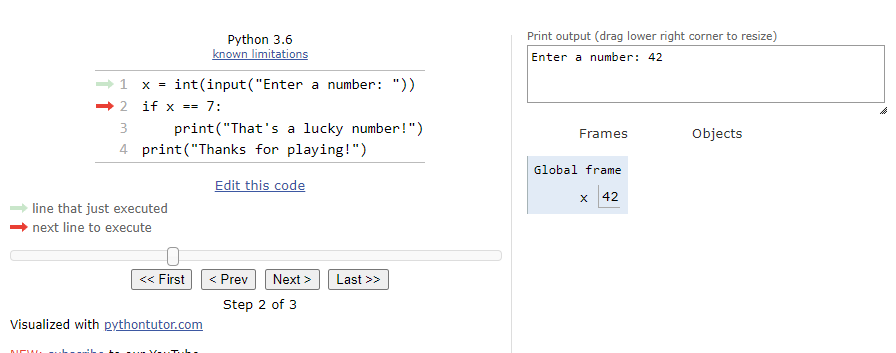
When you trace code manually, pause before the line that fails or surprises you. Ask:
- Which variables does this line read?
- What are their exact values and types right now?
- For a condition, is its Boolean expression actually
TrueorFalse? - For a list access, what is the list length and which index is requested?
- For a dictionary lookup, what keys are truly present?
Print diagnostics deliberately
For small programs, temporary print() statements are a legitimate debugging tool:
raw_score = "82"

print("raw_score:", raw_score)
print("type:", type(raw_score))

score = int(raw_score)

print("score:", score)
print("type:", type(score))
Use labels so that the output remains interpretable. A bare print(score) is less useful once several values are being inspected.
After you have identified the bug, remove or replace temporary diagnostic prints. Leaving scattered debugging output in data pipelines makes later results harder to read.
Notebook state needs extra care
In a script, Python normally starts at the first line and runs top to bottom. In a notebook, variables remain in memory after a cell has run. That means a notebook can appear to work because an old variable still exists, even though the current cells are not self-contained.
If notebook behavior seems inconsistent:
- Look at the variable with
print()andtype(). - Check which cells have actually been run.
- Restart the kernel and run the notebook from top to bottom.
- Confirm the same output appears from this clean state.
This is a basic form of reproducibility. Later, you will make it more rigorous with environments, versioned dependencies, and tests.
Logic errors: the program runs, but the result is wrong
Logic errors are often the most consequential in data work because they can quietly produce a dashboard metric, feature, or prediction that looks plausible.
Suppose a policy gives customers:
- no discount below 5 years;
- a 5% discount from 5 through 9 years;
- a 10% discount from 10 years onward.
This implementation runs without errors:
def discount_rate(customer_years):
    if customer_years >= 5:
        return 0.05
    elif customer_years >= 10:
        return 0.10
    else:
        return 0.0
But it is logically incorrect. For customer_years = 12, the first condition is already True, so Python returns 0.05 and never checks the elif.
The corrected version checks the more restrictive condition first:
def discount_rate(customer_years):
    if customer_years >= 10:
        return 0.10
    elif customer_years >= 5:
        return 0.05
    else:
        return 0.0
The key evidence is not an error message. It is a comparison between expected and observed behavior.
| Input: customer years | Expected discount | Buggy output | Correct output |
|---|---|---|---|
| 4 | 0% | 0% | 0% |
| 5 | 5% | 5% | 5% |
| 9 | 5% | 5% | 5% |
| 10 | 10% | 5% | 10% |
| 12 | 10% | 5% | 10% |
Notice the selected inputs: they sit at and around the policy boundaries. Testing only 4 and 5 would falsely suggest the buggy function works.
For data tasks, especially inspect:
- boundary values:
0, the first permitted value, the final value in a range; - empty inputs: empty lists, tables, or strings;
- missing or unexpected categories;
- representative normal cases;
- values that change branches: just below, exactly at, and just above a threshold.
This approach is more reliable than testing one convenient example and accepting the output because it “looks reasonable.”
A repeatable debugging workflow
Use this workflow whether you wrote the code yourself or received an AI suggestion.
-
Preserve the evidence. Copy the exact error message, traceback, input, and unexpected output before changing code.
-
Classify the failure. Decide whether Python could not parse the code, stopped with an exception, or completed with incorrect behavior.
-
Reduce the problem. Isolate the smallest cell, function call, or data example that still fails. A small reproduction is easier to reason about than a full notebook.
-
Inspect state and assumptions. Trace values, types, collection sizes, branch conditions, and function arguments immediately before the problematic line.
-
Make one targeted change. Fix the identified cause, not unrelated formatting or several speculative lines at once.
-
Verify the repair. Re-run the original failing case, then test nearby values and edge cases. A fix that only works for one example may have introduced a new logic error.
Short independent debugging routine
Create a notebook named debugging_practice.ipynb and work through these three separate cells. Before changing each cell, write one sentence predicting the category of bug and one sentence naming the evidence you expect to see.
Cell 1: syntax
monthly_target = 100
actual_sales = 120

if actual_sales >= monthly_target
    print("Target met")
Cell 2: runtime
daily_sales = ["12", "15", "9"]
total_sales = sum(daily_sales)

print(total_sales)
Cell 3: logic
def service_level(on_time_orders, total_orders):
    return (on_time_orders // total_orders) * 100

print(service_level(95, 100))
For the runtime cell, inspect both the values and their types before deciding how to correct the calculation. For the logic cell, the expected service level is 95.0, not 0; trace the effect of // versus /. When finished, restart the notebook kernel and run all cells in order to ensure no earlier state is masking a problem.
Key takeaways
Debugging is a disciplined comparison of code, state, and observed behavior.
- A syntax error prevents Python from parsing code. The reported location may be near, rather than exactly at, the source of the mistake.
- A runtime error is an exception raised during execution. Read its traceback from the bottom upward: exception message, failing line, then the chain of calls.
- A logic error produces no traceback. Reveal it by specifying expected outcomes and testing normal, boundary, and edge-case inputs.
- State tracing makes variable values, types, conditions, and collection positions explicit at the moment a program makes a decision or fails.
- In notebooks, restart and run from a clean kernel when behavior seems mysterious; persistent state can conceal defects.
- Do not accept an AI-generated “fix” merely because it removes an error. Reproduce the problem, inspect the reasoning, and verify the repair with relevant inputs.
Next, you will begin Reliable Coding and Development Workflow by turning short data-task requirements into ordered pseudocode before implementing them. That planning step reduces logic errors before Python ever runs.
Can't find a good explanation? Sign up and we'll make it for you
Sign up