
Hello again. In the previous lesson, you created an installable incident_api package with a src layout, a project-local .venv, and a pyproject.toml configured for setuptools. That solved where the code lives and how it is installed. Now we will make the environment itself deliberate and repeatable.
This lesson introduces uv as the project dependency manager. You will distinguish dependencies needed to run the incident API from tools needed only to develop it, record both categories in pyproject.toml, and commit a uv.lock file that makes local, CI, and deployment installations resolve to the same dependency set.
One project, several legitimate dependency categories
A dependency is not simply “a package we installed.” Its classification answers an operational question:
Must this package be present for the deployed application to perform its promised behavior?
If yes, it is a runtime dependency. If it only helps engineers write, validate, test, or package the application, it is a development dependency.
For the incident-management API, the first classifications are straightforward:
| Package | Category | Why |
|---|---|---|
fastapi | Runtime | The deployed application imports it to define and run its HTTP API. |
pytest | Development | It runs the test suite; production requests do not need it. |
ruff | Development | It formats and lint-checks source code. |
mypy | Development | It statically checks type annotations during development and CI. |
There are two other categories worth distinguishing now, because mixing them up creates confusing installation behavior later.
- Build dependencies are declared under
[build-system]. Your existingsetuptools>=68is one. It tells an installer how to build your package, not what the incident API imports while serving requests. - Optional dependencies, also called extras, support an optional feature of the installed package. For example, a reusable library might offer a
postgresextra. A consumer can consciously ask to install it. They are not the right place for your formatter or test runner.
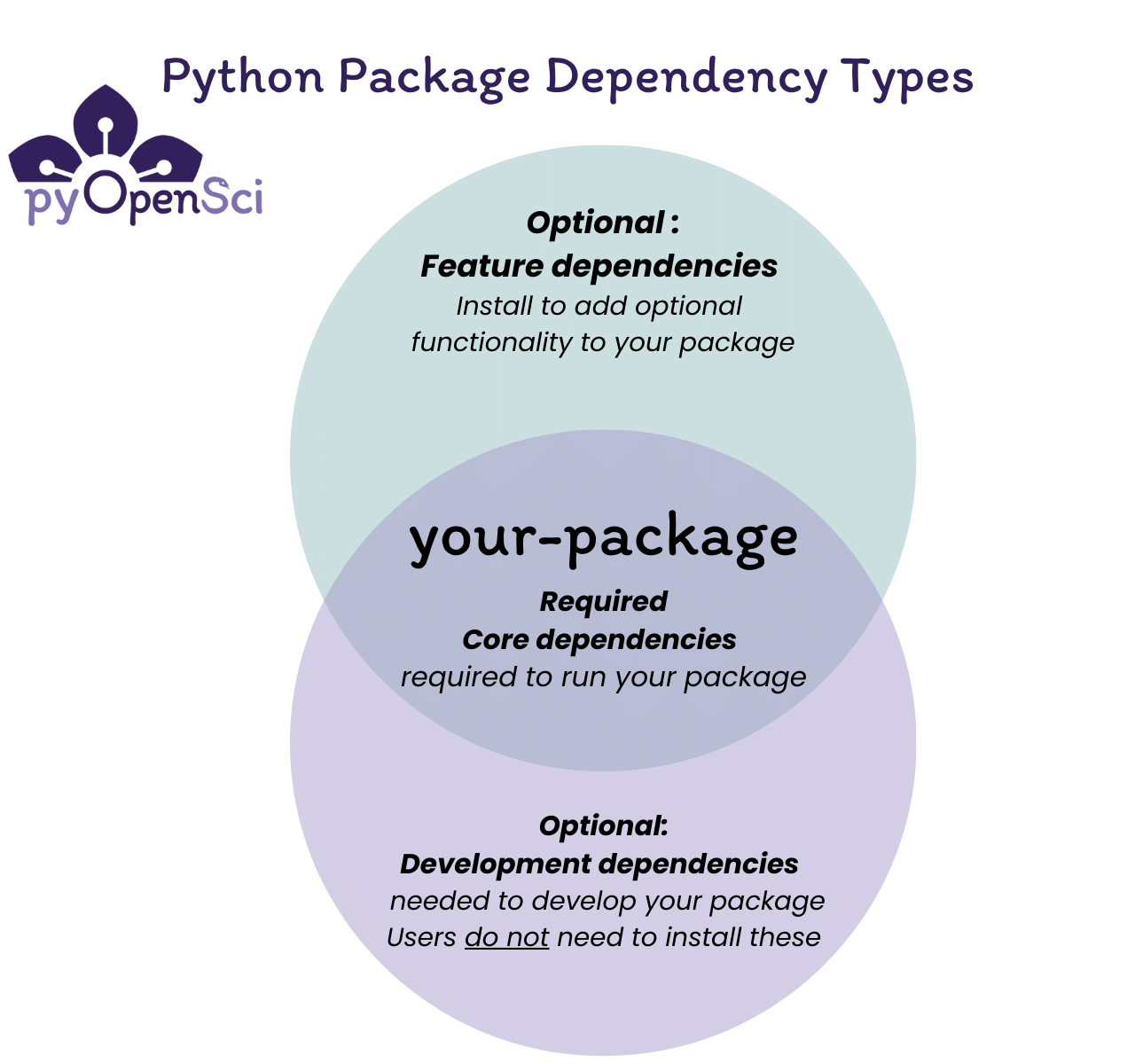
For this application, the practical rule is:
- Put production requirements in
[project].dependencies. - Put engineering tools in
[dependency-groups], initially in the conventionaldevgroup. - Do not put test, linting, or type-checking tools in optional extras merely because developers might choose to install them.
Managing dependencies | uv - Astral Docs
Read Astral's uv documentation to see how dependency declarations map to their intended consumers. Its distinction between published requirements and local development tools is the key design decision in this lesson.
In the “Dependency fields” section, begin at “Dependencies of the project are defined in several fields:” and read the three dependency fields. Then, in “Development dependencies,” read from the opening paragraph through the example of the dev group. Focus on the local-only distinction, and note that uv stores development tools in [dependency-groups].
A useful boundary test is to imagine building a minimal production container for the API. It should contain FastAPI and every package FastAPI needs at runtime. It should not need pytest, Ruff, or mypy. Installing those tools in production increases image size, dependency surface, and patching work without delivering API behavior.
Conversely, a CI quality job needs the application’s runtime dependencies and the development group, because tests import and execute application code.
Declaration is not locking
There are two related files, with different jobs:
| File | Purpose | Typical contents |
|---|---|---|
pyproject.toml | Human-maintained declaration of intent | Direct dependencies, supported Python versions, metadata, build settings |
uv.lock | Tool-generated resolved environment | Exact package versions, transitive dependencies, source and artifact information, environment markers |
Suppose pyproject.toml declares FastAPI with a compatibility constraint such as fastapi>=.... FastAPI itself depends on other packages, which depend on still more packages. That complete tree is the transitive dependency graph.
Without a lock file, two clean installations at different times can select different compatible versions. A new release of a transitive package might be valid according to the declared ranges, yet change behavior, introduce a regression, or require a newer Python version than expected. That is the familiar “works on the build agent but not locally” class of failure, now expressed at the package-resolution layer.
Locking resolves the declared graph to a concrete, reviewed answer. Syncing makes an environment match that answer.
This is similar to an infrastructure workflow in which Terraform configuration describes the desired infrastructure while a reviewed plan makes the specific proposed changes inspectable. They are complementary: a lock file does not replace the dependency declaration, and a declaration alone does not freeze a tested dependency selection.
A lock file does not eliminate every source of variability. The Python interpreter version, operating system, CPU architecture, package index availability, environment variables, and external services still matter. It does, however, make the Python package graph an explicit version-controlled input rather than an accidental property of one machine.
Locking and syncing | uv - Astral Docs
Read the uv documentation’s operational view of a lock file: when it is created, when environments are synchronized from it, and how the default development group is treated.
In “Creating the lockfile,” read the explanation of uv lock; then continue into “Syncing the environment.” In the “Syncing development dependencies” subsection, note that the dev group is included by default and can be excluded with --no-dev. Pay particular attention to the update policy: reproducibility depends on upgrades being deliberate rather than occurring silently because a package was released yesterday.
The lock file is therefore a source-controlled artifact. Commit uv.lock; do not add it to .gitignore, and do not hand-edit it. Its size and detailed transitive entries are normal. Review it as generated change output, especially when a direct dependency upgrade causes many indirect packages to change.
Add the first dependencies to the incident API
Keep working from the repository root, the directory containing pyproject.toml. uv is normally installed as a developer or CI tool rather than as a package inside each project environment. First verify that it is available:
uv --version
Your earlier manually created .venv is not a problem. uv uses the project environment at .venv when synchronizing the project. The important change is that uv, rather than ad hoc pip install commands, now becomes the authority for project dependency changes.
Add FastAPI as a runtime dependency:
uv add fastapi
Then add the engineering tools as development dependencies:
uv add --dev pytest ruff mypy
Each command updates the appropriate part of pyproject.toml, updates uv.lock, and synchronizes the project environment. Running uv sync explicitly is still useful when setting up a checkout or restoring an environment:
uv sync
At this point, your pyproject.toml will retain the [build-system] and setuptools package-discovery configuration from the previous lesson. uv does not replace your build backend. It adds a runtime dependencies entry under [project] and creates a development group conceptually shaped like this:
[project]
dependencies = [
    "fastapi",
]

[dependency-groups]
dev = [
    "mypy",
    "pytest",
    "ruff",
]
The actual entries generated by uv will normally include compatible version bounds. Let uv manage those details; the structural separation is what matters.
For this course, FastAPI belongs in runtime dependencies even before you have created the first route. The package will soon become part of the application’s executable behavior. pytest, Ruff, and mypy belong in dev because their consumers are developers and CI quality stages, not callers of the deployed API.
After adding the dependencies, inspect what changed:
git status
git diff -- pyproject.toml uv.lock
You should expect to see:
pyproject.tomlchanged to express the direct dependency intent.- a new
uv.lockfile, which should be added to Git; - local
.venvchanges, which remain ignored; - possibly refreshed package metadata under
src/*.egg-info/, also ignored by the.gitignorecreated previously.
To see the resolved dependency graph in a more readable form than the lock file itself, run:
uv tree
Look for FastAPI and observe that its supporting packages appear beneath it. Those packages are needed at runtime even though you did not name each one directly in pyproject.toml.
Why Python Developers Are Switching to UV
Watch the selected portions of “Why Python Developers Are Switching to UV” by Dave Ebbelaar for a compact demonstration of the exact workflow: add a runtime dependency, place a tool in a development group, and synchronize an environment.
Watch adding dependencies to see how a direct runtime dependency changes a project. Continue with development groups; the video uses the short -D form, equivalent to --dev. Finally watch environment sync and connect syncing to setting up a fresh checkout from the declared project state.
Make CI and production use the lock file
A local uv sync is convenient because it can update a stale lock file after you deliberately edit project dependencies. CI should be stricter. It should fail if someone changed pyproject.toml but forgot to regenerate and commit uv.lock.
For a quality pipeline that needs test and analysis tools, use:
uv sync --locked
uv run --locked ruff format --check .
uv run --locked ruff check .
Once tests exist in the next module, the same locked environment can run them:
uv run --locked pytest
The --locked flag communicates an important policy: do not resolve a new dependency graph during this job. Use the committed lock file, and fail if it no longer matches the dependency declarations.
A production-oriented build should exclude development tools. In a clean, isolated build environment, that installation would use:
uv sync --locked --no-dev
Do not run that command casually in the .venv you use for everyday development: it removes the development group from that environment, and you would need a normal uv sync afterward to restore it. Its natural home is a container build stage or dedicated deployment job.
This gives you a clear operating model:
- Change dependencies through
uv addoruv remove, selecting the correct category. - Let uv regenerate
uv.lock; inspect the diff before committing. - Commit both
pyproject.tomlanduv.lock. - Synchronize developer, CI, and production environments from that lock file.
- Upgrade dependencies intentionally, review the resulting lock-file diff, and run the quality checks before accepting it.
Avoid maintaining a separate manually produced pip freeze file alongside uv.lock for this project. A freeze captures whatever happened to be installed in one environment; pyproject.toml plus uv.lock captures both declared intent and the controlled resolution that uv can reproduce.
Key takeaways
You now have a dependency model suitable for a professional Python service:
[project].dependenciescontains packages the deployed API needs, beginning with FastAPI.[dependency-groups].devcontains local and CI engineering tools such as pytest, Ruff, and mypy.- Build requirements, runtime dependencies, development dependencies, and optional feature extras serve different consumers and should not be conflated.
pyproject.tomlstates the dependency policy;uv.lockrecords the exact resolved graph selected for that policy.- Commit
uv.lock, sync from it, and use--lockedin CI to detect an uncommitted or stale resolution. - Use
--no-devfor minimal production-oriented installations, not for normal development work.
Next, you will begin making the incident domain explicit in code by applying precise type annotations to functions, collections, and optional values.
Can't find a good explanation? Sign up and we'll make it for you
Sign up