
Hello! Welcome to the first lesson in our module on Paid Acquisition.
In the previous module, you successfully built and instrumented a high-converting landing page. Crucially, you learned how to set up Google Analytics 4 to track conversions (form submissions), which gives you the ability to measure what works. Now that you have a destination that can turn visitors into leads and a system to measure its success, it's time to generate targeted traffic.
This lesson marks our shift from building assets to actively distributing them. We'll start with the foundation of any successful Google Ads strategy: keyword research. Your learning outcome for today is to conduct keyword research for a Google Ads campaign, identifying high-intent commercial keywords and negative keywords.
Mastering this skill is vital for a SaaS founder. It's the difference between spending your marketing budget to attract potential customers who are ready to buy, and wasting it on clicks from users who will never convert. We'll focus on the tactical "how-to" while grounding our actions in a solid strategic framework tailored for SaaS businesses.
Part 1: The Foundation: Understanding Search Intent
Before we even open a tool, we must understand the single most important concept in search marketing: intent. The intent is the why behind a user's search query. For your SaaS, you want to find users whose intent is to solve a problem that your product addresses, or even better, to purchase a solution like yours.
We can categorize search intent into four main types.
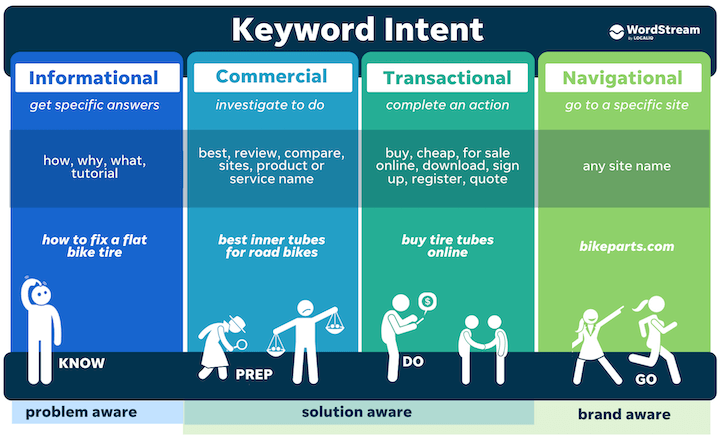
Let's break these down in a SaaS context:
- Informational: The user is looking for information. Example: "what is project management software". These are Top-of-Funnel (TOFU) and generally have low conversion potential.
- Navigational: The user wants to go to a specific website. Example: "asana login". These users are not your target unless the brand is a direct competitor.
- Commercial: The user is investigating and comparing solutions. Example: "best project management tool for small teams". This is a high-value target. They are solution-aware and in the Middle-of-Funnel (MOFU).
- Transactional: The user is ready to buy or sign up. Example: "asana pricing" or "clickup alternative". These are your highest-intent, Bottom-of-Funnel (BOFU) keywords.
Your goal as a startup with a limited budget is to focus your initial efforts squarely on commercial and transactional keywords. These are what we call "high-intent" keywords.
Part 2: How to Identify High-Intent Keywords for a SaaS
Now, let's get practical. High-intent keywords for a SaaS product typically fall into three buckets. As we go through these, think about what they would be for your own SaaS idea.
1. Solution-Focused Keywords
These are searches that describe the solution you provide or the problem you solve. They show the user is actively looking for a tool.
- Structure:
[feature] software,[industry] tool,[job-to-be-done] app - Examples:
email marketing automation softwarecrm for real estate agentshow to schedule social media posts
2. Competitor-Focused Keywords
This is one of the most powerful strategies for a new SaaS. You target users who are already familiar with a competitor but may be unhappy or looking for alternatives. However, there's a right way and a wrong way to do this.
How to Run Profitable Google Ads Competitor Campaigns
This guide from SaaS Hero, 'How to Run Profitable Google Ads Competitor Campaigns', explains the critical difference between wasteful and effective competitor targeting. Pay close attention to the keyword examples.
Read the sections 'Why Most SaaS Companies Fail at Competitor Campaigns' and 'The Right Way to Target Competitor Keywords'. Focus on the 'Broad Keyword Trap' and the list of 'High-Intent Competitor Keywords' that signal a user is shopping around.
As the guide highlights, you must avoid the "Broad Keyword Trap" of bidding on just a competitor's name (e.g., "Slack"). Most of those searchers are existing customers trying to log in.
Instead, you target intent-driven variations:
- Comparison-Seeking:
[competitor] alternative,[competitor] vs [your brand] - Pricing-Related:
[competitor] pricing,how much does [competitor] cost - Problem-Focused:
[competitor] issues,[competitor] too expensive - Review-Focused:
[competitor] reviews
These searches are clear signals that the user is actively evaluating their options.
3. Brand Keywords
This is simply your own company or product name (e.g., "SummarizeMe AI"). While you won't have search volume for this initially, running a small campaign on your own brand name is a cheap way to ensure you capture anyone specifically looking for you once you start gaining traction.
Part 3: Using Google Keyword Planner for Research
With a clear understanding of the types of keywords we're looking for, we can now use Google's own free tool to find them and gather data.
The following video provides a concise and current walkthrough of the Google Keyword Planner interface.
How to do Google Ads Keyword Research in 2025
This video from Define Digital Academy will guide you through the practical steps of using the Keyword Planner to discover keywords and analyze their potential.
Watch from 04:33 to 09:36. Your goal is to understand the workflow: Start with initial 'seed keywords' (use the high-intent patterns we just discussed). Use the 'Discover new keywords' feature with both keywords and your landing page URL. Interpret the key columns: Average monthly searches, Competition, and Top of page bid (low and high range).
Your Workflow in Keyword Planner:
- Go to Tools & Settings > Planning > Keyword Planner.
- Select "Discover new keywords".
- Enter 5-10 "seed keywords" based on the high-intent patterns from Part 2. Include a few solution, competitor, and problem-focused ideas. Also, enter your landing page URL to get suggestions.
- Analyze the results:
- Avg. monthly searches: Gives you a sense of demand. Don't be afraid of low-volume (10-100 searches/month) keywords if the intent is extremely specific and relevant.
- Competition: "Low," "Medium," or "High." This refers to the number of advertisers bidding on the keyword, not its difficulty for SEO. High competition often means high commercial intent.
- Top of page bid (low and high range): This is Google's estimate of what you'll need to bid per click (CPC) to appear at the top of the search results. This is crucial for budget forecasting.
As you find relevant keywords, build a list in a spreadsheet, categorizing them by theme (e.g., Competitor A, Competitor B, Solution X). This will form the basis of your campaign structure in the next lesson.
Part 4: Preventing Wasted Spend with Negative Keywords
Finding the right keywords is only half the job. Just as important is proactively telling Google which searches you don't want to appear for. This is done with negative keywords.
Ignoring negatives is one of the fastest ways to burn your budget. As the "Google Ads for SaaS" guide notes, it's not uncommon to see 30-40% of ad spend wasted on irrelevant searches.
Finding Negative Keywords
You find negative keywords in two ways:
- Proactively: Before you launch, brainstorm terms that indicate a user is not a potential customer. Common examples for SaaS include:
free,jobs,career,hiring,guide,tutorial,what is,example,template
- Reactively: After your campaign is live, you must regularly review the Search Terms Report. This report shows you the exact queries people searched for that triggered your ads. If you see an irrelevant query, you add it to your negative keyword list. This is a non-negotiable, continuous optimization task.
Negative Keyword Match Types
Just like with keywords you bid on, negative keywords have match types that determine how they work. Given your CS background, you'll appreciate the logical precision here.
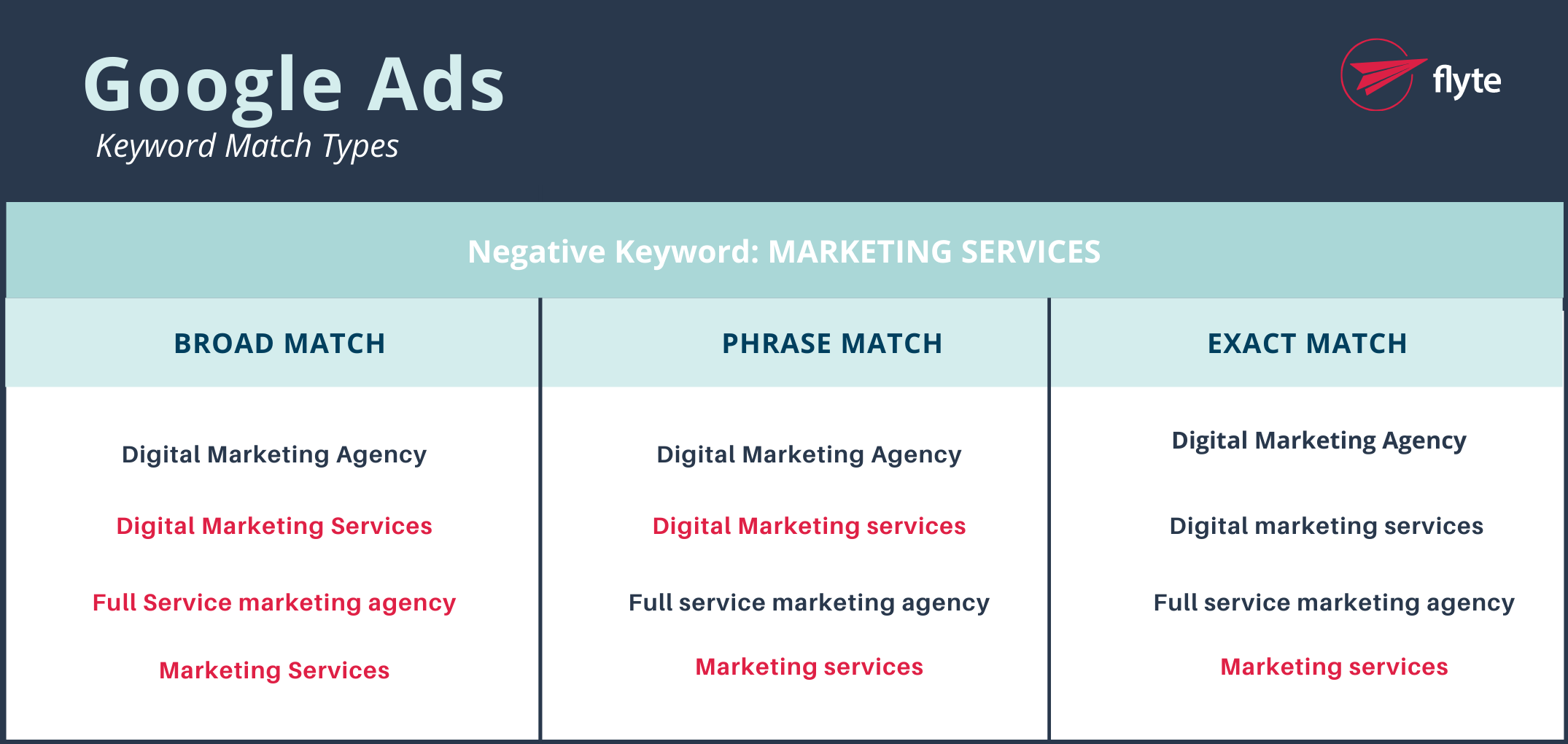
- Negative Broad Match (
keyword): Blocks searches containing all your negative keyword terms, in any order. Usingfree trialas a negative would blockfree trial softwareandsoftware trial free. - Negative Phrase Match (
"keyword"): Blocks searches containing your exact keyword phrase in that order. Using"marketing services"as a negative would blocklocal marketing servicesbut NOTmarketing and design services. - Negative Exact Match (
[keyword]): Blocks searches for your exact keyword phrase only. Using[marketing services]as a negative blocksmarketing servicesbut NOTlocal marketing services.
A classic SaaS example: When bidding on competitor keywords like "Asana alternative", you should add [Asana] as a negative exact match. This prevents your ad from showing to someone who just searches for "Asana," who is most likely an existing user trying to log in.
Test your understanding!
Your SaaS is an AI-powered meeting summarizer called 'MinuteMind'. You're bidding on the phrase match keyword "ai meeting assistant".
- A user searches for "fireflies.ai pricing". Fireflies.ai is a major competitor. Is this a high-intent keyword? What category does it fall into?
- The Search Terms Report shows you got clicks from the query "free ai meeting assistant for students". Your tool is a paid B2B product. What two negative keywords should you add to prevent this in the future?
- Would adding
"free"(Negative Phrase Match) be the best way to block that query? Why or why not?
Show answer
- Yes, "fireflies.ai pricing" is a very high-intent keyword. It falls into the Competitor-Focused (Pricing-Related) category. The user is evaluating cost, a strong bottom-of-funnel signal.
- You should add
freeandstudentsas negative broad match keywords. This will prevent your ads from showing on any future searches that include these terms. - No, using
"free"would not be the best approach. Negative Phrase Match is too restrictive. It would block "get a free demo" but not "free software". Usingfreeas a broad match negative is more effective because it blocks any search query containing the word "free," regardless of the order or other words in the query.
Conclusion
You now have the foundational framework for finding profitable keywords and avoiding wasteful ones. This strategic approach is far more valuable than simply plugging words into a tool.
Key Takeaways:
- Always start with intent. Focus your budget on Commercial and Transactional keywords where users are actively looking to buy.
- High-intent SaaS keywords cluster around specific solutions, competitor alternatives, and pricing/problem-focused queries.
- Use Google Keyword Planner to find keyword ideas and gather data on volume and cost, but use your strategic framework to select the right ones.
- A robust negative keyword list is your primary defense against wasted ad spend. Build it proactively and update it constantly by reviewing your Search Terms Report.
Preview of the Next Lesson:
You've researched what you want to target. In the next lesson, we will cover how to structure and launch a Google Search campaign with tightly-themed ad groups and compelling ad copy. You'll learn how to organize your keywords into a logical campaign structure that allows you to write highly relevant ads, which is the key to a high Quality Score and lower ad costs.