
Hello! Welcome to the fourth lesson in our "Digital DJ Toolkit" module.
In our last session, we focused on the crucial process of verifying and correcting beat grids in Rekordbox. You learned that a precise beat grid is the foundational data structure for many modern DJ features. Think of it as ensuring your data is clean and accurate before running any algorithms on it.
Today, we'll explore one of the most significant features that relies on that clean data. The learning outcome is to use the 'Sync' button to automatically beatmatch two tracks and discuss the pros and cons of its use in a DnB set. The Sync button is one of the most debated features in the DJ world. We'll treat it as what it is: a tool. We'll learn how it works, how to use it, and then critically evaluate when it's the right tool for the job.
1. What is Sync and How Does It Work?
At its core, the Sync function automates the manual process of beatmatching. Where you would use the pitch fader to match the tempo (BPM) and the jog wheel to align the phase (the beats), Sync does both automatically by referencing the beat grids of the two tracks.
From a technical perspective, you can think of manual beatmatching as a continuous, low-level process of monitoring and adjustment. The Sync button is a high-level abstraction, a single command that executes that process for you: sync(deck_A, deck_B). However, for this command to work, the underlying data—the beat grids you perfected in the last lesson—must be accurate. Garbage in, garbage out.
The mechanism involves two key concepts:
- Master Deck: When you play a track, that deck is typically designated as the 'MASTER'. Its tempo becomes the reference point for the entire system. On a CDJ, you'll see a 'MASTER' button light up.
- Sync Deck: When you press the 'SYNC' button on a second deck, it becomes a "slave" to the master. It automatically adjusts its pitch to match the master's BPM and aligns its beat grid with the master's grid.
Let's look at where these controls are located.
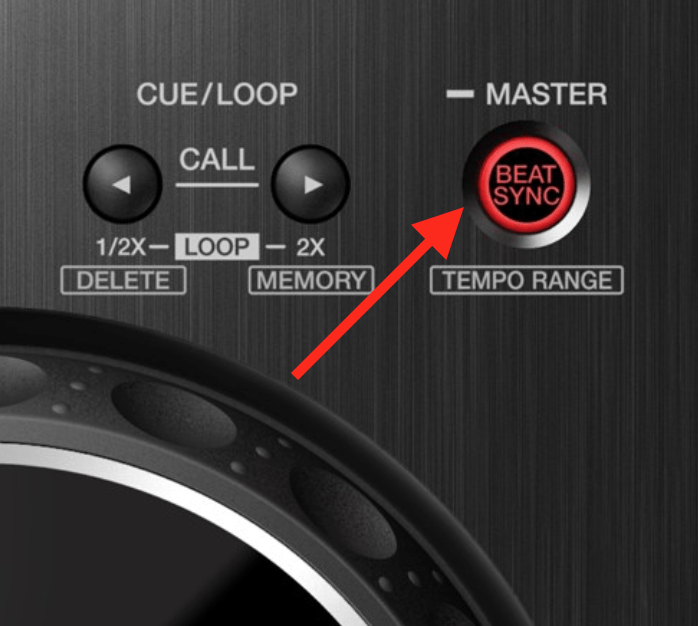

2. Using Sync: A Practical Walkthrough
Let's put this into practice. For this exercise, you'll need two DnB tracks that you have personally verified and locked the beat grids for in Rekordbox.
- Load Tracks: Load your two prepared tracks, one onto each deck.
- Play Track 1: Press play on Deck 1. You should see the 'MASTER' light illuminate on that deck, confirming it's the tempo source.
- Engage Sync on Track 2: Before playing Track 2, press the 'SYNC' button on Deck 2. You will see its BPM value instantly change to match Deck 1. The button will illuminate to show that Sync is active.
- Cue and Verify: Use your headphones to cue up Track 2. Press its Cue button to listen. The beats should be perfectly aligned with Track 1 playing out of the master output. Because the beat grids are also aligned, the phrases should line up if you start Track 2 on its first beat.
- Perform a Transition: When you're ready, press play on Deck 2 and use the channel faders or crossfader to mix it in. The tracks should remain perfectly locked together.
What happens if the grid is wrong?
If Track 2's beat grid was offset, pressing Sync would still match the BPM, but the beats would be misaligned by the same amount as the grid offset. The system does exactly what you tell it to, and if you feed it bad data (an incorrect grid), you get a bad result (an audible trainwreck).
Practice (10 mins):
Spend a few minutes practicing this. Sync several different pairs of tracks from your playlist. Notice how effortless the tempo and phase matching becomes, allowing you to focus entirely on the timing of your transition and the EQ.
3. The Great Debate: Pros and Cons
Now that you know how to use Sync, let's dive into the controversy. Is it a legitimate tool or a shortcut that hinders skill development?
To start, let's read a short article that explains the basics of using sync and touches on why a professional might use it.
The article 'How to Beatmatch' from DJ Tips provides a good, neutral overview of using automatic sync and whether it's used by professionals.
Please read the section 'How To Beatmatch Using Automatic Sync'. Pay attention to the points about checking the master deck and the discussion on professional use.
The article you just read introduces the core arguments. Now, let's explore a more opinionated piece that champions the use of Sync and then dive into the community's reaction.
SYNC - the DJ's big red button
This article from DJWORX, titled 'SYNC - the DJ's big red button', was written when Pioneer first added Sync to their flagship CDJs. The author, a veteran DJ, makes a strong case for why Sync is a positive development. The comment section is a fascinating snapshot of the entire debate.
First, read the main article from the beginning down to the 'To recap' summary. Then, spend about 5-10 minutes skimming the comments section. You don't need to read all of them, but try to get a feel for the different viewpoints expressed by other DJs.
Synthesizing these resources and the wider community discussion, we can summarize the arguments:
Pros of Using Sync (The "Tool" Argument)
- Creative Freedom: This is the biggest argument in favor. By automating the mechanical task of beatmatching, you free up mental and physical bandwidth to focus on more creative aspects:
- Sophisticated EQ work and blending.
- Live remixing with loops and hot cues.
- Applying effects in a more musical way.
- Mixing with 3 or 4 decks simultaneously.
- Better track selection and crowd reading.
- Enables New Techniques: Complex, rapid-fire transitions and layering of multiple tracks become much more manageable.
- Technical Perfection: With accurate grids, Sync can achieve a level of tempo-lock that is difficult to maintain manually, especially over long blends.
- Genre Blending: It simplifies mixing between tracks with very different BPMs, as the adjustment is instantaneous.
Cons of Using Sync (The "Crutch" Argument)
- Skill Atrophy & Dependency: The main argument against. If you rely on it exclusively, you may never develop or maintain the fundamental skill of beatmatching by ear. This leaves you vulnerable if:
- The club's equipment is older and lacks Sync.
- You need to mix with a vinyl DJ.
- The beat grid analysis fails or is incorrect.
- "Off-Grid" Music: Sync is ineffective for tracks that don't have a stable, computer-generated tempo. This includes many classic funk, soul, and early jungle records, or any track with a live drummer. Manual beatmatching is the only way to mix these.
- Lack of "Feel": Many DJs argue that the process of manually locking beats forces a deeper, more intimate connection with the music's groove. They feel this connection is lost with automation.
- The Stigma: While diminishing, there is still a "purist" segment of the DJ community that views using Sync as "cheating" or not "real DJing."
Conclusion
So, should you use the Sync button? As with many tools in a technical field, the answer is: it depends.
You have a background in software engineering, so think of it this way: you could write an entire web application in a low-level language for maximum control, but you often use a framework like React because it automates common tasks and lets you focus on building features. However, you still need to understand the fundamentals of JavaScript, HTML, and the browser's rendering process to debug issues and optimize performance.
The same logic applies here. Your manual beatmatching skills are your fundamentals. Sync is a powerful framework built on top of that.
Key Takeaways:
- The Sync button automates beatmatching by matching the BPM and aligning the beat grids of two tracks.
- It is entirely dependent on accurate beat grids. "Garbage in, garbage out."
- Pros: Frees up mental bandwidth for creativity, enables complex techniques, and ensures technical precision.
- Cons: Can lead to skill dependency, is ineffective for "off-grid" music, and may carry a stigma.
- The most pragmatic approach is to master manual beatmatching as your foundational skill, and view Sync as a powerful tool to be used intentionally and strategically, not as a crutch.
Next Lesson Preview:
Now that we've explored how to prepare your tracks and use Sync, we'll move on to another powerful performance feature that relies on your prepared grids. In the next lesson, we'll learn how to set and trigger 'Hot Cues' on the CDJ-3000 to instantly jump to pre-defined points in a track, opening up a world of creative, non-linear mixing possibilities.
Can't find a good explanation? Sign up and we'll make it for you
Sign up