Introduction
Welcome to the first lesson in our module on memory optimization. In the previous module, you implemented a paged KV cache, a sophisticated technique for managing the dynamic memory consumed by activations during inference. That optimization targeted memory efficiency and throughput. Today, we shift our focus to the model's static memory footprint—the space required just to load the model's weights into VRAM.
Our learning outcome for this lesson is to quantize a small model to INT8 using a library like bitsandbytes and compare its memory footprint and inference latency against the fp16 baseline.
You'll learn the fundamental principles of quantization, explore why the bitsandbytes library is particularly effective for large language models, and then conduct a hands-on experiment to measure the concrete benefits and trade-offs of this powerful optimization technique.
1. What is Quantization and Why Do We Need It?
At its core, quantization in deep learning is the process of reducing the precision of a model's numbers (weights and, sometimes, activations) to save memory and potentially speed up computation. Instead of storing a weight as a 16-bit floating-point number, we could represent it as an 8-bit integer, instantly halving the memory required for that weight.
Let's start with a high-level overview of why this is so critical for LLMs.
Quantizing LLMs - How & Why (8-Bit, 4-Bit, GGUF & More)
This video by Adam Lucek provides an excellent introduction to quantization, demonstrating the dramatic memory savings on a real model from the Hugging Face Hub.
Watch the first 2 minutes and 20 seconds of the video to get a clear sense of the motivation behind quantization and the tangible impact it has on model size.
From Floating-Point to Integers
To understand how quantization works, we first need to appreciate how numbers are represented in memory. As a computer scientist, you're familiar with data types, but a quick review of how floating-point numbers are structured is key to understanding the trade-offs involved.
The most common data types for training and inference are float32 (FP32), bfloat16 (BF16), and float16 (FP16). Quantization maps these values to lower-precision types, most commonly int8.
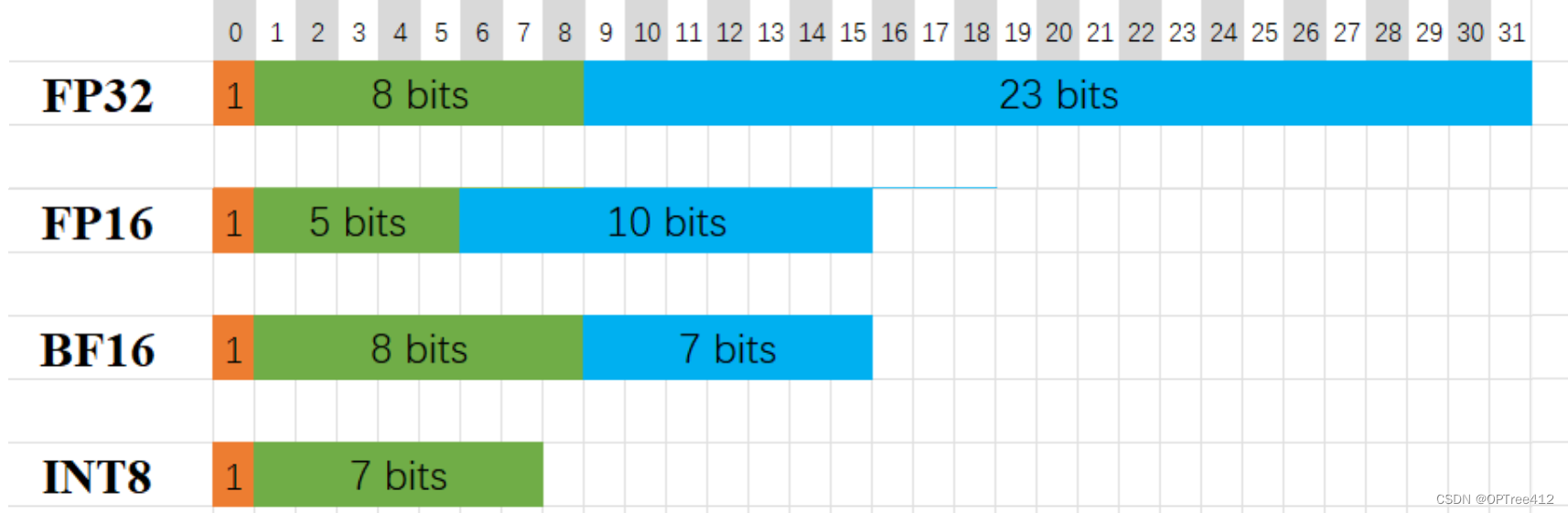
The following resources provide a detailed breakdown of these data types and the mathematical process of mapping a high-precision value to a lower-precision one.
Quantizing LLMs - How & Why (8-Bit, 4-Bit, GGUF & More)
Continuing with the same video, this segment dives into the bit-level representation of floating-point numbers and then explains how the mapping to 8-bit integers is performed.
Watch from 02:20 to 14:48. The first part (until 12:15) covers the structure of FP32 and FP16. The second part explains the mapping process and discusses why this "lossy compression" works for LLMs, where the relative relationships between weights are often more important than their exact values.
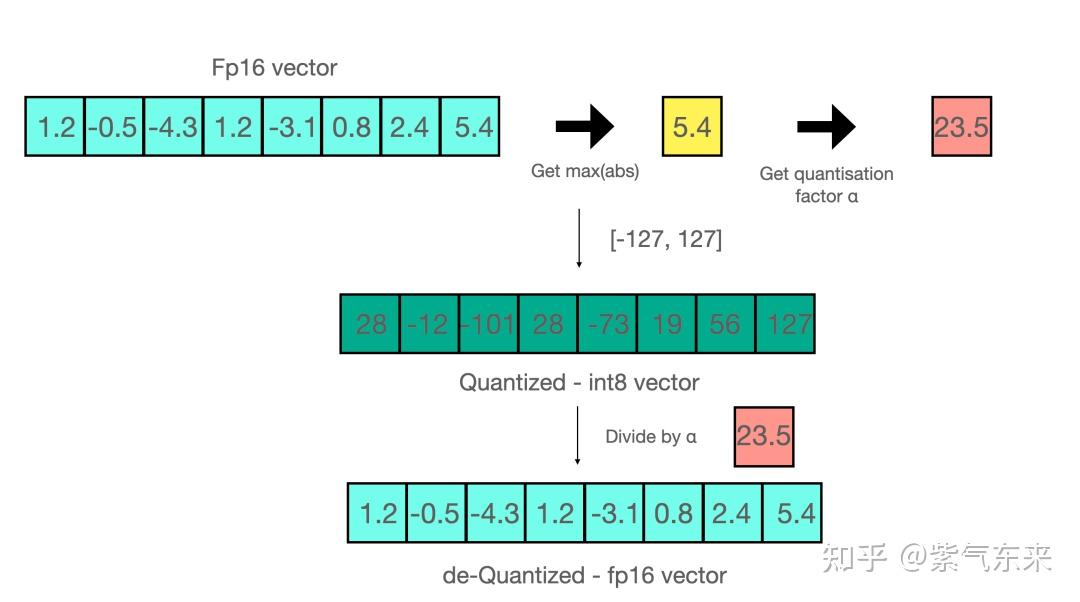
The core idea, as shown in the video and the diagram below, involves a scaling operation. In absmax quantization, you find the maximum absolute value in a tensor, and use that to scale all values into the target integer range (e.g., -127 to 127 for int8).
2. The bitsandbytes Advantage: Handling Outliers with LLM.int8()
While the basic concept of quantization is straightforward, applying it naively to large transformer models (typically >6B parameters) results in significant performance degradation. The reason lies in what researchers have termed "emergent features" or outliers—a small number of weight values with magnitudes far larger than the rest.
These outliers are critical for the model's performance. When you perform simple absmax quantization, these extreme values dominate the scaling factor, forcing the vast majority of "normal" values into a very narrow integer range. This squashing of values leads to a major loss of precision and, consequently, a drop in model accuracy.
The bitsandbytes library implements a clever solution to this problem, detailed in the paper LLM.int8(): 8-bit Matrix Multiplication for Transformers at Scale. Instead of quantizing everything uniformly, it uses a mixed-precision decomposition approach.
For a deeper dive into the algorithm, the original Hugging Face blog post is an excellent resource.
A Gentle Introduction to 8-bit Matrix Multiplication for LLMs
This blog post, co-authored by the creators of bitsandbytes, explains the LLM.int8() algorithm in detail. It's the technical foundation for what makes 8-bit quantization work so well for large models.
Read the section titled "A gentle summary of LLM.int8(): zero degradation matrix multiplication for Large Language Models". Focus on understanding the three-step process: outlier extraction, mixed-precision multiplication, and dequantization.
In summary, the LLM.int8() algorithm works as follows during a matrix multiplication hidden_state * weight:
- Outlier Extraction: It identifies and separates the outlier values in the hidden state.
- Mixed-Precision Multiplication:
- The outlier part of the hidden state is multiplied by the weights in standard
fp16precision. - The non-outlier part of the hidden state is multiplied by the
int8-quantized weights.
- The outlier part of the hidden state is multiplied by the weights in standard
- Dequantization & Combination: The result from the
int8multiplication is dequantized back tofp16and added to the result of thefp16outlier multiplication.
This approach preserves the precision of the critical outlier features while reaping the memory and compute benefits of int8 for the majority of the values.
3. Hands-On: Benchmarking INT8 vs. FP16
Now, let's put theory into practice. We will load a small model, TinyLlama/TinyLlama-1.1B-Chat-v1.0, in its default fp16 precision and then in int8 using bitsandbytes. We will measure and compare the VRAM footprint and inference latency for both.
Below is a complete Python script to run this experiment.
Setup:
Make sure you have the necessary libraries installed:
pip install torch transformers accelerate bitsandbytes
Benchmark Script:
import torch
import time
from transformers import AutoModelForCausalLM, AutoTokenizer, BitsAndBytesConfig

def get_vram_usage_gb():
    """Returns the maximum allocated VRAM in gigabytes."""
    if not torch.cuda.is_available():
        return 0


    # Returns the maximum GPU memory allocated to tensors in bytes
    # Convert bytes to gigabytes
    return torch.cuda.max_memory_allocated() / (1024 ** 3)

def benchmark_model(model_name: str, quantization_config=None):
    """Loads a model and benchmarks its VRAM and latency."""
    print(f"\n--- Benchmarking: {model_name} ---")
    if quantization_config:
        q_type = "INT8" if quantization_config.load_in_8bit else "None"
        print(f"Quantization: {q_type}")
    else:
        print("Quantization: FP16 (default)")


    # Clear CUDA cache before loading the model
    if torch.cuda.is_available():
        torch.cuda.empty_cache()
        torch.cuda.reset_max_memory_allocated()


    # Load model
    t0 = time.perf_counter()
    model = AutoModelForCausalLM.from_pretrained(
        model_name,
        torch_dtype=torch.float16,
        quantization_config=quantization_config,
        device_map="auto" # Automatically places model on available GPU
    )
    load_time = time.perf_counter() - t0
    vram_after_load = get_vram_usage_gb()

    print(f"Model loaded in {load_time:.2f}s")
    print(f"VRAM used after loading: {vram_after_load:.2f} GB")


    # Load tokenizer
    tokenizer = AutoTokenizer.from_pretrained(model_name)


    # Benchmark inference
    prompt = "What is quantization in the context of deep learning?"
    inputs = tokenizer(prompt, return_tensors="pt").to(model.device)


    # Warm-up run
    _ = model.generate(**inputs, max_new_tokens=5)


    # Timed run
    t0 = time.perf_counter()
    num_tokens = 100
    generated_ids = model.generate(**inputs, max_new_tokens=num_tokens)
    inference_time = time.perf_counter() - t0


    # Calculate tokens per second
    tokens_per_second = (num_tokens - 1) / inference_time


    # VRAM usage after generation (includes weights, activations, KV cache)
    vram_after_generation = get_vram_usage_gb()

    print(f"Generated {num_tokens} tokens in {inference_time:.2f}s")
    print(f"Inference speed: {tokens_per_second:.2f} tokens/sec")
    print(f"Peak VRAM during/after generation: {vram_after_generation:.2f} GB")

    return {
        "VRAM (GB)": vram_after_generation,
        "Latency (s)": inference_time,
        "Tokens/sec": tokens_per_second
    }

if __name__ == "__main__":
    if not torch.cuda.is_available():
        print("CUDA not available. This benchmark requires a GPU.")
        exit()

    MODEL_ID = "TinyLlama/TinyLlama-1.1B-Chat-v1.0"


    # 1. Benchmark FP16 (baseline)
    fp16_results = benchmark_model(MODEL_ID)


    # 2. Benchmark INT8
    int8_quantization_config = BitsAndBytesConfig(load_in_8bit=True)
    int8_results = benchmark_model(MODEL_ID, quantization_config=int8_quantization_config)


    # 3. Print comparison
    print("\n--- Comparison Summary ---")
    print(f"{'Metric':<15} | {'FP16':<10} | {'INT8':<10} | {'Change':<10}")
    print("-" * 55)

    vram_fp16 = fp16_results['VRAM (GB)']
    vram_int8 = int8_results['VRAM (GB)']
    vram_change = ((vram_int8 - vram_fp16) / vram_fp16) * 100
    print(f"{'VRAM (GB)':<15} | {vram_fp16:<10.2f} | {vram_int8:<10.2f} | {vram_change:<9.2f}%")

    speed_fp16 = fp16_results['Tokens/sec']
    speed_int8 = int8_results['Tokens/sec']
    speed_change = ((speed_int8 - speed_fp16) / speed_fp16) * 100
    print(f"{'Tokens/sec':<15} | {speed_fp16:<10.2f} | {speed_int8:<10.2f} | {speed_change:<9.2f}%")
4. Analyzing the Results
When you run the script, you should observe the following:
- Memory Footprint: The VRAM usage for the INT8 model will be roughly half that of the FP16 model. TinyLlama-1.1B has ~1.1B parameters. In FP16 (2 bytes/param), this is ~2.2 GB for the weights. In INT8 (1 byte/param), this drops to ~1.1 GB. Your measurements will reflect this, plus overhead for activations and the framework.
- Inference Latency: The change in
tokens/seccan be surprising. You might see a slight speed-up or even a slow-down.- Why a slow-down? The mixed-precision computation in LLM.int8() introduces overhead. For smaller models or on certain older GPU architectures, this overhead can negate or outweigh the benefits of faster 8-bit matrix multiplication.
- Why a speed-up? On larger models and newer GPUs (with better INT8 support), the reduced memory bandwidth pressure and faster compute kernels lead to a net speed increase.
To put your results in context, examine these professional benchmarks.
Building a Budget LLM Inference Box
This article provides benchmarks comparing FP16 and INT8 (labeled as 'BNB W8A16') for a Llama 3.1 8B model. This shows how quantization performs on a larger model and provides a reference for your own findings.
Review the benchmark table under the "Meta AI Llama 3.1 8B Instruct" section. Note the differences in VRAM Used, Speed (toks/sec), and Perplexity between the '3090 FP16' and '3090 INT8' columns.
The benchmark table shows that for an 8B model, bitsandbytes INT8 quantization:
- Reduces VRAM usage (though not by a full 2x due to activations and overhead).
- Significantly increases throughput (
93.8 toks/secvs50.0 toks/sec), demonstrating the speed-up on larger models. - Increases perplexity (
12.25vs11.62), indicating a small but measurable drop in model quality. This is the trade-off.
Conclusion
In this lesson, you have moved from theory to practice, successfully quantizing a model to INT8 and measuring the consequences. This is a fundamental skill for an AI Systems Engineer, directly addressing the challenge of fitting large models into limited hardware.
Key Takeaways:
- Quantization halves weight memory: The primary benefit of INT8 quantization is an approximate 2x reduction in the VRAM required to store model weights.
bitsandbytesintelligently handles outliers: The LLM.int8() algorithm's mixed-precision approach is crucial for preserving the accuracy of large models, which would otherwise be lost with naive quantization.- Performance is a trade-off: Quantization involves a three-way balance between memory, latency, and model quality (accuracy). For INT8, the memory savings are guaranteed, the latency impact depends on model size and hardware, and there is typically a small, often acceptable, degradation in quality.
Preview of the Next Lesson:
We've achieved a 2x reduction in model size with INT8. Can we do better? The next lesson will push this boundary further. You will learn to quantize a model to INT4 using an algorithm like GPTQ, aiming for a 4x reduction in memory footprint and analyzing the even starker trade-offs that come with such aggressive compression.