
Hello. In the previous lesson, you shaped identity-record pipelines with Where-Object, Select-Object, Sort-Object, and Group-Object, while keeping the data as live objects until the final display step.
That is useful for an individual report, but IAM automation becomes maintainable when the same logic is packaged as a reusable command. In this lesson, you will build an advanced PowerShell function that accepts well-defined identity inputs, rejects invalid values before processing, can receive records through the pipeline, and emits structured objects for the next pipeline stage. This is the basic shape of a safe, composable helper function in an IAM script.
A function is a command contract
A function gives a name and a stable interface to logic you expect to use more than once. Instead of copying a long access-validation pipeline into several scripts, you can define one focused command and call it consistently.
A conventional PowerShell function uses a Verb-Noun name:
function Test-IamIdentityRecord {
    # Function body
}
Test is an approved verb and fits this example because the function evaluates and validates a record; it does not make a directory change. The Iam prefix makes the noun more specific, reducing the chance of colliding with a command from another module.
For reusable IAM tooling, start with an advanced function:
function Test-IamIdentityRecord {
    [CmdletBinding()]
    param (
        # Parameters go here
    )

    process {
        # Per-record work goes here
    }
}
The pieces have distinct responsibilities:
| Part | Purpose |
|---|---|
function Test-IamIdentityRecord | Declares the command name. |
[CmdletBinding()] | Makes it behave more like a compiled cmdlet, including common parameters such as -Verbose and -ErrorAction. |
param (...) | Defines the inputs the command accepts. |
process { ... } | Runs once for each pipeline item when pipeline input is used. It is also a clear place to emit one output object per input record. |
At this stage, the important design idea is that a function interface is a contract. Parameter names, types, and validation rules tell both PowerShell and the operator what acceptable input looks like. That is much safer than accepting an unstructured collection of values and discovering a problem halfway through an automation run.
Watch PowerShell Functions from TechThoughts for a visual walkthrough of the function scaffold, advanced-function behavior, and the lifecycle of pipeline input.
Watch function anatomy for the relationship among the function name, CmdletBinding, param, and the optional begin, process, and end blocks. Then watch advanced functions to see what CmdletBinding adds. Finish with pipeline blocks; focus on the fact that process executes once per incoming item, whereas begin and end execute once each.
For this read-only function, [CmdletBinding()] is enough. Do not add SupportsShouldProcess merely by habit: -WhatIf and -Confirm become relevant when a command will change accounts, memberships, or other external state. You will use that capability later for state-changing IAM automation.
Type parameters and validate meaning
A parameter is a variable whose value is supplied when the command is called. Parameter typing constrains the kind of value PowerShell binds:
[string]$UserPrincipalName
[int]$RetryCount
[string[]]$GroupName
[switch]$IncludeDisabled
[string] says the function expects text. [int] expects an integer. [string[]] accepts an array of strings, while [switch] represents a Boolean option whose presence is normally interpreted as true.
Types are useful, but they do not establish whether a value makes sense in your IAM domain. For example, PowerShell can convert 42 into the string "42", but "42" is not a useful user principal name. That is the role of validation attributes.
Here is the parameter portion of an identity-record command:
param (
    [Parameter(Mandatory, ValueFromPipeline, ValueFromPipelineByPropertyName)]
    [ValidateNotNullOrWhiteSpace()]
    [ValidatePattern('^[^@\s]+@[^@\s]+\.[^@\s]+$')]
    [string]$UserPrincipalName,

    [Parameter(Mandatory, ValueFromPipelineByPropertyName)]
    [ValidateSet('Finance', 'HR', 'Sales', 'Engineering')]
    [string]$Department,

    [Parameter(Mandatory, ValueFromPipelineByPropertyName)]
    [ValidateSet('Enabled', 'Suspended', 'Disabled')]
    [string]$AccountState
)
Read each declaration from bottom to top:
$UserPrincipalNameis the parameter variable.[string]requires a string value.- The validation attributes specify further rules.
[Parameter(...)]controls how PowerShell treats the parameter during command binding.
Put validation attributes before the type, as shown. This is the recommended ordering because it avoids surprising behavior during type conversion and validation.
The validation rules above provide different protections:
| Rule | What it protects against | IAM example |
|---|---|---|
Mandatory | Missing required input | A record with no department cannot be routed correctly. |
ValidateNotNullOrWhiteSpace() | Null, empty, or whitespace-only strings | A value such as " " is not an identity. |
ValidateSet(...) | Values outside a finite approved vocabulary | Avoid treating "enable", "Enabled ", and "ACTIVE" as separate states. |
ValidatePattern(...) | Text that does not match a required form | Reject obvious non-UPN values before further processing. |
ValidateSet is especially valuable for controlled attributes, such as lifecycle states, requested environments, or action types. It also gives users tab completion for valid choices.
The pattern used for the UPN is:
'^[^@\s]+@[^@\s]+\.[^@\s]+$'
This is a deliberately modest format check:
^and$require the entire string to match.[^@\s]+requires one or more non-whitespace characters other than@.@requires the separator.\.requires a literal dot in the domain portion.
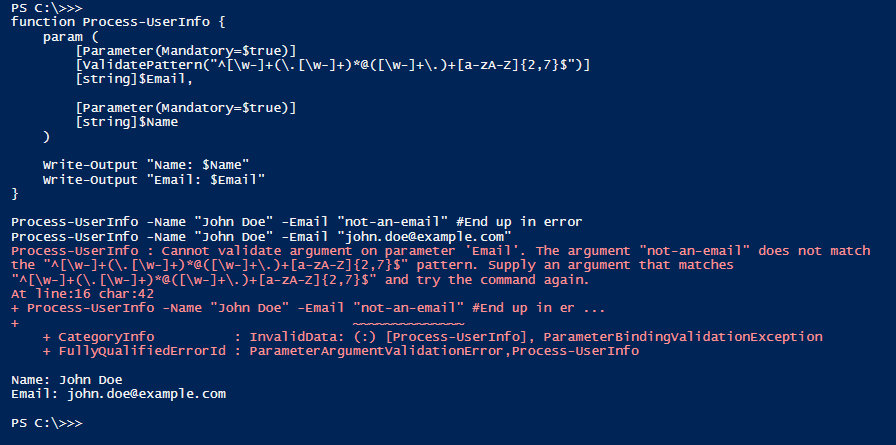
It will reject inputs such as "not-an-email" and "maya chen@contoso.com". It does not prove that the domain exists, that the mailbox exists, or that the account is authorized. Treat it as an early syntax gate, not as a complete identity-verification mechanism.
about_Functions_Advanced_Par...
Read Microsoft Learn’s about Functions Advanced Parameters as the reference for PowerShell parameter binding and validation attributes. It is particularly useful when you need to decide whether a value should be required, constrained to a list, checked against a pattern, or accepted from a pipeline.
In “Parameter declaration,” read the opening explanation to connect param() with parameter attributes. In “Attributes of parameters,” focus on the “Parameter attribute” subsection, especially Mandatory, ValueFromPipeline, and ValueFromPipelineByPropertyName. Then, in “Parameter and variable validation attributes,” read the validation overview, followed by the subsections for ValidatePattern, ValidateRange, and ValidateSet. Pay special attention to ValidateSet behavior: a failed validation prevents the function from being called.
A validation failure occurs during parameter binding, before code inside process runs. That is exactly what you want for input that is unsuitable for the job. An invalid user principal name should not become a partially processed result, a misleading report row, or—later in your automation work—a malformed API request.
Build a pipeline-ready IAM validation function
Now combine the function structure, typed parameters, validation, and structured output.
function Test-IamIdentityRecord {
    [CmdletBinding()]
    [OutputType([pscustomobject])]
    param (
        [Parameter(Mandatory, ValueFromPipeline, ValueFromPipelineByPropertyName)]
        [ValidateNotNullOrWhiteSpace()]
        [ValidatePattern('^[^@\s]+@[^@\s]+\.[^@\s]+$')]
        [string]$UserPrincipalName,

        [Parameter(Mandatory, ValueFromPipelineByPropertyName)]
        [ValidateSet('Finance', 'HR', 'Sales', 'Engineering')]
        [string]$Department,

        [Parameter(Mandatory, ValueFromPipelineByPropertyName)]
        [ValidateSet('Enabled', 'Suspended', 'Disabled')]
        [string]$AccountState
    )

    process {
        $reviewRoute = switch ($AccountState) {
            'Enabled'   { 'ContinuePolicyEvaluation' }
            'Suspended' { 'HoldForReview' }
            'Disabled'  { 'DoNotProvision' }
        }

        [pscustomobject]@{
            UserPrincipalName = $UserPrincipalName
            Department        = $Department
            AccountState      = $AccountState
            IsEnabled         = $AccountState -eq 'Enabled'
            ReviewRoute       = $reviewRoute
        }
    }
}
[OutputType([pscustomobject])] documents the intended output shape for help and tooling. It does not force PowerShell to convert every emitted value into a PSCustomObject; your code does that explicitly with [pscustomobject]@{ ... }.
The process block is the core of pipeline behavior:
- With a single named command call, it runs once.
- With ten incoming records, it runs ten times.
- Each time, it emits one
PSCustomObject.
PowerShell places an unassigned expression, such as the [pscustomobject]@{ ... } expression above, on the success-output stream. That object becomes input for the next command in the pipeline.
The function does not use Format-Table. As in the previous lesson, formatting is for final human display only. This function’s responsibility is to return data that another command can filter, select, sort, export, or use in a later decision.
Call it with named parameters
A named call is explicit and easy to read:
Test-IamIdentityRecord `
    -UserPrincipalName 'maya.chen@contoso.com' `
    -Department 'Finance' `
    -AccountState 'Enabled'
The emitted object has this conceptual shape:
UserPrincipalName : maya.chen@contoso.com
Department        : Finance
AccountState      : Enabled
IsEnabled         : True
ReviewRoute       : ContinuePolicyEvaluation
A malformed UPN is rejected before process can generate an object:
Test-IamIdentityRecord `
    -UserPrincipalName 'maya-at-contoso' `
    -Department 'Finance' `
    -AccountState 'Enabled'
Similarly, a department of 'Legal' is rejected by the current ValidateSet. That is not an assertion that Legal can never be a valid department. It means this particular function has been intentionally configured for a known, limited population. If the authoritative source expands, update the controlled list deliberately rather than silently accepting unexpected values.
Bind objects from the pipeline
The earlier lessons used objects with properties such as UserPrincipalName, Department, and AccountState. This function can accept those records directly because the parameters use ValueFromPipelineByPropertyName.
PowerShell matches incoming property names to parameter names, case-insensitively:
$accessDecisions |
    Test-IamIdentityRecord |
    Sort-Object -Property Department, UserPrincipalName |
    Select-Object -Property `
        UserPrincipalName,
        Department,
        AccountState,
        IsEnabled,
        ReviewRoute
For each incoming object, PowerShell binds:
| Incoming property | Function parameter |
|---|---|
UserPrincipalName | $UserPrincipalName |
Department | $Department |
AccountState | $AccountState |
The output is a new object with a stable report-oriented shape. This is a valuable boundary in a larger script: source objects may have many inconsistent or irrelevant properties, while downstream logic works with the few properties it actually requires.
The UPN parameter also includes ValueFromPipeline. That enables direct pipeline input by type when each pipeline item is a string:
@(
    'maya.chen@contoso.com'
    'li.wong@contoso.com'
) |
    Test-IamIdentityRecord `
        -Department 'Finance' `
        -AccountState 'Enabled'
In this call, each incoming string binds to $UserPrincipalName; the named Department and AccountState values are available for each item. The process block emits two objects, one per UPN.
The distinction matters:
- By value binding uses the incoming item’s type. Here, a string binds to a
[string]UPN parameter. - By property name binding uses property names on an incoming object. Here, an object property named
Departmentbinds to$Department.
When you build a function intended to accept objects from a report, CSV import, or directory command, property-name binding is usually the clearer interface. Stable property names make composition predictable.
You can inspect the result without formatting it:
$validatedRecords = $accessDecisions |
    Test-IamIdentityRecord

$validatedRecords |
    Get-Member

$validatedRecords |
    Where-Object {
        $_.ReviewRoute -eq 'HoldForReview'
    } |
    Select-Object -Property UserPrincipalName, Department, ReviewRoute
This continues the object-first discipline from the prior lesson. Get-Member verifies that the output has properties such as IsEnabled and ReviewRoute; Where-Object can then make a decision from those properties.
Design rules worth carrying forward
A function for identity work should make invalid and ambiguous input hard to pass accidentally. A practical design sequence is:
- Choose one focused responsibility. This example validates and classifies a supplied identity record; it does not query a directory or grant access.
- Use conventional, descriptive parameter names. A property called
UserPrincipalNamecan flow naturally between your source objects and the function. - Type parameters deliberately. Use
[string],[int],[datetime], arrays, and switches to express the expected data shape. - Validate at the command boundary. Use
Mandatoryfor essential values,ValidateSetfor controlled values, and patterns or scripts for meaningful structural rules. - Use
processfor one-record-at-a-time pipeline work. Avoid collecting pipeline input unnecessarily when each record can be handled independently. - Emit objects, not presentation text. A function should generally return data that the caller can continue to process.
- Reserve side effects for clearly named commands. A future command that changes group membership should have a name and safeguards appropriate to that risk.
Key takeaways
- A PowerShell function packages reusable logic behind a command-style interface;
[CmdletBinding()]turns it into an advanced function with common parameters such as-Verbose. - Typed parameters define expected data shape, but validation attributes define whether values are acceptable for the task.
Mandatory,ValidateNotNullOrWhiteSpace,ValidateSet, andValidatePatternreject unsuitable input during parameter binding, before the function body runs.ValueFromPipelineaccepts pipeline items by type;ValueFromPipelineByPropertyNamebinds object properties whose names match function parameters.- A
processblock runs once per pipeline item and should emit structured objects when the function is intended to compose with later pipeline commands. - Keep formatting out of reusable functions so downstream commands retain access to real object properties.
This completes the PowerShell foundations module. Next, you will apply these function and pipeline habits to structured identity data: importing CSV records, checking required columns and values, and producing consistently shaped objects for reliable IAM automation.
Can't find a good explanation? Sign up and we'll make it for you
Sign up