
Hello! Welcome to the final lesson in our module on Web Application Analysis.
In our last session, we dove into Cross-Site Request Forgery (CSRF), an attack that tricks a user's browser into submitting a malicious request. You learned how to spot missing or weak anti-CSRF tokens and how to navigate the complexities of modern defenses like the SameSite cookie attribute.
Today, we're exploring another vulnerability that deceives the user, but through a different mechanism: Clickjacking. Instead of forging a request behind the scenes, clickjacking manipulates what the user sees, hijacking their legitimate clicks to perform unintended actions. This is a classic client-side attack, and understanding how to demonstrate its impact is a crucial skill for any bug bounty hunter.
Your learning outcome for this lesson is to identify and demonstrate the impact of clickjacking vulnerabilities.
1. What is Clickjacking?
Clickjacking is a type of UI Redress Attack. The attacker loads a legitimate, target website inside a transparent <iframe> on their own malicious page. They then create a deceptive user interface on top of the invisible iframe, tricking the user into clicking on elements of the hidden page.
For this to work, the victim must be authenticated on the target website. Because the click happens on the legitimate page within the iframe, the browser will automatically send the victim's session cookies, making the action valid.
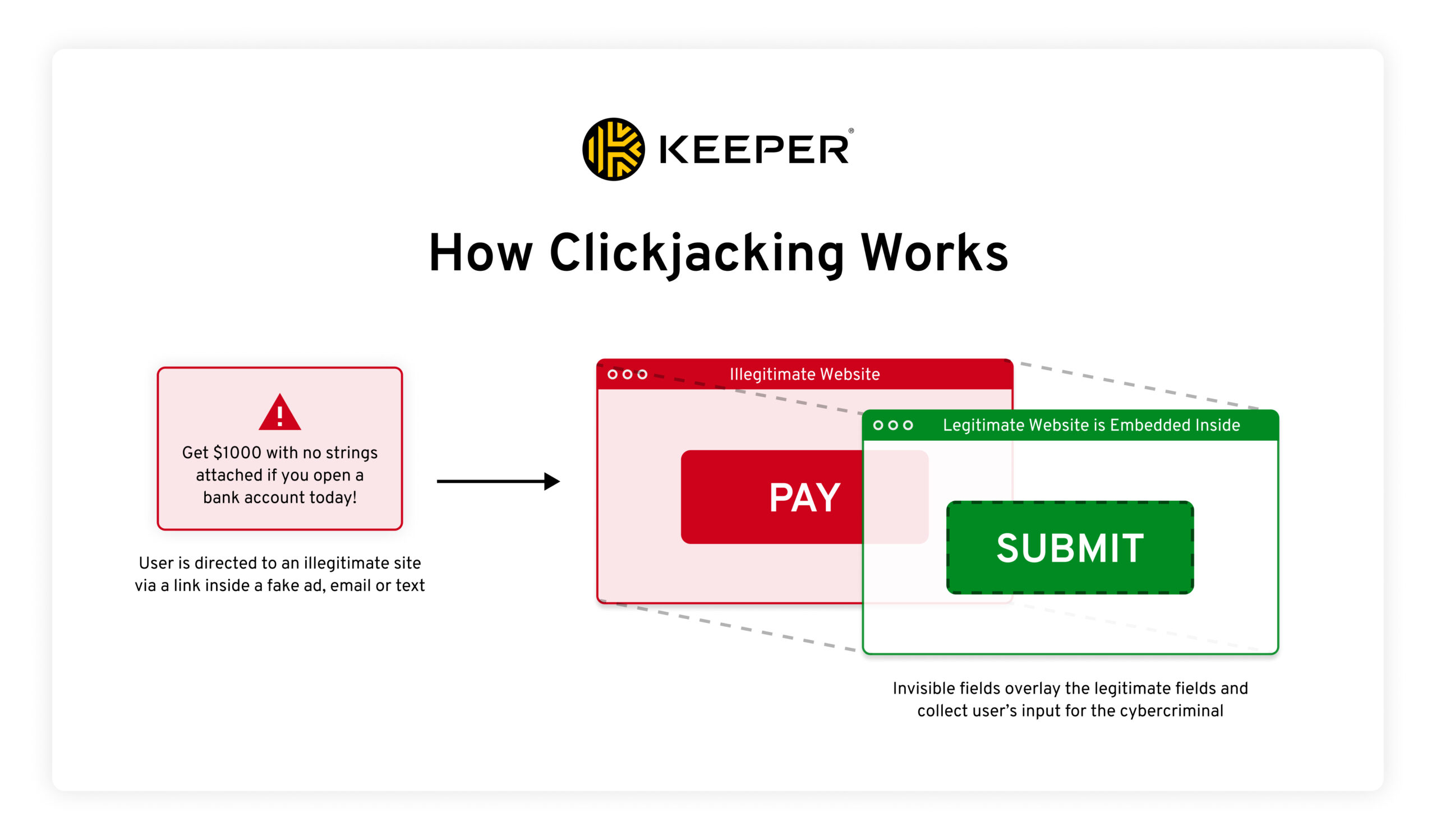
The first step in testing for clickjacking is to see if a target page can be loaded in an iframe at all.
The OWASP Web Security Testing Guide provides a concise definition of clickjacking and a simple method to test for it. This is your starting point for identifying a potentially vulnerable page.
Read the 'Summary' and 'How to Test' sections. Focus on understanding: The definition of clickjacking as a UI redressing technique. The basic test: creating an HTML page with an <iframe> that points to the target URL. If the page loads inside the frame, it is likely vulnerable.
If a page loads in the iframe, you've identified a potential vulnerability. However, just showing that a page can be framed is often considered low-impact. The next step, and the most important one for a bug bounty report, is to demonstrate how this can be exploited to cause harm.
2. Crafting a Clickjacking Proof of Concept
A strong clickjacking PoC tricks the user into performing a sensitive action, such as deleting their account, changing their email, or transferring funds. This is achieved by carefully layering and styling HTML elements using CSS.
The following video provides a perfect, step-by-step walkthrough of creating a clickjacking exploit that tricks a user into deleting their account.
The 'What is Clickjacking?' video from Intigriti demonstrates the classic attack from start to finish. It clearly explains the role of iframes and CSS in building the exploit.
Watch the entire video (about 6 minutes). Pay close attention to the code and the visual result at each stage: Framing the Target (00:00 - 02:13): The target page (with the 'Delete account' button) is loaded into an <iframe>. Applying CSS (02:13 - 03:12): CSS is used to make the iframe invisible by setting its opacity to a very low value. The z-index property is introduced, which controls the stacking order of elements. Creating the Decoy (03:12 - 04:57): A <div> element with the text 'Click me' is created. Using CSS position, top, left, and z-index, this decoy element is precisely positioned over the invisible 'Delete account' button. The Final Exploit (04:57 - 05:38): The victim sees only the 'Click me' button, but their click passes through to the underlying iframe, triggering the delete action.
This technique is the foundation of most clickjacking attacks. Your ability to manipulate CSS to create a convincing and pixel-perfect overlay is key to demonstrating a high-impact vulnerability.
3. Defenses and Advanced Bypasses
Modern applications use server-side headers to prevent framing. As a tester, you need to recognize these defenses and know how to look for implementation flaws.
The two primary defenses are:
X-Frame-OptionsHeader: An older header that can be set toDENY(no framing),SAMEORIGIN(allow framing only from the same site), orALLOW-FROM uri(allow from a specific URI, but with poor browser support).Content-Security-Policy: frame-ancestorsDirective: The modern, more flexible standard. It can specify multiple domains that are allowed to frame the page (e.g.,frame-ancestors 'self' partner.com;) or be set to'none'to block all framing.
However, a common mistake is inconsistent application of these headers. A site might protect its login page but forget to protect an internal settings page. This is where you, as a bug bounty hunter, can find an entry point.
Even when a frame-ancestors policy is present, it can sometimes be bypassed.
BUG BOUNTY TUTORIAL: BYPASSING CLICKJACKING PROTECTION | 2023
Let's watch a practical demonstration from the 'BePractical' channel. This video shows a bug bounty hunter's approach to bypassing a Content Security Policy.
Watch from 01:21 to 10:06. The key takeaway is the bypass technique: Analyze the Policy (03:55): The tester identifies a Content-Security-Policy header with a frame-ancestors directive that whitelists a third-party domain (testphp.vulnweb.com). Find a Flaw in the Whitelisted Domain (06:00): The tester discovers that the whitelisted domain has an HTML injection (or XSS) vulnerability. Chain the Vulnerabilities (07:15): The tester uses the HTML injection on the whitelisted domain to load the <iframe>. Because the iframe is now being loaded from an allowed ancestor, the CSP is bypassed, and the clickjacking attack becomes possible.
This is a great example of the mindset you need: defenses are just another part of the attack surface to be analyzed for weaknesses.
Test your understanding!
You are testing example.com. The "Change Password" page at example.com/settings/password is protected with Content-Security-Policy: frame-ancestors 'self'. However, you find that a marketing page at example.com/promo/new-product has no framing protections at all.
How might you still be able to perform a clickjacking attack against the "Change Password" page?
Show answer
You can create an attack page that frames the unprotected marketing page (/promo/new-product). Inside that iframe, you can use JavaScript to change the iframe's location to the protected "Change Password" page (/settings/password). Because the navigation occurs within a frame that originated from the same origin ('self'), the frame-ancestors policy may be satisfied, allowing you to display the protected page and carry out the clickjacking attack.
4. Beyond a Single Click: Multi-Step Clickjacking
The most sophisticated clickjacking attacks go beyond a single click. They can guide a user through a multi-step process, like filling out a form and clicking a confirmation button, all while the user thinks they are playing a simple game or filling out a survey. This turns a "low" severity finding into a critical one.
Beyond Clickjacking: How Small Bugs Become Critical ...
The article 'Beyond Clickjacking' from Software Secured details how these advanced, multi-step attacks work and presents a real-world case study of chaining vulnerabilities for account takeover.
Read the sections 'What is multi-step Clickjacking?', 'How Multi-Step Clickjacking Works', and 'Real-World Attack Scenarios (Account Takeover)'. Focus on these advanced concepts: The Core Idea: Chaining together a series of clicks to navigate complex workflows. The Timing Problem: How does the attacker know when the user has clicked to advance to the next step? The solution is clever: detecting the onmouseover event instead of the click itself. The Attack Chain: Understand how the researchers combined three distinct issues (an unprotected internal page, a redirection flaw, and a self-XSS) to create a multi-step clickjacking attack that led to full account takeover.
This multi-step attack is a perfect example of how combining several lower-impact findings can lead to a critical vulnerability. This is the kind of creative thinking that separates top-tier bug bounty hunters from the rest.
Conclusion
In this lesson, you've learned to look beyond the surface of a user interface. Clickjacking demonstrates that what the user sees isn't always what they get. You now have the skills to not only identify this vulnerability but, more importantly, to demonstrate its true impact.
Key Takeaways:
- Clickjacking is UI Redressing: It works by loading a target site in a transparent
<iframe>and tricking a user into interacting with it via a decoy UI. - Impact is Everything: A good report demonstrates a sensitive action being performed (e.g., account deletion, settings change). A simple "page can be framed" report is weak.
- Defenses Can Be Bypassed: Always check for inconsistent application of
X-Frame-OptionsandCSP: frame-ancestors. Look for flaws in whitelisted domains that allow you to bypass the policy. - Think in Chains: The most critical attacks, like multi-step clickjacking, often involve chaining multiple vulnerabilities together to escalate a minor issue into a severe one.
Next Lesson Preview:
This lesson concludes our module on web application analysis and client-side attacks. We've covered mapping applications, breaking authentication, and exploiting flaws like XSS, CSRF, and Clickjacking. In the next module, we will shift our focus to the server itself, beginning with a powerful class of vulnerabilities: Server-Side Injection and File Inclusion Attacks. You will learn how to inject commands directly into the server's operating system and how to read sensitive files from the server's file system.