Introduction
In our last lesson, you built a PagedKVCacheAllocator from the ground up, creating the "memory operating system" for a high-throughput LLM inference engine. You implemented the core data structures and the logic for allocating, freeing, and appending memory blocks on demand.
Today, we put that system to the test. Our goal is to integrate the paged KV cache into an inference loop and benchmark the reduction in memory waste under a simulated concurrent workload. This lesson is all about empirical validation. You will write a simulation to directly compare your paged allocator against a naive, contiguous allocation strategy. By the end, you won't just conceptually understand the benefits of paged memory—you will have the data to prove it.
The Problem with Naive Allocation
Before we benchmark our paged allocator, we need a baseline for comparison: the naive, contiguous KV cache. In this model, for every incoming request, the system pre-allocates a single, contiguous block of memory large enough to hold the entire potential output sequence (i.e., up to max_sequence_length).
While simple to implement, this approach is incredibly wasteful. Let's get a precise understanding of this waste.
Fast LLM Serving with vLLM and PagedAttention
The team behind vLLM at Anyscale provides a concise explanation of the three major sources of memory inefficiency in traditional KV cache systems. This will form the basis of our benchmark.
Watch the segment from 04:41 to 06:02. The speaker details the concepts of internal fragmentation, reservation, and external fragmentation. As you watch, think about how each of these problems would manifest in a busy inference server handling many requests of different lengths.
As the video explains, the key issues are:
- Internal Fragmentation: Memory is wasted within an allocated block because the generated sequence is shorter than the reserved space.
- Reservation: Memory allocated for a sequence's future tokens sits idle, unusable by other requests.
- External Fragmentation: When concurrent requests with varying lifetimes complete, they leave holes of free memory that are too small for new requests, even if the total free memory is sufficient.
This is the problem our paged allocator is designed to solve.
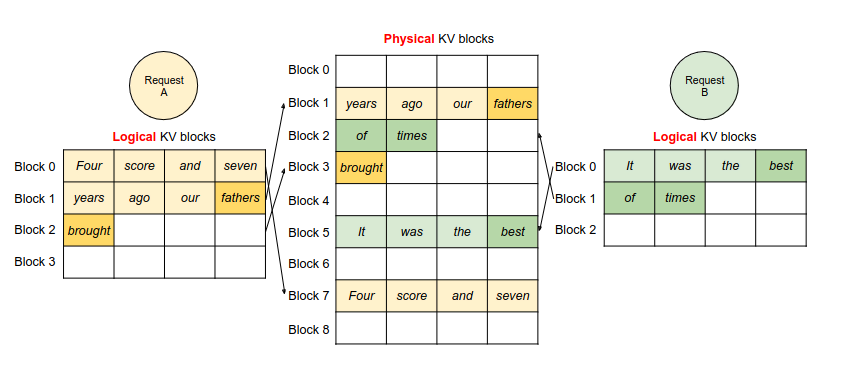
Simulating a Concurrent Workload
To demonstrate the superiority of paged allocation, we need to create a scenario where a naive allocator would struggle. A single request won't do; we need a simulated concurrent workload where multiple requests with different prompt lengths and generation lengths arrive and are processed over time.
We'll build a small simulation engine in Python. This engine will manage a queue of requests and process them step-by-step, interacting with an allocator to manage memory.
1. The Allocator Interface
First, let's define a common interface for our allocators. This will allow us to plug either the naive or the paged allocator into our simulation engine without changing the engine's code.
import torch
from collections import deque
from dataclasses import dataclass, field
from typing import List, Deque, Dict, Any


# Assuming these are defined from the previous lesson
@dataclass
class Block:
    block_id: int
    ref_count: int = 0

@dataclass
class BlockTable:
    block_ids: List[int] = field(default_factory=list)

    def append_block(self, block_id: int):
        self.block_ids.append(block_id)


# --- Allocator Implementations ---

class ContiguousKVCacheAllocator:
    """A naive allocator that reserves a contiguous block for the max sequence length."""
    def __init__(self, num_sequences: int, max_seq_len: int, block_size: int):
        self.max_seq_len = max_seq_len
        self.block_size = block_size
        self.blocks_per_seq = (max_seq_len + block_size - 1) // block_size

        self.total_blocks = num_sequences * self.blocks_per_seq
        self.free_slots = list(range(num_sequences))
        self.sequence_slots: Dict[int, int] = {}
        print(f"Contiguous Allocator: Total blocks = {self.total_blocks}, reserving {self.blocks_per_seq} blocks per sequence.")

    def allocate_for_sequence(self, seq_id: int, num_prompt_tokens: int):
        if not self.free_slots:
            raise RuntimeError("Out of sequence slots.")
        slot_idx = self.free_slots.pop(0)
        self.sequence_slots[seq_id] = slot_idx

    def free_sequence(self, seq_id: int):
        slot_idx = self.sequence_slots.pop(seq_id)
        self.free_slots.append(slot_idx)


    # These methods don't apply but are needed for the interface
    def append_block_to_sequence(self, seq_id: int):
        pass

    def get_num_allocated_blocks(self) -> int:
        return len(self.sequence_slots) * self.blocks_per_seq
Now, you should have your PagedKVCacheAllocator from the previous lesson. Make sure it has a get_num_allocated_blocks method for our benchmark:
# Add this method to your PagedKVCacheAllocator class from the last lesson
class PagedKVCacheAllocator:


    # ... (all the methods from the previous lesson)

    def get_num_allocated_blocks(self) -> int:


        # Number of allocated blocks is total blocks minus free blocks
        return self.num_blocks - len(self.free_blocks)
2. The Simulation Engine
Next, we'll create the engine. It will manage request state and advance the simulation one "decoding step" at a time. The design is inspired by the ContinuousBatchingEngine described in the resources.
vLLM-Style Fast Inference Engine: Building from Scratch on CPU
The following article describes building a vLLM-style engine from scratch. We will model our simulation engine on its ContinuousBatchingEngine class.
Review the code for the ContinuousBatchingEngine class, particularly the process_batch and _update_sequences methods. Notice how it manages pending_requests and running_sequences, and how it interacts with the kv_cache to allocate and deallocate blocks. Our simulation will be a simplified, non-async version of this logic.
Here is our simplified simulation engine:
@dataclass
class RequestState:
    seq_id: int
    prompt_len: int
    output_len: int
    current_len: int

class SimulationEngine:
    def __init__(self, allocator: Any, requests: List[Dict]):
        self.allocator = allocator
        self.block_size = allocator.block_size

        self.pending_requests: Deque[Dict] = deque(requests)
        self.running_sequences: Dict[int, RequestState] = {}
        self.completed_sequences: List[RequestState] = []
        self.step_num = 0

    def step(self):
        self.step_num += 1


        # 1. Try to schedule new requests
        while self.pending_requests:
            try:
                request = self.pending_requests[0]
                self.allocator.allocate_for_sequence(request['seq_id'], request['prompt_len'])


                # If allocation succeeds, move from pending to running
                self.pending_requests.popleft()
                state = RequestState(
                    seq_id=request['seq_id'],
                    prompt_len=request['prompt_len'],
                    output_len=request['output_len'],
                    current_len=request['prompt_len']
                )
                self.running_sequences[state.seq_id] = state
                print(f"Step {self.step_num}: Scheduled seq {state.seq_id}")
            except RuntimeError:


                # Not enough memory, break and wait for next step
                break


        # 2. Process running sequences (simulate one decode step)
        finished_ids = []
        for seq_id, state in self.running_sequences.items():


            # Check if sequence is finished
            if state.current_len >= state.prompt_len + state.output_len:
                finished_ids.append(seq_id)
                continue


            # Check if a new block is needed *before* advancing
            if state.current_len % self.block_size == 0 and state.current_len > state.prompt_len:
                try:
                    self.allocator.append_block_to_sequence(seq_id)
                except RuntimeError:


                    # Can't allocate a new block, this sequence is stalled
                    # In a real system, this might trigger preemption
                    continue


            # Advance token generation
            state.current_len += 1


        # 3. Clean up finished sequences
        for seq_id in finished_ids:
            state = self.running_sequences.pop(seq_id)
            self.allocator.free_sequence(seq_id)
            self.completed_sequences.append(state)
            print(f"Step {self.step_num}: Finished seq {state.seq_id}, freed its memory.")

    def has_pending_work(self) -> bool:
        return bool(self.pending_requests or self.running_sequences)

    def get_stats(self) -> Dict:


        # Calculate memory utilization
        allocated_blocks = self.allocator.get_num_allocated_blocks()

        tokens_in_use = 0
        for state in self.running_sequences.values():
            tokens_in_use += state.current_len

        blocks_in_use = (tokens_in_use + self.block_size - 1) // self.block_size

        if allocated_blocks == 0:
            utilization = 1.0 # Avoid division by zero
        else:


            # We compare blocks used vs. blocks allocated
            utilization = blocks_in_use / allocated_blocks

        return {
            "step": self.step_num,
            "running": len(self.running_sequences),
            "allocated_blocks": allocated_blocks,
            "tokens_in_use": tokens_in_use,
            "utilization": utilization
        }
Running the Benchmark
Now, let's put everything together. We'll define a workload and run it through our simulation engine, once with the contiguous allocator and once with your paged allocator.
The Workload:
We'll simulate a stream of 20 requests with varying prompt and output lengths to mimic a real-world scenario.
# --- Main Benchmark Script ---

def run_benchmark(allocator_class, allocator_args, requests):
    allocator = allocator_class(**allocator_args)
    engine = SimulationEngine(allocator, requests)
    history = []

    while engine.has_pending_work():
        engine.step()
        stats = engine.get_stats()
        history.append(stats)
        if engine.step_num > 500: # Safety break
            print("Simulation timed out!")
            break


    # Final analysis
    total_steps = history[-1]['step']
    avg_utilization = sum(h['utilization'] for h in history) / len(history)
    max_concurrent = max(h['running'] for h in history)

    print("\n--- Benchmark Summary ---")
    print(f"Allocator: {allocator_class.__name__}")
    print(f"Total steps to complete: {total_steps}")
    print(f"Max concurrent requests served: {max_concurrent}")
    print(f"Average memory utilization: {avg_utilization:.2%}")
    print("-------------------------\n")


if __name__ == "__main__":


    # Workload Definition
    WORKLOAD = [
        {'seq_id': i, 'prompt_len': 20 + i*5, 'output_len': 50 - i} for i in range(20)
    ]


    # System Parameters
    BLOCK_SIZE = 16
    MAX_SEQ_LEN = 256


    # Total memory budget: 100 blocks
    NUM_TOTAL_BLOCKS = 100


    # --- Run with Contiguous Allocator ---
    print(">>> Running with ContiguousKVCacheAllocator <<<")
    contiguous_args = {
        'num_sequences': 5, # We can only fit 5 max-length sequences in memory
        'max_seq_len': MAX_SEQ_LEN,
        'block_size': BLOCK_SIZE
    }
    run_benchmark(ContiguousKVCacheAllocator, contiguous_args, WORKLOAD)


    # --- Run with Paged Allocator ---
    print(">>> Running with PagedKVCacheAllocator <<<")


    # Make sure you have the PagedKVCacheAllocator class from the previous lesson defined
    paged_args = {
        'num_blocks': NUM_TOTAL_BLOCKS,
        'block_size': BLOCK_SIZE,
        'num_heads': 1, # Not used in sim, but required by class
        'head_dim': 1,  # Not used in sim, but required by class
        'dtype': torch.float32
    }
    run_benchmark(PagedKVCacheAllocator, paged_args, WORKLOAD)
Analysis of Results
When you run the script, you should see a stark difference.
- Contiguous Allocator: Will likely serve very few requests concurrently (e.g., 5). Its memory utilization will be extremely low, as it reserves a large chunk of memory (
256 / 16 = 16blocks) for every single request, regardless of its actual length. It will take many steps to process the entire workload because it can't batch requests efficiently. - Paged Allocator: Will be able to handle a much higher number of concurrent requests. Its memory utilization will be significantly higher because it only allocates blocks as they are needed. It will finish the entire workload in fewer steps because more requests can be processed in parallel.
Your results should empirically prove the claims made in the vLLM resources: by eliminating memory fragmentation, paged attention enables much higher batch sizes, which directly translates to higher throughput. The benchmark numbers from the Medium article (LINK, section idx=2) and the throughput graphs from the Anyscale video (LINK, section idx=5) are the real-world consequence of the high memory utilization you've just measured in your simulation.
Conclusion
Congratulations! You have successfully integrated your PagedKVCacheAllocator into a simulated inference loop and empirically demonstrated its dramatic impact on memory efficiency. This is a critical milestone in understanding how modern LLM serving systems achieve high throughput.
Key Takeaways:
- Integration is about interaction: Integrating the paged cache means having a scheduler or engine that communicates with the allocator to
allocate,append, andfreeblocks at the right moments in a request's lifecycle. - Concurrency exposes the weakness: The fatal flaw of naive allocation—external fragmentation—only becomes apparent under a concurrent workload with varying request lifetimes.
- High utilization enables high throughput: By packing requests into memory with near-zero waste, paged allocation allows the system to process a much larger batch of requests simultaneously, which is the primary driver of throughput in LLM inference.
Preview of the Next Lesson:
Your simulation highlighted a key component: the scheduler that decides which requests to run. Our current scheduler is a simple first-come, first-served queue. In the next lesson, we will dive deeper into more sophisticated scheduling by implementing continuous batching. You will design and implement the core logic for a scheduler that dynamically composes batches at each iteration, moving us one step closer to a production-grade inference engine.