
Welcome to the next lesson in our journey to designing scalable systems. In our previous session, we established the theoretical groundwork for database replication, contrasting the synchronous (consistency-first) and asynchronous (latency-first) approaches. Now, it's time to put that theory into practice.
Today's lesson focuses on one of the most fundamental and widely-used database scaling techniques: implementing read replicas. We will take the concept of asynchronous replication and apply it to solve a common problem: handling read-heavy traffic. You'll learn the step-by-step process for setting up read replicas in both PostgreSQL and MySQL, how to make your application aware of this new architecture, and how to manage the critical challenge of replication lag. Mastering this pattern is a non-negotiable skill for any engineer building systems that need to grow beyond a single server.
1. The Read Replica Architecture
Most applications exhibit a pattern where data is read far more frequently than it is written. Think of an e-commerce site (many users browsing products, few making purchases) or a blog (many readers, few writers). This read-heavy workload can quickly overwhelm a single database instance.
The solution is to horizontally scale our read capacity. We achieve this by creating one or more read-only copies of our primary database, called read replicas. The primary database continues to handle all write operations (INSERT, UPDATE, DELETE), while the read replicas handle the bulk of the read operations (SELECT).
This architecture is typically implemented using asynchronous replication, prioritizing low write latency on the primary. The diagram below illustrates this common setup.
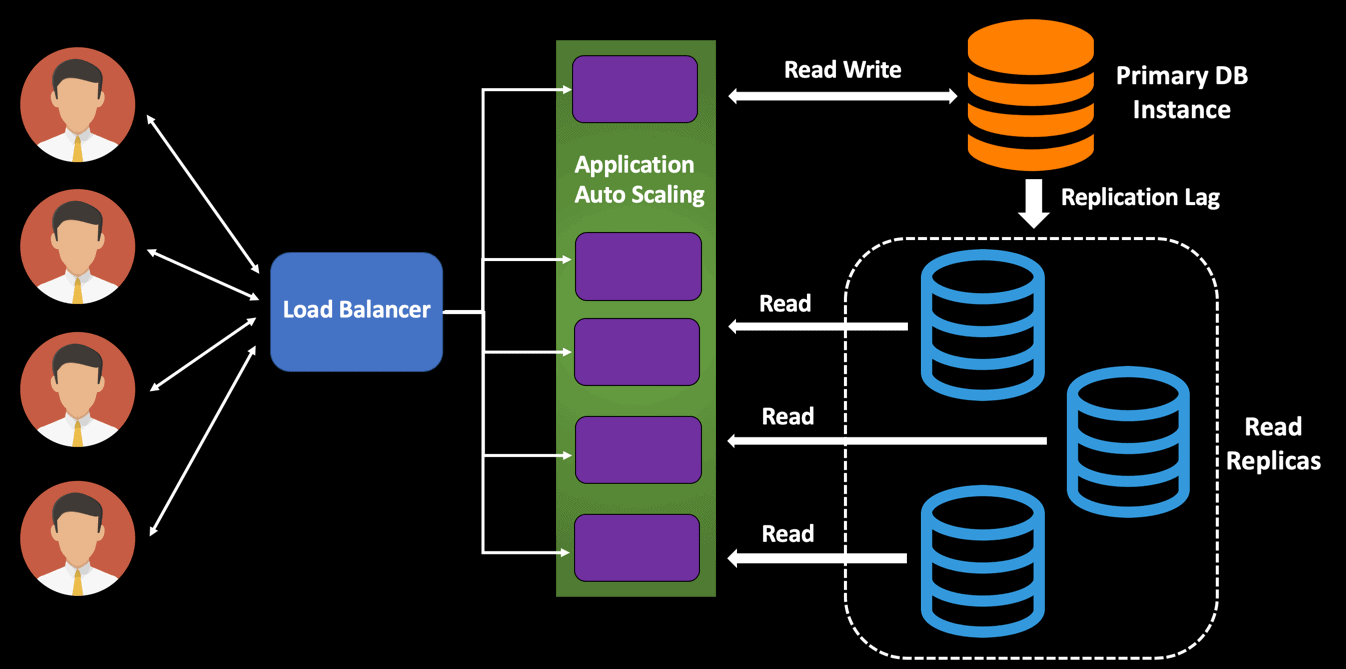
As you can see, the application logic (or a proxy/load balancer) becomes responsible for directing traffic, a concept we'll explore in detail.
How to Implement Database Read Replicas
This article from OneUptime provides an excellent introduction to the problem and the solution.
Start by reading the introductory paragraphs, from the initial problem statement down to the end of the first paragraph. Then, review the table of benefits in the "Read Replica Architecture" section to understand the various advantages this pattern provides beyond just scaling reads.
With the high-level architecture in mind, let's dive into the implementation details for both PostgreSQL and MySQL, which you have experience with.
2. Implementing Read Replicas in PostgreSQL
PostgreSQL's built-in streaming replication is a robust and popular choice for creating read replicas. It works by streaming the Write-Ahead Log (WAL) records from the primary to the replicas. The replicas then replay these records to stay in sync.
Before setting up, it's useful to know there are two main types of replication in PostgreSQL.
Horizontal scaling with Postgres replication - Readyset
This article from Readyset clearly explains the two main replication types in Postgres.
Read the section on Replication types. Focus on understanding the difference between Streaming replication (physical, whole-database copy) and Logical replication (selective, more flexible). For our goal of creating a simple, full read replica, streaming replication is the most direct and common method.
Now, let's walk through the configuration for setting up asynchronous streaming replication. The following tutorial video provides a great visual guide that complements the text-based steps.
PostgreSQL Streaming Replication Tutorial
This "PostgreSQL Streaming Replication Tutorial" from High-Performance Programming visually demonstrates the setup process.
You can watch the following segments as we go through the configuration steps: Primary Setup: This section covers configuring the primary server, creating the replication user, and adjusting access controls. Replica Setup: This part shows how to create the replica from a base backup and start it.
The process involves configuring both the primary server and the replica server(s).
Step-by-Step Configuration
Horizontal scaling with Postgres replication - Readyset
This section of the Readyset article provides a concise, hands-on walkthrough that is perfect for understanding the practical commands.
Follow the guide from the beginning of the section How to set up PostgreSQL replication. As you read, pay close attention to the following key actions: Configure the primary: Note the creation of a dedicated replication_user and the crucial modification to pg_hba.conf to allow this user to connect for replication purposes. Configure the replica: The pg_basebackup command is the star here. Understand its parameters, especially -Xs (stream WAL) and -R (creates recovery configuration). This command performs the initial data copy. Test replication: The final steps demonstrate how to verify that it's working: a write on the primary appears on the replica, but a write on the replica fails. This confirms the read-only nature of the replica.
By following these steps, you establish a one-way flow of data from your primary to your replica, effectively creating a dedicated instance for offloading read queries.
3. Implementing Read Replicas in MySQL
The process in MySQL is conceptually similar but uses different mechanisms and commands. It relies on the primary server writing all data-modifying events to its binary log (binlog). Replicas connect to the primary, read the binlog, and execute the events to replicate the data.
This diagram shows a typical MySQL replication topology.
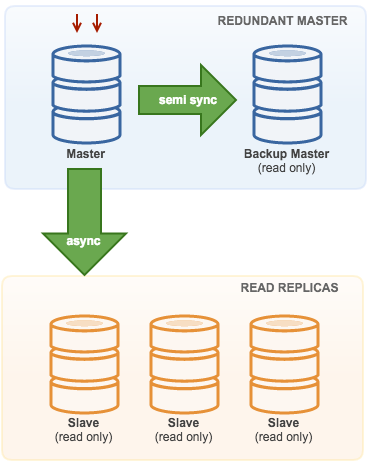
The following video provides a clear walkthrough of setting up this architecture.
Increase speed and durability with MySQL replication (2 easy ways)
This PlanetScale video, "Increase speed and durability with MySQL replication," offers a practical guide to the setup.
Watch the following segments to see the process in action: Primary Configuration: This part covers editing the my.cnf file, creating a replication user, and using SHOW MASTER STATUS to get the log coordinates. Replica Configuration: Here, the replica is configured and started using the CHANGE REPLICATION SOURCE TO command. Verification: This segment shows how to test that data created on the primary appears on the replica.
For a quick reference of the configuration files and SQL commands, the "How to Implement Database Read Replicas" article is very useful.
How to Implement Database Read Replicas
This article contains the specific configuration settings and commands for MySQL.
Review the section MySQL Replication Setup. It serves as an excellent "cheat sheet" for the required my.cnf settings and the SQL commands for creating the user and starting the replica.
4. Application Logic: Read/Write Splitting
Setting up the database replicas is only the infrastructure part. To make use of them, your application must be able to distinguish between read and write queries and send them to the correct database instance. This is called read/write splitting.
This logic typically resides within your application's data access layer.
- Write queries (
INSERT,UPDATE,DELETE, transactions) must always go to the primary database. - Read queries (
SELECT) can be distributed among the available read replicas to spread the load. A simple strategy is round-robin DNS or selecting a replica at random.
The following resource provides a fantastic, practical code example in Node.js, which aligns well with your JavaScript background.
How to Implement Database Read Replicas
This section demonstrates how to implement the routing logic at the application level.
Read the section on Application-Level Read/Write Splitting. Focus on the Node.js implementation. Notice how the DatabaseRouter class maintains separate connection pools for the primary and the replicas. The write() method uses the primary pool, while the read() method uses a replica pool. Also, pay attention to the readFromPrimary() method—this is a crucial feature for handling cases where you need to read the most up-to-date data.
5. The Critical Challenge: Handling Replication Lag
The biggest challenge with asynchronous replication is replication lag: the delay between a write committing on the primary and it being visible on a replica. This lag can range from milliseconds to seconds or even minutes, depending on network latency and replica workload.
Ignoring lag can lead to major user experience problems, such as:
- A user posts a comment, refreshes the page, and their comment is missing.
- A user changes their password, tries to log in, and the system rejects the new password.
A robust system design must account for this.
Monitoring and Mitigating Lag
First, you must be able to measure the lag.
How to Implement Database Read Replicas
This final practical section covers the most important operational aspect: managing lag.
Read the entire section on Handling Replication Lag. This is extremely important. Focus on three key concepts: Monitor Lag: The SQL queries provided for PostgreSQL and MySQL are what you would use in a monitoring system to track the health of your replication. Lag-Aware Routing: The LagAwareRouter class is a more advanced implementation. It actively checks replica health and routes traffic only to replicas that are within an acceptable lag threshold, falling back to the primary if necessary. This is a common pattern in production systems. Read-After-Write Consistency: The readAfterWrite function demonstrates a strategy to solve the "stale read" problem. If a read occurs very soon after a write, it's safer to direct that read to the primary to guarantee the user sees their own changes.
These strategies for managing lag are frequent topics in system design interviews. Being able to discuss not just the implementation of read replicas but also the trade-offs and solutions for eventual consistency demonstrates a senior level of understanding.
Conclusion
In this lesson, we moved from theory to practice, detailing how to implement a read replica strategy to scale a read-heavy application. This is a foundational building block for almost any large-scale system.
Key Takeaways:
- Read replicas are a standard pattern for horizontally scaling database read capacity, implemented using asynchronous replication.
- The setup process in both PostgreSQL (streaming replication) and MySQL (binlog replication) involves configuring a primary to log changes and a replica to consume them.
- Read/write splitting is the application-level logic required to route queries to the correct database (writes to primary, reads to replicas).
- Replication lag is the most significant challenge. Production-grade systems must monitor lag and implement strategies like lag-aware routing and read-after-write consistency to mitigate its effects.
You now have a complete picture of how to handle read-heavy workloads. However, what happens when write traffic becomes the bottleneck? In our next lesson, we will address this by exploring horizontal partitioning (sharding), a technique for distributing both reads and writes across multiple database instances.