
Welcome back. The previous lesson showed why manually copying BusyBox, libraries, and configuration files eventually becomes fragile: the real dependency graph exists whether or not it is recorded. This lesson makes that graph executable. You will take a supplied Buildroot defconfig and an approved source cache, verify its external-toolchain contract, build a QEMU image as an unprivileged user, and boot its BusyBox userspace.
The immediate target is QEMU rather than the AM62x board. That is intentional: it gives you a fast, repeatable environment to establish evidence-driven build habits before board-specific boot media, DDR, and peripheral issues enter the picture. The same Buildroot ideas later apply to a physical BSP, though the toolchain and boot command will differ.
By the end, your definition of done is concrete:
- a recorded Buildroot source revision, defconfig, and cache location;
- a completed
output/directory; - a kernel and root filesystem image under
output/images/; - evidence that the configuration imports an external toolchain and enables BusyBox init;
- a QEMU serial log reaching a Buildroot login prompt.
The Buildroot contract: configuration, inputs, and outputs
Buildroot is a Makefile-driven embedded-Linux build system. You declare a target system through Kconfig options; Buildroot then obtains or reuses sources, imports or builds a toolchain, compiles selected components, assembles a target filesystem, and generates deployable images.
Three terms need to remain separate:
| Item | What it is | Why it matters |
|---|---|---|
| Defconfig | A compact, version-controlled set of non-default Buildroot choices | The intended product configuration |
.config | The complete resolved configuration produced from the defconfig plus defaults | The exact build evidence |
| Source cache | A local collection of approved source archives, Git tarballs, patches, and possibly an external toolchain archive | Reduces network dependence and fixes known build inputs |
output/ | Disposable artifacts produced for one configuration | Contains build directories, sysroots, target tree, and images |
A defconfig is not normally a complete .config file. It deliberately omits defaults, which means it must be used with the Buildroot version for which it was prepared. Do not assume that a defconfig from an arbitrary Buildroot release will resolve safely on a newer release: symbols and defaults can change.
Before beginning, establish the lab’s source tree, supplied assets, cache, and output location. With a 250 GB SSD and a larger HDD, placing Buildroot work output on the HDD is a reasonable default unless you deliberately need SSD speed.
export BR="$HOME/work/buildroot"
export LAB="$HOME/work/buildroot-qemu-lab"
export CACHE="$LAB/source-cache"
export OUT="$HOME/build-output/qemu-external"

export DEFCONFIG="$LAB/qemu-external_defconfig"

test -d "$BR" && echo "Buildroot tree: OK"
test -f "$DEFCONFIG" && echo "Defconfig: OK"
test -d "$CACHE" && echo "Source cache: OK"

df -h "$HOME"
Replace these example paths with the paths supplied in your lab materials. The source tree and defconfig must be release-compatible.
Build as your ordinary Linux user. Never “solve” Buildroot errors with sudo make: that can create root-owned files in output/, conceal permission mistakes, and make a later normal-user build fail.
Read the Buildroot manual’s quick-start guidance to establish the standard configuration-and-build workflow, then learn what each output directory means. This directly replaces the ambiguous staging-versus-target copying discussed in the previous lesson.
In Chapter 4, begin with the normal-user rule, then read through the explanation of make menuconfig, .config, and make. Continue to the paragraph beginning the output tree. Read the entire directory list, especially host/, staging/, target/, and images/. Focus on why target/ is useful for inspection but is not itself the deployable filesystem image.
Why the external toolchain is part of the configuration contract
Your Ubuntu compiler is a host toolchain: it runs on x86-64 and produces x86-64 programs for Ubuntu. Buildroot needs a toolchain whose compiler runs on your host but produces programs for the QEMU target architecture.
With an internal toolchain, Buildroot builds GCC, binutils, the C library, and associated sysroot itself. With an external toolchain, it imports a prebuilt, compatible cross-toolchain. This lab uses the latter, which avoids a substantial toolchain-build phase and keeps the focus on system assembly.
An external toolchain is not merely “a directory containing a compiler.” It is a compatibility bundle containing:
- cross-binutils and GCC;
- target C library and dynamic loader;
- target headers;
- a sysroot;
- an ABI and target tuple;
- kernel-header compatibility assumptions.
For a custom external toolchain, Buildroot needs three facts:
- Toolchain path: the installation root, not the path to the
gccexecutable itself. - Toolchain prefix: the prefix before
-gcc, such asx86_64-unknown-linux-gnuoraarch64-none-linux-gnu. - C library and capability details: for example, glibc versus musl, C++ availability, and the appropriate kernel-header series.
A prefix must match a real compiler name. If the toolchain has:
/toolchains/x86_64/bin/x86_64-unknown-linux-gnu-gcc
then the likely Buildroot values are:
Toolchain path:   /toolchains/x86_64
Toolchain prefix: x86_64-unknown-linux-gnu
The prefix does not include the final -gcc.
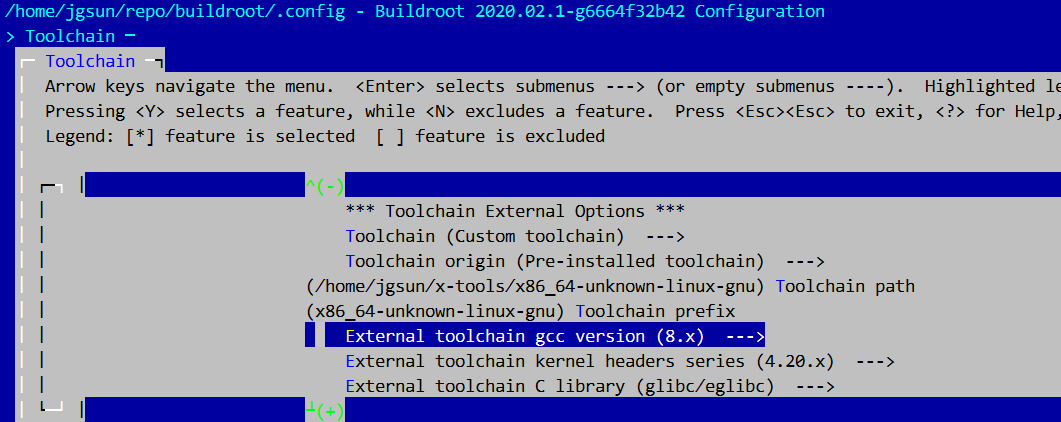
This Buildroot configuration reference explains the distinction between the workstation compiler and a cross-toolchain, then gives the supported ways to import an external toolchain.
In “Cross-compilation toolchain,” read from the toolchain definition through the host-versus-target explanation. Then read the “External toolchain backend” subsection in full, beginning with the external-toolchain choices. Pay particular attention to the required path, prefix, and C-library settings, and to the warning that Buildroot does not support importing a Yocto SDK or a distribution compiler as a Buildroot external toolchain.
Configure from the supplied defconfig
First inspect the supplied defconfig without editing it. This establishes what the lab is asking Buildroot to create.
sed -n '1,220p' "$DEFCONFIG"

grep -nE 'TOOLCHAIN|BUSYBOX|INIT|QEMU|LINUX_KERNEL|ROOTFS|DL_DIR' \
    "$DEFCONFIG" || true
Some expected settings may not appear because they are Buildroot defaults. For example, BusyBox and BusyBox init are often selected by default, so their absence from a minimal defconfig is not proof that they are disabled.
Create the output directory by asking Buildroot to resolve the defconfig:
make -C "$BR" O="$OUT" BR2_DEFCONFIG="$DEFCONFIG" defconfig
This does two things:
- it creates the complete configuration as
"$OUT/.config"; - it leaves the Buildroot source tree clean by performing an out-of-tree build in
"$OUT".
Now inspect the resolved configuration:
grep -E '^BR2_(TOOLCHAIN|INIT_BUSYBOX|PACKAGE_BUSYBOX|DL_DIR|LINUX_KERNEL|TARGET_ROOTFS)' \
    "$OUT/.config" || true
The exact symbols vary somewhat across Buildroot releases, but you should find evidence for:
- an external-toolchain selection;
- a BusyBox package and/or BusyBox init selection;
- a kernel;
- at least one root filesystem image type;
- either an explicit
BR2_DL_DIRor the default download location.
Point Buildroot at the approved source cache
A Buildroot download directory is a cache of inputs. It is not the target root filesystem and is not a directory you copy into the image. In a controlled product build, the cache is often shared across a team or populated by CI before the build begins.
If the supplied defconfig already specifies the cache location and that location is valid on your workstation, do not change it. If the lab instructions state that you must set your local cache path, use Buildroot’s configuration interface:
make -C "$BR" O="$OUT" menuconfig
In the menu:
- Open Build options.
- Locate Download dir.
- Set it to the supplied source-cache directory, for example
"$CACHE". - Save and exit.
Then inspect the final setting:
grep '^BR2_DL_DIR=' "$OUT/.config" || true
Do not manually change archive names, checksums, or source versions to make a cache lookup succeed. A missing file in the supplied cache is evidence that either the cache is incomplete, the defconfig does not match the Buildroot release, or the download-directory configuration is wrong.
Validate the external-toolchain settings before building
Open the Toolchain menu:
make -C "$BR" O="$OUT" menuconfig
Navigate to:
Toolchain ---> Toolchain type
For this lab, confirm the following rather than casually changing values:
| Setting | What to validate |
|---|---|
| Toolchain type | External toolchain is selected |
| Toolchain origin | Matches the lab’s supplied preinstalled or custom toolchain |
| Toolchain path | Exists on this workstation and is the installation root |
| Toolchain prefix | Corresponds to a real <prefix>-gcc binary |
| C library | Matches the toolchain’s actual glibc, musl, or uClibc-ng implementation |
| GCC/kernel-header values | Match the information supplied with the toolchain |
If you need to adapt an installation path, change only the environment-specific path directed by the lab material. Paths are workstation-local facts; they are not normally committed back into a shared product defconfig without careful relocation design.
A quick host-side check is useful. Substitute the actual prefix from the menu:
TOOLCHAIN_PATH="/path/from/toolchain-menu"
TOOLCHAIN_PREFIX="prefix/from/toolchain-menu"

"$TOOLCHAIN_PATH/bin/${TOOLCHAIN_PREFIX}-gcc" --version
"$TOOLCHAIN_PATH/bin/${TOOLCHAIN_PREFIX}-gcc" -print-sysroot
The first command must run on Ubuntu; the second should report a target sysroot associated with the external toolchain. If either fails, stop and correct the external-toolchain configuration. Building first would only waste time and produce a less clear error.
Build the image and follow Buildroot’s output
Start the build from the Buildroot source tree, directing all artifacts to "$OUT". Let Buildroot control its own package-level parallelism; do not add arbitrary top-level make -j options.
cd "$BR"

set -o pipefail
make O="$OUT" 2>&1 | tee "$OUT/build.log"
The tee command gives you two useful artifacts at once:
- live console output for monitoring;
build.log, which records the first failure if the build stops.
A successful Buildroot build normally performs these categories of work:
- It reuses source archives from the configured download cache where available.
- It imports and validates the external toolchain.
- It builds host-side helper tools and selected target packages.
- It prepares the target filesystem tree.
- It produces filesystem and kernel artifacts under
output/images/.
The most important distinction from the previous lesson is that Buildroot controls the boundary between build-time and runtime files.
output/host/      host tools plus target development sysroot
output/staging/   compatibility symlink to the target sysroot
output/target/    inspectable runtime-oriented root filesystem tree
output/images/    deployable kernel and filesystem image artifacts
output/host/ and output/staging/ are for compiling target software. They contain headers, unstripped libraries, and development symlinks that generally do not belong in the deployed image. output/target/ is close to the root filesystem, but Buildroot’s final filesystem-image creation applies required ownership, special modes, and device-node handling. Boot output/images/, not output/target/.
After a successful build, inspect the key evidence:
find "$OUT/images" -maxdepth 1 -type f \
    -printf '%f\t%s bytes\n' | sort

ls -l "$OUT/target/sbin/init" "$OUT/target/bin/sh" 2>/dev/null || true
file "$OUT/target/bin/busybox" 2>/dev/null || true

find "$OUT/host/bin" -maxdepth 1 \
    \( -type f -o -type l \) -name '*-gcc' -print
You should expect to see a kernel artifact and one or more root filesystem artifacts. Common names include bzImage, Image, rootfs.ext2, rootfs.ext4, rootfs.cpio, or rootfs.tar; the supplied defconfig determines the actual names.
For the BusyBox userspace, the expected relationship is usually:
/sbin/initis BusyBox’s init applet or a link to BusyBox;/bin/shis a BusyBox shell applet;- BusyBox init reads
/etc/inittab; - the default startup policy runs
/etc/init.d/rcS; - a getty process provides the serial login prompt.
This is a minimal system, not a systemd-based gateway image. Its importance is that the build describes and generates the userspace coherently, rather than relying on ad hoc copies from a staging directory.
Boot the generated image in QEMU
First look for a launch script supplied by the lab or generated with the build:
find "$OUT" -maxdepth 3 -type f \
    \( -name 'start-qemu.sh' -o -name '*qemu*.sh' \) -print
If the lab provides a QEMU launch script, use it. It encodes the machine type, kernel artifact, root-device name, console, and any architecture-specific firmware details. Those details are a single system contract; copying a command line from a different QEMU architecture is a common cause of boot failure.
For an executable script:
set -o pipefail
"$OUT/images/start-qemu.sh" 2>&1 | tee "$OUT/boot.log"
If it is not executable, run it explicitly through the shell:
set -o pipefail
sh "$OUT/images/start-qemu.sh" 2>&1 | tee "$OUT/boot.log"
Conditional x86-64 fallback
Use the following command only if your supplied defconfig is specifically an x86-64 QEMU configuration and produced both bzImage and an unpartitioned rootfs.ext2. It is not a universal Buildroot QEMU command.
qemu-system-x86_64 \
    -M pc \
    -m 512M \
    -kernel "$OUT/images/bzImage" \
    -drive file="$OUT/images/rootfs.ext2",format=raw,if=ide \
    -append "root=/dev/sda rootwait console=ttyS0" \
    -nographic
Here the core assumptions are:
| QEMU argument | System contract being satisfied |
|---|---|
-kernel | Supplies the generated x86 kernel directly |
-drive | Presents the generated ext2 root filesystem as an IDE disk |
root=/dev/sda | Tells the kernel which emulated block device holds / |
console=ttyS0 | Sends Linux console output to the emulated serial port |
-nographic | Connects QEMU’s serial console to your terminal |
For this QEMU mode, exit with Ctrl-a, then x.
A healthy boot progresses from kernel messages to BusyBox initialization and a login prompt.

At the prompt, the default account is often root; whether a password is required depends on the supplied configuration. After login, record a minimal runtime fingerprint:
uname -a
cat /etc/os-release 2>/dev/null || true
ps
mount
Then shut down cleanly if the image includes a shutdown utility, or terminate QEMU using its console escape sequence.
Diagnose the first failure from the evidence
Buildroot makes failures easier to localize because source, sysroot, target tree, images, and logs have distinct locations.
| Symptom | Likely boundary | First checks |
|---|---|---|
| Build attempts unexpected network downloads | Source-cache configuration or incomplete cache | Check BR2_DL_DIR, the cache path, and the missing filename in build.log |
| Buildroot rejects the external toolchain | Toolchain path, prefix, ABI, C library, or feature mismatch | Verify <path>/bin/<prefix>-gcc, --version, and -print-sysroot; recheck Toolchain menu values |
Build fails after a prior sudo make | Host filesystem permissions | Inspect ownership under "$OUT"; repair intentionally with sudo chown -R "$USER":"$USER" "$OUT" before rebuilding |
| QEMU cannot find a kernel or rootfs image | Wrong artifact name or incomplete build | List "$OUT/images" rather than guessing filenames |
| Kernel messages appear but root mount fails | QEMU drive interface and root= parameter disagree | Compare the launch script’s drive model with the kernel command line |
| Kernel starts but no serial output appears | Incorrect console= setting or QEMU serial routing | Use the supplied launch script; check configured getty and kernel console settings |
| Root filesystem mounts but no login appears | BusyBox init, /etc/inittab, rcS, or getty issue | Inspect "$OUT/target/etc/inittab" and the final serial log |
| Shell reports an executable is “not found” | Dynamic loader or shared library missing | This returns to the previous lesson: inspect the target ELF interpreter and NEEDED entries rather than trusting the pathname |
For this lab, retain four artifacts together:
mkdir -p "$LAB/evidence"

cp "$OUT/.config" "$LAB/evidence/qemu-external.config"
cp "$OUT/build.log" "$LAB/evidence/" 2>/dev/null || true
cp "$OUT/boot.log" "$LAB/evidence/" 2>/dev/null || true

find "$OUT/images" -maxdepth 1 -type f -print0 |
    sort -z |
    xargs -0 sha256sum > "$LAB/evidence/qemu-images.sha256"
Also record the Buildroot source revision. If the source is a Git checkout:
git -C "$BR" rev-parse HEAD
git -C "$BR" status --short
This small evidence set is the beginning of a reproducible-build record: configuration, logs, artifact hashes, and source identity.
You have now used Buildroot as more than a menu-driven image generator. A supplied defconfig resolved into a complete .config; the approved cache supplied controlled inputs; an external toolchain provided a target ABI and sysroot; Buildroot separated development files from runtime files; and QEMU verified that the resulting kernel, filesystem, console, and BusyBox init contract works end to end.
Next, you will follow individual Buildroot packages through their download, build, host, staging, target, and image-output locations. That directory-level trace is what lets you answer, precisely, why a particular file is present in an image and where it came from.
Can't find a good explanation? Sign up and we'll make it for you
Sign up