
Hello again. In the previous lesson, we separated the roles of the Yocto Project, OpenEmbedded, BitBake, Poky, and the image that eventually boots on a target. The next essential distinction is between describing a build and performing a build.
Yocto-based systems are powerful because they let a team express a Linux system as versioned metadata and configuration, then let BitBake determine the required tasks and reuse valid prior work. But this mechanism is not magic: it can make builds controlled and capable of reproducibility; it cannot guarantee that two builds are identical unless the project also controls sources, tools, environments, timestamps, and every meaningful input.
By the end of this lesson, you should be able to explain the chain from declarative metadata through task signatures and shared state, and identify precisely where reproducibility can still fail.
From descriptions to a resolved build plan
A traditional handwritten build script often mixes policy, source locations, commands, and machine-specific decisions in one imperative sequence: download this archive, run these commands, copy these files. Yocto takes a different approach. Most of its input is declarative metadata: statements about what software is required, where it comes from, what depends on what, and what the output should contain.
A recipe might declare:
- the source location and integrity information;
- the license and version of a component;
- build-time dependencies;
- functions that configure, compile, install, package, or deploy it;
- files and patches to apply;
- conditional behavior for a particular machine or distribution.
Configuration then supplies the product-specific choices that determine how those descriptions are interpreted. At a high level, it answers questions such as:
| Input category | Typical decision | Why it matters |
|---|---|---|
| Layers | Which metadata collections participate? | Defines the available recipes, classes, and policy |
| Machine | Which CPU, BSP, kernel, and boot assumptions apply? | Determines the target hardware contract |
| Distribution | Which system-wide policies apply? | Selects choices such as features, providers, and package policy |
| Image | Which packages and image features should be assembled? | Defines the deployable target system |
| Local build configuration | Where should caches live and how much concurrency is safe? | Shapes the host-side build environment |
BitBake reads all active configuration, layers, classes, recipes, and append files into a data store. It expands variables, applies applicable conditional metadata, chooses providers and versions, and builds a task graph. The result is a resolved build plan for one requested target.
A compact way to express the idea is:
The important word is resolved. The source text of one recipe is not enough to tell you its final behavior. A class can supply functions, a configuration file can choose a machine, a layer can append metadata, and an override can select a different variable value. Later lessons will teach you how to inspect that final result directly rather than guessing from one file.
Declarative does not mean that every part of a build is non-executable. A task such as do_compile eventually runs shell commands, Python code, a compiler, or CMake. What is declarative is the surrounding build description: which task exists, its declared inputs, when it may run, what it depends on, and which configuration selects it.
4 Syntax and Operators — Bitbake 2.18 documentation
Read “Syntax and Operators” in the official BitBake User Manual to see how metadata variables express build decisions rather than directly acting as shell commands.
In Section 4.1, “Basic Syntax,” read Sections 4.1.1 through 4.1.7, especially “Modifying Existing Variables,” “Variable Expansion,” and “Immediate Variable Expansion.” Begin with the modification context. Focus on the distinction between a value that is recorded now and a reference that is expanded later; this is why the final configuration, rather than a single line in a recipe, determines task behavior.
For a small conceptual example, consider:
FEATURES = "base"
FEATURES:append = " diagnostics"
The first statement gives a base value. The second describes an addition that BitBake applies when it resolves the variable. The result is governed by the metadata rules and applicable configuration, not simply by treating the file as a top-to-bottom shell script. The exact operators and override rules come later; for now, the key point is that metadata is combined into a final, build-specific description.
The build is a task graph, not a single compilation
An image build might involve hundreds or thousands of recipes, but BitBake does not treat a recipe as one indivisible unit. It reasons at the task level.
For a typical component, tasks include fetching source, unpacking it, applying patches, configuring a build system, compiling, installing into a staging area, splitting files into packages, and performing QA checks. Other recipes must provide build tools, headers, libraries, package metadata, or runtime packages at particular points in this process.
This task-level model gives BitBake two major capabilities:
- Correct scheduling. Independent tasks can run in parallel, while dependent tasks wait for the exact prerequisite task they need.
- Fine-grained reuse. If one change affects package-format generation but not compilation, BitBake can reuse earlier valid compile and install results while rerunning only the later work that actually needs to change.
The OpenEmbedded Architecture Workflow diagram gives a useful broad picture. Treat it as a map of responsibilities, not as a literal, strictly linear execution trace: BitBake's real task graph has branches, joins, and parallel work.
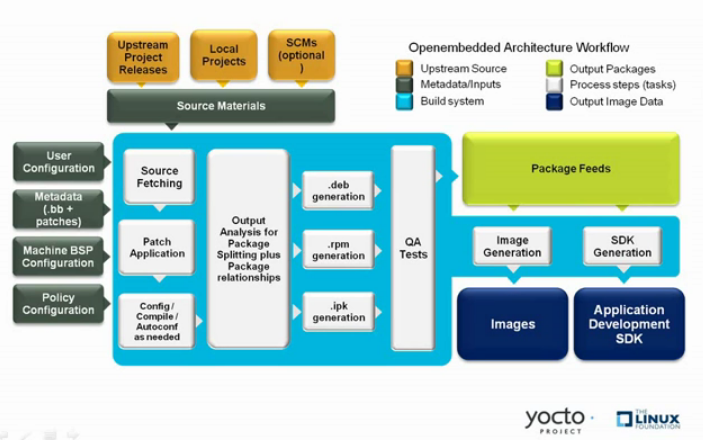
Read the diagram from left to right:
- Source materials may come from upstream releases, local projects, or source-control systems.
- Metadata and configuration state how those materials apply to a chosen system.
- The central build machinery fetches, patches, configures, compiles, analyzes, packages, and checks the software.
- The build can produce package feeds, deployable images, and development SDKs.
One subtle but important consequence follows: a successful image is not merely evidence that C or C++ source compiled. It is evidence that a large set of declared tasks completed under one resolved configuration, including packaging and image-construction tasks.
Task signatures: deciding whether prior work is still valid
Once BitBake has a task graph, it must decide whether each task needs to run. Rebuilding every task every time would be safe but prohibitively slow. Blindly trusting old output would be fast but unsafe.
The compromise is the task signature, also called a checksum or hash in this context.
For each task, BitBake calculates a signature from the inputs that are relevant to that task. Conceptually, those inputs include:
- the task body and functions it calls;
- relevant resolved variable values;
- tracked files and source-related inputs;
- the signatures of upstream tasks on which it depends.
The direct metadata-related portion is commonly called a base hash. When BitBake includes relevant dependency-task hashes, it obtains the task hash used to decide whether that task’s previous result is applicable.
This produces a disciplined rule:
If the signature changes, BitBake assumes a relevant input changed and schedules the task again. If the signature is unchanged, BitBake may reuse a prior result.
For example, suppose a compile task uses a compiler setting, a source tree, and a library staged by another recipe. A changed compiler setting should change the compile task’s signature. A change to the library’s relevant prior task should also affect the compile task through the dependency graph. BitBake can therefore invalidate the compilation without you manually deleting every downstream file.
Not every apparent change should invalidate every task. An absolute host path such as a particular temporary work directory generally should not affect a target binary. Including it in every signature would cause needless rebuilds and make caches non-portable between workspaces. BitBake therefore excludes certain irrelevant path and host-specific values, while metadata can explicitly add dependencies that automatic analysis cannot discover.
4 Yocto Project Concepts — The Yocto Project ® 5.0 documentation
Read the “Shared State Cache” and “Overall Architecture” material in the official Yocto Project Concepts manual. This is a conceptual reference; in the next lesson you will learn to pair all reference material with the exact release branch you choose.
In Section 4.5, “Shared State Cache,” start with the cache problem. Then read Sections 4.5.1, “Overall Architecture,” and 4.5.2, “Checksums (Signatures).” In the first, follow the task level reasoning; it explains why reuse is per task rather than per recipe. In the signatures section, concentrate on input selection, including why irrelevant build paths are excluded and why metadata sometimes needs to declare an additional dependency.
A signature is therefore an answer to a limited but powerful question:
“According to the metadata and dependency model, is this task being asked to perform the same work under the same relevant conditions?”
It is not a proof that output bytes will be identical. It also is not a complete hash of every byte on the host filesystem. The distinction matters:
- If a genuine task input is missing from the signature calculation, BitBake may wrongly reuse output.
- If an irrelevant value is included, BitBake may rebuild unnecessarily.
- If a task produces nondeterministic output despite unchanged inputs, its signature can remain the same while its output differs.
The first two are metadata and dependency-model correctness problems. The third is a reproducible-build problem.
Shared state: reusing task outputs, not merely skipping tasks
Signatures tell BitBake whether a task is still valid. Shared state, conventionally called sstate, provides a way to reuse the task’s output when it is valid.
When a task has sstate support, the build system can capture its useful output in a cache object. On a later build, BitBake first attempts a corresponding setscene task. If it finds an sstate object with a matching valid signature, it installs that cached output into the required build location instead of executing the normal task.
The cache directory is normally controlled by SSTATE_DIR. A team may also use SSTATE_MIRRORS to retrieve matching objects from a shared cache server or filesystem location.
This distinction is worth making carefully:
| Mechanism | Main role | Typical scope |
|---|---|---|
| Stamp files | Record that a task result is current in a particular build area | Primarily local build bookkeeping |
| Task signatures | Represent the relevant declared inputs of a task | Determines whether work is valid for reuse |
| Shared-state objects | Store reusable outputs associated with valid task signatures | Can be reused across builds and, when compatible, across workspaces |
| Download cache | Retains fetched source archives and repositories | Avoids repeated network fetches; it is not compiled output |
Sstate is broader than “a cache of compiled binaries.” It can preserve output relevant to tasks that populate recipe sysroots, generate packages, create metadata, or deploy files. This is why a second build can be dramatically faster even if it has a fresh temporary build directory.
4 Yocto Project Concepts — The Yocto Project ® 5.0 documentation
Continue with “Shared State” in the same official Yocto Project Concepts manual. This section connects the signature decision to the concrete task output that BitBake can restore.
Read Section 4.5.3, “Shared State,” from its opening explanation through the discussion of *_setscene tasks and SSTATE_DIR. Start with the central problem. Near the end, focus on the setscene decision. Notice that a matching sstate object can allow BitBake to skip not only one normal task but also prerequisite tasks whose results are no longer needed.
A useful mental model is that sstate makes task results replaceable. The required output may be produced locally during this build, or it may be restored from an earlier valid result. If the signature and cache object are valid, downstream tasks should not need to care which origin supplied the output.
This is especially valuable on a laptop with limited CPU, memory, and disk capacity. Later, you will place the downloads and shared-state directories outside an individual build directory, so a rebuild or a second build configuration can reuse them. That saves time and storage, but it does not change what the final image should contain.
Controlled builds are not automatically reproducible builds
At this point it would be tempting to conclude:
“If I use Yocto, then my image is reproducible.”
That statement is too strong.
A controlled build uses declared metadata, tracked configuration, explicit dependencies, signatures, and cache rules to make execution understandable and selectively repeatable. It gives a team a disciplined basis for rebuilding and diagnosing its system.
A reproducible build, in the stricter engineering sense, produces equivalent—often byte-for-byte identical—artifacts when rebuilt from the same intended inputs in a sufficiently controlled environment. Achieving that outcome requires work beyond enabling sstate.
Here are common ways reproducibility can fail:
| Failure source | What can go wrong | Better engineering practice |
|---|---|---|
| Mutable sources | A Git branch, release URL, or generated download changes over time | Pin immutable revisions; use verified checksums; retain source provenance |
| Unpinned layer revisions | A later git pull changes recipes, classes, or policy | Record and pin each layer revision used for a release |
| Host-environment leakage | Host paths, environment variables, locale, host tools, or credentials affect a task | Keep task environments controlled; explicitly pass only required values |
| Network access during a build task | A configure or compile step fetches a changing external input | Fetch declared source inputs in controlled fetch steps; avoid hidden network use |
| Time and randomness | Timestamps, build dates, random identifiers, or unstable archive ordering alter output | Configure deterministic build behavior and test independent rebuilds |
| Incomplete dependency declaration | A task reads an input BitBake does not know about | Declare file and variable dependencies accurately |
| Incorrect cache sharing | A stale, corrupt, incompatible, or improperly managed cache supplies an artifact | Treat sstate as managed infrastructure; diagnose unexpected reuse rather than trusting it blindly |
BitBake helps reduce host contamination by cleaning the task environment by default. That protection is meaningful, but it cannot prevent every mistake. A recipe could deliberately inspect the current time, call a host utility whose behavior changed, read an undeclared file, or use an unpinned network resource. In each case, the task may execute successfully while producing output that cannot be independently reproduced.
The central limitation is this:
A task signature establishes sameness of the inputs that BitBake knows and is configured to track. It cannot establish sameness of inputs that metadata failed to declare, and it cannot force nondeterministic software to become deterministic.
This limitation also explains why careless exclusions are dangerous. Excluding a variable from signatures can reduce unnecessary rebuilds, but only when that variable truly cannot affect task output. Excluding a real input merely tells BitBake to overlook a change; it does not make the output correct.
Similarly, cache reuse is not proof of reproducibility. Shared state is an optimization based on a correctness contract: a matching signature is assumed to mean that the cached output is appropriate. Reproducibility makes that contract more reliable, because independently produced outputs remain stable.
A practical reasoning pattern
When you later observe that BitBake reruns—or does not rerun—a task, reason in this order:
- Identify the task, not just the recipe. A change may affect packaging without requiring recompilation.
- Identify the declared inputs that should matter: metadata, configuration, files, source revisions, and prerequisite task outputs.
- Predict the signature result. If any relevant input changed, the signature should change.
- Check the reuse path. With a valid matching shared-state object, BitBake can restore output; otherwise it executes the normal task.
- Question hidden inputs. If behavior differs unexpectedly, look for host variables, changed source content, untracked files, or nondeterministic task behavior.
Later modules will make this concrete with task logs, generated run scripts, signature data, bitbake-diffsigs, and controlled cache experiments. For now, avoid the unhelpful habit of deleting the entire build directory at the first surprise. First form a hypothesis about which task input changed and which result ought to be reusable.
Takeaways and what comes next
Yocto-based builds are controlled because:
- Metadata declares software sources, policy, tasks, dependencies, and outputs.
- Configuration selects the machine, distribution, layers, image content, and host-side build settings that resolve metadata into a specific plan.
- Task signatures detect relevant changes at task granularity and propagate invalidation through dependencies.
- Shared state stores reusable task outputs, allowing BitBake to restore valid work rather than rebuild it.
Yet none of these mechanisms alone guarantees a reproducible release. Reproducibility also depends on immutable and verified inputs, pinned layer revisions, deterministic task behavior, controlled host influence, correct dependency declarations, and evidence from independent rebuilds.
Next, you will select a maintained Yocto LTS branch and learn why documentation, release notes, migration guidance, Poky, and every added layer must all be aligned to that same release line.
Can't find a good explanation? Sign up and we'll make it for you
Sign up