
Welcome back. In our previous lessons, we assembled a complete toolkit for declaratively defining AJAX requests: we can control the HTTP method, the trigger event, the target element, the swap strategy, and the data payload.
Now, it's time to move from mechanics to application and build our first complete, dynamic feature. This lesson tackles one of the most common requirements in any web application: displaying a list of data when a page first loads. We will implement the "Read" part of a CRUD interface, specifically focusing on the initial population of data.
For you, coming from a React background, this is the HTMX equivalent of a component's initial data fetch—think of a useEffect hook with an empty dependency array that calls fetch and then uses the resulting JSON to render a list. As you'll see, the hypermedia approach is fundamentally different, shifting the rendering responsibility from the client back to the server.
The Hypermedia Flow: HTML over the Wire
Before we write any code, let's revisit the core architectural difference between a Single Page Application (SPA) and a hypermedia-driven application. This conceptual distinction is key to the migration you're planning.
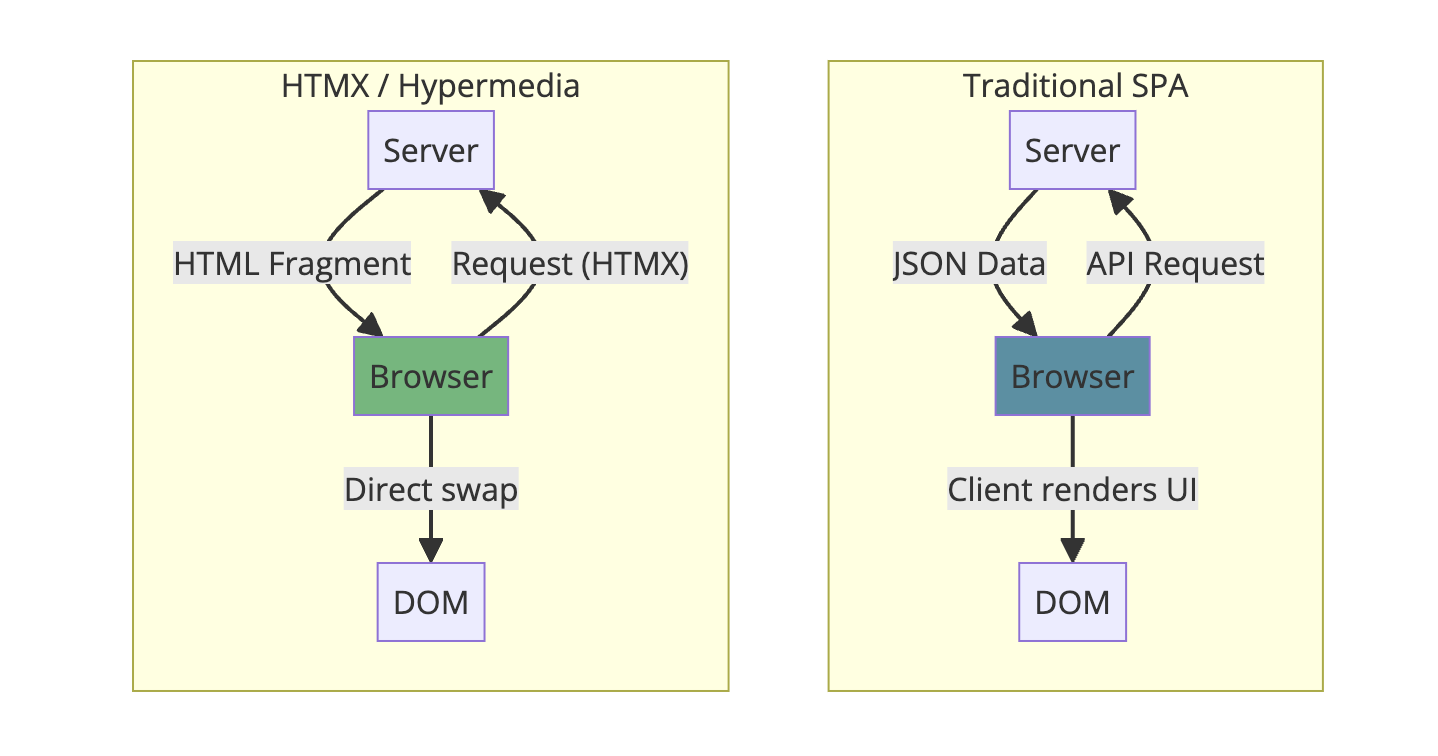
On the right, you see the familiar SPA model. The browser requests JSON data from an API. Once the data arrives, client-side JavaScript (your React code) is responsible for interpreting that data and rendering the necessary UI, often by manipulating a Virtual DOM which is then reconciled with the actual DOM. The server is largely a "data-only" API.
On the left is the HTMX model we will build today. The browser requests a resource, but the server responds directly with a fragment of HTML. The browser's role is much simpler: it receives this ready-to-render markup and swaps it directly into the specified place in the DOM. The rendering logic—the loop that turns data into <li> elements, for example—lives on the server.
The Core Pattern: Initial Load with hx-trigger="load"
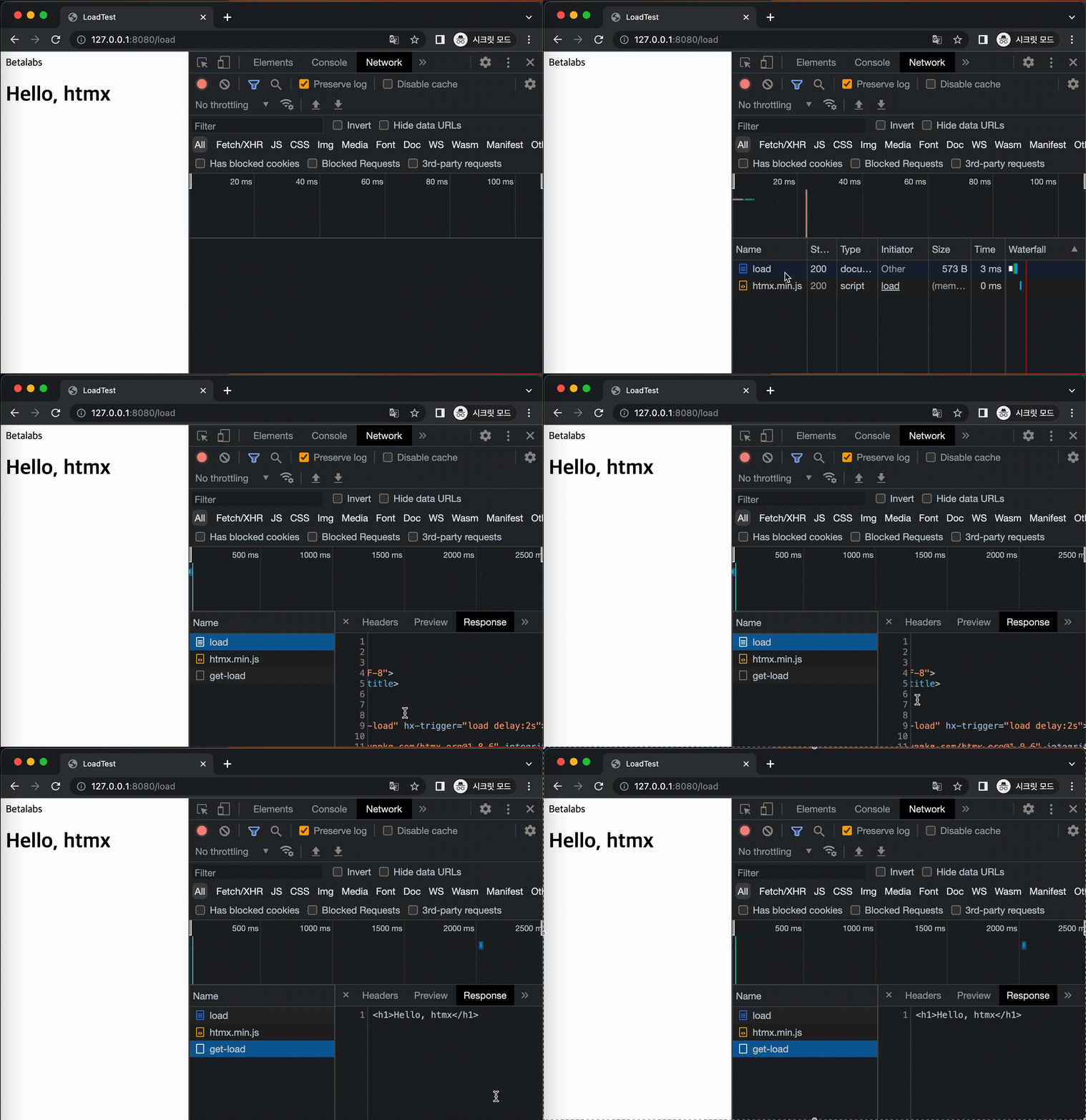
To implement the initial data display, we'll use a powerful feature of HTMX: triggering a request on page load. While we've previously used triggers like click and keyup, HTMX provides a special load event. This event fires exactly once, as soon as an element is loaded into the DOM.
The canonical pattern looks like this:
<div id="data-container" hx-get="/items" hx-trigger="load">
  <!-- A loading indicator could go here -->
</div>
When the browser parses this div, HTMX immediately issues a GET request to the /items endpoint. Because we haven't specified an hx-target, the response will, by default, be placed inside this same div using the default hx-swap strategy of innerHTML.
This single line of declarative markup replaces the need for an imperative JavaScript block that would typically handle an initial data fetch.
Building a To-Do List: A Practical Example
Let's walk through building a simple to-do list that populates itself on page load. We will use the approach detailed in the "htmx and ExpressJS" article from DEV Community.
1. The Frontend Shell
The starting point is an HTML page with an empty placeholder for our list.
htmx and ExpressJS - DEV Community
This article provides a complete, self-contained example of the pattern we're building. We'll start with the HTML structure.
In the index.html file shown, find the <body> section and focus on the <ul> element within the "Todos" section. It's defined as <tf start="<ul hx-get" end="id="todo-list">">this line.
Let's break down that one line:
<ul id="todo-list" ...>: We start with a standard unordered list. Giving it anidis crucial, as it allows other HTMX components to target this list for updates later (e.g., when adding or deleting an item).hx-get="/todos": This instructs HTMX to make a GET request to the/todosendpoint on our server.hx-trigger="load": This specifies that the request should be fired as soon as the<ul>element is loaded.
That's it for the frontend. We have an empty container that knows how to fetch and display its own content.
2. The Server-Side Rendering
Now, let's look at the server. What happens when it receives a request at GET /todos? Following the hypermedia model, it must return an HTML fragment.
htmx and ExpressJS - DEV Community
Now let's examine the corresponding Express.js backend code that serves the HTML fragment.
First, look at the main server file's code to find the <tf start="app.get("/todos"" end="buildTodosList(todos));">GET /todos endpoint. Notice that it fetches data from a repository and then calls buildTodosList. Next, review the <tf start="export function buildTodosList(todos)" end="}, "");">buildTodosList function. This is the core of the server-side rendering logic. Pay close attention to how it uses standard JavaScript array methods (sort and reduce) to construct a string of <li> elements from the data array.
The workflow is straightforward:
- The
GET /todosroute handler is invoked. - It retrieves the raw to-do data (an array of objects).
- It passes this data to the
buildTodosListfunction. This function acts as our server-side template. It iterates over the data and constructs a raw HTML string containing all the<li>elements. - The Express handler sends this HTML string as the response, with the
Content-Typeheader correctly set totext/html.
The browser receives this string of <li>...</li><li>...</li> and, following the instructions on the <ul> tag, places it directly inside the list. The page is now fully rendered.
An Alternative: Server-Side Includes for the Initial Load
The hx-trigger="load" pattern is powerful, but it's not the only way to handle initial content. An alternative, which may feel more familiar if you've worked with traditional SSR frameworks, is to include the initial content directly in the first page render.
In this approach, your main page template would not have an empty placeholder. Instead, the server-side route that renders the main page would fetch the initial data and pass it to a partial that gets embedded directly.
In an EJS templating context, your index.ejs might look like this:
<!-- ... inside main page ... -->
<h2>Todos</h2>
<ul id="todo-list">
  <%- include('partials/todo-list', { todos: initialTodos }) %>
</ul>
<!-- ... -->
Here, the / route handler would be responsible for fetching initialTodos and passing them to the index.ejs template. The todo-list partial would contain the same logic as our buildTodosList function.
Let's consider the trade-offs, as this is an important architectural decision:
| Method | hx-trigger="load" | Server-Side Include (SSR) |
|---|---|---|
| Requests | 2 (1 for page shell, 1 for content) | 1 (page and content together) |
| Perceived Speed | Can be faster. The page shell (HTML, CSS) loads instantly, providing fast feedback. Content loads asynchronously. | Can be slower. The browser must wait for the server to fetch data before the page starts rendering (higher TTFB). |
| UX | May cause content to "pop in" unless you use a loading indicator within the placeholder element. | No content pop-in. The page arrives fully formed. |
| SEO | Can be weaker, as crawlers might not execute the second request to see the content. | Stronger, as all initial content is in the first HTML response. |
For many CRUD applications, the SSR approach is simpler and often preferable for the initial page load. The hx-trigger="load" pattern becomes particularly useful for components that are secondary, below the fold, or expensive to render, where you want to defer their loading until after the main content is visible.
Conclusion
In this lesson, you've implemented the fundamental "Read" pattern of a hypermedia application. You've seen how to use hx-get with hx-trigger="load" to create self-populating components, and you understand the critical role of the server in rendering HTML fragments instead of serving JSON.
Key Takeaways:
- Initial Load Pattern: A placeholder element with
hx-getandhx-trigger="load"is the primary HTMX pattern for asynchronously loading initial content. - Server Renders HTML: The backend endpoint must respond with an HTML fragment (
Content-Type: text/html), not JSON. This is the essence of "HTML over the wire." - Architectural Choice: You can choose between an asynchronous load (
hx-trigger="load") or a synchronous server-side include for the initial render, each with distinct performance and UX trade-offs.
You now have a complete, working list view. In our next lesson, we will build directly on this foundation to implement server-side pagination. You'll see how to add "Next" and "Previous" buttons that use the very same fragment-rendering endpoint to fetch and replace just the list content, without touching the rest of the page.
Can't find a good explanation? Sign up and we'll make it for you
Sign up