
Welcome to the final lesson of our module on arrays, strings, and lookups. In our previous session, we mastered a powerful technique for modifying 1D arrays in-place using fast and slow pointers. We saw how this pattern allows for O(1) space solutions by intelligently overwriting parts of an array. Today, we elevate this systematic approach from one dimension to two.
This lesson focuses on the learning outcome: Traverse a matrix without omitting or revisiting cells at its boundaries. You'll learn a robust pattern for navigating 2D arrays, a common task in problems involving grids, game boards, or images. Instead of thinking in terms of unstructured loops, we'll establish a set of boundaries and systematically shrink them, ensuring every required cell is visited exactly once. This methodical approach is key to taming the complexity of matrix problems and building confidence.
From 1D Pointers to 2D Boundaries
In a 1D array, we use indices or pointers to mark positions. In a 2D array, or matrix, we need coordinates: (row, col). Just as your front-end work requires you to reason about (x, y) coordinates in a layout, matrix problems require you to manage (row, col) indices carefully.
A common subproblem is traversing the "perimeter" or boundary of a matrix. Let's start there. The core idea is to break the traversal into four distinct, sequential movements, like walking around the four sides of a fenced-in area.
Understanding Array Traversal Patterns in JavaScript - DEV Community
This article from the DEV Community provides a wonderful analogy for this process. It frames boundary traversal as walking along four "fences" of a garden.
Please read the section Pattern 3: Border Traversal. Pay close attention to the breakdown into four sides: North, East, South, and West. Notice how for each "fence," one coordinate remains fixed while the other changes.
As the article hints, simply running four separate loops for each side can lead to problems. Specifically, the corner elements will be visited twice. For example, the top-right corner is the end of the "North Fence" traversal and the start of the "East Fence" traversal. A correct algorithm must account for this.
A Systematic Approach to Boundary Traversal
To implement this correctly, we can use four loops, but we must carefully define their start and end points to avoid re-visiting the corners.
- Top Row: Traverse from the first column to the last column.
- Right Column: Traverse from the second row to the last row (to avoid the top-right corner).
- Bottom Row: Traverse from the second-to-last column back to the first column (to avoid the bottom-right corner). This step is only needed if there's more than one row.
- Left Column: Traverse from the second-to-last row back up to the second row (to avoid the bottom-left and top-left corners). This step is only needed if there's more than one column.
Boundary Elements of a Matrix - GeeksforGeeks
This GeeksforGeeks article provides a clear, step-by-step implementation of this logic.
Focus on the approach section and its step-by-step illustration. Then, examine the JavaScript implementation. Trace how its four for loops correspond to the four sides of the boundary and how their loop bounds prevent visiting corners multiple times.
Generalizing to Spiral Traversal
Now, let's tackle a more complex and classic interview problem: traversing the entire matrix in a spiral pattern. This isn't just about the outer boundary; it's about traversing an outer layer, then the next layer in, and so on, until the center is reached.
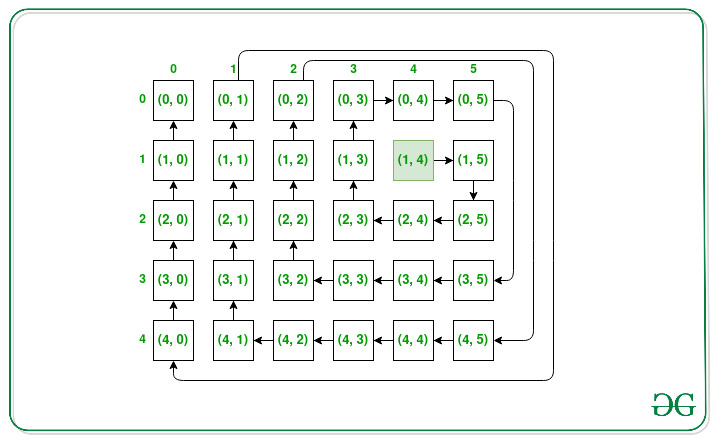
The brute-force loop structure from the boundary traversal gets complicated quickly if we try to extend it layer by layer. A much more elegant and robust solution uses a set of four variables to define the boundaries of the current layer we're traversing: top, bottom, left, and right.

The algorithm proceeds in a loop. In each iteration, it "peels" one layer off the matrix by performing the four-sided traversal, and then it "shrinks" the boundaries inward.
The process for one layer looks like this:
- Go Right: Traverse the
toprow fromlefttoright. After this, we're done with the top row, so we incrementtop. - Go Down: Traverse the
rightcolumn from the newtoptobottom. After this, we're done with the rightmost column, so we decrementright. - Go Left: Traverse the
bottomrow from the newrighttoleft. After this, we're done with the bottom row, so we decrementbottom. - Go Up: Traverse the
leftcolumn from the newbottomtotop. After this, we're done with the leftmost column, so we incrementleft.
This loop continues as long as our boundaries have not crossed (i.e., while left <= right and top <= bottom). This simple condition elegantly handles matrices of all shapes and sizes, including single rows, single columns, and squares.
The following videos provide excellent walkthroughs of this exact logic using JavaScript.
LEETCODE 54 (JAVASCRIPT) | SPIRAL MATRIX | CODING INTERVIEW PREP
This video from Andy Gala provides a great high-level introduction to the problem and the setup of the boundary variables.
Watch the initial explanation from the beginning to understand the variable names and overall strategy. Then watch the variable setup part where he initializes top, left, bottom, right, and the size variable.
Now that you have the conceptual setup, let's dive into the details of the implementation and how the boundaries shrink with each step.
Spiral Matrix - LeetCode 54 - JavaScript
This video from AlgoJS provides a more detailed, step-by-step trace of how the boundary variables are updated after each directional pass.
First, watch the conceptual walkthrough from 1:52 to 3:43. The visualization here of the search area shrinking is key. Then, watch the code implementation from 4:08 to 8:14 to see how this logic translates directly into a while loop containing four for loops.
Putting It All Together: A TypeScript Implementation
By combining the insights from these resources, we can build a clean, reliable implementation. Notice the checks (if (top <= bottom) and if (left <= right)) before the third and fourth movements. These are crucial to prevent redundant traversal in matrices with a single row or column.
function spiralOrder(matrix: number[][]): number[] {
    const result: number[] = [];
    if (matrix.length === 0) {
        return result;
    }

    let top = 0;
    let bottom = matrix.length - 1;
    let left = 0;
    let right = matrix[0].length - 1;

    while (top <= bottom && left <= right) {
        // 1. Traverse top row (left to right)
        for (let i = left; i <= right; i++) {
            result.push(matrix[top][i]);
        }
        top++; // Move top boundary down

        // 2. Traverse right column (top to bottom)
        for (let i = top; i <= bottom; i++) {
            result.push(matrix[i][right]);
        }
        right--; // Move right boundary left

        // Check if there are rows and columns left to traverse
        if (top <= bottom) {
            // 3. Traverse bottom row (right to left)
            for (let i = right; i >= left; i--) {
                result.push(matrix[bottom][i]);
            }
            bottom--; // Move bottom boundary up
        }

        if (left <= right) {
            // 4. Traverse left column (bottom to top)
            for (let i = bottom; i >= top; i--) {
                result.push(matrix[i][0]);
            }
            left++; // Move left boundary right
        }
    }

    return result;
}
This pattern is a powerful addition to your toolkit. It transforms a potentially confusing 2D traversal into a structured, repeatable process.
Conclusion
In this lesson, you moved from 1D arrays to 2D matrices, learning how to perform systematic traversals without missing elements or visiting them twice.
Key Takeaways:
- Matrix traversal problems can often be simplified by breaking them down into movements along four directions: right, down, left, and up.
- The Boundary Pointer pattern is a robust way to solve spiral and boundary traversal problems. It uses four variables (
top,bottom,left,right) to define a rectangular region of interest. - By iterating in four directions and shrinking the boundaries (
top++,right--,bottom--,left++) in a loop, you can "peel" away layers of a matrix systematically. - This pattern gracefully handles edge cases like single-row or single-column matrices, as long as you include checks to ensure the boundaries haven't crossed.
You've now completed the "Arrays, Strings, and Hash-Based Lookup" module. You've built a solid foundation, from frequency counting and prefix sums to in-place modifications and now, matrix traversal.
In the next module, we'll dive into "Two Pointers and Sliding Windows." We will revisit 1D arrays but explore a new set of powerful patterns that use pointers to define and manipulate windows or partitions within the data. This will further enhance your ability to solve a wide range of array problems efficiently.
Can't find a good explanation? Sign up and we'll make it for you
Sign up