
Hello again. In the previous lesson, you built a controlled x64 fixture whose runner loads fixture.dll, prints its PID, and waits for run. That waiting point gives us a reliable target: the DLL is present, but the interesting work has not started.
In this lesson, you will perform the smallest complete Frida host–agent interaction on that authorized local process. Your Node.js host will attach by PID, read the compiled JavaScript agent bundle, create and load it, receive one readiness message, and then unload and detach cleanly. This is deliberately a smoke test: it proves the deployment path before we add typed protocols, RPC operations, or hooks.
The host–agent loading boundary
There are two runtimes involved:
| Runtime | Runs where | Responsibility in this lesson |
|---|---|---|
| Node.js host | Your CLI process | Finds the fixture PID, attaches, reads the agent bundle, manages cleanup, displays status |
| Frida agent | Inside fixture-runner.exe | Executes target-local JavaScript and sends a minimal readiness notification |
The source language of the agent may be TypeScript, but the artifact supplied to session.createScript() is JavaScript. Keeping an explicit compilation step makes the deployment boundary visible and lets the agent grow beyond a single source file without changing how the host loads it.
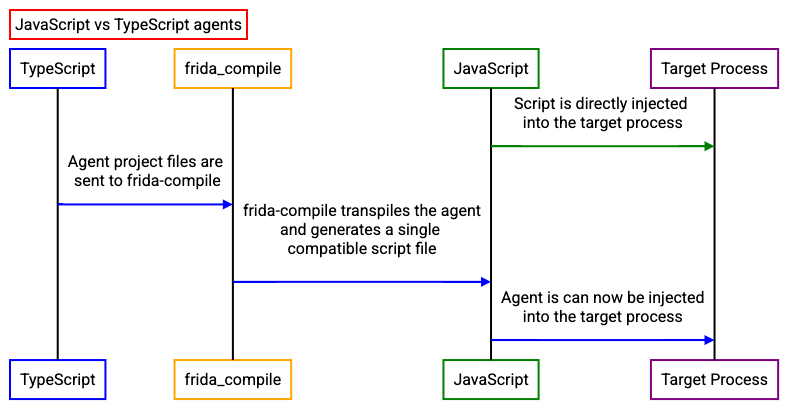
The diagram’s central idea is the important one: TypeScript exists at development time, while the target process executes the resulting JavaScript bundle. Depending on Frida version and tooling, there may be conveniences for TypeScript input, but this course intentionally keeps the bundle explicit. It makes builds reproducible and avoids making the host responsible for compiling code during an attach operation.
Frida’s Node bindings express the attach/load sequence in a small asynchronous API:
- Call
frida.attach(pid)to create a session connected to the target. - Call
session.createScript(agentSource)to prepare the JavaScript source in that session. - Register a message handler before loading, so no early agent message is missed.
- Call
script.load()to activate the agent in the target. - Later, unload the script and detach the session, even if loading or verification fails.
frida-node/test/script.ts at main · frida/frida-node · GitHub
Read the Frida project's own Node.js test as a compact reference for the host-side attach and script-load lifecycle. It uses a controlled test target, just as your fixture does.
On the GitHub page, find the describe("Script" test suite. In its beforeEach setup and the first should support rpc test, read the attach/load core. Focus on the separation between attaching to the process, creating a script, and loading it. The RPC calls after that point are only a preview; you will design the typed host–agent protocol and RPC boundary in later lessons.
A useful distinction: a session represents the host’s connection to a target process, while a script represents one loaded agent within that session. A future instrumentation session in your application will own both, but at this stage keep them as direct Frida objects in a development smoke runner.
Create a minimal TypeScript agent
Assuming the agent build target from the first Host–Agent Foundations lesson uses this layout:
agent/
  src/
    index.ts
  dist/
    index.js
create or replace agent/src/index.ts with:
send({
  kind: "agent-ready",
  pid: Process.id,
  agent: "minimal",
});
This agent does not enumerate modules, resolve exports, or change the target’s behavior. Its sole responsibility is to prove three things:
- Frida loaded the compiled script into the fixture process.
- The agent can access target-local Frida APIs such as
Process.id. - A message can travel from the target process back to the host.
Build it using the script established in your project configuration:
pnpm run build:agent
For this lesson, the expected output is:
agent/dist/index.js
If your configured agent entry point or output directory differs, retain your existing build configuration and adjust only the path used by the host below. The architectural rule remains the same: the host reads the bundled JavaScript artifact, not the .ts source file.
Before attaching, it is worth inspecting the first few lines of agent/dist/index.js. You should see JavaScript output containing the send(...) call. You do not need to understand all bundler wrapper code; the relevant verification is that the build artifact exists and is not empty.
Write a narrow host-side smoke runner
Create src/dev/attach-fixture.ts. This is a development/integration utility, not a domain command handler yet. It is acceptable for it to import Frida directly because it lives at the infrastructure edge.
import { readFile } from "node:fs/promises";
import { resolve } from "node:path";
import frida from "frida";

function parsePid(value: string | undefined): number {
  const pid = Number(value);

  if (!Number.isSafeInteger(pid) || pid <= 0) {
    throw new Error(
      "Usage: pnpm exec tsx src/dev/attach-fixture.ts <positive-pid>",
    );
  }

  return pid;
}

function waitForEnter(): Promise<void> {
  process.stdin.resume();

  return new Promise((resolveInput) => {
    process.stdin.once("data", () => resolveInput());
  });
}

async function main(): Promise<void> {
  const pid = parsePid(process.argv[2]);

  // Run this command from the repository root.
  // An environment variable makes the artifact location configurable
  // without hard-coding a machine-specific absolute path.
  const bundlePath =
    process.env.GRASP_AGENT_BUNDLE ?? "agent/dist/index.js";

  const agentSource = await readFile(
    resolve(process.cwd(), bundlePath),
    "utf8",
  );

  console.log(`Attaching to authorized fixture PID ${pid}...`);

  const session = await frida.attach(pid);

  try {
    const script = await session.createScript(agentSource);

    const ready = new Promise<void>((resolveReady, rejectReady) => {
      script.message.connect((message) => {
        console.log("[agent message]", JSON.stringify(message));

        if (message.type === "send") {
          resolveReady();
        }

        if (message.type === "error") {
          rejectReady(
            new Error(`Agent runtime error: ${JSON.stringify(message)}`),
          );
        }
      });
    });

    await script.load();
    await ready;

    console.log("Minimal agent is loaded.");
    console.log("Press Enter to unload the agent and detach.");

    await waitForEnter();

    try {
      await script.unload();
      console.log("Agent unloaded.");
    } finally {
      await session.detach();
      console.log("Detached from fixture.");
    }
  } catch (error) {
    // If script creation or loading failed, the session still must be closed.
    await session.detach().catch(() => undefined);
    throw error;
  }
}

void main().catch((error: unknown) => {
  const detail =
    error instanceof Error ? error.stack ?? error.message : String(error);

  console.error(`Attach/load smoke test failed:\n${detail}`);
  process.exitCode = 1;
});
Several design choices here are worth making explicit.
Read the bundle in the host
readFile() belongs on the Node.js side because it accesses the host filesystem. The agent receives source text only after the host has loaded it. An injected agent should not reach back into your development repository to locate its own source.
The environment variable is a small example of a configuration boundary:
set GRASP_AGENT_BUNDLE=agent\dist\index.js
Most of the time, the default path is sufficient. The override becomes useful later when packaged distributions place the agent bundle beside the CLI executable rather than inside the repository.
Register the message listener before load()
The agent’s top-level send() runs as soon as the script activates. If the host registered script.message.connect(...) only after await script.load(), a short agent could send its only message before the listener existed. The host would then wait indefinitely despite a successful load.
For now, any Frida send message completes the readiness promise. The next lesson will replace that permissive check with a versioned, validated message protocol. Do not treat raw message.payload as trusted application data yet.
Keep cleanup nested around ownership
The host owns the session it attaches and the script it creates. Therefore, it is responsible for releasing them:
script.unload()removes this specific agent from the target.session.detach()ends the Frida connection.
The nested try blocks ensure detachment is still attempted if unloading fails. A mature application will need a more complete, idempotent lifecycle model for unexpected target exits and externally triggered detaches; this smoke runner establishes the basic ownership rule first.
Run the attach/load check against the fixture
Use two terminals.
Terminal A: start the authorized fixture
From the fixture build directory created previously:
fixture-runner.exe
Wait for output resembling:
READY pid=12345
Commands: run | quit
fixture>
Keep this process open and do not enter run yet. Copy its PID.
Terminal B: build and attach
From the repository root, build the agent and run the host smoke runner:
pnpm run build:agent
pnpm exec tsx src/dev/attach-fixture.ts 12345
Replace 12345 with the actual PID printed by your fixture.
Expected host output resembles:
Attaching to authorized fixture PID 12345...
[agent message] {"type":"send","payload":{"kind":"agent-ready","pid":12345,"agent":"minimal"}}
Minimal agent is loaded.
Press Enter to unload the agent and detach.
The exact JSON property order is not important. The key facts are:
- The message has Frida’s
type: "send". - The payload reports
kind: "agent-ready". - The payload PID is the same PID to which you attached.
Now press Enter in Terminal B. You should see:
Agent unloaded.
Detached from fixture.
Terminal A should still be waiting at fixture>. That is expected: this minimal agent observes nothing and changes nothing. To confirm the fixture remains usable, enter run in Terminal A and verify its normal DONE sequence=1 result=1 response. Then enter quit.
This gives you a clean integration-test narrative: start known fixture, attach, load known bundle, observe readiness, unload, detach, and confirm the target remains functional.
Diagnose failures without broadening scope
Most attach failures are environmental or lifecycle failures rather than problems in the three-line agent.
| Symptom | Likely cause | First action |
|---|---|---|
Usage: ... <positive-pid> | PID argument missing or invalid | Copy the numeric PID from the fixture’s READY line |
| Process cannot be found | Fixture exited, or PID is stale | Start a new fixture runner and use its new PID |
| Access denied | Host and target have different privilege levels | Run both unelevated under the same account when possible; do not attach to processes you are not authorized to inspect |
| Agent bundle file is missing | Agent was not built or path differs | Run pnpm run build:agent; check agent/dist/index.js or set GRASP_AGENT_BUNDLE |
| Waits forever after attaching | Loaded bundle lacks the expected top-level send() | Inspect the generated bundle and rebuild after saving agent/src/index.ts |
Agent runtime error | Invalid generated JavaScript or unsupported agent API usage | Rebuild, then reduce the agent to the minimal send(...) form shown above |
| Fixture exits after attachment | Incorrect target, manual quit, or a fixture failure | Start the controlled runner again and keep it at the prompt during the smoke test |
Do not “solve” a permissions or endpoint-security problem by disabling security controls. Keep this work to the local fixture you compiled, follow your organization’s policy, and use a normal user-level target whenever possible.
Key takeaways
You now have a minimal but complete host–agent deployment path:
- The Node.js host attaches to the authorized fixture by its PID with
frida.attach(pid). - The host reads a compiled JavaScript bundle produced from the TypeScript agent.
session.createScript()prepares the bundle, andscript.load()activates it inside the target process.- A readiness message confirms that code executed in the fixture process and communicated back to the host.
- The host unloads its script and detaches in cleanup, leaving the fixture process alive and unchanged.
Next, you will turn the ad hoc readiness payload into a typed, validated message protocol. That will establish the contract used later for intercepted-call events, diagnostics, and session recording.
Can't find a good explanation? Sign up and we'll make it for you
Sign up