
Hello! Welcome back to our module on advanced server-side vulnerabilities.
In our previous lesson, we explored how an XML External Entity (XXE) vulnerability can be used to trigger a Server-Side Request Forgery (SSRF). This demonstrated a crucial concept: one vulnerability can often serve as a gateway to another.
Today, we will focus on SSRF as a standalone, high-impact vulnerability. While you've seen it as a consequence of XXE, SSRF can arise from many different coding flaws. Our goal is to identify and exploit SSRF vulnerabilities to scan internal networks and interact with internal services. Mastering this is fundamental for both penetration testing and bug bounty hunting, as it often allows an attacker to bypass perimeter defenses and access sensitive internal systems.
1. What is Server-Side Request Forgery?
Server-Side Request Forgery (SSRF) is a web security vulnerability that allows an attacker to coerce a server-side application into making HTTP requests to an arbitrary destination. The key danger lies in the server's privileged position within the network. A request originating from the server is trusted differently than one from an external user. It can access resources on localhost, other servers on the internal network, and cloud provider metadata services that are completely inaccessible from the outside.
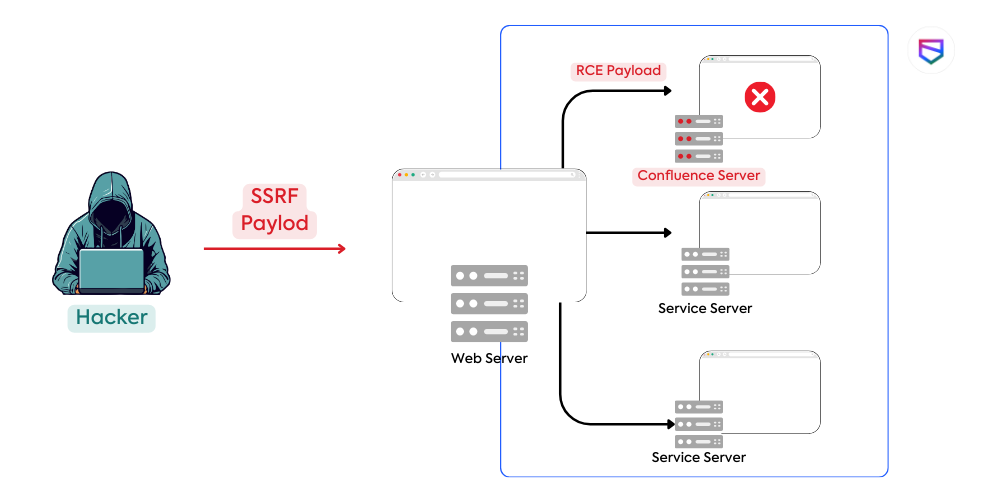
Conceptually, you can think of it like a function in your code, fetch_resource(url), that is exposed to the user. If the application doesn't validate the url parameter before passing it to the function, an attacker can supply URLs pointing to internal resources instead of the intended external ones.
SSRF vulnerabilities are commonly found in features that need to fetch remote resources based on user input.
SSRF: Advanced Exploitation Guide
The article 'SSRF: Advanced Exploitation Guide' from Intigriti provides a good list of common places to look for SSRF vulnerabilities.
Read the section titled 'Identifying SSRF vulnerabilities'. Pay attention to the list of common features like profile image loaders and webhook services, as these are prime candidates for testing.
2. Confirmation is Key: Server-Side vs. Client-Side Requests
The first and most critical step when you suspect an SSRF vulnerability is to confirm that the request is actually being made by the server. Many applications fetch URLs using client-side JavaScript, which means the request originates from your own browser, not the server. Such a request has no special network access.
To verify this, you can use a tool that provides a unique URL and logs incoming requests, such as Burp Suite's Collaborator or free online alternatives.
- Generate a unique URL from your collaborator tool.
- Provide this URL as input to the vulnerable feature.
- Check your collaborator logs. If a request appears, examine its source IP address.
- Server-Side Request: The source IP will belong to the web server or its underlying infrastructure.
- Client-Side Request: The source IP will be your own public IP address.
This video from bug bounty hunter NahamSec provides an excellent demonstration of this crucial verification step.
Server-Side Request Forgery (SSRF) Explained
Watch this video to understand the fundamental difference between a true SSRF and a client-side request, and how to use a collaborator service to tell them apart.
Watch from the beginning to 06:47. Focus on the method used to distinguish between a request made from the server and one made from the client's browser. This is the most important initial step in testing for SSRF.
3. Mapping the Internal Network via SSRF
Once you've confirmed a true SSRF, you can use it as a pivot to explore the internal network. Your first objectives are to discover live hosts and open ports.
Common Targets for Enumeration
- Localhost (
127.0.0.1): Servers often run administrative, monitoring, or database services that are only bound to the localhost interface for security. An SSRF can reach these. - Internal IP Ranges: Corporate networks use private IP ranges that are not routable over the public internet. These are defined in RFC 1918:
10.0.0.0/8(10.0.0.0 – 10.255.255.255)172.16.0.0/12(172.16.0.0 – 172.31.255.255)192.168.0.0/16(192.168.0.0 – 192.168.255.255)
The goal is to use the SSRF vulnerability to send requests to these internal addresses on various ports and analyze the response to see if a service is running.
Port Scanning with SSRF
You can perform port scanning by systematically changing the port number in your SSRF payload. For example, to check for a web server on localhost:8080, your payload might be http://127.0.0.1:8080.
Analyzing the server's response can tell you the port's status:
- Open Port: Often returns a service banner, an HTTP response, or an error message that is distinct from a connection error.
- Closed Port: Typically results in an immediate connection error message like "Connection refused".
- Filtered Port: The request might time out if a firewall is silently dropping the packet.
While you can do this manually with a tool like Burp Repeater, it's inefficient. A much better approach is to use a fuzzing tool or a script.
The following video demonstrates how to use fuff, a popular command-line fuzzer, to automate port scanning through an SSRF vulnerability.
This video provides a practical, hands-on demonstration of using SSRF for internal network enumeration, from identifying the vulnerability to fuzzing for open ports.
Watch from 01:21 to 04:16. Pay close attention to how the SSRF is first tested with localhost (01:21) and then how fuff is configured to fuzz the port number to automate the discovery of open internal ports (02:09).
Test your understanding!
You are using fuff to scan ports 1-65535 on localhost through an SSRF vulnerability at https://example.com/proxy?url=FUZZ_TARGET. The payload needs to be in the format http://localhost:PORT. You want to filter out responses that contain the word "refused" and have a size of 0 bytes, as these likely indicate closed ports.
How would you construct the fuff command?
Show answer
A possible fuff command would be:
fuff -w /path/to/wordlist/of/ports -u "https://example.com/proxy?url=http://localhost:FUZZ" -fw "refused" -fs 0
-w /path/to/wordlist/of/ports: Specifies the wordlist containing numbers from 1 to 65535.-u "https://example.com/proxy?url=http://localhost:FUZZ": Defines the target URL, withFUZZas the placeholder for the port number.-fw "refused": Filters out (hides) responses containing the word "refused".-fs 0: Filters out responses with a size of 0.
Scripting Your Scans
Given your background in computer science and Python, you can take automation a step further by writing custom scripts. This gives you more control over the logic, such as handling different response types and performing multi-threaded scanning for efficiency.
Server-Side Request Forgery (SSRF) Attack Guide
This 'SSRF Attack Guide' from Hackviser includes excellent Python scripts for automating internal network scanning. These are great templates for building your own tools.
Review the two Python scripts under the headings 'Internal Network Scanning' and 'Internal Service Mapping'. The first is a basic sequential scanner. Pay closer attention to the second script, which uses concurrent.futures to perform a much faster, multi-threaded port scan. Understand how it checks for open ports by analyzing the response text.
4. Interacting with Discovered Services
Finding an open port is just the first step. The real impact comes from interacting with the service running on that port.
Let's return to the scenario from the SSRF & Network Enumeration video. After discovering an open port 8888, the next step is to explore what's hosted there.
This final clip shows the payoff of enumeration: accessing a hidden service and finding sensitive information.
Watch from 04:16 to the end. Observe how the discovered port is used to access an internal web page, enumerate its contents, and ultimately retrieve a backup file containing credentials. This demonstrates the full attack chain from discovery to exploitation.
This example highlights the typical workflow:
- Scan: Use SSRF to find an open port (e.g.,
http://localhost:8888). - Explore: Access the root of the service (
/) to see what it is. - Enumerate: Analyze the response (HTML, JSON, etc.) for links, comments, or file paths.
- Exploit: Access discovered paths (e.g.,
/doc.backup) to retrieve sensitive information or functionality.
Depending on the server's configuration and the library handling the URL, you might also be able to use different protocol wrappers, such as file:/// to read local files, which effectively turns the SSRF into a Local File Inclusion (LFI) vulnerability.
Conclusion
In this lesson, you've taken a deep dive into Server-Side Request Forgery as a primary vulnerability. You've learned how to move beyond simple detection and use it as a powerful tool for internal network reconnaissance.
Key Takeaways:
- SSRF abuses the server's trusted network position. The danger comes from forcing the server to make requests on your behalf to resources it can access but you cannot.
- Always confirm the request is server-side. Use a collaborator service to check the source IP of the request before investing time in exploitation.
- The primary use of SSRF is internal enumeration. Start by scanning
localhostand then expand to private IP ranges, looking for open ports and services. - Automate your scanning. Manual port scanning is slow. Use fuzzing tools like
fuffor custom Python scripts to efficiently map the internal network. - Interaction is the goal. Finding a port is good, but the real impact comes from accessing the service, enumerating its contents, and finding sensitive data or functionality.
Next Lesson Preview:
We've focused on generic internal networks today. However, a huge number of modern applications are hosted in the cloud. In our next lesson, we will explore one of the most critical SSRF attack vectors: upgrading a basic SSRF to a more impactful attack by targeting cloud metadata services. You'll learn how a simple SSRF can be leveraged to query endpoints like AWS's 169.254.169.254 to steal cloud credentials and potentially take over the entire infrastructure.