
Hello. You now have an Entra ID-authenticated Terraform remote state backend in Azure Blob Storage, with a separate state key for each workload. That separation is important here: the Container Registry will be a deployable workload resource, while the Storage account that holds Terraform state remains protected infrastructure.
This begins the module on private containers and cloud-ready application configuration. In this lesson, you will provision a private Azure Container Registry (ACR) with Terraform, grant your signed-in identity permission to push images without enabling an admin account, and publish distinct, versioned backend and frontend images. Those image references will become the deployment inputs for Azure Container Apps and later AKS.
What Azure Container Registry stores
Azure Container Registry is Azure’s managed registry for OCI-compatible artifacts: most commonly Docker container images, but also artifacts such as Helm charts. It is a managed service rather than a VM or Docker daemon that you operate.
A useful way to read an image reference is:
registry-login-server/repository:tag
For this lab, your published image references will look similar to:
yourregistry.azurecr.io/grasp/backend:git-a1b2c3d4e5f6
yourregistry.azurecr.io/grasp/frontend:git-a1b2c3d4e5f6
The parts have distinct responsibilities:
| Element | Example | Meaning |
|---|---|---|
| Registry | yourregistry.azurecr.io | The Azure resource and image-service endpoint. |
| Repository | grasp/backend | A logical collection of related artifact versions. A slash is allowed in repository names. |
| Tag | git-a1b2c3d4e5f6 | A human-readable version label referring to an image manifest. |
| Digest | sha256:... | Content-derived immutable identity of an exact manifest. Docker displays it after a successful push. |
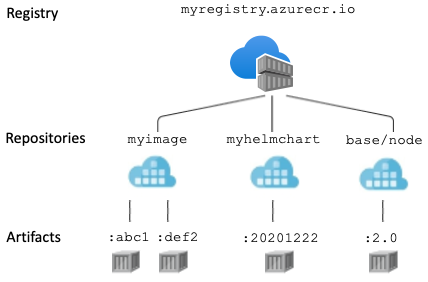
Tags are convenient release names, but they are not inherently immutable: a later push can assign the same tag to a different image. Therefore, a deployment should use a fresh, traceable version tag rather than an ambiguous tag such as latest. The image digest is the ultimate record of exactly what was pushed.
A registry is private by default in the access-control sense: anonymous users cannot pull its contents. It can still expose a public network endpoint, secured by authentication and authorization. That is appropriate for this budget-conscious lab because your laptop, GitHub Actions, Container Apps, and AKS can authenticate to it without the extra network infrastructure required for private endpoints. Full network isolation with private endpoints is a separate Premium-tier design, not needed here.
azurerm_container_registry | Resources | hashicorp/azurerm | Terraform | Terraform Registry
Read the Terraform AzureRM provider reference to see the resource shape, supported service tiers, and the login_server value Terraform returns after creation.
Start with the introduction and Example Usage. In Arguments Reference, read the name constraint, then find the entries for resource_group_name, location, sku, admin_enabled, and tags. In Attributes Reference, read the exported endpoint. Also retain the opening state caution: this lab deliberately avoids configuring an admin account or any access keys.
For the course, choose the Basic SKU. It supports private image push and pull workflows and is sufficient for the small backend and frontend images. Do not select Standard merely because the Azure CLI quickstart uses it, and do not select Premium for features we are not using.
Cost model before provisioning: A Basic ACR has a continuous, hourly base charge from its creation until deletion. In many regions, that is roughly USD 5 per month if kept for a full month, charged pro rata; regional prices and included storage terms can change. Image layers also consume registry storage, and network transfer can be billed in some circumstances. For two small test images, the likely material cost is the Basic registry baseline, but it is not a zero-cost service. This fits within the USD 50 monthly budget if you avoid unnecessary higher tiers and destroy the registry when you stop the course.
Provision a registry with Terraform and Entra RBAC
Create a new root module directory beside the existing bootstrap and workload directories:
mkdir container-registry
cd container-registry
This module will have its own state key, container-registry/terraform.tfstate. It will manage:
- a resource group dedicated to the registry;
- one Basic Azure Container Registry;
- one registry-scoped AcrPush role assignment for your current Entra identity.
It will not manage images themselves. Terraform creates the registry resource; Docker pushes OCI image manifests and layers to it afterward.
Create backend.tf. Use the existing resource group and Storage account that hold your remote Terraform state. As in the prior lesson, these values must be literal values because Terraform initializes its backend before evaluating variables.
terraform {
  backend "azurerm" {
    resource_group_name  = "rg-grasp-lab-yourinitials"
    storage_account_name = "replace-with-your-state-storage-account"
    container_name       = "tfstate"
    key                  = "container-registry/terraform.tfstate"

    use_azuread_auth = true
    use_cli          = true
  }
}
Next, create main.tf:
terraform {
  required_version = ">= 1.6.0"

  required_providers {
    azurerm = {
      source  = "hashicorp/azurerm"
      version = "~> 4.0"
    }
  }
}

provider "azurerm" {
  features {}
}

data "azurerm_client_config" "current" {}

variable "registry_resource_group_name" {
  type        = string
  description = "Resource group used for the Azure Container Registry."
}

variable "registry_name" {
  type        = string
  description = "Globally unique ACR resource name: 5 to 50 lowercase alphanumeric characters."

  validation {
    condition     = can(regex("^[a-z0-9]{5,50}$", var.registry_name))
    error_message = "The registry name must contain 5 to 50 lowercase letters or digits only."
  }
}

variable "location" {
  type        = string
  description = "Azure region for the registry."
  default     = "westeurope"
}

variable "tags" {
  type = map(string)

  default = {
    environment = "lab"
    course      = "grasp-azure"
    managed_by  = "terraform"
    cleanup     = "retain-until-course-end"
  }
}

resource "azurerm_resource_group" "registry" {
  name     = var.registry_resource_group_name
  location = var.location
  tags     = var.tags
}

resource "azurerm_container_registry" "main" {
  name                = var.registry_name
  resource_group_name = azurerm_resource_group.registry.name
  location            = azurerm_resource_group.registry.location
  sku                 = "Basic"

  # The default is false; setting it explicitly makes the intent visible.
  admin_enabled = false

  # Use ordinary Entra RBAC built-in roles in this course.
  role_assignment_mode = "LegacyRegistryPermissions"

  tags = var.tags
}

resource "azurerm_role_assignment" "current_user_acr_push" {
  scope                = azurerm_container_registry.main.id
  role_definition_name = "AcrPush"
  principal_id         = data.azurerm_client_config.current.object_id
}

output "acr_name" {
  value       = azurerm_container_registry.main.name
  description = "Azure resource name used with az acr commands."
}

output "acr_id" {
  value       = azurerm_container_registry.main.id
  description = "Resource ID used as the scope for registry access."
}

output "login_server" {
  value       = azurerm_container_registry.main.login_server
  description = "Fully qualified registry endpoint used in image references."
}
Create your ignored local values file, registry.auto.tfvars. Replace ab and the numeric suffix with your own initials and a sufficiently distinctive number. The registry name has no hyphens or underscores.
registry_resource_group_name = "rg-grasp-acr-ab"

# Must be globally unique, lowercase, and alphanumeric only.
registry_name = "acrgab20250301"

tags = {
  environment = "lab"
  course      = "grasp-azure"
  managed_by  = "terraform"
  cleanup     = "retain-until-course-end"
  owner       = "ab"
}
Although these values are not secrets, keeping the local file ignored is consistent with the workflow established earlier. The registry name is globally unique, so a name copied into source control will eventually become unusable by someone else.
The AcrPush role is deliberately scoped to the one registry. It authorizes the signed-in user to authenticate, inspect repositories, and push images. It does not use the registry’s admin username and password, and no registry credential is put into Terraform configuration or state.
Run the normal reviewed Terraform workflow:
terraform init
terraform fmt
terraform validate

terraform plan -lock-timeout=5m -out=create-acr.tfplan
terraform apply -lock-timeout=5m create-acr.tfplan
Review the plan before confirming it. It should create exactly three Azure-managed objects:
azurerm_resource_group.registryazurerm_container_registry.mainazurerm_role_assignment.current_user_acr_push
After apply, retrieve the important outputs:
terraform output
terraform output -raw login_server
Do not construct the login server by guessing from the registry resource name. Azure can apply DNS naming protections, and the exported login_server is the authoritative endpoint for Docker image references.
If the role-assignment resource fails with an authorization error, your signed-in identity can create resources but lacks permission to create RBAC assignments. You generally need Owner or User Access Administrator at a suitable scope. Do not work around that problem by enabling the ACR admin account. Use an identity authorized to make the role assignment, or ask the subscription administrator to grant the required permission.
Cost of this practical action: terraform init, formatting, validation, and planning have no Azure service cost. Applying creates a Basic ACR and starts its continuous base charge, approximately USD 5/month at typical regional pricing, prorated by time. The resource group and the RBAC role assignment have no direct charge. If you are stopping after this lesson, use the destroy procedure near the end rather than leaving the registry running.
Authenticate Docker and publish the two application images
Azure CLI login and Docker login are related but not identical:
az loginauthenticates the Azure CLI as your Entra identity.az acr loginuses that authenticated Azure session to configure Docker access to one registry.docker pushtransfers locally built image layers to the registry.
The role assignment may take a few minutes to propagate after Terraform applies. A temporary authorization failure immediately after creation is usually a propagation delay. Wait briefly and retry the login; do not enable admin credentials as a workaround.
Quickstart: Create a private container registry using the Azure CLI
Read Microsoft Learn’s Azure CLI quickstart for the Docker-side workflow: authenticating to ACR, tagging an existing local image with the registry endpoint, pushing it, and listing the resulting repositories and tags.
In Configure parameters for a container registry, note the naming rule. Then read Log in to registry, especially the login convention: the Azure CLI login command takes the short Azure resource name, not the login server. In Push image to registry, focus on the tagging requirement. Finish with List container images, including the listing commands.
The following commands use Bash. First retrieve Terraform outputs into shell variables:
ACR_NAME="$(terraform output -raw acr_name)"
LOGIN_SERVER="$(terraform output -raw login_server)"

printf 'Registry resource: %s\nLogin server: %s\n' "$ACR_NAME" "$LOGIN_SERVER"
Authenticate Docker to the registry:
az acr login --name "$ACR_NAME"
Use the short ACR resource name for az acr login. Use the fully qualified login server only in a Docker image reference.
Before tagging, identify the local image names that your application’s Docker build or Docker Compose workflow produced:
docker image ls --format 'table {{.Repository}}\t{{.Tag}}\t{{.ID}}\t{{.Size}}'
Set the two source image references to match that output. The values below are examples only; replace them with your actual local names and tags.
BACKEND_SOURCE="grasp-backend:local"
FRONTEND_SOURCE="grasp-frontend:local"
Choose one release version shared by both services. If the images were built from the current Git commit, use a commit-derived tag:
RELEASE="git-$(git rev-parse --short=12 HEAD)"
printf 'Publishing release: %s\n' "$RELEASE"
If this is not a Git working tree, choose an explicit release tag instead, for example:
RELEASE="v0.1.0"
Avoid publishing either service as latest. A commit-derived release tag establishes a clear connection between a deployed container and the source revision used to build it.
Now define target image references and apply tags locally:
BACKEND_REPOSITORY="grasp/backend"
FRONTEND_REPOSITORY="grasp/frontend"

BACKEND_TARGET="$LOGIN_SERVER/$BACKEND_REPOSITORY:$RELEASE"
FRONTEND_TARGET="$LOGIN_SERVER/$FRONTEND_REPOSITORY:$RELEASE"

docker tag "$BACKEND_SOURCE" "$BACKEND_TARGET"
docker tag "$FRONTEND_SOURCE" "$FRONTEND_TARGET"
docker tag does not rebuild or copy the image layers. It adds another local name pointing to the same image manifest. The registry endpoint and repository name in the new tag tell Docker where the subsequent push should publish it.
Push each service explicitly:
docker push "$BACKEND_TARGET"
docker push "$FRONTEND_TARGET"
On the first push, Docker uploads only layers that ACR does not already possess. Its output ends with a digest, which identifies the pushed image manifest. Record the release tag and digest in the pull request, release note, or deployment record when working in a team.
Cost of this practical action: Docker authentication itself has no direct Azure charge. The pushes create image storage in the Basic registry. For two normal test-service images, this is generally small relative to the registry’s base charge, but very large layers, repeated unique builds, or long-term retention can increase storage usage. Avoid pushing build caches, development-only images, or multiple large versions without a cleanup decision.
Verify the registry contents
The first push creates each repository automatically. Confirm that ACR now contains two repositories:
az acr repository list \
  --name "$ACR_NAME" \
  --output table
Expected repository names include:
grasp/backend
grasp/frontend
Then inspect the versions in each repository:
az acr repository show-tags \
  --name "$ACR_NAME" \
  --repository "$BACKEND_REPOSITORY" \
  --output table

az acr repository show-tags \
  --name "$ACR_NAME" \
  --repository "$FRONTEND_REPOSITORY" \
  --output table
Both should show the exact value of RELEASE. If one repository is absent, first check the corresponding docker push output. If Docker reports an authorization error, verify the selected Azure subscription, wait for RBAC propagation, and run az acr login --name "$ACR_NAME" again.
A successful verification establishes the release inputs you need later:
| Service | Repository | Versioned image reference |
|---|---|---|
| FastAPI backend | grasp/backend | LOGIN_SERVER/grasp/backend:RELEASE |
| React frontend | grasp/frontend | LOGIN_SERVER/grasp/frontend:RELEASE |
In deployment configuration, replace LOGIN_SERVER and RELEASE with the literal values produced in this lab. Later automation will generate equivalent references from GitHub Actions rather than from your local Docker daemon.
Cost of this practical action: Listing repositories and tags makes only lightweight registry API requests and has no meaningful incremental cost. It creates no compute resources and does not download image layers.
Keep the registry, or clean it up deliberately
Keep this registry for the following lessons. It will be the source of private images when you deploy to Azure Container Apps and AKS. The registry incurs its Basic-tier charge for as long as it exists, even when no container is running.
If you need to stop the course now or want to remove the lab before the next billing period, destroy only this module:
terraform plan -destroy \
  -lock-timeout=5m \
  -out=destroy-acr.tfplan

terraform apply -lock-timeout=5m destroy-acr.tfplan
Run those commands only from the container-registry directory. Review the destroy plan: it should remove the registry-scoped role assignment, the Container Registry, and rg-grasp-acr-ab. It must not mention the bootstrap resource group, state Storage account, or tfstate container.
Deleting the registry removes all repositories and images inside it. This is appropriate before any application runtime depends on those images; it is not appropriate once Container Apps or AKS workloads are pulling from it.
Cost of this cleanup action: Deleting the registry stops future Basic registry charges and removes its stored images. The resource group and role assignment have no deletion charge. Your Terraform state backend remains intentionally intact and continues to have only negligible Azure Storage usage.
Key takeaways
You now have a private, RBAC-controlled image source for the course:
- ACR organizes artifacts as a registry containing repositories, each with versioned tags.
- A private registry does not permit anonymous image pulls; a public network endpoint is still compatible with authenticated private access.
- The Basic SKU is sufficient for this lab and is the budget-conscious choice, though it has an ongoing base charge while retained.
- Terraform creates the registry and a registry-scoped
AcrPushrole assignment; Docker manages the actual image uploads. az acr logintakes the short registry resource name, while Docker image references must use Terraform’s exportedlogin_server.- Publish backend and frontend images to separate repositories with a fresh, traceable release tag rather than
latest. - Retain the registry for upcoming deployments, or destroy it from this module when pausing the course to stop its recurring charge.
Next, you will adapt the FastAPI backend for environment-based configuration and add separate liveness and readiness endpoints. Those changes will make the backend suitable for the health checks and runtime configuration used by the Azure deployment platforms later in the course.
Can't find a good explanation? Sign up and we'll make it for you
Sign up