
Hello. Your backend now reads configuration at runtime and keeps local .env files out of Git and Docker build contexts. The remaining problem is where a real credential belongs once the application runs in Azure. It must be available to an authorized workload, while remaining absent from the repository, Terraform state, image layers, and normal command output.
In this lesson, you will create an Azure Key Vault with Terraform, use Azure RBAC rather than legacy vault access policies, and upload an application secret through the Azure CLI without passing its value to Terraform. The immediate example uses a future DATABASE_URL secret slot; the actual PostgreSQL connection string will be installed later, once the database exists.
This is the final lesson in the application-configuration module. The next module will provision a temporary PostgreSQL instance and deploy the backend to Azure Container Apps.
The boundary: Terraform manages the safe container, not its secret contents
A secret-management design has two distinct responsibilities:
- Infrastructure definition: create the vault, configure its authorization model, and grant narrowly scoped access.
- Secret-value delivery: place the actual credential in the vault through a channel that does not persist it in Terraform state or Git.
Terraform is suitable for the first responsibility. It is not automatically suitable for the second.
A common but unsafe configuration looks like this:
resource "azurerm_key_vault_secret" "database_url" {
  name         = "database-url"
  value        = var.database_url
  key_vault_id = azurerm_key_vault.app.id
}
Even if database_url is declared sensitive = true, Terraform normally stores the secret value in its state. sensitive redacts output in the CLI; it does not remove the value from state or saved plan files. A remote Azure Storage backend with access controls remains good practice, but it does not turn a state file containing credentials into a secret vault.
For this lab, keep the boundary unambiguous:
| Item | Managed by Terraform? | May contain the actual secret value? |
|---|---|---|
| Key Vault | Yes | No |
| Vault RBAC role assignment | Yes | No |
| Vault URI and vault name | Yes | No |
Secret name, such as database-url | Optionally documented in code | No |
| Secret value, such as a PostgreSQL URL | No | Yes, only in Key Vault |
| Container image | No | Never |
| Git repository and GitHub Actions configuration | No | Never |
This is a deliberately practical model: Terraform builds the secure location, while an authorized operator writes the secret directly to that location. In a later CI/CD lesson, GitHub Actions will authenticate using short-lived OIDC credentials, not a stored Azure client secret.
Manage sensitive data in your configuration | Terraform | HashiCorp Developer
Read HashiCorp’s guidance to separate output redaction from true state avoidance. It is particularly useful if you have previously treated sensitive = true as complete secret protection.
In “Hide sensitive variables and outputs,” read the explanation of sensitive values. Focus on the statement that redacted values still persist in Terraform state and plan files. Then, in “Omit values from state and plan files,” read the introduction to ephemeral values and scan the “State security best practices” list. Terraform’s newer ephemeral and write-only mechanisms can help where a provider supports them, but this lab will use the simpler, provider-independent boundary: Terraform never receives the secret value.
Why not use a Terraform variable supplied interactively?
Entering a secret through an interactive Terraform prompt avoids committing it to terraform.tfvars, but a normal variable value can still be recorded in state when used by a managed resource. Setting TF_VAR_database_url has the same issue and additionally leaves the value in the process environment.
Newer Terraform versions support ephemeral values, and some provider resources have write-only arguments. These are valuable capabilities, but they depend on the Terraform and provider versions and on the exact resource schema. For this course’s application secret, direct upload to Key Vault is easier to inspect and proves the core rule: the secret never crosses Terraform’s input boundary.
Key Vault, Microsoft Entra ID, and RBAC
Azure Key Vault can store three broad types of protected material:
- Secrets: opaque strings such as database URLs, API tokens, and passwords.
- Keys: cryptographic keys used for operations such as encryption or signing.
- Certificates: certificate material and its lifecycle.
Your DATABASE_URL is a secret. Key Vault does not need to understand PostgreSQL syntax; it stores a protected string and controls who may retrieve it.
An application should not authenticate to Key Vault with a Key Vault password. Instead, it presents an access token issued by Microsoft Entra ID. Later, Azure Container Apps will use a managed identity: Azure gives the workload an identity and issues it tokens without placing a long-lived credential in the container.
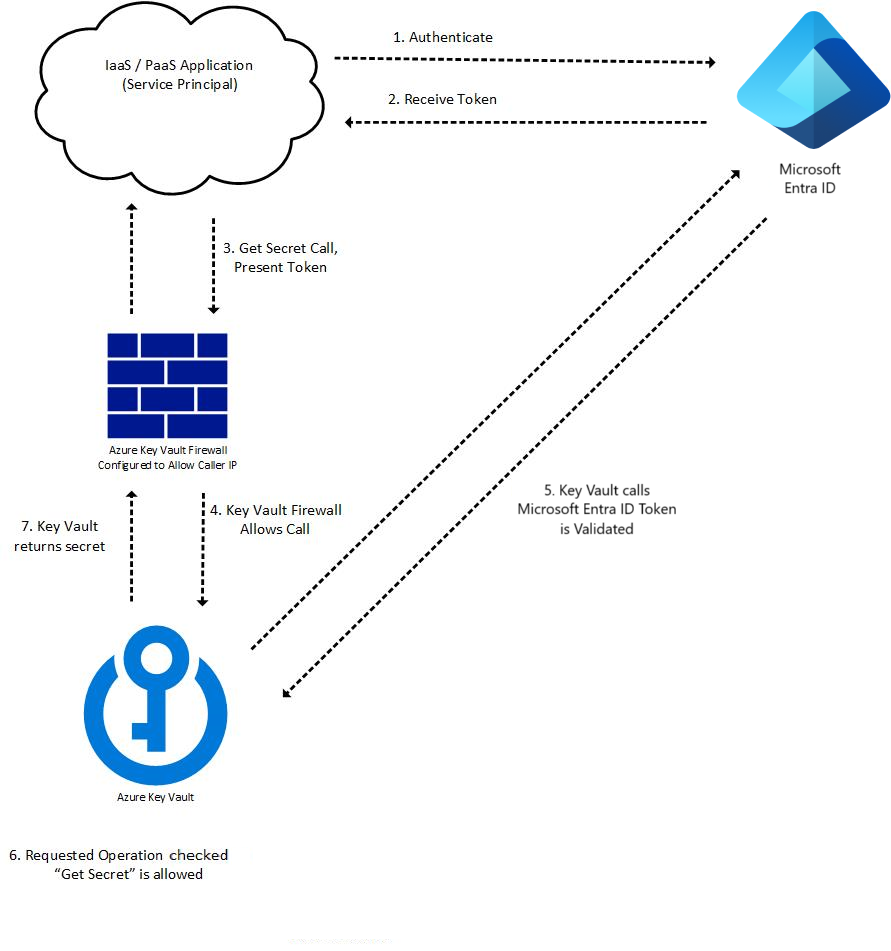
The diagram shows four separate checks that are easy to blur together:
| Control | Question it answers | Example failure |
|---|---|---|
| Network access | “May this network path reach the vault endpoint?” | A firewall or private-endpoint rule blocks the caller. |
| Authentication | “Who is calling?” | The workload has no valid Entra ID token. |
| Authorization | “May that identity perform this action?” | A workload can reach the vault but lacks get permission. |
| Application handling | “Does the process use the retrieved value safely?” | A secret is accidentally logged or returned in an API response. |
For this introductory lab, the vault will allow public network access. This does not make secrets anonymously readable: Entra ID authentication and RBAC authorization are still required. The choice avoids a common early failure in which future Container Apps cannot reach a vault protected by an IP firewall despite having the right identity.
A production design often adds private endpoints or carefully designed network rules. That requires coordinating DNS, virtual networks, and the workload’s egress path, so it is not a safe “checkbox hardening” change for this first deployment.
Use Azure RBAC, not legacy access policies
A Key Vault can use either legacy access policies or Azure RBAC for data-plane permissions. We will use Azure RBAC because it gives one role-assignment model across Azure resources.
The key roles in this lesson are intentionally different:
| Identity | Role | Purpose |
|---|---|---|
| Your signed-in lab user | Key Vault Secrets Officer | Create, update, and inspect secret metadata |
| Future Container App managed identity | Key Vault Secrets User | Retrieve secret values at runtime |
| Terraform identity | Azure resource-management permissions plus role-assignment permission | Create the vault and assign roles |
Do not give the future application Key Vault Secrets Officer. An application that only needs to read a connection string should not be able to create, delete, or rotate all secrets.
Also note that broad management-plane roles can be misleading: Contributor on a vault does not automatically grant permission to read its secret values. Key Vault data-plane access needs an appropriate Key Vault role.
Set and retrieve a secret from Azure Key Vault using Azure CLI
Read Microsoft Learn’s CLI quickstart for the Key Vault creation, RBAC, and secret lifecycle concepts. We will adapt its commands so that the secret value is never displayed or passed as a command-line argument.
In “Create a key vault,” read the creation guidance, paying attention to RBAC authorization and purge protection. In “Give your user account permissions to manage secrets in Key Vault,” read the RBAC assignment explanation. Finally, read the “Add a secret to Key Vault” and “Retrieve a secret from Key Vault” sections for the lifecycle. Do not use the example command that places a secret after --value, and do not run the value-retrieval command shown there; this lesson uses a local temporary file and verifies only secret metadata.
Create the vault with Terraform
Add a file such as key-vault.tf to the Terraform root you established in the Terraform module. This assumes the AzureRM provider and remote state are already configured.
First, add a non-secret variable. The name becomes part of the vault DNS name, so it must be globally unique across Azure, not merely unique in your subscription.
variable "key_vault_name" {
  description = "Globally unique name for the application Key Vault."
  type        = string
}
A value such as the following is safe to store in a committed environment .tfvars file because it is an identifier, not a credential:
key_vault_name = "kv-grasp-lab-yourinitials-4821"
Use lowercase letters, numbers, and hyphens. Keep the name between 3 and 24 characters.
Now add the vault, your current identity lookup, and a role assignment:
data "azurerm_client_config" "current" {}

resource "azurerm_key_vault" "app" {
  name                = var.key_vault_name
  location            = azurerm_resource_group.lab.location
  resource_group_name = azurerm_resource_group.lab.name
  tenant_id           = data.azurerm_client_config.current.tenant_id

  sku_name                   = "standard"
  enable_rbac_authorization  = true
  public_network_access_enabled = true

  # A short retention period is appropriate for this disposable lab.
  # Once enabled, purge protection cannot be disabled.
  soft_delete_retention_days = 7
  purge_protection_enabled   = true

  tags = {
    project     = "grasp-azure-lab"
    environment = "lab"
    managed_by  = "terraform"
  }
}

resource "azurerm_role_assignment" "lab_user_can_manage_secrets" {
  scope                = azurerm_key_vault.app.id
  role_definition_name = "Key Vault Secrets Officer"
  principal_id         = data.azurerm_client_config.current.object_id
}

output "key_vault_name" {
  description = "Name used by Azure CLI and later deployment configuration."
  value       = azurerm_key_vault.app.name
}

output "key_vault_uri" {
  description = "Non-secret base URI of the Key Vault."
  value       = azurerm_key_vault.app.vault_uri
}
Replace azurerm_resource_group.lab with the actual resource-group resource from your Terraform configuration if it has a different local name.
There are two assumptions behind the role assignment:
- Terraform is running as the same Entra ID user that you will use with the Azure CLI.
- That identity has permission to create Azure role assignments, normally through
OwnerorUser Access Administratorat a suitable scope.
On a personal subscription, the first assumption is usually true after az login. In a shared environment or CI pipeline, do not blindly grant the deployment principal secret-management privileges just because it created the vault. Assign roles intentionally to the distinct human or workload identities that need them.
Run the usual review-first workflow:
terraform fmt -recursive
terraform validate
terraform plan
terraform apply
Azure RBAC assignments can take several minutes to become effective. If the next CLI command initially returns Forbidden, wait a few minutes and retry rather than weakening the design or switching to legacy access policies.
Cost of this practical action: Azure Key Vault Standard is primarily transaction billed. In typical regions, secret operations are roughly USD 0.03 per 10,000 operations, so creating one vault and performing a few lab operations should cost only cents and creates no compute charge. Exact prices vary by region and currency. Purge protection means that a deleted vault cannot be permanently purged until its retention period ends; retain this small resource until the course cleanup rather than repeatedly creating replacements with new names.
Confirm that state contains no secret resource
The vault resource, its URI, your tenant ID, and the RBAC assignment are expected in state. None is a secret value. Confirm Terraform is tracking only the infrastructure layer:
terraform state list
You should see entries similar to:
data.azurerm_client_config.current
azurerm_key_vault.app
azurerm_role_assignment.lab_user_can_manage_secrets
You should not see an azurerm_key_vault_secret resource. Do not add one later merely to make Terraform “aware” of the secret: that would either require Terraform to receive the secret value or create confusing lifecycle ownership.
Upload a secret without shell history, Git, or Terraform state
Before placing a value in Key Vault, reinforce the repository and Docker protections introduced in the previous lesson. Add this line to both .gitignore and .dockerignore:
.secrets/
The .secrets/ directory will be a short-lived local staging location. It must never enter Git’s index or Docker’s build context.
For now, create an opaque lab-only value under the secret name database-url. It is not yet a usable PostgreSQL URL because the database does not exist. In the next module, you will replace this value with the real connection string without modifying Terraform.
First, make sure you are using the expected Azure subscription:
az account show --query "{subscription:name, tenant:tenantId, user:user.name}" -o json
Set the non-secret vault name from Terraform output:
export KEY_VAULT_NAME="$(terraform output -raw key_vault_name)"
Then, from your repository root, run the following in a shell with command tracing disabled. Do not use set -x.
mkdir -p .secrets
chmod 700 .secrets
umask 077

SECRET_FILE="$(mktemp .secrets/database-url.XXXXXX)"

read -r -s -p "Enter a new lab-only secret value: " SECRET_VALUE
printf '\n'
printf '%s' "$SECRET_VALUE" > "$SECRET_FILE"
unset SECRET_VALUE

git check-ignore -v "$SECRET_FILE"

az keyvault secret set \
  --vault-name "$KEY_VAULT_NAME" \
  --name "database-url" \
  --file "$SECRET_FILE" \
  --output none

rm -f "$SECRET_FILE"
This process protects several boundaries:
read -sprevents your terminal from echoing the typed value.--filemeans the secret is not present in shell history as a command argument..secrets/is ignored by Git and excluded from Docker builds.az keyvault secret setsends the value directly to Key Vault over the authenticated CLI session.- Terraform does not execute this command, receive the value, or record it in state.
- The local staging file is removed immediately after upload.
A removed file is not a cryptographic erase guarantee, especially on SSD-backed storage. The important practice here is to avoid leaving a persistent secret file in the project directory. For more sensitive real-world values, use your organization’s approved operator workstation, secret-entry process, or dedicated rotation workflow.
Cost of this practical action: The secret upload is a single Standard Key Vault secret operation, normally a tiny fraction of a cent at the indicative transaction price. It creates no Container Apps, database, network gateway, or image-registry cost.
Verify existence without revealing the value
The Microsoft Learn quickstart demonstrates retrieving a secret value. Do not do that in this lab, because plain-text terminal output may be copied into terminal scrollback, shell logs, recordings, or support tickets.
Instead, verify that Key Vault has created an enabled, versioned secret by requesting only its metadata:
az keyvault secret show \
  --vault-name "$KEY_VAULT_NAME" \
  --name "database-url" \
  --query "{id:id, enabled:attributes.enabled, created:attributes.created}" \
  -o json
The returned id is a versioned secret URI. It is safe to inspect and demonstrates an important Key Vault behavior: a secret has a stable logical name (database-url) and one or more immutable versions. When you later replace the value under the same name, Key Vault creates a new version.
Check that the current Git working tree has not accidentally staged anything sensitive:
git status --short
git diff --cached --name-only
You should see only the intentional Terraform files and ignore-file changes. There should be no .secrets/ file, .env file, or secret value in a tracked configuration file.
Cost of this practical action: Metadata retrieval is another low-volume Key Vault transaction, normally negligible. The Git checks are local and have no Azure cost.
Prepare for runtime retrieval, but do not grant it yet
At this point, your own user can manage secrets. The running application does not yet have access, and that is correct: no Container App exists to authenticate as.
When Container Apps are introduced, the design will be:
- Enable a managed identity for the Container App.
- Assign that identity
Key Vault Secrets Userat the vault scope. - Configure the platform to resolve the
database-urlsecret into a Container Apps secret. - Supply that platform secret to the backend as
DATABASE_URL. - Set
DATABASE_REQUIRED=trueonly after the backend can reach the database.
The Python application remains Azure-neutral. Its Pydantic settings code still sees an ordinary DATABASE_URL environment variable. Azure is responsible for retrieving the protected value; FastAPI should never need a Key Vault access credential baked into the image.
Avoid a tempting shortcut: do not add Azure SDK code and a Key Vault URI to the FastAPI service merely to retrieve one deployment secret. Platform-level secret references are simpler for this deployment path and keep the application’s configuration contract portable to local Docker Compose and later AKS.
Key takeaways
You now have a state-safe secret-management boundary:
- Azure Key Vault stores the actual protected value; Terraform creates the vault and authorization structure, but never receives that value.
- Terraform’s
sensitive = truesetting redacts CLI output but does not by itself keep secrets out of state or saved plans. - Azure RBAC separates duties: your lab user has
Key Vault Secrets Officer, while the future application will receive onlyKey Vault Secrets User. - The secret was uploaded through Azure CLI using a temporary ignored file, avoiding Git, Docker build contexts, Terraform state, and shell command arguments.
- Secret metadata may be inspected safely; avoid commands that print secret values.
- Key Vault Standard has very low transaction-based cost for this lab, but purge protection means cleanup has a retention delay.
Next, you will provision a short-lived, budget-conscious Azure Database for PostgreSQL instance with Terraform, prepare the schema, and replace the placeholder database-url secret with the real runtime connection value.
Can't find a good explanation? Sign up and we'll make it for you
Sign up