
Hello. In the previous lesson, you treated exceptions as part of an application’s contract and diagnostic design: failures should retain their causes and be handled at a layer that can act meaningfully. Build tools serve a similarly practical purpose at the project level. They make the external code your application relies on explicit, reproducible, and packageable.
This lesson uses Maven as the concrete example, since it is common in Spring Boot projects. The underlying ideas also apply to Gradle, although the exact configuration syntax and version-conflict rules differ. By the end, you should be able to explain how Maven resolves a dependency graph, selects versions, runs a build lifecycle, and turns a Spring Boot application into something that can be started with java -jar.
A build tool is a dependency resolver and an orchestrator
A Java build tool has two connected jobs:
- Resolve the project model: determine the project’s identity, dependencies, versions, repositories, plugins, and configuration.
- Execute the build: compile source code, run tests and checks, package outputs, and optionally publish the result.
In Maven, the central project descriptor is pom.xml, where POM means Project Object Model. It declares the project’s coordinates:
<groupId>com.example</groupId>
<artifactId>orders-api</artifactId>
<version>1.0.0</version>
Together, these identify an artifact. An artifact is a versioned build output or metadata published to a repository: commonly a JAR file plus its POM. The coordinates are how another build refers to it.
A realistic Spring Boot project’s POM is not interpreted in isolation. Maven combines its local configuration with inherited parent configuration, imported BOMs, active profiles, and Maven defaults. The result is called the effective POM.
That matters because a Boot application often appears to specify remarkably little:
<parent>
    <groupId>org.springframework.boot</groupId>
    <artifactId>spring-boot-starter-parent</artifactId>
    <version>...</version>
</parent>

<dependencies>
    <dependency>
        <groupId>org.springframework.boot</groupId>
        <artifactId>spring-boot-starter-web</artifactId>
    </dependency>
</dependencies>
Yet the effective model includes substantial inherited plugin configuration and dependency-version management. A build tool is therefore not merely “running javac.” It is constructing and executing a declared model of the application.
Dependency resolution: from a declaration to a graph
When you declare a dependency, you rarely receive only one JAR. Libraries themselves depend on other libraries. Those are transitive dependencies.
For example, an application may directly declare two libraries, each of which brings further requirements:
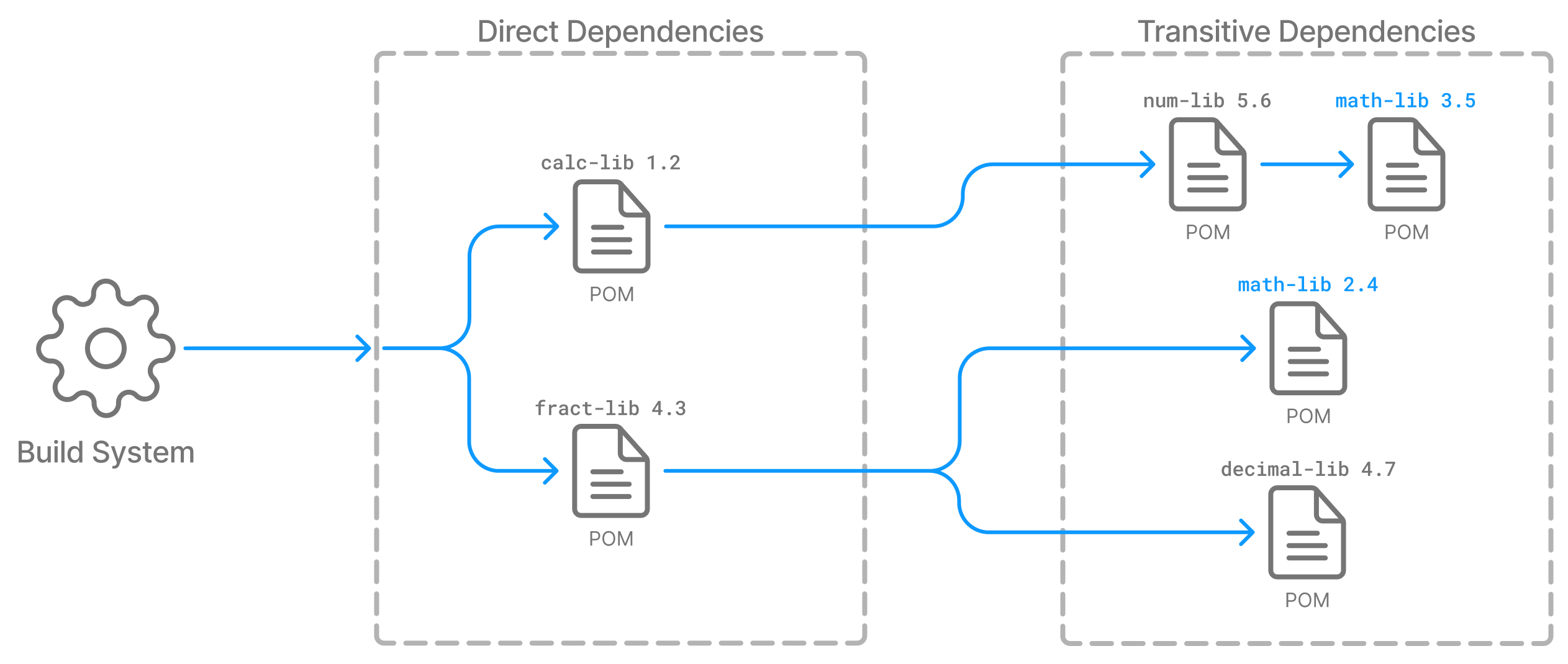
The important distinction is:
- A direct dependency is one your project declares.
- A transitive dependency is brought in because one of your dependencies needs it.
In a Spring Boot application, spring-boot-starter-web is a direct dependency. It brings a curated set of transitive dependencies needed for a typical web application, such as Spring MVC and an embedded servlet container.
Conceptually, Maven resolves dependencies in this order:
- It reads the effective POM, including parent and managed-version configuration.
- It constructs the dependency graph from every direct dependency and the metadata of their dependencies.
- It checks the local Maven repository, normally under
~/.m2/repository, for required POMs and artifacts. - If an artifact is missing locally, Maven obtains it from configured remote repositories and stores a local copy.
- It chooses one version wherever the graph requests multiple versions of the same artifact.
- It creates appropriate classpaths for compilation, tests, and runtime according to dependency scope.
A repository is not simply a web page from which Maven downloads JAR files. It is an organized store of versioned artifacts and metadata. Maven needs both:
- The JAR, containing compiled classes and resources.
- The dependency’s POM, which tells Maven what that artifact itself depends on.
This metadata is why Maven can traverse a large dependency graph automatically rather than requiring developers to manually locate every indirect library.
Introduction to the Dependency Mechanism - Apache Maven
Read Apache Maven’s “Introduction to the Dependency Mechanism” to build a precise mental model of transitive dependencies, scope, conflict mediation, dependency management, and BOMs. These distinctions come up frequently in Spring Boot interviews.
In “Transitive Dependencies,” read the transitive-resolution discussion. Focus on why Maven needs dependency mediation when one artifact appears through several paths. Then, in “Dependency Scope,” read the direct-dependency guidance, followed by the scope explanation and table. Note particularly the difference between compile, runtime, provided, and test. Finally, read “Dependency Management” from its introduction through the version-override example, then “Bill of Materials (BOM) POMs” from the BOM motivation and usage example.
Why declare a library you already get transitively?
Suppose your source code imports a type from library C, but you only declare library B, which happens to bring C transitively. The code may build today. But if a future version of B stops depending on C, your build breaks despite no change to your own source code.
The better rule is:
Declare every library that your application directly uses in source code. Let transitive dependencies fill in the libraries that those direct dependencies require internally.
This is both documentation and stability. It makes the POM reveal the application’s real API-level dependencies.
Version conflicts are a design decision, not a download failure
A dependency graph may request two versions of the same artifact. Java class loading generally cannot safely treat two versions of the same ordinary library as one coherent classpath dependency. Maven must select one.
Maven’s default mediation rule is nearest definition wins:
- Maven selects the version reached by the shortest path from your project.
- If competing versions are at the same depth, the first declared dependency wins.
- A direct declaration is at depth one, so declaring a version directly generally overrides a deeper transitive request.
This does not prove that the selected version is compatible with all consumers. Maven has resolved the graph deterministically, not established that every library was compiled and tested against the winning version. A dependency conflict can therefore produce a successful build followed by a runtime NoSuchMethodError, ClassNotFoundException, or behavior change.
A strong practical response is usually to make the intended version explicit through dependency management, rather than hoping the nearest-path rule continues to choose the desired version.
Dependency management, BOMs, and Spring Boot
Maven’s dependencyManagement section supplies version constraints for dependencies. Crucially, managing a dependency does not itself add that dependency to the application. It means:
If this artifact is declared or encountered transitively, use this version.
This separates two concerns:
| Concern | Maven mechanism | Meaning |
|---|---|---|
| “My application needs this library.” | <dependencies> | Adds the library to the project graph. |
| “If this library appears, use this version.” | <dependencyManagement> | Controls the version without necessarily adding the library. |
A Bill of Materials, or BOM, is a POM that manages a coherent set of library versions. Rather than specify a separate version for every Spring module, a project can import a BOM and declare the modules it needs without versions.
Spring Boot’s dependency management has the same practical purpose: it provides a tested, compatible set of versions for Spring, embedded servers, logging libraries, and many common integrations. In most Boot applications, overriding a managed version is possible, but should be a deliberate compatibility and security decision rather than routine copy-paste.
One interview-quality caveat:
Maven’s nearest-definition rule is Maven-specific. Gradle also resolves dependency graphs and supports version constraints, but its default conflict-resolution behavior is different. Explain the general problem first, then name the tool’s actual rule.
Scope decides where a dependency is available
Dependency scope is about which classpath needs a library and whether it should spread to consumers of your artifact.
The scopes worth knowing for ordinary backend development are:
| Scope | Available while compiling main code? | Available at application runtime? | Typical use |
|---|---|---|---|
compile | Yes | Yes | Default scope for libraries used by production code. |
runtime | No | Yes | A driver or implementation needed only when the application starts. |
provided | Yes | No | A library supplied by the execution environment. |
test | No for main code | No for the packaged application | JUnit, Mockito, test fixtures. |
For instance, a JDBC API may be available at compile time through your application’s dependencies, while a particular database driver is primarily a runtime concern. Test dependencies must not be needed to start production code.
Scope also prevents accidental leakage. If a library exists only to run unit tests, consumers of your published artifact should not inherit it.
In a modern Spring Boot executable JAR, the packaging plugin determines which runtime dependencies are bundled. Test dependencies are not bundled simply because Maven used them to compile or run tests.
The lifecycle: phases describe intent, plugin goals do the work
Once Maven has a model and resolved dependencies, it performs build work through lifecycles.
Maven has three built-in lifecycles:
cleanremoves build output, usually thetargetdirectory.defaultcompiles, tests, packages, verifies, installs, and deploys the project.sitegenerates project documentation.
The default lifecycle contains many phases. For an interview explanation, these are the most useful milestones:
| Phase | Intent |
|---|---|
validate | Check that required project information is present. |
compile | Compile main source code into .class files. |
test | Compile and run unit tests. |
package | Create a distributable artifact such as a JAR. |
verify | Run further quality checks, often including integration-test-related verification. |
install | Copy the artifact and its metadata to the local Maven repository. |
deploy | Publish the artifact to a remote repository. |
Maven executes all earlier phases when you request a later phase. Therefore:
./mvnw package
runs the build up through package, including compilation and ordinary unit tests. It does not mean “only make a JAR.”
Similarly:
./mvnw clean package
runs the clean lifecycle first and then builds through package. This avoids accidentally using old generated output.
A phase is a point in the lifecycle. A plugin goal is the concrete task that does work at that point.
For example, with JAR packaging, Maven’s standard bindings include goals that copy resources, compile main code, compile test code, run tests, create the JAR, install it, and deploy it. Plugins provide these goals. Your POM can also bind additional goals, such as code generation, static analysis, integration-test setup, or container-image creation, to suitable phases.
Introduction to the Build Lifecycle - Apache Maven
Read Apache Maven’s lifecycle guide to distinguish lifecycle phases from plugin goals. This distinction lets you explain what a Maven command means rather than treating it as a memorized incantation.
In “Build Lifecycle Basics,” read the lifecycle overview and default phases. Pay attention to the difference between package, install, and deploy. Next, in “A Build Phase is Made Up of Plugin Goals,” read the phase-versus-goal explanation. Then read the “Packaging” subsection from the default JAR bindings. Relate each goal to the lifecycle phase it supports.
Two common misunderstandings are worth correcting:
packageis notinstall. Packaging creates output undertarget; installation copies the artifact and POM into the local repository so other local projects can depend on it.installis notdeploy. Deployment publishes to a configured shared remote repository, typically done in CI or a release process rather than from every developer laptop.
A plain JAR is not necessarily a runnable Spring Boot application
A standard Java JAR is an archive containing classes and resources. It can be executable if its manifest identifies a Main-Class, but it does not automatically contain every dependency needed at runtime.
Historically, a deployment could consist of:
- an application JAR;
- a directory of dependency JARs;
- a classpath definition;
- perhaps an externally managed Tomcat server.
Spring Boot commonly produces a self-contained executable JAR instead. The Spring Boot Maven Plugin repackages the ordinary application JAR so it contains the application, its runtime dependencies, and Boot’s launcher infrastructure.
A typical executable Spring Boot JAR includes:
META-INF/
  MANIFEST.MF
org/springframework/boot/loader/
BOOT-INF/
  classes/        application classes and resources
  lib/            dependency JARs
The key details are:
BOOT-INF/classescontains the compiled code and resources from your application.BOOT-INF/libcontains the resolved runtime dependency JARs, including an embedded server when the relevant web starter is used.- The manifest’s
Main-Classidentifies Spring Boot’s launcher rather than directly naming your application class. - The manifest’s
Start-Classidentifies your application class containingmain.
When you run:
java -jar target/orders-api-1.0.0.jar
the Boot launcher creates the appropriate runtime classpath from the nested JARs and invokes your application’s main method. Your application then starts Spring, which creates the application context and, for a servlet web application, starts its embedded web server.
The server still needs a compatible Java runtime. It does not need Maven, Gradle, a separate dependency download step, or an externally installed Tomcat merely to run that executable JAR.
[Episode 43] Packaging a Spring Boot Application into an Executable JAR
Watch “[Episode 43] Packaging a Spring Boot Application into an Executable JAR” by Bingyang Wei for a concrete view of the Maven plugin, java -jar, and the executable archive’s manifest.
Watch packaging and launch to connect the Spring Boot Maven Plugin with the produced JAR and its direct execution from a terminal. Then watch manifest roles to see why the launcher is the manifest’s main class while the application’s own class is recorded as the start class.
What mvn package produces in a Boot project
For a conventional Boot Maven project, this is the important chain of responsibility:
- Maven resolves the project’s plugins and dependencies.
- The compiler plugin compiles
src/main/javainto bytecode, typically undertarget/classes. - The test plugins compile and execute test code.
- Maven’s normal JAR packaging creates an application archive.
- The Spring Boot Maven Plugin repackages it into an executable archive containing the runtime dependency JARs and Boot launcher.
The exact plugin configuration can be inherited from the Spring Boot parent POM or explicitly declared. The conceptual point is that ordinary JAR packaging and Boot repackaging are separate responsibilities.
A practical diagnostic routine
When a build behaves unexpectedly, avoid guessing from an IDE dependency view alone. Maven exposes the information needed to reason about it:
./mvnw dependency:tree
./mvnw help:effective-pom
./mvnw clean package
Use them with distinct purposes:
dependency:treeshows the resolved graph and helps locate the path through which a library arrived.help:effective-pomshows inherited and managed configuration that is not obvious in the localpom.xml.clean packagedemonstrates the complete build through artifact creation.
For a Boot executable JAR, inspecting the archive contents is also informative:
jar tf target/orders-api-1.0.0.jar
Look for BOOT-INF/classes, BOOT-INF/lib, and META-INF/MANIFEST.MF. This turns “Spring Boot makes a fat JAR” from a vague phrase into a verifiable claim.
Explain it in an interview
A concise but substantial answer could sound like this:
Maven starts by reading the project’s effective POM, including inherited parent configuration and dependency management. Each declared dependency has coordinates and a POM containing its own dependency metadata, so Maven builds a transitive dependency graph. It resolves artifacts from the local repository or configured remote repositories and creates classpaths based on scopes such as compile, runtime, and test.
If multiple versions of the same artifact occur, Maven normally uses nearest-definition mediation, but dependency management or a direct declaration can intentionally control the version. In Spring Boot, the parent POM or imported BOM provides a compatible set of managed versions, while starters bring common groups of dependencies.
When I run
mvn package, Maven executes all earlier default lifecycle phases, including compilation and tests, then creates an artifact intarget. For Spring Boot, the Boot Maven Plugin repackages the regular JAR as an executable JAR. It includes application classes, runtime dependency JARs, and a Boot launcher, sojava -jarcan start the application and embedded server on a machine with a compatible JRE.
Key takeaways
- A build tool resolves a versioned dependency graph and orchestrates compilation, testing, packaging, and publication.
- Direct dependencies are declared by your project; transitive dependencies are required by those libraries.
- Declare libraries your own source code directly uses, even when they currently arrive transitively.
- Maven resolves version conflicts using nearest-definition mediation by default; this is deterministic but does not guarantee compatibility.
dependencyManagementcontrols versions without necessarily adding a dependency; BOMs centralize a compatible set of managed versions.- Maven phases express build stages, while plugin goals perform the actual work.
packagecreates an artifact,installcopies it to the local repository, anddeploypublishes it to a remote repository.- A Spring Boot executable JAR contains application classes, runtime libraries, and a launcher, allowing startup with
java -jar.
This completes the Java-fluency module. Next, the course moves below the application source level: how Java code progresses through compilation, class loading, interpretation, and JIT compilation in the JVM.
Can't find a good explanation? Sign up and we'll make it for you
Sign up