
Hello again. Last time, you used print() to make Python display text and numbers, then followed the useful routine: edit, save, run, inspect.
This lesson adds an important part of that routine: when Python cannot understand the structure of your code, it gives you an error message. You will learn to use the error type, line number, and caret marker to find and correct a simple syntax error. Debugging is not a sign that someone is bad at coding; it is a normal part of writing every program.
Syntax: Python’s rules for writing instructions
A program has syntax when it follows the language’s structural rules. English has syntax rules too: a sentence usually needs words in a sensible order and punctuation at the end. Python is much less able to guess what you meant.
For example, this is valid Python:
print("System check started")
But this is not:
print("System check started)
The closing quotation mark is missing. Python sees the opening " and expects another " to mark where the text ends. Since it cannot find one, it stops and reports a SyntaxError.
A syntax error means:
“I cannot read this program as valid Python code.”
Python checks the syntax of the whole file before it begins running the program. So even a syntax error on the last line stops all of the program from running. That is why a correct line near the top might produce no output when another line contains a syntax error.
3.5. Syntax errors — Foundations of Python Programming
Read this short section from Foundations of Python Programming at Runestone Academy. It explains syntax as the structure of a program and shows why one syntax mistake can prevent an entire script from running.
In Section 3.5, “Syntax errors,” first read from Python's syntax rules. Then continue with the next paragraph beginning “For most readers of English” through the numbered observations about SyntaxError, especially observation 2 about no lines running and observation 3 about the line number. Ignore the later discussion of indentation for now; loops and indentation come in a later module.
Reading a simple error message
When you press F5 in IDLE and a script has a syntax mistake, look in the Shell. The message may look roughly like this:
  File "C:\Users\YourName\PythonProjects\debug_practice.py", line 2
    print("Check complete)
          ^
SyntaxError: unterminated string literal (detected at line 2)
The exact file path and wording can differ slightly depending on your version of Python. Still, the important parts are consistent:
| Part of the message | What it tells you |
|---|---|
File ... | Which Python file was run |
line 2 | Where Python noticed a problem |
| Code line shown below it | The line to inspect first |
^ caret | The place Python was examining when it detected trouble |
SyntaxError: ... | The kind of problem and a useful clue |
An unterminated string literal means text was started with a quote but not ended with the matching quote. “Literal” simply means text written directly in your code, such as "Hello".
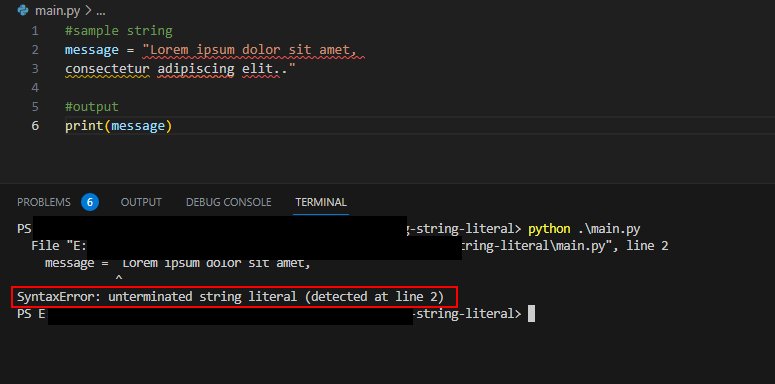
The image uses a different code editor from IDLE, but the key evidence is the same: the error type is at the bottom, and the line number tells you where to begin looking.
One careful detail matters: the line number is a strong clue, not an absolute guarantee. Python reports the place where it first realizes that the code no longer makes sense. If you leave a quote or parenthesis open, the actual missing symbol may be slightly earlier on that line, or sometimes on the line above.
A practical debugging routine
When you see SyntaxError, do not randomly rewrite your whole program. Use this small, repeatable process instead:
- Read the final line first. Find
SyntaxErrorand read the explanation after it. - Find the reported line number in the IDLE editor. Line numbers are normally shown at the left of the code.
- Inspect the code line and caret. Look closely at quotation marks, parentheses, commas, and spelling.
- Check just before the marked spot if the message seems confusing. An opening quote or
(may be missing its matching partner. - Make the smallest correction that fixes the structure.
- Save with
Ctrl+S, run withF5, and inspect the new result.
A good first visual scan is to match symbols in pairs:
| Opening symbol | Matching closing symbol | Example |
|---|---|---|
" | " | "Ready" |
( | ) | print("Ready") |
' | ' | 'Ready' |
For this course, double quotes are the usual choice for text. If you start a string with ", finish it with ". Do not accidentally finish it with '.
This brief video reinforces the two most useful cases for today: a missing quotation mark and unmatched parentheses.
What is a Syntax Error in Python? (Examples + How to solve it)
Watch the selected moments from “What is a Syntax Error in Python?” by Indently. It gives a quick visual explanation of why Python rejects incomplete strings and unbalanced parentheses.
Watch the introduction for the meaning of a syntax error. Then watch missing quotes, which matches the error you are most likely to see after today’s print() practice. Finally, watch parenthesis errors to see why every opening parenthesis needs a closing one. The later collection example is not important yet; focus on print() lines.
Two common print() syntax mistakes
1. A missing quotation mark
Here is an incorrect line:
print("Status: ready)
Python starts reading text after the first ", but never finds the closing quote.
Correct it by adding the matching ":
print("Status: ready")
2. An extra closing parenthesis
Here is another incorrect line:
print("Status: ready"))
There is one opening parenthesis after print, so there must be exactly one closing parenthesis at the end.
Correct version:
print("Status: ready")
Python’s message for this may include wording such as unmatched ')'. It means Python found a ) that has no matching (.
For now, keep your attention on matching quotes and parentheses in print() statements. Later lessons will introduce other syntax rules, including colons for conditions and indentation for groups of code.
Guided build: fix the errors one at a time
In IDLE, create a new file named debug_practice.py in your PythonProjects folder. Type this correct starter program:
print("Debugging practice")
print("Check 1: ready")
print("Check 2: ready")
Save it with Ctrl+S, then run it with F5. Confirm that all three lines appear in the Shell.
Now deliberately make one small mistake. Change line 2 to this:
print("Check 1: ready)
Save and run it. You should see an error message containing:
SyntaxError: unterminated string literal
Notice two things:
- The message identifies line 2.
- No output from line 1 appears, even though line 1 is correct. Python found a syntax error while checking the file and did not run any part of it.
Fix line 2 by restoring the missing quote:
print("Check 1: ready")
Save and run again. The program should work.
Next, make a different mistake on line 3:
print("Check 2: ready"))
Run it, read the message, remove only the extra ), save, and run again. Your finished program should return to:
print("Debugging practice")
print("Check 1: ready")
print("Check 2: ready")
This may feel like intentionally breaking something, but it is controlled practice. Learning to calmly inspect an error message is much more useful than hoping errors never happen.
Syntax errors versus other problems
Not every mistake is a syntax error. For example:
pritn("Hello")
This has balanced parentheses and quotation marks, so Python can read its structure. But pritn is not the name of a function Python knows. When you run it, you will get a different kind of error later called a NameError.
Also, a program can be syntactically correct but produce an answer you did not intend:
print("Attempts:", 2)
This runs perfectly, even if you actually meant to display 3. Python cannot know that your intended number was different.
For today, use this distinction:
- Syntax error: Python cannot understand the code’s structure, so it does not run the file.
- Other error: Python starts running, then encounters a problem.
- Wrong result: Python runs successfully, but the program’s instruction was not what you meant.
Key takeaways
A syntax error means that Python cannot understand the structure of your code.
- Python checks syntax before running your script; one syntax error prevents the whole file from running.
- Start with the bottom line of the error message, then use the reported line number and caret as clues.
- Missing quotation marks cause an unterminated string literal error.
- Every opening quote and parenthesis needs its matching closing symbol.
- Correct one small issue, save the file, run it again, and read the new result.
You have now completed the first module’s core workflow: create a script, display output, and use error messages to repair simple code. Next, you will begin storing information in variables, which let a program remember values such as a username, score, or status.
Can't find a good explanation? Sign up and we'll make it for you
Sign up