
Hello! Welcome to the next lesson in our n8n course.
In our last session, we built a robust safety net by configuring our primary workflows to trigger a central error-handling workflow. This ensures that any catastrophic, unhandled failure is caught and processed. You can think of that as the catch block for your entire application.
Today, we're going to add a more immediate, self-healing layer of resilience. We'll focus on implementing retry logic to handle the common, temporary glitches that plague any system interacting with external services. Instead of immediately failing, you'll teach your workflows to try again, automatically resolving many issues without any intervention. This is your first and most effective line of defense for building production-ready automations.
1. The Power of a Second Chance: "Retry on Fail"
Many workflow failures aren't permanent. They are transient "hiccups"—a brief network issue, a third-party API being momentarily overloaded, or a temporary rate limit. A basic workflow will fail on the first hiccup. A professional workflow has the automated equivalent of the classic tech support advice, "Have you tried turning it off and on again?", built right in.
In n8n, this is the "Retry on Fail" feature.
5 n8n Error Handling Techniques for a Resilient ... - AI Fire
The article '5 n8n Error Handling Techniques' from AI Fire has an excellent section that introduces this concept. It explains why this simple feature is your most powerful tool for improving workflow resilience.
Read the section titled 'Technique #2: The "Turn It Off and On Again" Button (Retry on Failure)', up to (but not including) 'The Art of the Retry'. This will explain the core idea and how to set it up.
As you just read, this feature is available in the settings of almost every n8n node. The setup is straightforward:
- Click on the node you want to make more resilient (e.g., an HTTP Request node).
- Go to the Settings tab.
- Toggle Retry On Fail to ON.
- Configure two key options:
- Max. Tries: The number of times n8n should re-attempt the action after the first failure. A value of 3 means one initial attempt and up to three retries, for a total of four attempts.
- Wait Between Tries: The delay (in milliseconds) between each attempt.
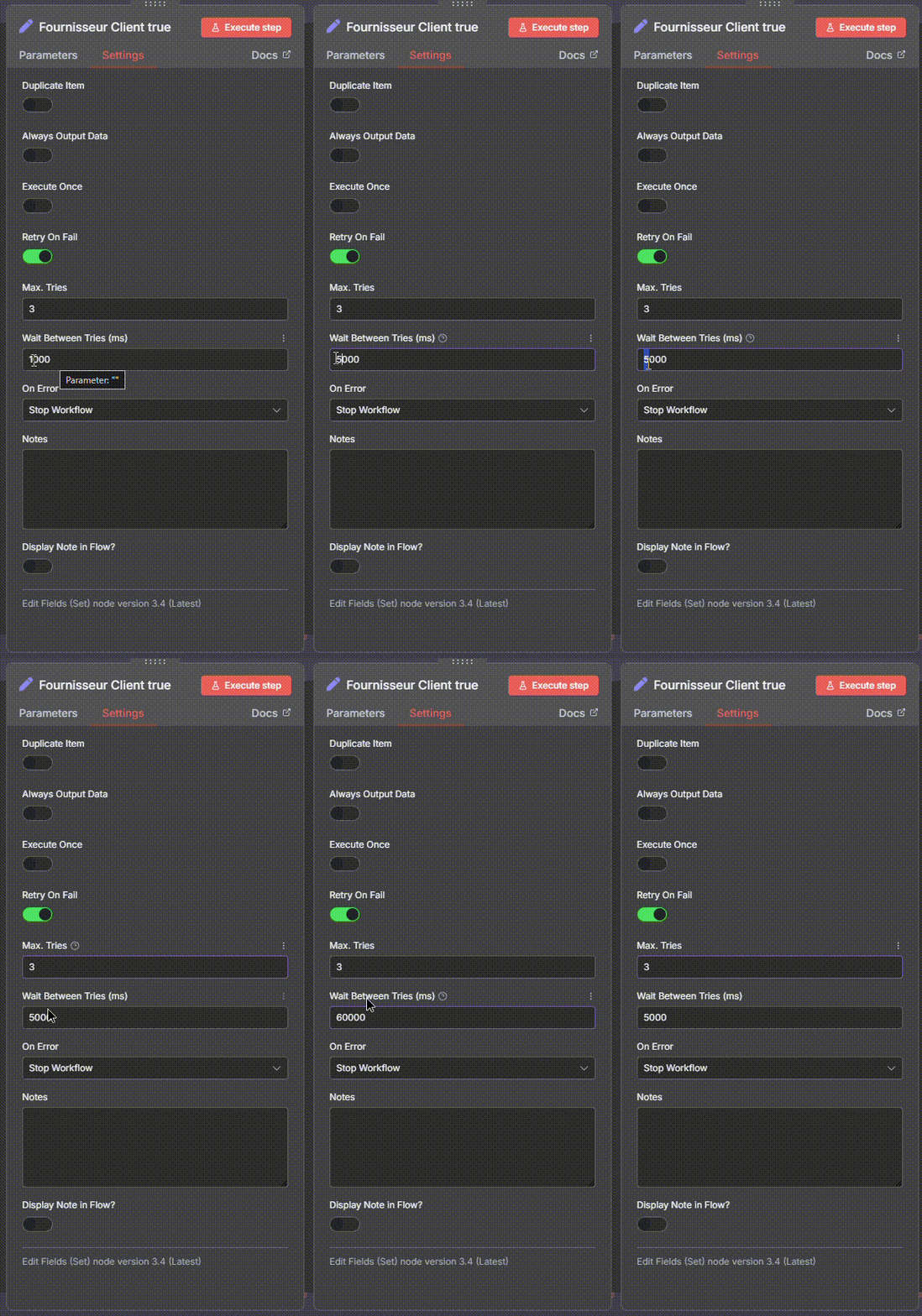
To see this in action, the following video demonstrates the difference between a workflow with and without retry logic when a node fails.
A Beginner's Guide to Error Handling (n8n Tutorial)
In 'A Beginner's Guide to Error Handling', Michele Torti provides a clear demonstration of what 'Retry on Fail' looks like during an execution.
Watch from 00:19 to 02:43. Pay close attention to the visual difference in the n8n canvas when the HTTP Request node fails. With retries enabled, you'll see the node enter a looping/waiting state, giving it a chance to succeed on a subsequent attempt.
2. The Art of the Retry: A Strategic Approach
Configuring retries isn't a one-size-fits-all task. The ideal number of retries and the wait time depend heavily on the type of service you're interacting with and the nature of the likely errors.
5 n8n Error Handling Techniques for a Resilient ... - AI Fire
Let's return to the AI Fire article, which provides excellent strategic guidance on this topic.
Read the subsections titled 'The Art of the Retry: A Strategic Guide' and 'The OpenAI Hiccup: A Real-World Example'. This will give you practical defaults for different scenarios.
To summarize and expand on these strategies:
- External APIs (e.g., weather data, CRM updates): These are the most common points of failure. A strategy of 3-5 retries with a 5-10 second delay is a strong starting point. This gives the external server enough time to recover from a momentary overload.
- AI Models (e.g., OpenAI, Anthropic): These can fail due to server load. Often, a quick retry is all that's needed. A good strategy is 2-3 retries with a 5-second delay. If it fails three times in a row, it likely indicates a larger outage that more retries won't solve.
- Rate-Limited Services: If an API limits you to a certain number of requests per minute, you might get a
429 Too Many Requestserror. In this case, a longer wait time is crucial. You might set 1-2 retries but with a 60-second wait to ensure you're outside the rate-limiting window on the next attempt. - File Operations (Local or Network): Failures are often due to a file being temporarily locked. These issues resolve quickly. A strategy of 5+ retries with a very short 1-2 second delay is effective.
The following video shows this thinking in a practical context, discussing how to adjust retry settings for AI agents and how to use the wait time to handle potential rate limits.
Why 97% of n8n Workflows Fail in Production (And How to Fix It)
In this clip from 'Why 97% of n8n Workflows Fail in Production', Bart Slodyczka discusses applying retry logic specifically to AI agents and API calls.
Watch from 06:14 to 08:35. The video reinforces the idea of using retries for API and LLM calls and explicitly mentions adjusting the 'time between retries' to handle rate limiting issues.
Test your understanding!
You are building a workflow that does two things:
- It calls the public
api.coindesk.comAPI to get the current price of Bitcoin. This API is generally reliable but can occasionally be slow. - It then feeds this price into an OpenAI node to write a short market commentary.
How would you configure the Retry on Fail settings for both the HTTP Request node (for CoinDesk) and the OpenAI node? Justify your choices.
Show answer
- HTTP Request Node (CoinDesk): A good setting would be Max. Tries: 3 and Wait Between Tries: 5000ms (5 seconds). This handles transient network issues or temporary server load on the CoinDesk API without waiting too long.
- OpenAI Node: A good setting would be Max. Tries: 2 and Wait Between Tries: 5000ms (5 seconds). OpenAI failures are often due to high demand. A couple of quick retries are often enough. If it fails more than that, it's likely a wider service issue, and further retries are unlikely to succeed.
3. Pro-Level Resilience: Custom Retry with Exponential Backoff
The built-in retry mechanism uses a fixed, or linear, delay. For your most critical workflows, you can implement a more sophisticated strategy common in production software systems: exponential backoff.
The idea is simple: instead of waiting the same amount of time between each retry, you increase the delay exponentially.
- Retry #1: Wait 5 seconds.
- Retry #2: Wait 10 seconds.
- Retry #3: Wait 20 seconds.
This gives a struggling server an increasing amount of "breathing room" to recover. While n8n doesn't have a built-in toggle for this, your software development background makes building it manually straightforward.
5 n8n Error Handling Techniques for a Resilient ... - AI Fire
The AI Fire article touches on this advanced technique, positioning it as a professional upgrade for bulletproof automations.
Read the final subsection, 'Pro-Level Upgrade: The "Exponential Backoff" Strategy'.
You can implement this pattern in n8n using a loop. The basic structure looks like this:

Here is the conceptual flow, which mirrors a for or while loop with a try...catch:
- Initialize: Before the loop, use a
Setnode to initialize aretryCountvariable to 0. - Attempt: Use an
HTTP Requestnode to make the API call. Turn its nativeRetry on Failsetting OFF. - Catch Failure: If the node fails, the execution follows the error output (the red connector).
- Increment and Check: Use an
Ifnode. In its condition, incrementretryCount. IfretryCountis still less than your max retries, proceed to thetruebranch. Otherwise, go tofalse. - Wait: On the
truebranch, add aWaitnode. You can use an expression to calculate the wait time, e.g.,{{ 5 * Math.pow(2, $json.retryCount) }}seconds. - Loop: Connect the
Waitnode back to the input of theHTTP Requestnode. - Give Up: The
falsebranch of theIfnode is where you handle the final failure (e.g., connecting it to aStop and Errornode).
This pattern gives you complete control over the retry logic for mission-critical operations.
Conclusion
You have now added a crucial layer of self-healing capability to your n8n workflows. By understanding and implementing retry logic, you can build automations that are resilient to the temporary, unavoidable glitches of interconnected systems.
Key Takeaways:
- The
Retry on Failsetting is a node-level feature that acts as your first line of defense against transient errors. - Your retry strategy should be tailored to the service you are calling; there is no single "best" setting.
- Factors like API rate limits, server stability, and task type (API call vs. AI model) should influence your choice of retries and wait times.
- For maximum resilience, you can build custom loops to implement advanced strategies like exponential backoff, a familiar pattern from software engineering.
In the previous lesson, you built the final safety net (the error workflow). Today, you strengthened the system so that the safety net is needed less often. In our next lesson, we will complete the error-handling picture by learning how to set up notifications for workflow failures, ensuring that when a problem is truly permanent (i.e., it fails even after all retries), a human is immediately alerted to investigate.