
Hello! Welcome back.
In our last lesson, you created a high-value lead magnet asset, the very piece of content you'll use to attract your first potential customers. An asset is powerful, but only if people can get it.
Today, we'll build the "digital storefront" for that asset. Our learning outcome is to set up a simple landing page using Carrd or Tally to capture email leads in exchange for the lead magnet. This is a critical step in your go-to-market strategy. A landing page is a single, focused webpage designed for one purpose: to convert a visitor into a lead. For an early-stage SaaS, this is your primary engine for building an email list and validating interest before you even have a full product.
The Anatomy of a High-Converting Landing Page
Before we jump into the tools, let's establish a clear blueprint. A good landing page is ruthlessly efficient. It eliminates all distractions and guides the visitor toward a single action.
To understand these core principles, let's start with a foundational article.
How to Build a High-Converting Landing Page Using Carrd
The article 'How to Build a High-Converting Landing Page Using Carrd' from No Code MBA provides an excellent overview of the essential components and best practices. Read it to build a mental model before we start building.
Please read the sections 'What is a Landing Page?' and 'Tips for Creating High-Converting Landing Pages'. Pay close attention to the concepts of removing distractions, emphasizing benefits, and crafting a clear Call-to-Action (CTA).
As you read, you'll see a landing page needs:
- A Compelling Headline: Grab attention and state the primary benefit.
- A Clear Value Proposition: Briefly explain what the lead magnet is and what problem it solves.
- Engaging Visuals: A mockup or image of your lead magnet can significantly increase conversions.
- A Simple Form: Only ask for what you absolutely need, which is usually just an email address.
- A Strong Call-to-Action (CTA): An action-oriented button (e.g., "Get the Checklist," not "Submit").
Here is an example of a clean landing page that incorporates these elements:

Your Toolkit: Carrd vs. Tally
For rapid execution, we'll focus on two excellent no-code tools mentioned in the learning outcome.
- Carrd: A simple, responsive one-page site builder. It's fantastic for creating visually appealing landing pages with a bit more design control. It's incredibly affordable (the Pro plan is about $19/year) and perfect for your goal of launching multiple projects without high overhead.
- Tally: An "as-easy-as-a-doc" form builder. You can create a simple but effective landing page in minutes. It's the ultimate tool for speed and validation. If you just want to test an idea and collect emails, Tally is often the fastest path.
For today's main build, we'll focus on Carrd, as it gives you a solid foundation in creating a more polished-looking page. We'll then cover Tally as a hyper-fast alternative.
Building Your Landing Page with Carrd
Let's get hands-on. We're going to build a landing page that offers the lead magnet you created in the last lesson. The following video gives a fantastic, real-time demonstration of how quickly you can assemble a page in Carrd.
Building a Carrd Landing Page in 10 Minutes!
The video 'Building a Carrd Landing Page in 10 Minutes!' by Craylor is a fast-paced tutorial that shows how intuitive Carrd is. We'll focus on the second half, where a more complex software landing page is built.
Watch the section from 06:51 to 14:40. As you watch, observe how the presenter: Selects a template and replaces placeholder content. Customizes text, buttons, and images. Deletes unneeded sections to keep the page focused. Sets up the email sign-up form.
The Critical Step: Capturing the Lead
The most important part of this process is configuring the form to correctly capture email addresses and add them to your email marketing service (like Mailchimp, ConvertKit, etc.). This is where you connect your "storefront" to your "customer database."
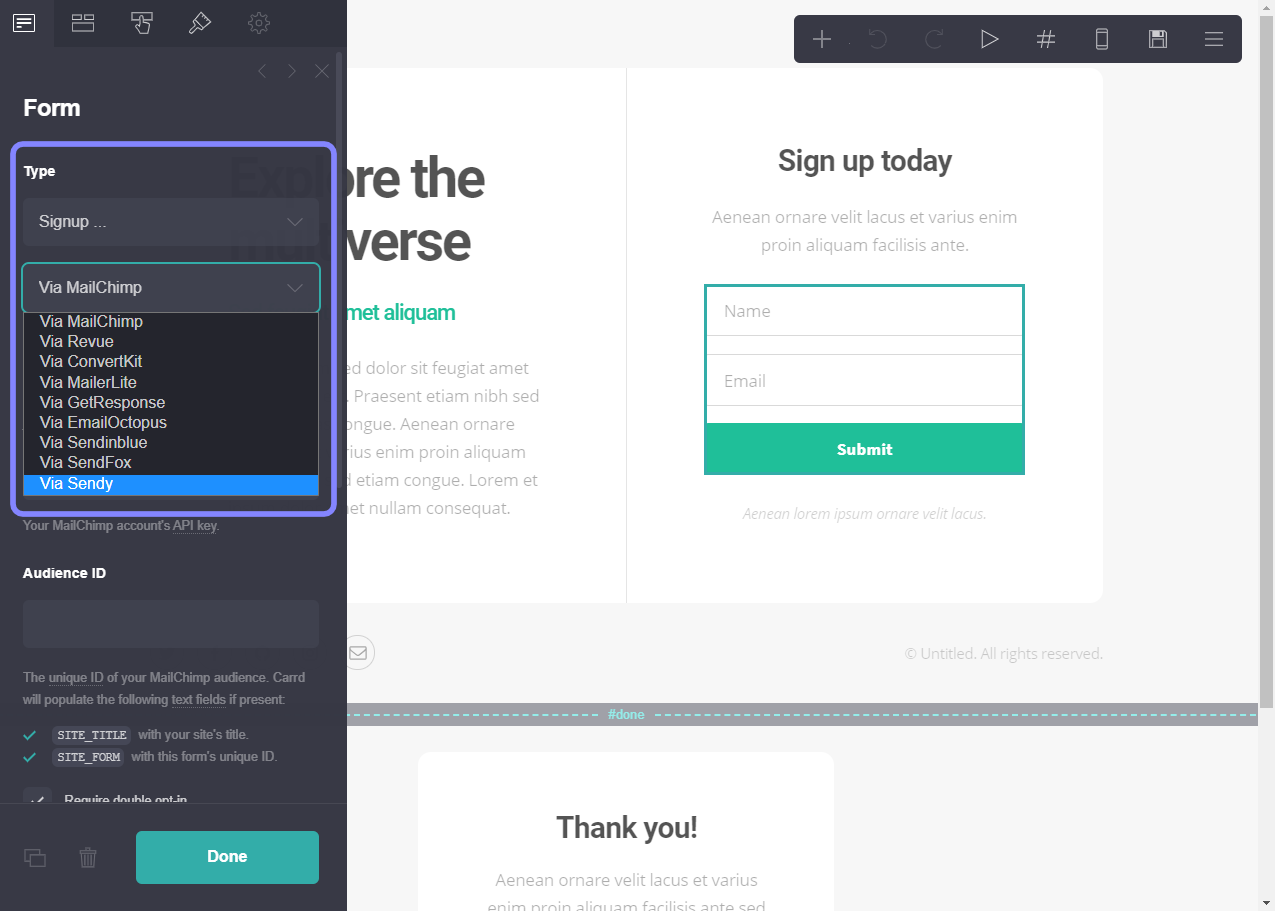
The next video provides a detailed walkthrough of this specific step.
Adding custom forms to Carrd (email, Typeform, and more)
The video 'Adding custom forms to Carrd' by No Code MBA dives deeper into the form element, which is crucial for our goal.
Watch these two key segments: Configuring a Sign-Up Form (01:42 - 04:39): Pay close attention to how you change the button text to match your lead magnet (e.g., 'Get My Free Guide') and how you would connect an email service provider using an API key and Audience ID. Adding a New Form (06:51 - 07:33): This short clip shows how to add a form element from scratch if your chosen template doesn't have one.
Your Action Plan for Carrd:
- Sign up for a Carrd Pro account (the $19/year plan is more than enough).
- Choose a "Landing" or "Form" template as your starting point.
- Rewrite the headline and body copy to promote your lead magnet.
- Replace the placeholder image with a mockup of your lead magnet (you can easily create one in Canva).
- Click the form element, set the Type to Signup, and configure it:
- Change the button text to a compelling CTA.
- Select your email provider and paste in your API key and list/audience ID. (You can find instructions for this in your provider's help docs).
- Set the "On Completion" message to thank the user and tell them to check their email for the lead magnet.
- Publish your page to a temporary
carrd.coURL.
The Hyper-Fast Alternative: Tally
What if you want to test an idea in 15 minutes? That's where Tally shines. Tally is fundamentally a form builder, but its simplicity allows you to create a functional landing page with zero friction.
The process is as simple as writing a document. You add blocks for headings, text, and, most importantly, an email input field.
How to validate your business idea with Tally
The article 'How to validate your business idea with Tally' explains how to use Tally for exactly what you need: rapid idea validation and lead capture.
Read the sections 'The Landing Page' and 'The Fake Door Test'. The Buffer example is a classic in the startup world—it shows how a simple page was used to validate demand for a multi-million dollar company.
Using Tally, you can replicate the famous "fake door" test: create a landing page that describes a product or feature, and the only CTA is to sign up for a waitlist. The number of signups is your first signal of market demand. This aligns perfectly with your goal to test and launch 10 SaaS companies efficiently.
Test your understanding!
You have an idea for a new SaaS that helps developers create documentation faster. You want to validate interest by offering a free PDF "10 Prompts for Generating API Docs with AI." You want to post a link in a developer forum this afternoon.
Which tool, Carrd or Tally, would be more appropriate for this immediate validation task, and why? What three elements are non-negotiable for your page?
Show answer
Tally would be more appropriate. Its main advantage is speed. You can create and launch a clean, functional lead capture page in under 15 minutes, which is perfect for immediate validation.
The three non-negotiable elements are:
- A strong headline: "Create API Docs 10x Faster with AI."
- A clear value proposition: "Get our free guide with 10 powerful prompts to instantly generate documentation for your projects."
- An email form with a CTA button: An email input field and a button that says "Send Me the Guide."
Conclusion
You have now bridged the gap between having a valuable asset and having a mechanism to distribute it. You've learned how to build a focused, single-purpose landing page designed to convert visitors into leads—a cornerstone of any go-to-market strategy.
Key Takeaways:
- A landing page's sole purpose is to drive a single action, typically an email signup.
- Carrd is an excellent, low-cost tool for building polished, responsive one-page sites.
- Tally is the fastest way to create a form-based landing page for rapid idea validation.
- The core of your landing page is the integration between the form and your email marketing service, which automates lead collection.
Preview of the Next Lesson:
Your lead magnet is created, and your landing page is live. Now, how do you get people to see it? A landing page without traffic is useless. In our next lesson, we will map out a 1-month content calendar using a tool like Trello or Notion, aligning topics with your marketing funnel stages. This will be your strategic plan for consistently driving your Ideal Customer Profile to your new landing page.