
Welcome to your first ServiceNow development lesson. This course builds the practical foundation you will use in a Personal Developer Instance (PDI): understanding the platform’s data model, configuring applications, writing scripts, securing access, automating work, and deploying changes safely.
Before creating anything, develop one core mental model: ServiceNow is a cloud platform where applications organize work around shared data. A form, a list, a workflow, and a script can look like separate features, but they all ultimately operate on records stored in tables within an instance.
By the end of this lesson, you will be able to explain how an instance, application, table, record, and metadata fit together—and distinguish an application’s configuration from the business data it manages.
The platform from the outside in
A ServiceNow instance is a dedicated, web-hosted deployment of the ServiceNow platform. It has its own URL, users, data, configuration, installed applications, and security settings.
Your Personal Developer Instance is an instance intended for learning and experimentation. In a workplace, the organization will usually keep separate instances for distinct purposes:
| Instance type | Main purpose | Typical users |
|---|---|---|
| Development | Build and test changes safely | Developers and administrators |
| Test | Validate changes before release | Testers, developers, business users |
| Production | Run live business processes | End users and support teams |
These are separate environments. Creating a table or changing a form in development does not automatically change production. Later in the course, you will learn controlled ways to move configuration changes between instances.
Within one instance, ServiceNow provides three tightly connected things:
- A relational database that stores data.
- A collection of applications that give people useful interfaces and processes.
- A development platform for configuring and extending those applications.
Watch this short overview first. It establishes the platform-level picture before we zoom in to tables and records.
ServiceNow for Beginners: How the Platform Actually Works (Full Overview)
Watch “ServiceNow for Beginners: How the Platform Actually Works (Full Overview)” by Knewget. It introduces ServiceNow as a browser-based platform built around a shared database, business applications, and a development environment.
Watch the platform model to see how the database, applications, and browser interface fit together. Then watch instance tiers for the distinction between development, test, and production instances. Focus on the idea that an application is not an isolated program with an isolated database; it uses data in the instance.
A useful way to state the relationship is:
| Concept | What it is | Example |
|---|---|---|
| Instance | A complete ServiceNow environment | Your PDI |
| Application | A grouped capability for a business purpose | Incident Management or a custom request app |
| Table | A structured collection of one kind of record | User or Incident |
| Record | One stored item in a table | One employee, one incident, one request |
| Field | One attribute of a record | Email, State, Short description |
| Metadata | Data that defines how the platform and its data behave | A field’s type, label, mandatory setting, or access rules |
The word metadata literally means “data about data.” In ServiceNow, it is much more than documentation. Metadata actively tells the platform how to display, validate, secure, and process records.
Tables and records: the data layer
A ServiceNow database is relational. Data is held in tables, and each table is designed to represent one coherent kind of thing.
For example:
- The User table stores people who can exist in the instance.
- The Group table stores teams or groups of users.
- The Incident table stores reported interruptions or issues.
- The Task table provides common work-management behavior that many other tables can inherit.
- A custom application might add a table for equipment loans, training requests, or project work items.
If you have worked with spreadsheets, the basic analogy is accurate:
| Spreadsheet concept | ServiceNow concept |
|---|---|
| Worksheet | Table |
| Column | Field |
| Row | Record |
| Cell value | Field value on a record |
For instance, a row in the Incident table is one incident record. Its values might include a number, short description, priority, caller, state, and assignment group. A ServiceNow form is simply a user-friendly view of one record; a list is a user-friendly view of many records from the same table.
Fields define what each record can contain
Every field has a field type, which determines the kind of value it can hold and often how ServiceNow presents or validates it. Common types include:
- String for short text
- Integer or Decimal for numbers
- Date and Date/Time for calendar values
- Choice for a small controlled set of options
- Reference for a link to a record in another table
- Boolean for true or false
Choosing the correct field type is a data-quality decision, not merely a form-design choice. For example, storing an employee’s name in an unrestricted String field makes duplicates and inconsistent spellings likely. A Reference field to the User table keeps the relationship consistent and lets the platform retrieve related information such as email, department, or manager.
Every record has a sys_id
Each record receives a system ID, stored in the sys_id field. A sys_id is a unique, platform-generated identifier for that record throughout the instance.
People normally work with readable values such as an incident number or a user name. Scripts and relationships, however, often rely on sys_id values because labels, names, and even record numbers can change, while the identifier is intended to remain stable.
ServiceNow also maintains system information on records, such as:
sys_created_onandsys_created_bysys_updated_onandsys_updated_bysys_mod_countsys_id
These are examples of record-level metadata: they tell you when a record was created or changed, who changed it, and which exact record you are examining.
Relationships: tables do not live alone
A relational database becomes useful when its tables can refer to one another without copying the same data repeatedly.
Suppose an Incident record needs to identify its caller. It should not store a separate copy of the caller’s name, email address, department, and manager. Instead, the incident contains a reference field that points to one User record.
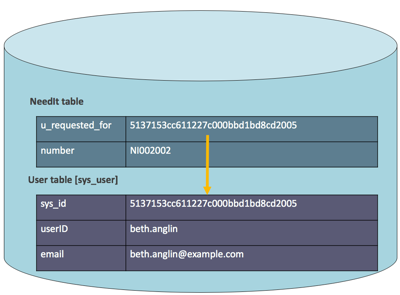
The visual form of a reference field may show Beth Anglin, but the stored value is the sys_id of Beth’s User record. This distinction is fundamental:
- Display value: the readable value shown to a person, such as a user’s name.
- Stored reference value: the
sys_ididentifying the related record.
This design prevents duplication. If Beth’s email address changes, it is updated on her User record. Every NeedIt record that refers to Beth can then show the current email without updating each request individually.
A table can have many reference fields. For example, an incident can reference:
- the caller who reported it,
- the configuration item affected,
- the group assigned to resolve it,
- the user assigned to work it.
This is why it is more accurate to view ServiceNow as an interconnected data platform rather than a collection of independent screens.
Metadata: the platform’s structural layer
Now consider a different question: How does ServiceNow know that the Incident table exists, that “Caller” is a reference field, or that “State” should display a set of choices?
The answer is metadata records.
ServiceNow stores its database definitions in special system tables, often called dictionary tables. That means ServiceNow can represent the structure of its own database as records that authorized developers and administrators can inspect and configure.
Two important examples are:
| Metadata table | Purpose |
|---|---|
sys_db_object | Contains a record describing each table |
sys_dictionary | Contains records describing fields and their properties |
A table-definition record can describe the table’s label, internal name, whether it extends another table, and related configuration. A dictionary record can describe a field’s internal name, label, type, length, default value, reference target, and many other behaviors.
That gives you two valid ways to look at a table:
| Lens | Question it answers | Example |
|---|---|---|
| Data lens | “What records does this table contain?” | Which users exist in sys_user? |
| Metadata lens | “How is this table and its fields defined?” | Is email a writable Email field? |
The next video demonstrates this distinction in the platform interface.
ServiceNow Database Explained: Tables, Records, Fields, and Relationships
Watch “ServiceNow Database Explained: Tables, Records, Fields, and Relationships” by Knewget. This segment shows how dictionary records expose the structure behind tables and fields.
Watch dictionary metadata to see the Tables module, a table-definition record, and related field definitions. Then watch two table lenses, which contrasts viewing User records in a list with viewing the User table’s structural definition. Do not worry about memorizing every module name yet; focus on the difference between runtime data and metadata.
Names and labels
ServiceNow uses both a technical name and a human-readable label for tables and fields.
For example:
| Object | Label | Internal name |
|---|---|---|
| User table | User | sys_user |
| System identifier field | Sys ID | sys_id |
| A custom request field | Requested for | u_requested_for |
Labels are intended for people using the interface. Names are intended for the platform, URLs, filters, and scripts. Internal names have naming constraints and should be selected carefully when you create custom application artifacts. You will write these names frequently in scripts later, so it is worth becoming comfortable with both forms now.
Where applications fit
An application organizes a solution around a business purpose. It typically provides some combination of:
- tables and fields to store application data,
- modules and navigation items to reach records,
- forms and lists for working with data,
- scripts, flows, and business rules to automate behavior,
- roles and access controls to protect data,
- reports, notifications, workspaces, or portals for users.
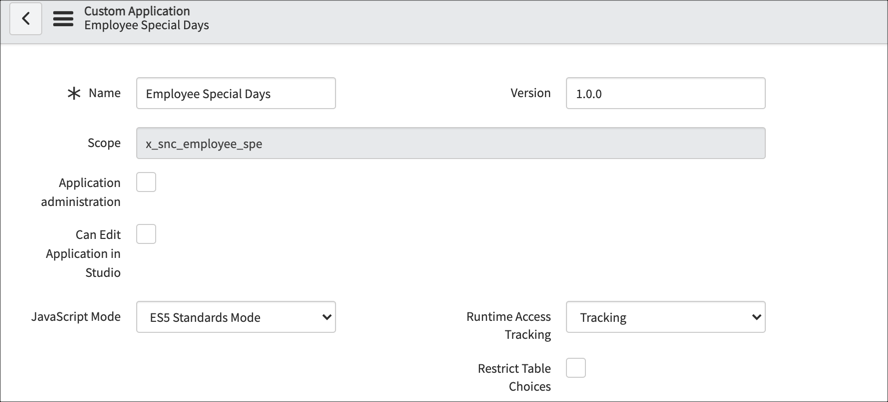
Incident Management is an example of a baseline ServiceNow application. A custom app might manage employee special days, maintenance requests, vendor onboarding, or internal equipment loans.
An application is therefore not the same thing as a table. One application may use several tables, and one table may be useful to multiple applications. Many applications refer to shared platform tables such as User, Group, Company, and Task.
It is also useful to distinguish two categories of records connected to an application:
| Category | What it represents | Example |
|---|---|---|
| Application configuration | The definitions that make the application work | Table definitions, fields, scripts, flows, ACLs, form layouts |
| Runtime data | The business records created while the app is used | A submitted request, a work item, an approval record |
When you add a field to a custom table, you create configuration metadata. When a user creates a request using that field, they create runtime data. This distinction becomes essential when you later use update sets and deployment tools: configuration is usually promoted between environments, while live business data is managed differently.
Application scope: a brief first look
Custom applications are normally created in a scoped application. Scope gives an application its own namespace and helps control what its artifacts can access or modify.
For example, a custom table’s technical name may begin with a prefix such as x_company_app_. This makes its origin clear and reduces naming collisions with other applications.
For now, retain these distinctions:
- An instance is the whole ServiceNow environment, such as your PDI.
- An application scope is a boundary within that instance.
- A scoped application contains artifacts associated with that scope.
- The global scope contains shared baseline platform functionality and many broadly available artifacts.
Scope is not another instance and does not create a separate database. A scoped app operates in the same instance but has controlled relationships with data and artifacts outside its own scope. You will create a scoped training application later in this module, then examine cross-scope access in depth in the security module.
A practical inspection in your PDI
Spend about 10–15 minutes observing these ideas in your PDI. This is an inspection activity, not a configuration task; avoid modifying baseline records.
-
Identify the instance. Open your PDI and look at its URL. Record its instance name. This is your development environment, not a production environment.
-
Inspect data records. In the Application Navigator, filter for Users, then open the Users list. Open one user record and identify:
- the table’s human label,
- a few ordinary data fields, such as Name or Email,
- system fields such as Sys ID or Updated.
-
Inspect metadata. In the Application Navigator, filter for Tables and open System Definition > Tables. Search for the
sys_usertable record. Open it and examine its related list of columns or fields. You are now looking at metadata that describes the User table rather than at the users themselves. -
Find a relationship. Return to a user record, or open an Incident record if Incident Management is available. Locate a field that selects another record, such as Department, Manager, Caller, Assignment group, or Assigned to. Notice that it displays a readable value even though it represents a reference to another table.
-
Write a five-line map. In your notes, complete this structure using one real example from the PDI:
- Instance:
- Application:
- Table:
- Record:
- Metadata that defines one field:
This small habit of identifying the table behind an interface will help throughout the course. When debugging, automating, securing, importing, or scripting ServiceNow behavior, asking “Which table and record does this involve?” is usually the right first question.
Key takeaways
ServiceNow can be understood as a set of business applications built on shared, relational data inside an instance.
- An instance is the complete ServiceNow environment, such as your PDI, development instance, or production instance.
- An application packages a business capability using interface elements, automation, security, and data structures.
- A table defines a kind of data; a record is one stored item in that table; a field is one attribute on the record.
- A reference field stores the
sys_idof a related record, keeping shared data consistent rather than duplicating it. - Metadata defines how tables, fields, forms, scripts, and other platform artifacts behave. In ServiceNow, much of that metadata is itself stored as records.
- Application configuration and runtime business data are different categories, even though both are represented through platform records.
Next, you will move from the conceptual map to the interface: using the Application Navigator and filters to locate applications, modules, records, and configuration pages efficiently.
Can't find a good explanation? Sign up and we'll make it for you
Sign up