
Welcome back. Last lesson treated a split as something that must be reviewed in the EM stack and in 3D, because a completed operation is not automatically a correct reconstruction. This lesson addresses the uncomfortable but essential counterpart: what to do when you realize an action was wrong.
The central distinction is simple but critical: FlyWire’s Undo control can recover certain interface-level actions, but it does not reverse committed proofreading splits or merges. You will learn to recognize which situation you are in, recover safely when Undo applies, and handle a genuine edit mistake without compounding it.
Two meanings of “undo”
In a complex viewer, not every change has the same status. Some actions only change your current working view; others change the reconstruction that later users may inspect. Treating them as equivalent is the source of many recovery mistakes.
| What changed? | Typical example | Does Undo apply? | Safe response |
|---|---|---|---|
| Navigation state | You clicked to the wrong location or lost your prior position | Usually yes | Use Undo or to return |
| Temporary selection state | You accidentally deselected a segment from the working view | Often yes, depending on how it was deselected | Use Undo immediately; otherwise reselect from trusted material |
| Layer-list state | You remove a segment ID from a layer’s segment list | Not necessarily | Re-add or reselect it deliberately; do not assume Undo will restore it |
| Committed proofreading edit | You submitted a split or merge | No | Stop, document, verify, then use an authorized recovery path or a new evidence-supported corrective edit |
This is much like the difference between moving a cursor in an editor and committing a change to a shared repository. The first is local working state. The second has consequences outside the current moment and must be corrected deliberately, not casually rolled back.
Study the short official explanation before relying on the control in a live task.
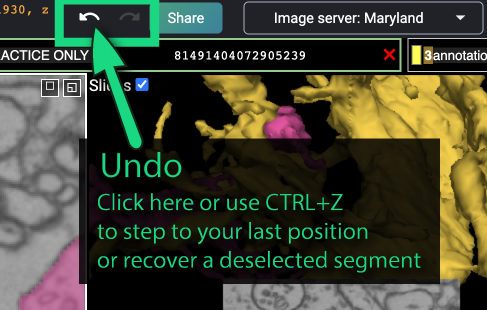
Read the “Undo” guidance in FlyWire 101 from the FlyWire Blog. Its key limitation is more important than the keyboard shortcut: Undo is intended for accidental interface actions, not reconstruction splits or merges.
In “Working with FlyWire controls,” go to the “Undo” subsection near the end of the page. Read the complete short subsection, beginning the Undo guidance. Focus on the explicit statement that split and merge operations are excluded.
The safest operational rule is:
Use Undo immediately for an accidental navigation or selection action. Do not use it as a recovery plan for a submitted split or merge.
Immediate use matters because intervening clicks and selections can make it unclear what state will be restored.
Recovering an accidental selection or navigation change
Suppose you are inspecting a candidate false merge and accidentally double-click to remove a segment from your view, or you jump away from the region that contained the evidence. This is inconvenient, but it is not necessarily a reconstruction error.
First, pause. Do not start clicking around to “get it back” by guesswork. You want to preserve a clean distinction between the object you intended to inspect and a nearby object that happens to be visible.
Use this short routine:
-
Recognize the action as local.
Ask whether you submitted any proofreading operation. If you only changed what is selected, displayed, or where you are looking, treat it as a viewer-state recovery. -
Use the Undo button or immediately.
Confirm that the intended segment or prior position returns. A return to a prior viewpoint is useful only if it brings you back to the evidence window you were examining; check the EM imagery rather than trusting the camera position alone. -
Re-identify the segment from trusted material.
If Undo does not restore the view as intended, navigate to a location where the target’s identity was already clear. Select it there, then return to the ambiguous region. Do not select the nearest similarly colored mesh merely because it looks plausible in 3D. -
Restore an inspectable display.
Ensure that the relevant mesh is visible in 3D and that the segmentation overlay in 2D does not obscure membrane evidence. Then continue the inspection from the last verified point, not from the point where the accidental click occurred.
Layer controls can make the display state more complicated. A segment can be hidden, recolored, or removed from a layer’s explicit segment list without changing the underlying reconstruction.
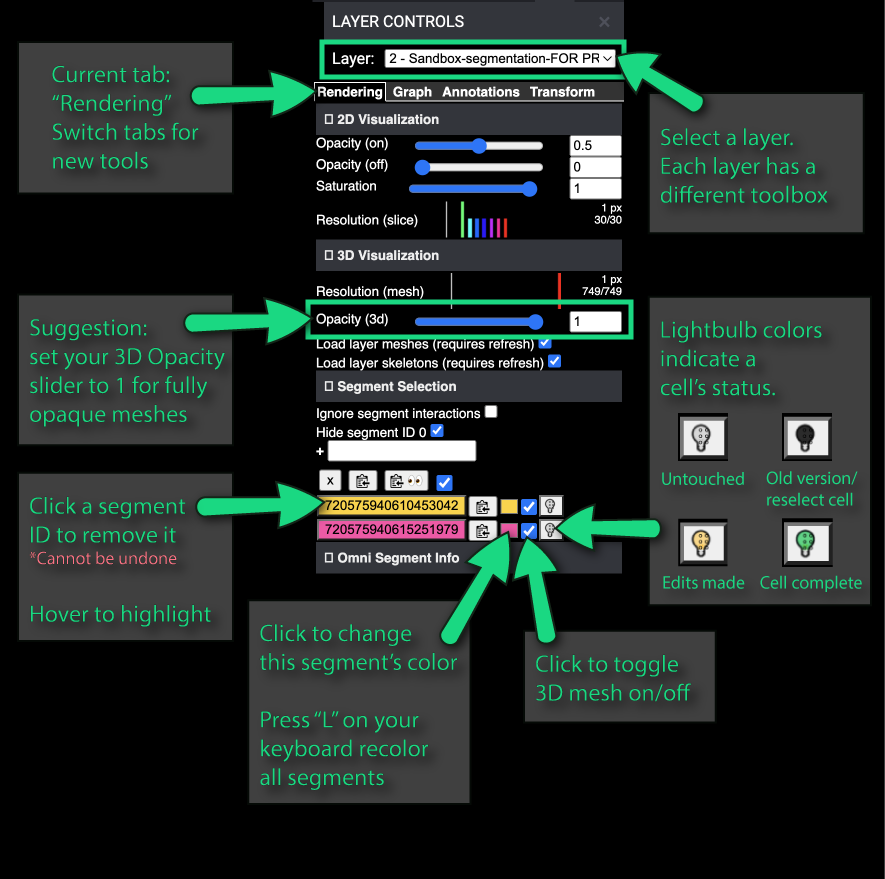
The Layer Controls screenshot highlights a subtle caution: removing a segment ID from the layer list is presented as an action that cannot be undone. This does not mean the neuron has been deleted from FlyWire. It means your current layer configuration no longer contains that selected entry. Recover by selecting trusted material again or restoring the segment through the layer workflow available in your interface; do not confuse this with reversing a proofreading edit.
When an incorrect split or merge has already happened
A submitted split or merge is a different incident. FlyWire 101 explicitly says Undo does not reverse these operations. Therefore, the wrong response is to press repeatedly, make several fast compensating edits, or assume that “doing the opposite” will restore the original cell.
For example:
- An erroneous split may have detached valid target material, but the detached output can contain more than the branch you noticed initially.
- An erroneous merge may have attached a neighbor in a way that looks easy to remove, while the true boundary is extended or ambiguous over several sections.
- A compensating merge or split can be wrong even when it superficially resembles the inverse operation, because the affected segmentation scope and current root identities may no longer match the pre-edit state.
The recovery workflow is therefore an incident response, not a button press.
1. Stop editing the case
Once you suspect a committed edit was incorrect, do not make a second edit merely to make the 3D view look more reasonable. Every additional action can obscure the causal chain:
- what the reconstruction looked like before the mistake,
- what the mistaken operation changed,
- and what a later corrective action actually repaired.
Keep the case bounded. If the original task permits other independent cases, move on only after preserving the evidence for this one.
2. Preserve a reproducible record
Record enough information for another proofreader, reviewer, or task administrator to reopen the exact situation:
- coordinates of the intended edit site;
- a FlyWire Share link, rather than a copied browser URL;
- the current target and detached or attached root identifiers, if visible in your workflow;
- the approximate time and type of submitted operation;
- the intended outcome;
- the observed unwanted result;
- whether you can confirm the problem in adjacent EM sections.
A minimal note might read:
“Possible incorrect split at recorded coordinates. Intended to detach a neighboring process from the target, but post-edit review shows a target-like branch in the detached output. In adjacent sections, the branch appears cytoplasmically continuous with trusted target material. No further edit made. Share link and current root IDs recorded; recovery review requested.”
This is not bureaucracy. It preserves the evidence needed to distinguish a real collateral split from a confusing 3D projection or a pre-existing segmentation gap.
3. Verify that the issue is genuinely caused by the edit
Use the same four-pass review from the preceding lesson:
- inspect the original location through adjacent EM sections;
- inspect the target locally in 3D;
- inspect the whole-cell morphology for a new stump, gap, or foreign branch;
- inspect the other output of the split or the newly attached material in a merge.
The question is not simply, “Does the neuron look bad now?” Ask instead:
- Is there visible EM continuity between the trusted target and the material that was detached?
- Does the error begin at, or plausibly result from, the edit region?
- Is the suspicious structure a new consequence, or was it already an unresolved gap or path-swap-like error?
- Can you identify a bounded correction that is independently supported by the images?
If image alignment, membrane visibility, or identity is uncertain, the correct classification is uncertain, not “probably reversible.”
Choose recovery by evidence and authorization
After verification, classify the situation before deciding on an intervention.
| Situation after review | Correct immediate action |
|---|---|
| Only a selection or navigation change occurred | Undo immediately, then re-establish the segment from trusted material |
| Segment was removed from the display layer | Restore the display selection deliberately; the reconstruction itself was not changed |
| A committed edit is suspected but evidence is ambiguous | Stop and document; request review through the project’s supported workflow |
| A committed edit is clearly wrong, but correction scope is not obvious | Stop and escalate with coordinates, Share link, IDs, and EM evidence |
| A committed edit is clearly wrong and a bounded correction is independently verified and permitted by the task | Perform the corrective edit as a new proofread action, then complete a full post-edit review |
The last row needs restraint. A corrective edit is not an “Undo”; it is a new claim about the image data. It needs the same proof standard as the original action, and usually a higher one because you are repairing an already altered reconstruction.
For a confirmed collateral false split, a carefully verified addition may be appropriate only when the two disconnected pieces are demonstrably the same neurite across the EM stack. For a confirmed false merge, a bounded separation may be appropriate only when the correct boundary and the affected material are clear. If the situation involves a possible path swap, multiple fragments, or uncertain object ownership, it is no longer a simple recovery case.
A practical recovery checklist
Use this checklist whenever the thought “I may have made the wrong edit” occurs:
- Stop: no speculative second edit.
- Classify: viewer state, layer state, or submitted reconstruction edit?
- Undo only local state: use the button or promptly for an accidental click, position, or eligible deselection.
- Record the case: coordinates, Share link, operation type, current IDs, intended change, observed outcome.
- Verify in EM and 3D: establish what actually changed and whether it is wrong.
- Choose one disposition: recovered locally, unchanged and escalated, or corrected under explicit authorization.
- Review any corrective edit: inspect the target, the other output, and the broader morphology before closing the case.
The key habit is to separate recovery of your workspace from repair of shared reconstruction data. The first can be immediate. The second must be evidence-led, auditable, and bounded.
Key takeaways
FlyWire’s Undo control is valuable, but its scope is limited:
- Use Undo or immediately to recover accidental navigation and eligible selection changes.
- Do not expect Undo to reverse a submitted split or merge.
- Removing a segment from a layer’s display list is not the same as altering the reconstruction, but may require deliberate reselection rather than Undo.
- For a suspected incorrect proofreading edit, stop first, preserve coordinates and a Share link, and verify the result in both EM and 3D.
- A corrective split or merge is a new evidence-based edit, not an automatic inverse; escalate whenever the scope or evidence is uncertain.
Next, you will consolidate the module by producing an audit log for a bounded set of proofreading cases, including edits, reviews, unchanged decisions, and the evidence supporting each one.
Can't find a good explanation? Sign up and we'll make it for you
Sign up