
Hello again. Last time, you used Python’s indentation-based control flow, direct iteration, typed function signatures, keyword-only options, and explicit None handling to build a small text-filtering routine. That routine stored accepted values in a list; this lesson makes that collection-handling code far more expressive.
We will focus on three connected ideas:
- Slicing ordered data such as strings, lists, and tuples.
- Unpacking structured values into well-named variables.
- Comprehensions for constructing lists, dictionaries, and sets from existing data.
These are core tools for handling raw text, records, batches, tokenizer output, model configurations, and metrics throughout the rest of the pathway.
1. Sequences: positions, boundaries, and mutability
A sequence is an ordered collection. The sequence types you will use constantly are:
str: immutable textlist: mutable ordered collectiontuple: immutable ordered collection, often used for fixed-size records or returned groups of values
All three support indexing and slicing.
model_names = ["tiny", "base", "large"]
text = "attention"
shape = (32, 128)
An index retrieves one item. Python starts at zero:
print(model_names[0])  # "tiny"
print(text[0])         # "a"
print(shape[1])        # 128
Negative indices count from the end. Crucially, negative indexing starts at -1, not 0, because -0 is simply 0.
print(model_names[-1])  # "large"
print(text[-1])         # "n"
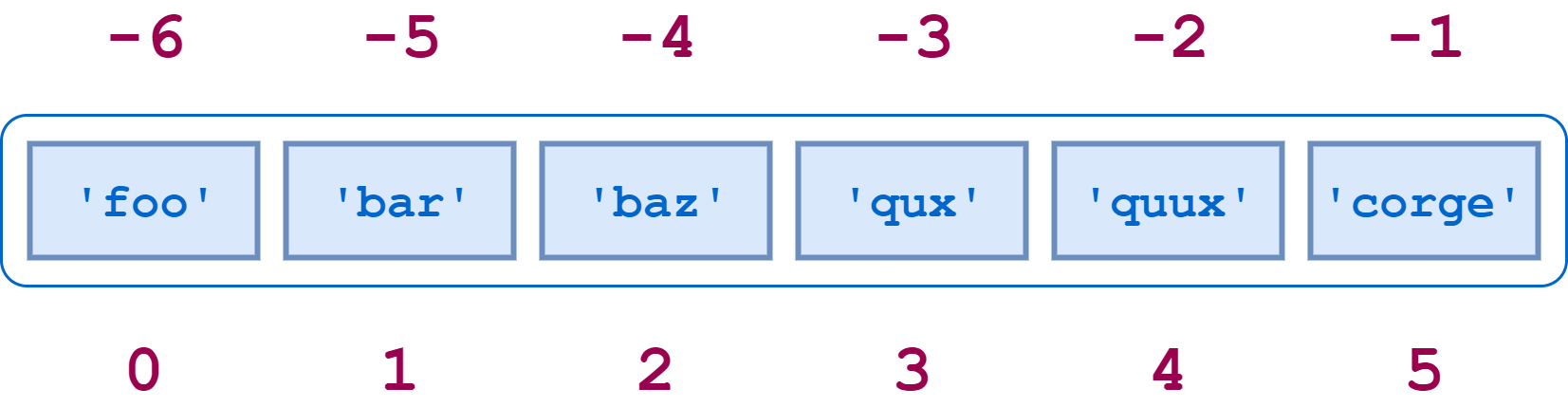
This convention is especially practical when you care about recent items or a suffix of text: messages[-1] means “the latest message” without needing to calculate the list length.
The official Python tutorial’s Section 3.1.2, “Text,” establishes the boundary model behind indexing and slicing, then Section 3.1.3, “Lists,” shows that lists use the same notation but can be modified.
3. An Informal Introduction to Python
Read the relevant portions of the official Python documentation to establish a precise mental model for positive and negative indices, slice boundaries, and the important difference between immutable strings and mutable lists.
In Section 3.1.2, “Text,” begin at negative indexing and slicing. Focus on why the start boundary is included while the end boundary is excluded, and on the distinction between an out-of-range index and an out-of-range slice. Then continue into Section 3.1.3, “Lists,” through its examples of indexed replacement, copying with [:], and slice assignment. Notice that the same slice notation has different consequences for a mutable list than for a string.
Indexing versus slicing
An index requests exactly one element:
labels = ["cat", "dog", "bird"]

first_label = labels[0]   # "cat"
last_label = labels[-1]   # "bird"
A slice requests a sequence of elements. Its general form is:
sequence[start:stop:step]
All three parts are optional. The key rule is:
A slice includes its
startposition and excludes itsstopposition.
tokens = ["The", "model", "predicts", "a", "token"]

print(tokens[1:4])   # ["model", "predicts", "a"]
print(tokens[:2])    # ["The", "model"]
print(tokens[3:])    # ["a", "token"]
print(tokens[:])     # a new shallow list containing all items
Think in terms of boundaries between items, not item labels. For a sequence of length five, there are six forward boundaries: 0 through 5. The slice tokens[1:4] takes everything between boundary 1 and boundary 4, which contains items at indices 1, 2, and 3.
That exclusive end boundary gives slices a useful composition property:
split_at = 2

left = tokens[:split_at]
right = tokens[split_at:]

print(left + right == tokens)  # True
No item is duplicated and none is lost.
Defaults, steps, and defensive slicing
Omitting the start means “beginning”; omitting the stop means “end.”
document = "Transformer models process sequences"

prefix = document[:11]   # "Transformer"
suffix = document[-9:]   # "sequences"
A third slice component supplies a step:
values = [0, 1, 2, 3, 4, 5, 6]

print(values[::2])   # [0, 2, 4, 6]
print(values[1::2])  # [1, 3, 5]
print(values[::-1])  # [6, 5, 4, 3, 2, 1, 0]
A negative step traverses backward. [::-1] is concise and useful for inspection, but it creates a new list or string; avoid treating it as an in-place reversal.
Python deliberately distinguishes these two cases:
values[99]     # IndexError: there is no element at index 99
values[3:99]   # [3, 4, 5, 6]
values[99:]    # []
A slice is therefore convenient for tolerant operations such as previewing text:
preview = raw_text[:200]
If raw_text is shorter than 200 characters, this still works. By contrast, use direct indexing only when your logic truly requires that item to exist.
Lists can change; strings and tuples cannot
Lists are mutable:
statuses = ["raw", "cleaned", "ready"]
statuses[0] = "discarded"

print(statuses)  # ["discarded", "cleaned", "ready"]
You can replace a list slice, including with a differently sized sequence:
tokens = ["A", "very", "very", "short", "example"]

tokens[1:3] = ["compact"]
print(tokens)  # ["A", "compact", "short", "example"]
Strings and tuples are immutable. This prevents accidental changes but means that a “modification” creates a replacement value.
name = "llama"
updated_name = "L" + name[1:]

dimensions = (8, 16, 32)
# dimensions[0] = 4  # TypeError
One subtle but important list behavior: assignment does not copy a list.
original = ["clean", "validated"]
alias = original

alias.append("saved")

print(original)  # ["clean", "validated", "saved"]
Both variables refer to one underlying list. If you need a separate outer list, make a shallow copy:
copied = original[:]
copied.append("published")

print(original)  # ["clean", "validated", "saved"]
print(copied)    # ["clean", "validated", "saved", "published"]
A shallow copy is enough for a flat list of strings or numbers. Later, when working with nested records and tensors, you will need to be more deliberate about which objects are shared.
2. Unpacking: make structure visible
Unpacking assigns elements from an iterable to several names at once. You saw a version of this with for index, value in enumerate(...) in the prior lesson. It is not special syntax for enumerate; it is general sequence unpacking.
model_info = ("tiny-llm", 125_000_000, "decoder-only")

name, parameter_count, architecture = model_info

print(name)             # "tiny-llm"
print(parameter_count)  # 125000000
The number of targets normally must match the number of values:
pair = ("train", 0.9)

split, score = pair
This works because there are two values and two variables. The following would fail:
# split, score, extra = pair # ValueError
The documentation’s Section 5.3, “Tuples and Sequences,” provides useful context: tuples commonly represent small fixed structures, and unpacking converts their positional structure into named variables. Section 5.5 then introduces dictionaries as key-value mappings.
5. Data Structures — Python 3.14.0 documentation
Read the official tutorial’s treatment of tuples, sequence unpacking, and dictionaries. The goal is to distinguish positional data from keyed data and to see why unpacking and dictionary access are complementary tools.
In Section 5.3, “Tuples and Sequences,” locate the paragraph beginning “The reverse operation is also possible:” and read the unpacking explanation, including the x, y, z = t example. Then read Section 5.5, “Dictionaries,” from core dictionary operations. Pay particular attention to the difference between mapping[key] and mapping.get(key).
Collecting a variable-length remainder with *
Often, you know the first or last item but do not know, or do not care about, the exact number of items in the middle. Prefix one target with * to collect the remainder into a new list:
batch_sizes = [8, 16, 32, 64]

first, *remaining = batch_sizes
*smaller, largest = batch_sizes

print(first)      # 8
print(remaining)  # [16, 32, 64]
print(smaller)    # [8, 16, 32]
print(largest)    # 64
This is readable when the variable names communicate why the division matters:
prompt_tokens = ["Summarize", "this", "article", "clearly"]

first_token, *continuation = prompt_tokens
Do not use starred unpacking merely to avoid writing an index. prompt_tokens[-1] is clearer if you only need the final element.
Multiple assignment also safely supports swapping:
current_loss = 0.82
best_loss = 0.76

current_loss, best_loss = best_loss, current_loss
Python evaluates the values on the right before assigning names on the left. You do not need a temporary variable.
Unpacking pairs while iterating
Many Python APIs produce pairs. Unpacking makes loop bodies direct and meaningful:
metrics = [
    ("train_loss", 1.24),
    ("validation_loss", 1.31),
]

for metric_name, value in metrics:
    print(f"{metric_name}: {value:.2f}")
The same pattern appears with enumerate():
examples = ["first example", "second example"]

for row_number, text in enumerate(examples, start=1):
    print(f"Row {row_number}: {text}")
And with zip(), which combines corresponding elements:
names = ["learning_rate", "batch_size", "epochs"]
values = [0.0003, 8, 3]

for setting_name, setting_value in zip(names, values):
    print(f"{setting_name} = {setting_value}")
When combining separate lists, ensure that their alignment is a real invariant of your program. zip() stops at the shorter input, which can otherwise conceal a data-quality error.
3. Dictionaries: mapping meaningful keys to values
A dictionary maps unique keys to values. In C#, the closest familiar type is Dictionary<TKey, TValue>. Its Python spelling is concise:
run_config: dict[str, object] = {
    "model_name": "tiny-llm",
    "batch_size": 8,
    "learning_rate": 0.0003,
    "use_gpu": True,
}
A dictionary is not addressed by numeric position. It is addressed by a key:
batch_size = run_config["batch_size"]
Bracket access is appropriate when the key is required. Missing required configuration should fail visibly:
# run_config["unknown_key"] # KeyError
Use .get() when absence is a valid possibility:
warmup_steps = run_config.get("warmup_steps", 0)
notes = run_config.get("notes")  # None when absent
This distinction matters in data pipelines. A record missing mandatory "text" is usually invalid and should not silently become an empty value. An optional "source" field, however, may reasonably use .get().
record: dict[str, str] = {
    "id": "example-014",
    "text": "Language models predict the next token.",
    "split": "train",
}

text = record["text"]
source = record.get("source", "unknown")
Updating and iterating over mappings
Assigning to a new key inserts it; assigning to an existing key replaces the value:
record["source"] = "internal-demo"
record["split"] = "validation"
To test for a key, use in. For a dictionary, it checks keys, not values:
if "text" in record:
    print("This record has text")

if "train" in record:
    print("This does not test the split value")
When you need both keys and values, use .items() and unpack each pair:
for field_name, field_value in record.items():
    print(f"{field_name}: {field_value}")
The related methods are:
| Expression | Produces | Typical use |
|---|---|---|
record.keys() | keys | checking or listing field names |
record.values() | values | inspecting values only |
record.items() | key-value pairs | processing fields with their names |
record.get("key", default) | one value or a fallback | optional field access |
Modern Python dictionaries preserve insertion order. That is useful for predictable display and serialization, but your program should still access a specific field by key rather than relying on its apparent position.
You can also construct a new dictionary by merging existing mappings. This is particularly useful for configuration defaults:
defaults = {
    "batch_size": 8,
    "epochs": 3,
    "learning_rate": 0.0003,
}

overrides = {
    "batch_size": 16,
}

effective_config = {**defaults, **overrides}

print(effective_config["batch_size"])  # 16
Values placed later win when keys overlap. Neither source dictionary is mutated. Treat this as a configuration-building tool, not a replacement for deliberate validation of settings.
4. Comprehensions: transform and filter in one expression
A comprehension creates a collection from an iterable. It is Python’s compact equivalent of the very common pattern:
cleaned_texts: list[str] = []

for text in raw_texts:
    cleaned_texts.append(text.strip())
The equivalent list comprehension is:
cleaned_texts = [text.strip() for text in raw_texts]
Read it from left to right:
Produce
text.strip()for eachtextinraw_texts.
The output expression comes first, followed by the loop that supplies its values.
Corey Schafer’s video gives a useful visual comparison between explicit loops and comprehensions. Watch the straightforward transform and filter patterns first, then the dictionary-comprehension segment.
Python Tutorial: Comprehensions - How they work and why you should be using them
Watch “Python Tutorial: Comprehensions – How they work and why you should be using them” by Corey Schafer to connect familiar loop-and-append code with readable list and dictionary comprehensions.
Watch basic patterns for list construction, transformation, and filtering. Relate each comprehension to the equivalent multi-line loop before adopting the shorter syntax. Then skip to dictionary comprehensions to see how zip() and a key-value expression create a mapping.
Transforming every value
Suppose a raw corpus contains inconsistent surrounding whitespace:
raw_texts = [
    "  Attention is selective. ",
    " Embeddings map tokens to vectors.",
    "  Training requires data.  ",
]

cleaned_texts = [text.strip() for text in raw_texts]

print(cleaned_texts)
This creates a new list. It does not modify the original raw_texts.
A transformation can be any clear expression:
lengths = [len(text) for text in cleaned_texts]
uppercased = [text.upper() for text in cleaned_texts]
previews = [text[:20] for text in cleaned_texts]
Filtering with an if clause
Place an if after the for clause to retain only items satisfying a condition:
nonempty_texts = [
    text.strip()
    for text in raw_texts
    if text.strip()
]
This says:
Strip each text and retain it only when its stripped form is non-empty.
For a more maintainable pipeline, avoid repeating a complicated transformation in both the output and condition. A normal loop is often clearer when validation has several steps or when you need to log rejected values.
There are two distinct uses of if in a comprehension:
# Filter: some inputs are omitted.
long_texts = [text for text in cleaned_texts if len(text) > 25]

# Conditional expression: every input remains, but its output changes.
quality_labels = [
    "long" if len(text) > 25 else "short"
    for text in cleaned_texts
]
The first if follows for and filters. The second has an if ... else ... expression before for, so it produces one result per input.
Dictionary and set comprehensions
A dictionary comprehension has a key: value expression inside braces:
text_lengths = {
    text: len(text)
    for text in cleaned_texts
}

print(text_lengths)
In realistic data, use stable IDs as keys instead of raw text, because dictionary keys must be unique:
examples = [
    ("ex-001", "Attention is selective."),
    ("ex-002", "Embeddings map tokens to vectors."),
]

length_by_id = {
    example_id: len(text)
    for example_id, text in examples
}
The loop unpacks each (example_id, text) tuple, then the comprehension stores example_id as the dictionary key and the text length as its value.
A set comprehension uses braces without a colon:
raw_splits = ["train", "train", "validation", "test", "train"]

unique_splits = {split_name for split_name in raw_splits}
Sets eliminate duplicates, but they are not ordered sequences. Use them for membership and uniqueness, not for data whose order matters.
Choose clarity over compression
Comprehensions are excellent for a single transformation and optional simple filter. Do not turn every loop into a comprehension. Prefer a normal loop when the work requires:
- several sequential operations;
- error handling or logging;
- mutation of multiple structures;
- complex nested conditions;
- a result whose intent is unclear when compressed onto one line.
For example, this is compact but not a good default style for production preprocessing:
# Avoid this style when validation logic grows.
results = [
    text.strip().lower()
    for text in raw_texts
    if text and len(text.strip()) < 200
]
A named function plus a loop will be easier to test and extend. You will build that habit in later data-cleaning and testing lessons.
5. Putting the tools together: prepare lightweight text records
Create collections_basics.py in your project. This example treats text examples as dictionaries, filters them with a list comprehension, slices display previews, and builds a derived mapping of character counts.
raw_records: list[dict[str, str]] = [
    {
        "id": "ex-001",
        "split": "train",
        "text": "  Attention compares positions in a sequence.  ",
    },
    {
        "id": "ex-002",
        "split": "train",
        "text": "   ",
    },
    {
        "id": "ex-003",
        "split": "validation",
        "text": "A model learns patterns from examples.",
    },
    {
        "id": "ex-004",
        "split": "train",
        "text": "Embeddings turn discrete identifiers into vectors.",
    },
]

train_records = [
    {
        "id": record["id"],
        "text": record["text"].strip(),
    }
    for record in raw_records
    if record["split"] == "train" and record["text"].strip()
]

char_count_by_id = {
    record["id"]: len(record["text"])
    for record in train_records
}

for record in train_records:
    example_id, text = record["id"], record["text"]
    preview = text[:30]

    print(f"{example_id}: {preview!r}")

print("\nCharacter counts:")
for example_id, char_count in char_count_by_id.items():
    print(f"{example_id}: {char_count}")
Run it:
python collections_basics.py
Read the program in this order:
raw_recordsis a list, and each item is a dictionary representing one example.- The list comprehension retains records whose
"split"is"train"and whose stripped text is non-empty. - Each retained result is a new dictionary with only the fields needed by the next stage.
- The dictionary comprehension creates a lookup from example ID to character count.
example_id, text = ...unpacks two explicitly selected dictionary values.text[:30]safely creates a preview, whether text is shorter or longer than 30 characters..items()supplies key-value pairs which the final loop unpacks.
Make a few small, concrete modifications while the output is in front of you:
- Change one record’s split from
"train"to"validation"and observe that it disappears fromtrain_records. - Add an empty or whitespace-only training record and verify that it is filtered out.
- Change
text[:30]totext[-15:]to inspect the final 15 characters of each valid example. - Add a
"source"field to one record, then retrieve it safely with.get("source", "unknown").
This is a small program, but its structure is close to real dataset preparation: records are keyed mappings, a selection stage creates a clean subset, and derived metadata is stored separately rather than repeatedly recalculated.
You can now work fluently with Python’s most common in-memory data structures:
- Sequences are ordered; use indexing for one item and slicing for a range.
- Slices include the start boundary and exclude the stop boundary, making them composable and safe for previews.
- Lists are mutable; strings and tuples are immutable.
- Unpacking turns positional records and key-value pairs into meaningful local names.
- Dictionaries represent named fields and configuration values; use bracket access for required keys and
.get()for optional ones. - Comprehensions create new lists, dictionaries, and sets clearly when the transformation is simple.
Next, you will move from manipulating values to designing reusable structures: defining classes, organizing code into importable modules, and handling exceptional conditions explicitly.
Can't find a good explanation? Sign up and we'll make it for you
Sign up