
Good to see you again. Last time, you built a small CSV-to-JSON preparation pipeline: explicit UTF-8 handling, conservative text normalization, schema validation, rejection reporting, and a JSON round-trip check. That pipeline now has behavior worth protecting. If a later refactor changes how whitespace is handled, silently accepts a missing column, or corrupts serialized Unicode, automated tests should reveal it immediately.
In this lesson, you will use pytest to test two kinds of code that recur throughout AI work:
- Data-processing code, where correctness means honoring a data contract: required fields, cleaning policy, rejections, and files written correctly.
- Numerical code, where correctness includes shapes and dtypes, but floating-point results usually must be compared within a justified tolerance.
The goal is not merely to make a green test suite. It is to write tests that would fail for meaningful defects—the same standard expected in an open-source ML repository. Plan for about 40–45 minutes.
1. Pytest: executable contracts for your code
A unit test calls a small unit of behavior under controlled inputs and checks an observable result. In your prior development experience, this is the familiar arrange–act–assert structure:
- Arrange a known input and required context.
- Act by calling the function under test.
- Assert its observable result, side effect, or expected failure.
For an LLM data pipeline, “observable result” might be a list of cleaned records or a written JSON file. For a numerical routine, it might be a NumPy array whose values, shape, and dtype satisfy a stated contract.
Watch the following concise portion of How To Write Unit Tests in Python by pixegami. It covers pytest naming conventions, discovery, assertions, and the incremental test-first workflow.
How To Write Unit Tests in Python • Pytest Tutorial
Watch “How To Write Unit Tests in Python • Pytest Tutorial” by pixegami to see the minimal pytest workflow in action before applying it to your own data and numerical modules.
Watch discovery and asserts. Focus on the naming rules for test modules and functions, then on how a failed assert becomes a useful diagnostic rather than just a Boolean result.
Pytest discovers test files named test_*.py and test functions named test_*. A practical layout for the project from the previous lesson is:
project/
├── data/
│   ├── raw_documents.csv
│   └── cleaned_documents.json
├── tests/
│   ├── test_prepare_dataset.py
│   └── test_array_ops.py
├── prepare_dataset.py
└── array_ops.py
Install pytest in the same virtual environment that contains NumPy:
python -m pip install pytest
python -m pytest --version
Using python -m pytest is a useful habit: it ensures the pytest executable belongs to the currently selected Python interpreter and virtual environment.
The official pytest guide is a compact reference for the core features you will use today.
Read “Get Started” in the official pytest documentation. It establishes the conventions behind pytest’s small, readable test functions and introduces the file fixture and floating-point tools needed below.
In “Create your first test” and “Run multiple tests,” read the first-test pattern, then note the discovery rule. Next, in “Compare floating-point values with pytest.approx,” read approximate comparison. Finally, in “Request a unique temporary directory for functional tests,” read temporary directory setup and notice that pytest supplies tmp_path by matching the test function parameter name.
Run all discovered tests from the project root:
python -m pytest -q
During focused development, run one module or one test only:
python -m pytest tests/test_prepare_dataset.py -q
python -m pytest tests/test_prepare_dataset.py::test_load_and_clean_csv_accepts_valid_records_and_reports_rejections -q
The -q option produces compact output. Avoid using print() as your primary debugger in tests: a precise assertion failure normally gives better evidence. The Test Explorer in VS Code can provide the same feedback visually.
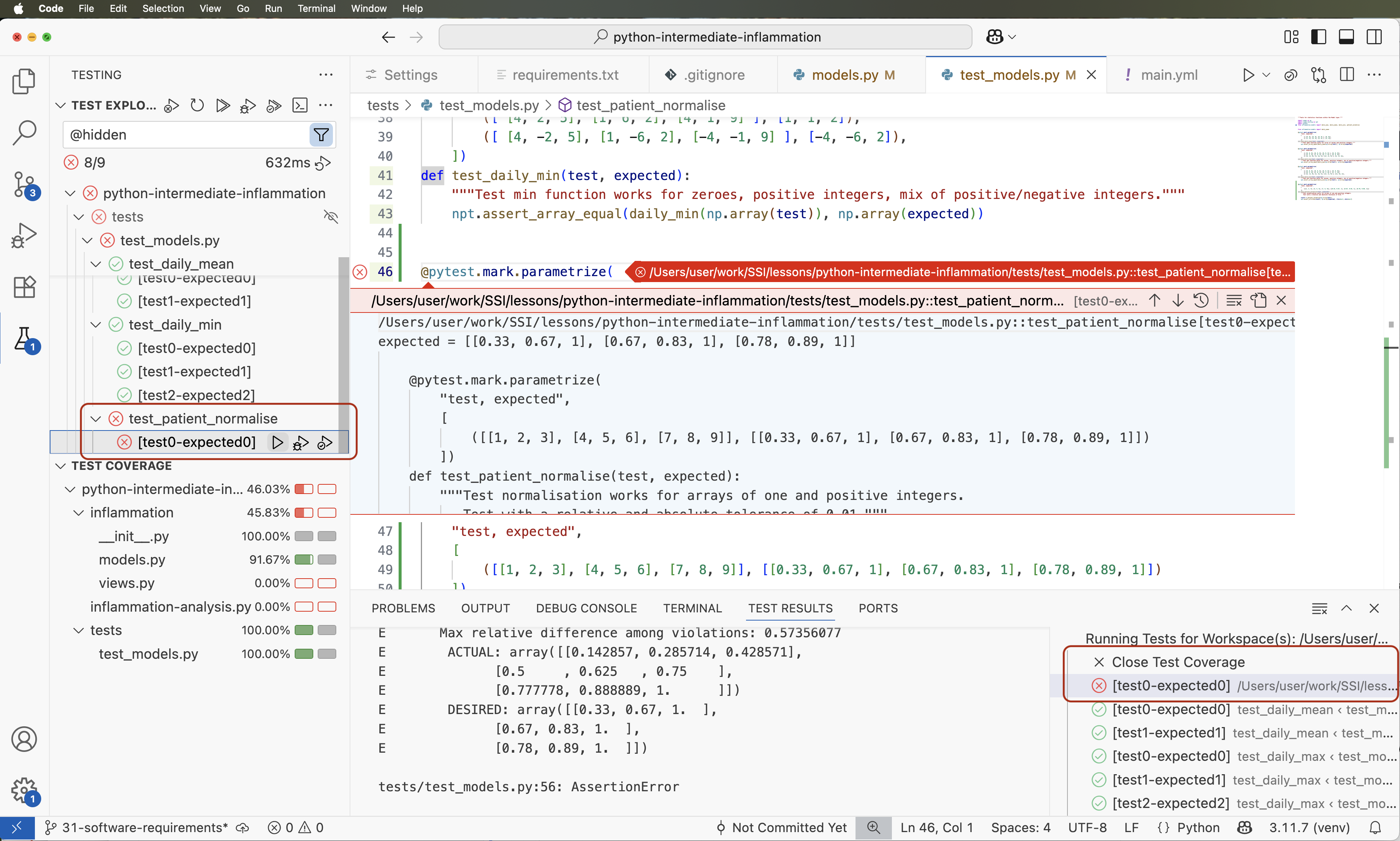
2. Test the data-pipeline contract, not its implementation details
Before importing prepare_dataset.py from a test, make one small structural improvement. In the prior lesson, the orchestration code executed at module level. That is fine for a first script, but importing it in a test would then read files and write JSON as a side effect.
Move that orchestration code into main() and call it only when the file is run directly:
def main() -> None:
    raw_path = Path("data/raw_documents.csv")
    cleaned_path = Path("data/cleaned_documents.json")

    records, rejected = load_and_clean_csv(raw_path)
    write_json(records, cleaned_path)

    print(f"Accepted records: {len(records)}")
    print(f"Rejected records: {len(rejected)}")

    for reason in rejected:
        print(f"  - {reason}")

    with cleaned_path.open("r", encoding="utf-8") as file:
        reloaded_records = json.load(file)

    if reloaded_records != records:
        raise RuntimeError("JSON round-trip verification failed.")

    print(f"Verified JSON round trip: {cleaned_path}")


if __name__ == "__main__":
    main()
This is the Python form of keeping an application’s composition root separate from reusable library behavior. Now a test can safely write from prepare_dataset import load_and_clean_csv.
Identify the behavior that must remain true
The implementation of your previous pipeline may change: you might replace a list with a generator later, reorganize helpers, or add logging. Tests should not care about those internal decisions. They should state externally visible contracts:
| Behavior | Testable contract |
|---|---|
| Normalization | Leading/trailing and repeated whitespace are normalized; Unicode is NFC-normalized. |
| Valid records | Required fields become cleaned strings and accepted records preserve expected values. |
| Invalid records | Blank required fields and duplicate IDs are rejected with useful reasons. |
| Schema failures | A CSV missing a required column raises ValueError. |
| Serialization | JSON is created, reloads to the original record structure, and preserves Unicode text. |
Create tests/test_prepare_dataset.py:
import json
from pathlib import Path

import pytest

from prepare_dataset import clean_snippet, load_and_clean_csv, write_json


@pytest.mark.parametrize(
    ("raw_text", "expected"),
    [
        ("  Build \t model\ncards.  ", "Build model cards."),
        ("Cafe\u0301", "Café"),
    ],
)
def test_clean_snippet_normalizes_whitespace_and_unicode(
    raw_text: str,
    expected: str,
) -> None:
    assert clean_snippet(raw_text) == expected


def test_load_and_clean_csv_accepts_valid_records_and_reports_rejections(
    tmp_path: Path,
) -> None:
    csv_path = tmp_path / "documents.csv"
    csv_path.write_text(
        "id,source,text\n"
        '001,docs,"  Build   model cards. "\n'
        '002,forum,"    "\n'
        '001,docs,"Duplicate identifier"\n',
        encoding="utf-8",
    )

    records, rejected = load_and_clean_csv(csv_path)

    assert records == [
        {
            "id": "001",
            "source": "docs",
            "text": "Build model cards.",
        }
    ]
    assert rejected == [
        "line 3: blank required field(s): text",
        "line 4: duplicate id: 001",
    ]


def test_load_and_clean_csv_rejects_a_missing_required_column(
    tmp_path: Path,
) -> None:
    csv_path = tmp_path / "missing_text.csv"
    csv_path.write_text(
        "id,source\n001,docs\n",
        encoding="utf-8",
    )

    with pytest.raises(
        ValueError,
        match="CSV is missing required columns: text",
    ):
        load_and_clean_csv(csv_path)


def test_write_json_round_trips_records_and_preserves_unicode(
    tmp_path: Path,
) -> None:
    records = [
        {
            "id": "001",
            "source": "docs",
            "text": "Café owners discussed tokenization.",
        }
    ]
    output_path = tmp_path / "derived" / "cleaned.json"

    write_json(records, output_path)

    saved_text = output_path.read_text(encoding="utf-8")
    reloaded = json.loads(saved_text)

    assert output_path.exists()
    assert "Café" in saved_text
    assert reloaded == records
There are several important pytest patterns here.
tmp_path provides test isolation
tmp_path is a built-in pytest fixture. Each test receives its own temporary Path, so it does not depend on the repository’s real data/ directory, a pre-existing file, or the execution order of other tests.
This is especially valuable for data code. A test that reads a developer’s local files can pass on one laptop and fail on CI, or worse, modify real data. A test that creates its own tiny input dataset is self-contained and reproducible.
Parametrization expresses one rule across examples
The @pytest.mark.parametrize decorator runs the same test once per supplied case. Here, both whitespace normalization and Unicode normalization are examples of the same contract: clean_snippet turns alternate textual representations into a canonical form.
The NumPy testing guide illustrates this pattern for multiple numerical dimensions and dtypes, along with the array-specific assertion tools you will use shortly.
Testing guidelines — NumPy v2.5 Manual
Read the relevant parts of NumPy’s “Testing guidelines.” Although written for NumPy contributors, its guidance on clear assertions, parametrization, and deterministic numerical tests transfers directly to ML utility code.
In “Writing your own tests,” read assertion guidance, paying attention to the distinction between exact and near array comparison. In “Parametric tests,” read the parametrization introduction. Finally, in “Tests on random data,” read the reproducibility warning. For now, favor small hand-constructed cases; when random inputs become necessary, use a local seeded generator.
pytest.raises tests a deliberate failure
An exception is part of a function’s contract when invalid input should be rejected. The code inside the with pytest.raises(...) block must be the specific action expected to fail.
This is intentionally narrow:
with pytest.raises(ValueError, match="CSV is missing required columns: text"):
    load_and_clean_csv(csv_path)
If you wrapped the whole test body, a ValueError from test setup—for example, an accidental conversion mistake—could make the test pass for the wrong reason. The match argument further verifies that the error explains the intended schema problem.
Run the data tests:
python -m pytest tests/test_prepare_dataset.py -q
A useful test name reads as a behavioral statement. Compare:
def test_case_1():
    ...
with:
def test_load_and_clean_csv_rejects_a_missing_required_column():
    ...
The second name documents what broke when it fails and makes reports understandable to a future contributor.
3. Test numerical code with array-aware assertions
Data-pipeline failures often involve incorrect records or file behavior. Numerical failures can be subtler: a wrong axis, unintended broadcasting, a lost dtype, a tiny rounding difference, or a degenerate input such as a zero vector.
Create array_ops.py with a small routine that will be representative of later embedding and attention code:
import numpy as np


def l2_normalize(vector: np.ndarray) -> np.ndarray:
    """Return a one-dimensional vector with Euclidean norm equal to one."""
    values = np.asarray(vector, dtype=np.float64)

    if values.ndim != 1:
        raise ValueError("vector must be one-dimensional")

    norm = np.linalg.norm(values)

    if norm == 0.0:
        raise ValueError("cannot normalize a zero vector")

    return values / norm
For a vector , its L2 norm is:
L2 normalization returns:
For the vector , the norm is , so the expected result is .
Create tests/test_array_ops.py:
import numpy as np
import pytest

from array_ops import l2_normalize


@pytest.mark.parametrize(
    ("values", "expected"),
    [
        (
            np.array([3, 4]),
            np.array([0.6, 0.8]),
        ),
        (
            np.array([0, -5, 0]),
            np.array([0.0, -1.0, 0.0]),
        ),
    ],
)
def test_l2_normalize_returns_expected_values(
    values: np.ndarray,
    expected: np.ndarray,
) -> None:
    actual = l2_normalize(values)

    assert actual.shape == expected.shape
    assert actual.dtype == np.float64
    np.testing.assert_allclose(
        actual,
        expected,
        rtol=1e-12,
        atol=1e-12,
    )


def test_l2_normalize_returns_a_unit_vector_without_mutating_input() -> None:
    values = np.array([3, 4])
    original_values = values.copy()

    actual = l2_normalize(values)

    assert np.linalg.norm(actual) == pytest.approx(1.0, abs=1e-12)
    np.testing.assert_array_equal(values, original_values)


def test_l2_normalize_rejects_a_zero_vector() -> None:
    with pytest.raises(ValueError, match="zero vector"):
        l2_normalize(np.array([0, 0, 0]))


def test_l2_normalize_rejects_a_matrix() -> None:
    with pytest.raises(ValueError, match="one-dimensional"):
        l2_normalize(np.array([[3, 4]]))
Why exact equality is usually wrong for floating-point results
Most decimal fractions cannot be represented exactly in binary floating point. Operations also introduce small rounding differences depending on dtype and operation order. Therefore, this is usually inappropriate:
assert actual == expected
For NumPy arrays it is worse than merely fragile: actual == expected produces an array of elementwise Booleans, which Python cannot safely interpret as one True or False assertion.
Use the assertion tool that matches the contract:
| Situation | Preferred assertion |
|---|---|
| Python scalar, string, list, dictionary, or exact data record | assert actual == expected |
| Exact NumPy array values, such as IDs or masks | np.testing.assert_array_equal |
| Floating-point arrays | np.testing.assert_allclose |
| Floating-point scalar or a simple numeric invariant | pytest.approx |
| Array structural requirements | Explicit shape and dtype assertions |
| Invalid input must fail | pytest.raises |
np.testing.assert_allclose compares arrays element by element and produces diagnostics that identify differing elements and the magnitude of the mismatch. The tolerance condition is effectively:
Here, rtol=1e-12 and atol=1e-12 are deliberately strict because this is a small deterministic calculation in float64. Tolerances should be chosen from the numerical context, not inflated until a failing test happens to pass. Later, with GPU float16 or bfloat16 operations, tolerances will generally need to be looser and justified by the lower precision.
Notice that the second test checks an invariant—the output’s norm is one—rather than only a single expected array. It also checks that the function did not mutate its input. Combining a concrete known answer, a mathematical property, and edge-case tests makes it harder for an incorrect implementation to pass accidentally.
Run the full suite:
python -m pytest -q
A healthy result will report all tests as passed. To confirm that the tests genuinely protect behavior, make a temporary intentional defect, such as changing the return statement to:
return values
Then rerun pytest. The expected-value and unit-norm tests should fail. Restore the correct implementation immediately afterward. This small check is a practical way to ask whether your test suite detects a defect rather than merely executing code.
4. A compact checklist for ML-oriented unit tests
As your code shifts from CSV utilities to tokenizers, tensor operations, and training loops, retain this decision process:
- State the contract first. What must be true to downstream code or users?
- Use tiny, hand-verifiable inputs. A three-row CSV or a vector like makes failures legible.
- Cover normal behavior and boundaries. Test a valid result, an invalid input, and a meaningful edge condition.
- Isolate filesystem work. Use
tmp_path, not real data paths. - Test expected errors narrowly. Scope
pytest.raisesaround only the operation that should fail. - Distinguish exact and approximate numerical claims. Check shapes and dtypes deliberately; use array-aware approximate assertions for floating-point values.
- Keep tests deterministic. Avoid uncontrolled randomness, wall-clock dependence, network calls, and hardware-specific assumptions in unit tests.
- Run focused tests while editing, then the full suite before committing.
You can now write and run pytest tests for both data-processing and numerical utilities. You have tested cleaning behavior, invalid schemas, file serialization, array values, numerical invariants, shape-related failures, and zero-vector handling—using isolated temporary files and assertions suited to each kind of output.
Next, the course moves into mathematical foundations for neural networks, beginning with vectors, matrices, and tensor shapes. The testing habits from this lesson will become immediately useful when you start implementing and verifying those operations.
Can't find a good explanation? Sign up and we'll make it for you
Sign up