
Hello. In the previous lesson, you designed the boundaries that make Terraform manageable in production: reusable modules, isolated root configurations and states, explicit versions, and clear ownership. This lesson focuses on the operational checkpoint that sits between a pull request and production: deciding whether a Terraform plan is actually safe to approve.
For a high-value exchange platform, a plan is not evidence that a change is safe merely because Terraform produced it successfully. It is a proposed mutation of live infrastructure. Your job as reviewer is to establish what will change, why it will change, what else depends on it, what authority will execute it, and how failure or unintended drift will be contained.
By the end, you should be able to review a production plan systematically for destructive replacement, dependency effects, drift, state and locking hazards, privilege scope, and sensitive-data exposure—and explain that process credibly in an interview.
1. A plan is a change proposal, not an approval
Terraform forms a plan by reconciling three views of the world:
- Configuration: the desired infrastructure expressed in the reviewed commit.
- State: Terraform’s record of the objects this root configuration owns.
- Remote reality: AWS resources as Terraform can read them during refresh.
This is why a clean plan can still be unsafe. Terraform may correctly propose changes that are operationally unacceptable: replacing an RDS instance because its identifier changed, removing an ingress rule required by a partner, or reverting a manually applied emergency mitigation.
terraform plan command reference
Read HashiCorp’s official “terraform plan command” reference to anchor the distinction between normal plans, drift reconciliation, targeting, locking, and saved plan artifacts.
In the Introduction, read the plan model. Focus on why a plan compares refreshed remote objects, prior state, and configuration. Then, in Planning Modes, read the explanation beginning refresh only mode. This is the controlled mechanism for examining intentional out of band changes. In Planning Options, review the descriptions of -replace and -target. Treat both as exception mechanisms, not normal delivery controls. In Other Options, study locking options, followed by the saved plan warning.
Read the action symbols before reading the details
The first pass through a plan is triage. Terraform’s action markers tell you where the risk is concentrated:
| Plan marker | Meaning | Initial reviewer response |
|---|---|---|
+ | Create | Verify the resource belongs in this account, Region, subnet tier, and cost envelope. |
~ | Update in place | Determine service impact, propagation time, and whether the change weakens security or availability. |
- | Destroy | Stop and identify the business owner, dependency impact, retained data, and rollback path. |
-/+ | Destroy, then create replacement | Treat as an outage or data-loss risk until proven otherwise. |
+/- | Create, then destroy replacement | Better availability posture, but still validate cutover, quotas, names, and dependencies. |
The summary line—such as “2 to add, 4 to change, 1 to destroy”—is useful but insufficient. A replacement counts as both an add and a destroy; it can be hidden inside otherwise ordinary-looking totals.
Consider this shortened plan extract:
# aws_db_instance.orders must be replaced
-/+ resource "aws_db_instance" "orders" {
      identifier = "orders-prod" -> "orders-prod-v2" # forces replacement
      ...
    }

# aws_security_group_rule.api_to_db will be updated in-place
~ resource "aws_security_group_rule" "api_to_db" {
      cidr_blocks = [
        "10.20.0.0/16",
      ] -> [
        "10.20.16.0/20",
      ]
    }

Plan: 1 to add, 1 to change, 1 to destroy.
A junior review might say, “Only three actions.” A production review says:
- The RDS replacement is not approvable without a database migration and cutover plan. A new database instance does not contain production data merely because its Terraform configuration matches.
- The security-group change may remove database access from workloads outside
10.20.16.0/20. Review actual task and node subnet ranges, migration jobs, bastions, monitoring agents, and disaster-recovery tooling. - The combined changes may be coupled. If application tasks lose DB reachability while the database is replaced, diagnosis and recovery become much harder.
The correct unit of review is therefore the service behavior produced by the whole plan, not each resource in isolation.
2. Review destructive changes as service migrations
A forced replacement means that the provider or Terraform cannot alter an attribute in place. The plan typically identifies the reason with text such as # forces replacement. That comment should trigger a specific set of questions:
-
What is being replaced, and is it stateful?
Replacement of an ECS task definition revision is routine. Replacement of an RDS instance, KMS key, production ALB, NAT gateway, VPC endpoint, or Route 53 record needs materially stronger review. -
Can the old and new resources coexist?
create_before_destroyhelps only if AWS allows coexistence. Fixed names, unique DNS records, quota limits, elastic IP allocation, and service-specific constraints can make it impossible. -
How will consumers move?
Creating a new resource first does not itself perform a safe cutover. You still need a deliberate mechanism: weighted DNS, ALB target registration, a database replication cutover, or a compatible endpoint transition. -
What happens to data and identity?
For databases, queues, buckets, certificates, and cryptographic keys, replacement can mean data loss, inaccessible encrypted data, broken clients, or invalidated trust relationships. -
What is the rollback point?
A rollback that simply reapplies old Terraform may not restore a deleted database, a released static IP, or a changed external integration. The plan must be paired with a recovery method appropriate to the resource.
Lifecycle settings are safeguards, not magic
Terraform lifecycle controls can reduce risk, but each has a limited purpose.
resource "aws_db_instance" "orders" {
  # Configuration omitted

  lifecycle {
    prevent_destroy = true
  }
}
prevent_destroy is a useful safety fuse for critical resources. If Terraform proposes their deletion or replacement while the lifecycle rule is present, Terraform fails rather than proceeding. Use it deliberately for resources where accidental destruction is unacceptable, such as production databases or long-lived data stores.
However, it is not a complete data-protection strategy:
- It does not replace backups, restore testing, deletion protection, or change control.
- It can obstruct legitimate migrations unless the team has an approved process for temporarily changing the guardrail.
- If a resource is removed from configuration entirely, its lifecycle block is removed too. Review deletion pull requests especially carefully.
For infrastructure where a replacement is both valid and technically feasible, create_before_destroy can improve availability:
resource "aws_launch_template" "api" {
  # Configuration omitted

  lifecycle {
    create_before_destroy = true
  }
}
Even then, approve only after validating the consumer transition. For example, a new target group must receive healthy tasks and traffic before the old target group is retired. Terraform ordering is not the same as application readiness.
Replacements that should make you pause
For an exchange-style AWS platform, treat these plan categories as high-risk by default:
| Resource type | Why replacement is dangerous | Safer response |
|---|---|---|
| RDS instance, cluster, or subnet topology | Data continuity, endpoints, replication, client connection behavior | Use migration, replication, tested restore, and controlled cutover rather than a casual replacement. |
| VPC, subnets, route tables, NAT gateway | Broad connectivity blast radius and hidden dependencies | Separate network change, map affected workloads, and validate routing and egress first. |
| IAM role, policy, permission boundary | Can remove critical access or unintentionally expand privilege | Compare effective permissions and trust policy, not just JSON diffs. |
| KMS key or key policy | May affect decryptability of state, backups, logs, and data | Require security ownership and a key-rotation or migration design. |
| ALB, listener, target group, DNS record | Can cause immediate availability or routing failure | Validate health checks, listener rules, DNS TTL, weighted routing, and rollback. |
| ECS service or task execution role | May interrupt capacity or prevent tasks from starting | Confirm desired count, deployment configuration, secret access, image pull access, and alarm behavior. |
A valuable interview statement is:
“I never approve a replacement based only on the Terraform action symbol. I identify whether the resource is stateful or externally consumed, confirm whether old and new instances can coexist, define the cutover and rollback mechanism, and verify that the dependency graph will remain healthy throughout the transition.”
3. Follow dependencies, not just the changed line
Terraform derives many dependencies from references. A task definition that references a task role, a security group that references a VPC, and an ECS service that references subnets are connected in Terraform’s graph even when depends_on is absent.
A reviewer needs to identify both direct and operational dependencies.
Direct dependency checks
When reviewing a resource, scan for changes to:
- IDs passed into other resources: VPC IDs, subnet IDs, security group IDs, target group ARNs, KMS key ARNs, IAM role ARNs.
- Module outputs that have changed shape, value, or key names.
- Data sources that select resources by tag, name, or an ambiguous filter.
for_eachkeys. Changing a key can cause Terraform to interpret an existing resource as removed and a new resource as created.- Refactors that change Terraform addresses. A moved resource address without appropriate state migration can appear as an unnecessary destroy and create.
For example, renaming this map key is not cosmetically harmless:
services = {
  trading_api = {
    desired_count = 6
  }
}
If the key changes from trading_api to orders_api, Terraform may see one instance to destroy and another to create. The reviewer must distinguish a genuine service replacement from a configuration-address refactor that needs explicit state movement.
Operational dependency checks
Terraform cannot infer every real dependency. It does not know that:
- A partner has allowlisted a NAT gateway’s public IP.
- An external client uses an undocumented DNS record.
- A reconciliation worker needs an S3 bucket policy that looks unrelated to the trading API.
- A manual emergency IAM permission was added during an incident.
- A certificate rotation depends on a client deployment cadence.
For high-risk plans, ask for evidence outside Terraform:
- Current dashboards and service ownership.
- Architecture documentation and dependency inventory.
- AWS Config, CloudTrail, VPC Flow Logs, and access logs where relevant.
- A staging or pre-production validation that represents the production traffic path.
- A rollout plan with named owners and decision points.
Be cautious with -target and -replace
A targeted plan can be useful during recovery, such as when an incident requires replacing one known-degraded node or reconciling a narrowly defined mistake. But it is not a routine way to make a large root configuration feel smaller.
Targeting can skip changes Terraform would otherwise identify. That makes the resulting state harder to reason about and can leave hidden drift behind. If a team repeatedly needs -target for normal releases, the likely correction is a better state boundary—such as separating a service root from the network or data root—not permanent targeted deployment.
Likewise, -replace should be accompanied by an explicit reason: an immutable rollout, a known-corrupt resource, a compromised host, or a controlled recovery action. “The command worked after I added -replace” is not sufficient rationale.
4. Classify drift before Terraform “fixes” it
Drift is a difference between Terraform’s intended configuration and the actual AWS environment caused outside the normal Terraform workflow. It is not automatically bad; it is a signal that needs classification.
Typical production examples include:
- An SRE changes an Auto Scaling limit during an incident.
- A security engineer restricts an overly broad security-group rule.
- An application team updates an ECS service manually to mitigate a bad deployment.
- A console user modifies a Route 53 record.
- A resource is changed by another controller or AWS service.
A normal Terraform plan refreshes managed remote objects first. It may then propose to restore the configuration in Git. That can be correct, but do not blindly apply it.
Use this decision framework:
| Drift category | Example | Appropriate response |
|---|---|---|
| Intended emergency change | Temporary ECS scale-out during a traffic surge | Capture the incident context; decide whether the configuration should be updated to retain the change or whether it should be deliberately reverted. |
| Intended external ownership | A platform controller manages a specific metadata field | Document ownership and consider narrowly scoped ignore_changes for only that field. |
| Unauthorized or accidental change | A public ingress rule added manually | Investigate and remediate promptly; preserve audit evidence before overwriting it. |
| Terraform model defect | An imported resource is missing configuration or state is wrong | Correct configuration and state safely; do not make repeated ad hoc console changes. |
A refresh-only plan is particularly useful after an emergency change. It reconciles Terraform state with the current remote object without proposing configuration-driven infrastructure mutation. That gives the team a factual basis for deciding what the desired configuration should be.
Avoid normalizing drift with broad lifecycle rules such as:
lifecycle {
  ignore_changes = [all]
}
That effectively relinquishes Terraform ownership of the resource. A narrowly justified ignore_changes rule can be valid when another system owns a specific attribute, but it should state:
- Which system owns the attribute.
- Why Terraform cannot own it.
- Which changes Terraform must still enforce.
- Who reviews future exceptions.
Do not disable refresh in production merely to make plans faster. A plan created with refresh disabled can miss remote changes and therefore give an incomplete risk picture.
5. State, locks, privileges, and secrets are approval criteria
A plan is only meaningful within its execution context. The same code can be safe in a non-production account and dangerous in production.
Confirm the state and environment boundary
Before examining resource changes, verify:
- The target AWS account and Region are the intended production target.
- The root configuration and backend key match the intended state boundary.
- The reviewed commit includes the expected module and provider versions.
- The provider lock file has not changed unexpectedly.
- Remote-state consumers point to the intended account, environment, and outputs.
- The pipeline is using the production deployment role rather than a broadly privileged shared role.
An incorrect remote-state reference can be especially dangerous. If a production ECS root reads subnet IDs or a KMS key ARN from a non-production network state, the plan may look syntactically valid while deploying into the wrong environment or failing at runtime.
A state lock serializes changes; it does not make them safe
Locking prevents concurrent Terraform operations from writing the same state simultaneously. It does not approve a change, stop console changes, validate architecture, or protect resources owned by other state files.
Use these operating rules:
- Keep locking enabled for production plans and applies.
- Set a sensible lock timeout in CI rather than disabling locking.
- Serialize pipelines per state root. The
prod/trading-apistate can have its own controlled queue, independent from a separately ownedprod/networkstate. - Investigate a lock before attempting force-unlock. Confirm the run ID, identity, pipeline status, and whether an apply is still active.
- Treat a stale-plan error as a reason to regenerate, review, and reapprove the plan—not as an inconvenience to bypass.
Match plan and apply privilege to the blast radius
A successful plan proves only what the executing identity can see and propose. It does not prove that the identity should have authority to make every proposed change.
A mature model generally separates:
| Identity | Typical permissions | Purpose |
|---|---|---|
| Engineer identity | Read-only access to approved logs, metrics, and limited AWS metadata | Development and diagnosis without production mutation rights |
| CI plan role | Read permissions needed to refresh managed resources and access scoped state | Generate reviewable plans |
| CI apply role | Mutating permissions limited to the resources and account owned by one root state | Execute approved production changes |
| Break-glass role | Time-bound, heavily audited emergency authority | Incident mitigation under defined controls |
Review the role trust policy as well as its permissions. For CI, short-lived credentials obtained through workload identity or OIDC are preferable to long-lived access keys. The production apply role should be assumable only by the approved pipeline and should have a permission boundary or equivalent guardrail appropriate to the organization.
Treat state and plan artifacts as sensitive
Terraform’s sensitive = true setting reduces exposure in CLI output, but it does not guarantee that a value is absent from Terraform state. Saved plan files are also sensitive: they can contain full configuration, input values, and values obscured in terminal output.
How to Manage Secrets in Terraform?
Watch the selected parts of “How to Manage Secrets in Terraform?” by Anton Putra for a concise explanation of why private repositories alone do not protect secrets and why Terraform state requires explicit protection.
Watch source code risks to establish why plaintext credentials do not belong in Terraform files, even in private repositories. Then watch state protection, focusing on encrypted remote state and restricted backend access. Finally, watch secret stores for the basic AWS Secrets Manager integration pattern; remember that retrieving a secret value into Terraform can still expose it in state.
In a production review, look for these leakage paths:
- Credentials in
.tf,.tfvars, shell arguments, or pull-request comments. - Secrets exposed in CI logs or
terraform show -jsonoutput. - Saved plan files retained as broadly readable build artifacts.
- Terraform state stored locally, committed to Git, or accessible to all developers.
- Secret values passed from a secret store into Terraform when a workload could instead receive only a secret ARN and retrieve the value at runtime.
For ECS services, the preferred pattern is commonly to grant the task role permission to retrieve a narrowly scoped secret at runtime, while Terraform manages the secret reference and IAM policy. This reduces unnecessary handling of the secret value by Terraform and the delivery pipeline.
6. Turn plan review into an enforceable production gate
The following AWS delivery pattern shows the core stages often used around Terraform: checkout, validation, plan, and apply, with artifacts stored in encrypted S3.
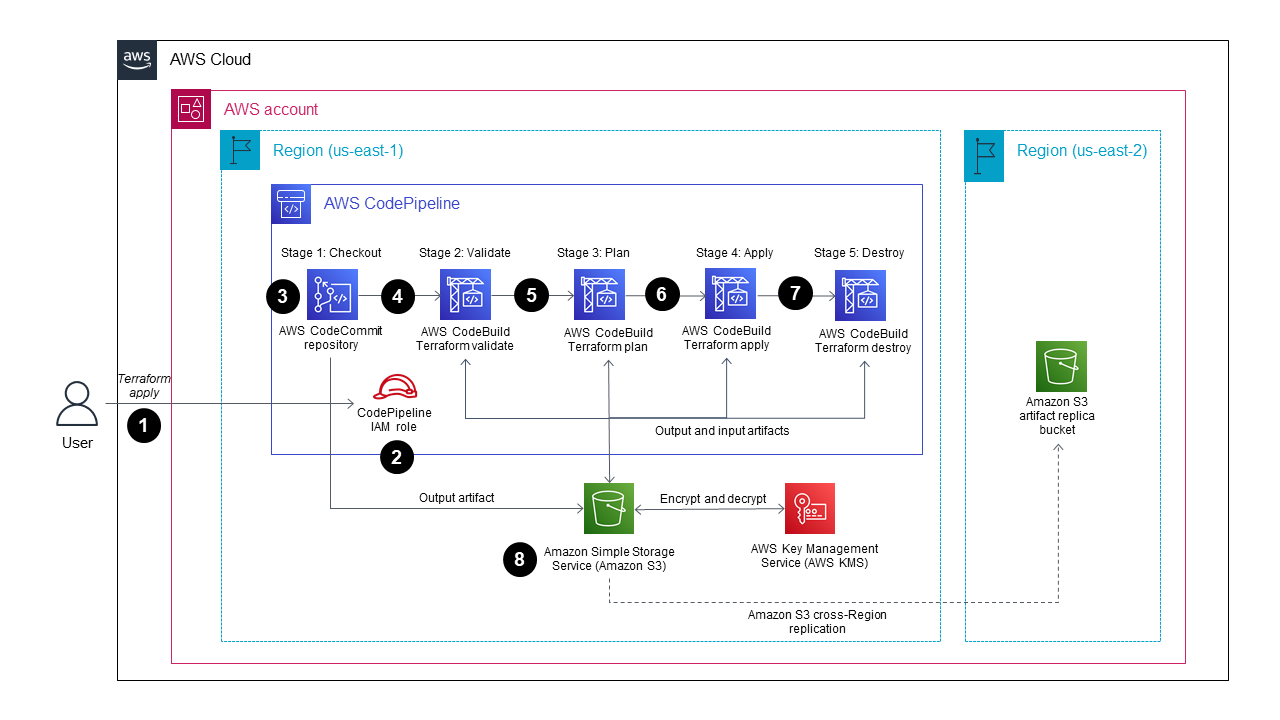
The important distinction is that a production pipeline is not just automation; it is a set of evidence-producing controls.
A practical Terraform approval sequence is:
-
Establish source integrity
Build from a protected branch and immutable commit SHA. Review the pull request, module version changes, provider lock-file changes, and environment variable changes. -
Validate before planning
Run formatting, syntax validation, module tests where available, static analysis, policy checks, and secret scanning. Fail early on a wrong account, wrong Region, or unexpected backend key. -
Generate the plan under the intended production context
Use the production-scoped plan role, normal refresh behavior, locking, and explicit noninteractive variables. Capture the plan in a protected artifact if the organization uses plan-then-apply. -
Perform semantic review
Review every delete, replacement, IAM/KMS/network change, remote-state change, and sensitive output. Compare the proposed behavior with the approved change request, rollout plan, and maintenance constraints. -
Require accountable approval
The approver should be able to explain the operational impact. High-risk changes may require service owner, platform, database, or security approval rather than a generic pipeline approval. -
Apply the reviewed artifact promptly
Apply the exact approved plan artifact using the constrained production apply role. If the plan is stale, the state changes, or the change window expires, regenerate the plan and repeat review rather than silently replanning during apply. -
Verify actual outcomes
Confirm resource health, service-level telemetry, access paths, alarms, and key business flows. Follow with a normal plan or drift check after the change window where appropriate.
A saved-plan command might be used in a controlled pipeline:
terraform plan \
  -input=false \
  -lock-timeout=5m \
  -out=tfplan
The file name is not the security control. The control is the surrounding process: encrypted artifact storage, strict access control, short retention, no publishing to untrusted logs, and a policy that only the pipeline’s production apply identity can consume it.
A compact approval checklist
Before approving a production plan, be able to answer “yes” to each relevant question:
| Review area | Approval question |
|---|---|
| Scope | Is this the correct repository commit, root configuration, AWS account, Region, and remote state? |
| Destruction | Have all deletes and replacements been explicitly justified, including data retention and rollback? |
| Dependencies | Have downstream consumers, external integrations, network paths, and IAM relationships been assessed? |
| Drift | Are unexpected changes investigated rather than automatically overwritten? |
| State | Is remote state encrypted, correctly isolated, tightly access-controlled, and locked during operations? |
| Privilege | Does the pipeline use a short-lived, scoped production role with only required authority? |
| Secrets | Are state, plan artifacts, CI logs, and source files protected from credential exposure? |
| Delivery | Is there an approved cutover, verification, rollback, and stakeholder communication plan? |
Interview-ready response
If asked, “How do you review a Terraform plan before approving production?”, a strong concise response is:
“I treat the plan as a production change proposal, not a command output. First, I verify the execution context: protected commit, target account and Region, expected backend key, module and provider versions, and the CI role. I then triage every destroy and replacement before looking at the summary counts, because a replacement can hide a database, IAM, network, or availability impact.
I trace dependency effects through module outputs, security groups, roles, DNS, load balancers, and remote state, and I distinguish intended drift from unauthorized or emergency changes before Terraform reverts anything. I require state locking and avoid targeted operations except for controlled recovery. Finally, I verify that plan artifacts and state are encrypted and access-restricted, and that the apply role is narrowly scoped. Approval requires a defined cutover, health validation, and rollback method—not merely a green Terraform plan.”
Key takeaways
- A Terraform plan compares configuration, state, and remote AWS reality; it is a proposal, not proof of safety.
- Read every delete and replacement before relying on aggregate action counts.
- Treat stateful, shared, externally consumed, security-sensitive, and network resources as high-risk replacement candidates.
- Review both Terraform references and real operational dependencies that Terraform cannot see.
- Classify drift before overwriting it; refresh-only planning is useful after intentional out-of-band changes.
- Remote state, locking, execution identity, and plan-artifact handling are all part of production approval.
sensitiveoutput masking does not remove secrets from state or saved plans.- A mature delivery gate combines automated validation with accountable human review of service impact.
Next, you will use these controls to produce a zero-downtime ECS delivery and rollback runbook: immutable artifact promotion, validation gates, approvals, health verification, deployment strategies, and backward-compatible database migration.
Can't find a good explanation? Sign up and we'll make it for you
Sign up