
Hello and welcome to a new module in your journey to becoming a penetration tester and bug bounty hunter!
In our last module, we delved into advanced server-side vulnerabilities, culminating in the art of evading Web Application Firewalls. You learned to think like an attacker, dissecting WAF rules and crafting payloads that slip through the cracks.
Today, we pivot to Module 10: Advanced Web Attacks & API Security. We'll start with a technology that underpins a vast majority of modern web and mobile applications: JSON Web Tokens (JWTs). Your goal for this lesson is to analyze the structure of a JSON Web Token (JWT) including its header, payload, and signature.
Understanding this structure is not just a theoretical exercise. Since JWTs are often used to manage authentication and user sessions, being able to dissect them is the first step toward identifying and exploiting critical vulnerabilities that can lead to account takeover.
1. What is a JSON Web Token?
A JSON Web Token (JWT) is an open standard (RFC 7519) for creating self-contained tokens that securely transmit information between parties. Think of it as a digitally signed ID card for the web. When a user logs into an application, the server can issue a JWT. The user then includes this JWT with every subsequent request to prove their identity and access protected resources.
Unlike traditional session IDs that are stored on the server, a JWT contains all the necessary user information within the token itself. This stateless approach is highly efficient for modern distributed systems and APIs.
To get a formal introduction, please read the first few sections of the jwt.io introduction page.
JSON Web Token Introduction - jwt.io
This resource from jwt.io, a key hub for JWT information, provides a clear and concise definition of JWTs and their primary use cases in authorization and information exchange.
Read the sections 'What is JSON Web Token?' and 'When should you use JSON Web Tokens?'. Focus on understanding that JWTs are for securely transmitting information and that their most common use is for authorization.
A crucial point to grasp is that JWTs are typically signed, not encrypted. This means the information inside a JWT is readable by anyone who has the token. The signature's job is not to hide the data, but to ensure its integrity—that is, to prove it hasn't been tampered with. We're primarily dealing with what are technically called JSON Web Signatures (JWS).
2. The Anatomy of a JWT: Three Core Parts
A JWT looks like a long, cryptic string, but it has a very specific structure. It always consists of three parts, separated by dots (.):
[Header].[Payload].[Signature]
Let's look at this visually.
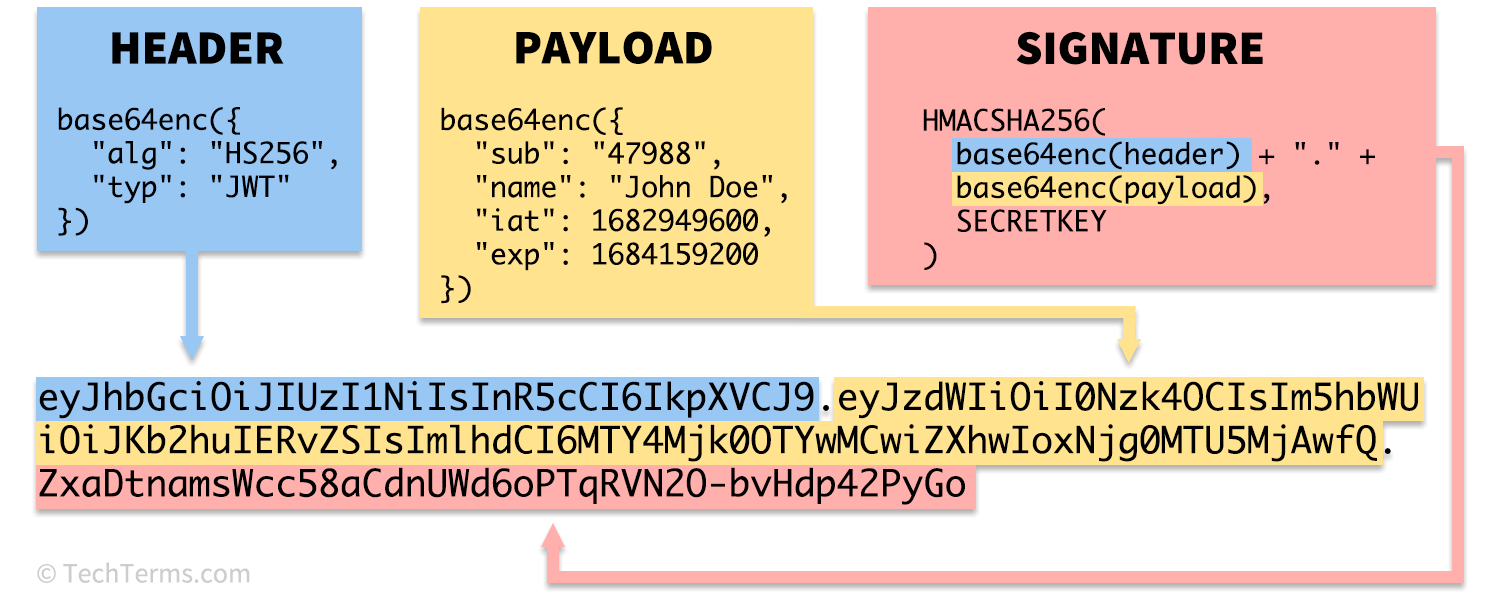
To see a practical breakdown, let's watch a segment from a presentation by security researcher Farah Hawa.
Hacking JWTs for Beginners with Farah Hawa
In this video, Farah Hawa provides an excellent, beginner-friendly walkthrough of the JWT structure. She demonstrates finding a JWT in Burp Suite and explains each component clearly.
Watch from 08:31 to 14:22. Pay close attention to her explanation of the header, payload, and signature, and how she identifies a JWT in an HTTP request.
Now, let's break down each part in more detail.
Part 1: The Header
The header is a JSON object that provides metadata about the token. It typically contains two key-value pairs:
typ(Type): Declares the token type, which is almost always"JWT".alg(Algorithm): Specifies the signing algorithm used to generate the signature. Common examples areHS256(HMAC using SHA-256) andRS256(RSA signature using SHA-256).
Here is an example of a decoded header:
{
  "alg": "HS256",
  "typ": "JWT"
}
This JSON object is then Base64Url encoded to form the first part of the JWT.
Part 2: The Payload
The payload is a JSON object containing the "claims"—statements about an entity (typically the user) and additional data. These claims are the core information the application uses to make decisions.
There are three types of claims:
- Registered Claims: A set of predefined, recommended claims like
iss(issuer),exp(expiration time),sub(subject, often the user ID), andiat(issued at). - Public Claims: Custom claims defined by those using JWTs, which should be registered to avoid collisions.
- Private Claims: Custom claims created to share information between parties that agree on using them. These are the most common custom claims you'll see. For example:
{"role": "admin"}or{"username": "carlos"}.
Here is an example of a decoded payload:
{
  "sub": "1234567890",
  "name": "John Doe",
  "admin": true,
  "iat": 1516239022
}
Like the header, this JSON object is Base64Url encoded to form the second part of the JWT. Remember, this data is visible to anyone who can see the token. Never put sensitive information that must remain secret in the payload of a JWT unless the token is also encrypted (JWE).
Part 3: The Signature
The signature is what provides the security guarantee. It's used to verify that the message wasn't changed along the way. To create the signature, you take the encoded header, the encoded payload, and a secret key, and sign them with the algorithm specified in the header.
The process for an HS256 signature looks like this:
HMACSHA256(
  base64UrlEncode(header) + "." + base64UrlEncode(payload),
  secret
)
If an attacker changes the admin claim in the payload from false to true, they would need the server's secret to generate a new, valid signature. Without it, the server will reject the token because the signature will not match the tampered payload.
There are two main families of signing algorithms:
- Symmetric (HMAC): Like
HS256. Uses a single shared secret key to both create and verify the signature. - Asymmetric (RSA/ECDSA): Like
RS256. Uses a private key to create the signature and a corresponding public key to verify it.
This Tiny JWT Mistake = Massive Bug Bounty
This short clip from NahamSec quickly clarifies the difference between the two main signing methods, HS256 (symmetric) and RS256 (asymmetric). This distinction is fundamental to many JWT attacks.
Watch from 00:20 to 01:12. Focus on the difference: HS256 uses one shared secret, while RS256 uses a private/public key pair.
3. Hands-On: Decoding a JWT
The best way to understand the JWT structure is to decode one yourself. The website jwt.io has an interactive debugger that is the standard tool for this.
Let's use the following example JWT:eyJhbGciOiJIUzI1NiIsInR5cCI6IkpXVCJ9.eyJzdWIiOiJ1c2VyMTIzIiwibmFtZSI6IkFsaWNlIiwiaWF0IjoxNTE2MjM5MDIyLCJyb2xlIjoidXNlciJ9.W7uXV2A0I_7ybgGg1mWvj292w5yA9gU2A4L02D8w_qY
- Go to jwt.io.
- On the right side, under "Debugger," paste the token into the "Encoded" box.
- The tool will automatically decode the token for you.
You should see something like this:
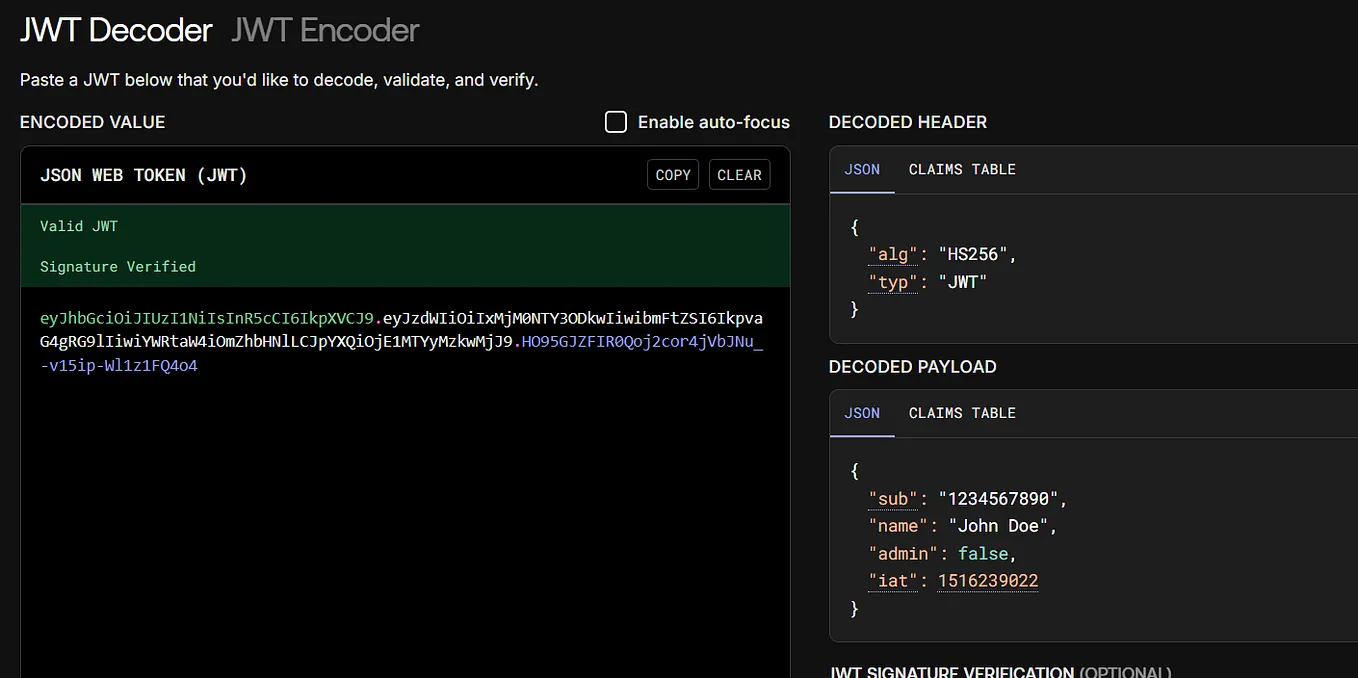
You can now clearly see the header and payload claims. The tool also attempts to verify the signature, but since it doesn't know the secret, it will show "Signature Verified" only if the secret is the default 'secret' or if you provide the correct one.
Test your understanding!
Take the following JWT and paste it into the jwt.io debugger:
eyJhbGciOiJIUzI1NiIsInR5cCI6IkpXVCJ9.eyJzdWIiOiJjYXJsb3MiLCJleHAiOjE3MzIwNTg0MDAsImVtYWlsIjoiY2FybG9zQGNhcmxvcy1tb250b3lhLm5ldCIsInJvbGUiOiJibG9nX2F1dGhvciJ9.jXk_yY1nL1B-1H7oQ2kY-oK5u8aL3f9jT5gC1hD2kZk
Based on the decoded payload, answer the following questions:
- What is the subject (
sub) of this token? - What is the user's role?
- Does this token expire? If so, when? (You can hover over the
expvalue in jwt.io to see the human-readable date).
Show answer
- The subject (
sub) iscarlos. - The user's
roleisblog_author. - Yes, the token has an expiration time (
exp) claim. In jwt.io, hovering over the timestamp reveals it expires on November 1, 2024.
Conclusion
In this lesson, you've dissected the anatomy of a JSON Web Token. You now understand its fundamental structure and the purpose of each component. This knowledge is the bedrock upon which all JWT attacks are built.
Key Takeaways:
- A JWT is composed of three dot-separated, Base64Url-encoded parts: Header, Payload, and Signature.
- The Header specifies the token type and the signing algorithm (
alg). - The Payload contains the claims, such as user ID, roles, and expiration dates. It is readable by anyone with the token.
- The Signature provides integrity, ensuring that the header and payload have not been tampered with. It is created using a secret key (for HMAC) or a private key (for RSA/ECDSA).
Next Lesson Preview:
Now that you can read and understand a JWT, we will move on to breaking them. In the next lesson, you will learn how to exploit JWT vulnerabilities such as weak secrets, algorithm confusion (alg=none), and signature stripping. You'll see firsthand how seemingly small implementation mistakes can lead to complete authentication bypass.