Hello! Welcome back.
In our previous lesson, we established that Kafka's architecture is fundamentally a distributed, replicated log. We saw how topics are divided into partitions to enable scalability and how those partitions are replicated across brokers to provide durability.
Today, we will put that theory into practice. This lesson focuses on the two most fundamental configuration parameters you will set when creating a Kafka topic: the number of partitions and the replication factor. Mastering these settings is the first step in tuning a topic's performance, scalability, and fault tolerance to match your application's requirements.
Lesson Goal: By the end of this session, you will be able to configure Kafka topics with a specific number of partitions and a replication factor, and you will be able to analyze the trade-offs inherent in these choices.
1. Creating and Configuring a Topic
The primary tool for managing topics in a Kafka cluster is the command-line utility kafka-topics.sh. It allows you to create, alter, describe, and delete topics.
Let's start with the basic command for creating a new topic.
Comprehensive Guide on Kafka Topic Creation
The article 'Comprehensive Guide on Kafka Topic Creation' provides a clear, hands-on introduction to the topic creation command and its main parameters. We'll start here to see the basic syntax.
Please read the section 'Manual Creation of Kafka Topics'. Focus on the basic command and the explanation of the --partitions and --replication-factor parameters.
As you saw, the command is straightforward:
kafka-topics.sh --create --topic <topic_name> --bootstrap-server <broker_list> --partitions <count> --replication-factor <count>
While Kafka can be configured to create topics automatically when a producer first writes to them (auto.create.topics.enable=true), this is generally discouraged in production environments. Manual creation ensures that topics are configured with deliberate choices for partitioning and replication, avoiding uncontrolled sprawl and misconfiguration.
The rest of this lesson is dedicated to making intelligent choices for --partitions and --replication-factor.
2. Choosing the Number of Partitions
The number of partitions is your primary tool for controlling a topic's throughput and the parallelism of your consumers. Each partition is an independent log that can be read from and written to in parallel.
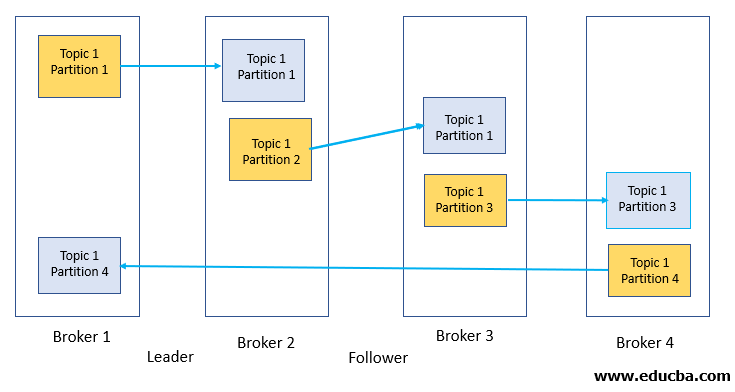
Deciding on the right number of partitions involves balancing several competing factors.
Comprehensive Guide on Kafka Topic Creation
The 'Comprehensive Guide' article offers an excellent starting point for thinking about a partitioning strategy. It frames the decision around practical requirements like throughput and consumer count.
Please read the section 'Partitioning Strategy'. Pay attention to the 'Factors to Consider' and the practical examples provided.
To add more depth to this, let's consult the official Confluent documentation, which highlights some of the finer-grained systems-level trade-offs.
Best Practices for Kafka Production Deployments in ...
The Confluent documentation, 'Best Practices for Kafka Production Deployments', provides a more nuanced perspective on the consequences of your partition count, especially concerning cluster overhead.
Please read the section 'Picking the number of partitions for a topic'. Note the trade-offs listed, such as the impact on leader failover time and the number of open files.
Synthesizing the Trade-offs
Let's consolidate the key considerations for choosing a partition count:
-
Throughput: The total throughput of a topic is the sum of the throughput of its partitions. A rough starting point can be calculated:
Target Throughput / Throughput per Partition- You need to determine the maximum throughput a single partition can handle on your hardware and with your message size. This typically requires benchmarking. For example, if you need 100 MB/s and a single partition can sustain 20 MB/s, you'll need at least 5 partitions.
-
Consumer Parallelism: The number of partitions is the hard upper limit on the number of consumers that can process a topic in parallel within a single consumer group. If you have 10 partitions, you can have at most 10 active consumers in a group. If you have more consumers than partitions, the excess consumers will be idle.
-
Ordering Guarantees: Kafka only guarantees message order within a partition. If you need global ordering for all messages in a topic, you must use a single partition, sacrificing parallelism. More commonly, you need ordering per entity (e.g., all events for a specific
user_idorpayment_id). This is achieved by using a message key, where Kafka ensures all messages with the same key land in the same partition. The number of partitions doesn't break this guarantee, but it does affect which key goes to which partition. -
System Overhead: More partitions are not "free". Each partition is a set of log files on disk, consuming file handles. Furthermore, each partition requires a leader election if its leader broker fails. With thousands of partitions, a single broker failure can trigger a storm of elections, increasing failover time.
Practical Guidance:
- Over-provision, but don't go overboard. It is easy to add partitions to a topic later, but it is not possible to reduce the number of partitions. Adding partitions doesn't re-shuffle existing data, which can disrupt consumers that rely on key-based partitioning.
- A common rule of thumb is to choose a number of partitions based on your target throughput and then multiply by a small factor (e.g., 1.5x-2x) to account for future growth and consumer parallelism needs.
- Consider the number of brokers in your cluster. A number of partitions that is a multiple of your broker count can help ensure an even distribution of load.
3. Choosing the Replication Factor
The replication factor determines how many copies of each partition's log are stored across the cluster. This is your primary lever for controlling data durability and availability.
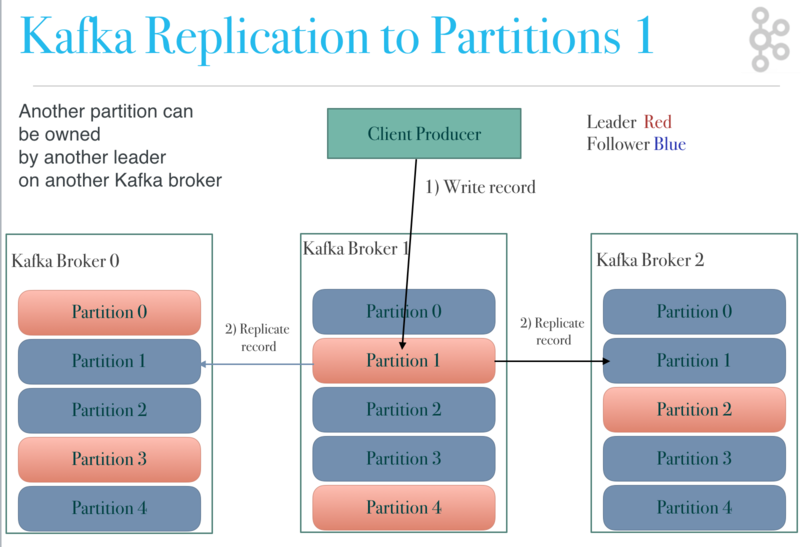
Let's examine the guidelines for setting this crucial parameter.
Comprehensive Guide on Kafka Topic Creation
The 'Comprehensive Guide' article also provides clear, scenario-based advice for choosing a replication factor.
Please read the section 'Replication Factor'. Focus on the 'Key Considerations' and the 'Example Scenarios'.
Synthesizing the Trade-offs
-
Fault Tolerance & Durability: A replication factor of
Nmeans that the cluster can tolerate up toN-1broker failures without losing any committed data. When the producer usesacks=all, it waits for the write to be propagated to all in-sync replicas before receiving an acknowledgment. This guarantees that if the leader fails, a fully up-to-date follower can be promoted to leader without data loss. -
Availability: A higher replication factor increases the likelihood that a live replica is available for reads, even during broker failures or rolling restarts.
-
Performance & Cost: Replication is not free.
- Write Latency: With
acks=all, the write latency is determined by the slowest replica in the ISR, as the leader must wait for confirmation from all of them. - Network Bandwidth: Data must be copied from the leader to all followers, consuming network bandwidth.
- Storage: A replication factor of
Nmeans you needNtimes the disk space for your topic's data.
- Write Latency: With
-
Cluster Size: The replication factor cannot be larger than the number of brokers in your cluster. If you set
replication-factor=3, you must have at least 3 brokers available.
Practical Guidance:
- Development/Testing: A replication factor of
1is acceptable. There is no fault tolerance. - Production (Standard): A replication factor of
3is the most common and highly recommended setting. It provides a strong balance of durability and cost. It allows you to take one broker down for maintenance while still being able to tolerate one additional, unplanned broker failure. - Mission-Critical Data: For extremely critical data, a replication factor of
4or5could be considered, but this is rare. The incremental durability benefits must be weighed against the significant increase in write latency and resource costs.
You can change the replication factor of a topic after creation using the kafka-reassign-partitions.sh tool. This is an operational task that involves generating a plan to move replicas between brokers and can be throttled to avoid impacting cluster performance.
Conclusion
In this lesson, we moved from the theory of Kafka's architecture to the practice of its configuration. You learned how to use the kafka-topics.sh tool and, more importantly, how to reason about the two most critical parameters for any topic.
Key Takeaways:
- Partitions drive parallelism and throughput. The choice is a trade-off between scalability and system overhead. You can increase the partition count later, but you cannot decrease it.
- Replication factor drives durability and availability. The choice is a trade-off between fault tolerance and resource cost (storage, network, latency). A setting of
3is the standard for production systems. - These two settings are not independent. A topic with 10 partitions and a replication factor of 3 will result in 30 total partition replicas that the cluster must manage.
Next Up
Our discussion of replication and durability is not yet complete. The replication-factor and the producer's acks setting are mediated by a crucial mechanism: the In-Sync Replica (ISR) set. In the next lesson, we will dive deep into the architecture of the ISR, how it is managed, and its central role in Kafka's consistency and availability guarantees.