
Welcome back. In our last lesson, we contrasted the "smart post office" model of RabbitMQ with the "immutable log" model of Kafka. We concluded that RabbitMQ excels at distributing discrete tasks to worker processes, a pattern fundamental to building scalable and resilient applications.
Today, we transition from theory to practice. You will implement the classic producer-consumer pattern using RabbitMQ and your preferred language, Go. This hands-on experience is crucial for designing decoupled systems where components can fail, be updated, or scale independently without bringing the entire application down. This lesson will equip you with a core building block for the robust, distributed architectures sought after in modern engineering roles.
1. The Core Components in Practice
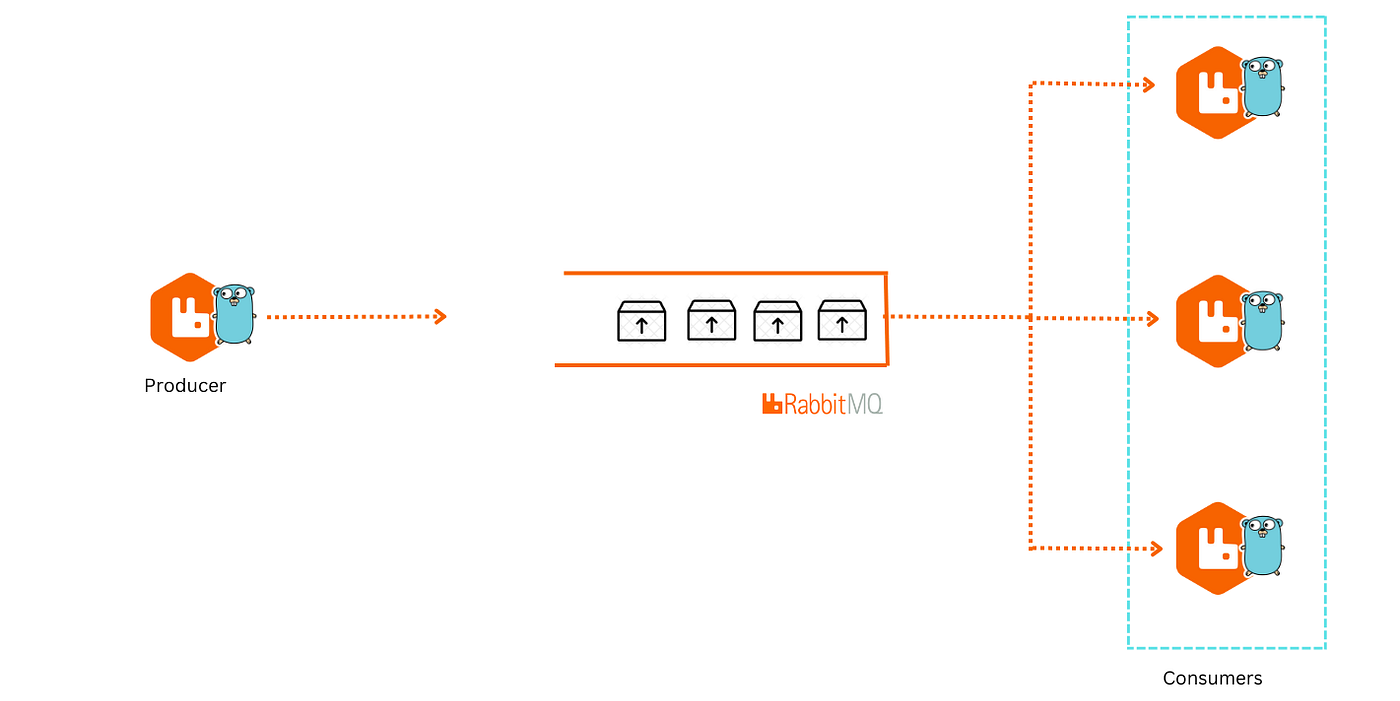
Let's quickly revisit the main actors in a RabbitMQ system, this time with an eye toward implementation.
- Producer: An application that sends messages.
- Queue: A buffer that stores messages.
- Consumer: An application that receives and processes messages.
The communication happens over the Advanced Message Queuing Protocol (AMQP), and we'll use the official Go library, amqp091-go, to interact with our RabbitMQ broker.
2. Setting Up Your Environment
First, you'll need a running RabbitMQ instance. The easiest way to get started is with Docker. The following video and article provide clear instructions for this.
RabbitMQ : Message Queues for beginners
The video "RabbitMQ : Message Queues for beginners" by That DevOps Guy provides a clear, step-by-step guide to getting RabbitMQ running with Docker and enabling the management UI.
Watch the segment from the start of the installation guide. This will walk you through: Running RabbitMQ in a Docker container. Enabling the management plugin, which provides a web-based dashboard. Accessing the dashboard to monitor your instance.
The management UI, typically at http://localhost:15672, is an invaluable tool. It allows you to visualize your queues, see message rates, and inspect the state of your broker. Keep it open in a tab as we work through the code.
For our Go code, we'll use the official RabbitMQ client library. You can install it with:
go get github.com/rabbitmq/amqp091-go
3. Building the Producer: Sending a Task
A producer's job is to connect to the broker, create a message, and send it to a queue. However, in a reliable system, just "firing and forgetting" a message isn't enough. We need to be sure the broker actually received and stored it. This is achieved using publisher confirms.
Let's examine a production-ready implementation of a producer.
How to Use RabbitMQ in Go with amqp091-go
This article from OneUptime provides an excellent, robust example of a RabbitMQ producer in Go.
Read the section on Publishing Messages with Confirmations. Start from the heading and read down to the PublishBatch function. Pay close attention to the NewPublisher and PublishWithConfirm functions. Specifically, focus on these key steps in the code: amqp.Dial(url): Establishes the TCP connection to the broker. conn.Channel(): Opens a channel, which is a lightweight virtual connection where most API operations happen. ch.Confirm(false): This is the crucial step that enables publisher confirms on the channel. ch.PublishWithDeferredConfirmWithContext(...): Publishes the message. Note the DeliveryMode: amqp.Persistent flag, which tells RabbitMQ to save the message to disk. This ensures it survives a broker restart. confirmation.WaitContext(ctx): This is where the producer blocks and waits for the broker to acknowledge receipt of the message. If this fails or times out, you know the message might not have been delivered.
By enabling publisher confirms, you're transforming an unreliable UDP-style "send and pray" into a reliable TCP-style confirmed delivery to the broker. This is a non-negotiable feature for any critical task.
4. Building the Consumer: Processing the Task Reliably
The consumer's role is more involved. It must retrieve messages, process them, and—most importantly—inform the broker when the work is complete. This last step is handled by message acknowledgments (ACKs) and is the cornerstone of consumer reliability.
If a consumer retrieves a message and then crashes before finishing its work, we need a way for that message to be re-processed. By using manual acknowledgments, the message remains "unacknowledged" in the queue. If the consumer's connection drops, RabbitMQ will re-queue the message to be picked up by another consumer (or the same one when it restarts).
Let's look at how to build a reliable consumer.
How to Use RabbitMQ in Go with amqp091-go
Continuing with the same article, we'll now focus on the consumer implementation.
Read the section Consuming Messages with Acknowledgments. Study the code from the heading down to the Close() function. Focus on these critical aspects: ch.Qos(10, 0, false): The Qos (Quality of Service) setting. The prefetch count (10 here) tells RabbitMQ to only send this consumer a maximum of 10 unacknowledged messages at a time. This prevents a single fast consumer from hoarding all messages and allows for better load distribution among multiple consumers. ch.Consume(...) with autoAck: false: This is the most important parameter. Setting autoAck to false means we are responsible for manually acknowledging messages. delivery.Ack(false): This is how we acknowledge a message after it has been successfully processed. This tells RabbitMQ the message is complete and can be safely deleted. delivery.Nack(...) or delivery.Reject(...): These are used to signal that processing has failed. You can choose whether to requeue the message for another attempt or to discard it (potentially sending it to a Dead Letter Queue, which we'll touch on later). The example shows a simple retry mechanism.
The manual acknowledgment flow is what makes the producer-consumer pattern so resilient. It creates a transactional handshake: the broker won't delete a message until the consumer explicitly confirms its work is done.
5. Visualizing the Flow
Now, let's put it all together. The following diagram shows how these components interact in a more complete application context, similar to what you've seen in your own backend development experience.
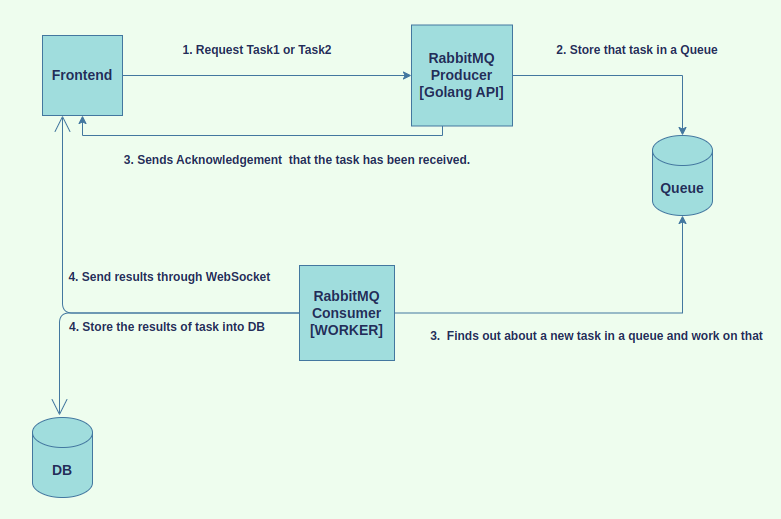
The beauty of this architecture, which you've just learned to implement the core of, is its scalability and resilience:
- If task processing is slow, you can simply add more consumers to increase throughput, without touching the API service.
- If the consumer workers crash, the messages remain safely in the RabbitMQ queue, ready to be processed when the workers come back online.
- The frontend API can remain lightweight and responsive, as it only needs to perform the quick action of enqueuing a task.
Working with RabbitMQ in Golang for an Event-Driven Architecture
To see this resilience in action, the video "Working with RabbitMQ in Golang" has an excellent live demonstration.
Watch the final segment from "what happens if we send a message". The presenter shuts down the consumer service, publishes several messages, and then shows in the RabbitMQ management UI that the messages are waiting in the queue. When the consumer is restarted, it immediately picks up the backlog of work. This is the pattern you've just learned in action.
Conclusion
In this lesson, you've moved from understanding the concept of a message queue to implementing a robust producer-consumer pattern in Go. You now have the practical skills to build services that are decoupled, resilient, and horizontally scalable.
Key Takeaways:
- The producer-consumer pattern is a cornerstone of scalable backend architecture, used for background jobs and decoupling services.
- Publisher Confirms are essential on the producer side to guarantee that messages are safely received by the broker.
- Manual Acknowledgments (
autoAck: false) are critical on the consumer side to ensure messages are not lost if a consumer crashes during processing. - Prefetch Count (
Qos) is a vital tool for load balancing between consumers and preventing any single consumer from being overwhelmed. - The RabbitMQ Management UI is a powerful tool for observing and debugging your messaging system.
This hands-on experience with RabbitMQ's "smart broker" model provides a strong foundation. In our next lesson, we will implement a similar producer-consumer system using Apache Kafka. This will allow you to directly compare the implementation details and developer experience of a task-oriented message queue versus an event-streaming distributed log, solidifying your understanding of when to use each powerful tool.