
Hello and welcome back!
In our last two lessons, we've focused on executing commands directly on a server through OS command injection and bypassing the filters designed to stop us. Now, we're going to shift our focus from executing commands to reading files. While it might sound less dramatic, gaining the ability to read arbitrary files on a server is a critical vulnerability that can expose source code, credentials, and configuration secrets.
This lesson focuses on Path Traversal, also known as Directory Traversal. This technique is the primary way to exploit Local File Inclusion (LFI) vulnerabilities. Your goal is to learn how to identify and exploit path traversal vulnerabilities to read arbitrary files on the server. We'll cover the basic attack and then, building on your skills from the last lesson, dive into bypassing common filters.
1. What is Path Traversal and Local File Inclusion (LFI)?
A Path Traversal attack exploits insufficient security validation of user-supplied input that is used in a file path. By manipulating this input, an attacker can use sequences like ../ (dot-dot-slash) to "traverse" up the directory tree and access files outside of the intended folder, such as the web root.
When this is used to make the application read and display a local file from the server, it's called Local File Inclusion (LFI).
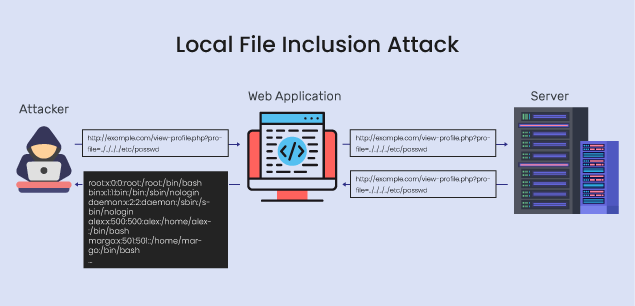
The root cause is almost always insecure code that concatenates user input directly into a file path. Consider this simple PHP example:
<?php
    $file = $_GET['file'];
    include('pages/' . $file);
?>
If a user requests index.php?file=contact.html, the server includes pages/contact.html. However, an attacker could request index.php?file=../../../../etc/passwd, causing the server to attempt to include /etc/passwd.
It's crucial to understand the difference between LFI and Remote Code Execution (RCE):
- LFI: Lets you read files on the server.
- RCE: Lets you execute commands on the server.
While distinct, LFI can sometimes be a stepping stone to RCE, a topic we will explore in a future lesson. For now, our goal is to master reading files.
A guide to path traversal and arbitrary file read attacks
To get a solid grasp of the fundamentals, start by reading the introductory sections of the 'A guide to path traversal and arbitrary file read attacks' article from YesWeHack.
Read the sections 'What is path traversal?' and 'Typical vulnerable patterns'. This will reinforce the core concept and show you common places to look for this vulnerability in a web application.
2. Finding and Exploiting a Basic LFI
Now that you know what LFI is, let's find one. The process involves identifying a parameter that loads a resource and testing it with a basic path traversal payload.
Directory Traversal Attacks Made Easy
The video 'Directory Traversal Attacks Made Easy' by The Cyber Mentor provides an excellent walkthrough of discovering and exploiting a simple LFI vulnerability. Pay close attention to how he uses Burp Suite to identify the vulnerable parameter.
Watch from the beginning to 04:40. Focus on: The definition of path traversal (00:00 - 01:07). How he identifies a request loading an image via a filename parameter. The construction of the basic payload: ../../../../../etc/passwd. How he confirms the vulnerability by observing the contents of /etc/passwd in the response.
As the video demonstrates, the basic workflow is:
- Identify Input: Find a parameter in the URL or request body that seems to reference a file (e.g.,
?page=home,?file=image.jpg,?template=main). - Craft Payload: Replace the legitimate filename with a path traversal sequence. A common starting point is
../../../../../etc/passwdfor Linux servers or../../../../boot.inifor Windows servers. The number of../sequences is an estimate to ensure you traverse all the way to the root directory. - Analyze Response: Check if the server's response contains the contents of the requested file.
High-Value Files to Target
Once you've confirmed LFI with a file like /etc/passwd, the next step is to find more valuable files. Your goal is to uncover credentials, source code, or configuration details.
Here are some high-value targets. You can find a more exhaustive list in the "Local/Remote File Inclusion (LFI/RFI) Attack Guide" under the "Reading Sensitive Files" section.
Linux:
/etc/shadow: Contains hashed user passwords (usually requires root privileges to read)./var/www/html/config.phpor.../.env: Application configuration files, often containing database credentials./root/.bash_history: History of commands run by the root user./home/user/.ssh/id_rsa: A user's private SSH key./proc/self/environ: Environment variables for the running process, which may contain API keys or other secrets.
Windows:
C:\Windows\win.ini: A classic proof-of-concept file.C:\inetpub\wwwroot\web.config: IIS web server configuration, can contain secrets.C:\Users\Administrator\NTUser.dat: User registry hive.
3. Bypassing LFI Filters
Just like with command injection, developers will try to prevent LFI with filters. Your methodical approach to bypassing these filters will be the same: test, observe the block, and craft a bypass for that specific defense.
Let's explore some common filters and bypasses.
3.1. Filter: Stripping ../
A naive filter might simply remove any occurrences of ../ from the input string.
Bypass: Non-recursive Filtering
If the filter is not recursive (i.e., it only runs once), you can embed the forbidden string within itself. For example, if ../ is stripped, a payload like ....// becomes ../ after the inner ../ is removed.
Directory Traversal Attacks Made Easy
Let's return to The Cyber Mentor's video. He demonstrates a bypass for a non-recursive filter.
Watch from 05:29 to 09:28. He encounters a filter that blocks his basic payload. Notice his payload ....//....//....//etc/passwd, which defeats a filter that strips ../ but doesn't re-check the string afterward.
3.2. Filter: Blocking Slashes or ../ Patterns
A slightly more robust filter might block the ../ pattern or encode slashes.
Bypass: URL and Double URL Encoding
As with command injection, encoding is your best friend. A web server will decode URL-encoded characters. If the filter runs before the decoding, you can bypass it.
../can be encoded as%2e%2e%2f.- If that's blocked, try double URL encoding, where the
%is also encoded:%252e%252e%252f.
Advanced Directory Traversal Techniques!
The video 'Advanced Directory Traversal Techniques!' from Intigriti demonstrates several advanced bypasses, starting with encoding.
Watch from 01:13 to 02:54. The presenter shows how single URL encoding (%2f for /) fails, but double URL encoding (%252f) succeeds.
3.3. Filter: Requiring a Specific Starting Path
Some applications validate that the file path begins with an expected directory, like /var/www/images/.
Bypass: Include the Valid Path
The bypass is simple: start your payload with the expected path, then traverse out of it.payload: /var/www/images/../../../../../etc/passwd
The server validates the start of the string, sees /var/www/images/, and allows the request. The file system then processes the ../ sequences, leading you back to the root directory.
Advanced Directory Traversal Techniques!
The Intigriti video also covers this exact scenario.
Watch from 02:54 to 04:35. Note how the application returns an error message revealing the expected full path, which the presenter then uses to build a successful payload.
3.4. Filter: Appending a File Extension
A very common defense is to append an extension to the user's input, for example, .php. A payload of ../../etc/passwd becomes ../../etc/passwd.php, which is not a valid file and the attack fails.
Bypass: Null Byte Injection (%00)
The null byte character (%00 in its URL-encoded form) acts as a string terminator in many C-based languages, including older versions of PHP (before 5.3.4). When the application constructs the file path, the null byte causes the rest of the string (including the appended .php) to be ignored.
payload: ../../../../etc/passwd%00
The server processes this as ../../../../etc/passwd because the string is terminated at the null byte.
Advanced Directory Traversal Techniques!
Let's see the final bypass technique from the Intigriti video: null byte injection.
Watch from 04:35 to 06:02. The presenter uses %00 to truncate the expected file extension, allowing the inclusion of /etc/passwd.
Test your understanding!
You are testing a photo gallery application. The URL to view an image is https://example.com/gallery.php?view=photo1.jpg. The application's code is roughly equivalent to include('images/' . $_GET['view'] . '.jpg');.
Your basic payload ?view=../../etc/passwd fails because the server tries to access images/../../etc/passwd.jpg.
Which bypass technique would be most effective here, assuming the server is running an older version of PHP? Craft the full payload.
Show answer
The most effective technique is Null Byte Injection. The goal is to terminate the filename before the .jpg is appended.
Payload: ?view=../../../etc/passwd%00
Explanation:
- The
../sequences (three are likely enough to exitimages/and get to the root) navigate the directory structure. - The application receives
../../../etc/passwd%00. - It constructs the path:
images/../../../etc/passwd%00.jpg. - Because of the null byte (
%00), the string is terminated, and the file system is asked to readimages/../../../etc/passwd, which resolves to/etc/passwd. The trailing.jpgis ignored.
Your Reference for LFI Bypasses
The number of potential bypasses is large and depends on the specific server OS, web server software, and application language. The "Hackviser" guide and "PayloadsAllTheThings" (from the last lesson) are excellent references for more advanced techniques.
Local/Remote File Inclusion (LFI/RFI) Attack Guide
The 'Local/Remote File Inclusion (LFI/RFI) Attack Guide' from Hackviser is a great cheat sheet that consolidates many of the bypass techniques we've discussed and more.
Review the 'Bypass Techniques' section, focusing on 'Extension Bypass' and 'Path Filter Bypass'. You will see the null byte, question mark truncation, and various encoding tricks we've covered, plus others like overlong UTF-8. Bookmark this as a handy reference.
Conclusion
You have now learned how to turn a simple file loading feature into a serious information disclosure vulnerability. LFI is a common and impactful bug class found in both penetration tests and bug bounty programs.
Key Takeaways:
- Path Traversal is the technique of using
../to navigate a server's file system. LFI is the vulnerability where this can be used to read arbitrary local files. - The exploitation process is methodical: find a parameter that loads a file, test it with a basic payload like
../../etc/passwd, and analyze the response. - When basic LFI is blocked, you must pivot to filter bypass techniques, applying the same systematic mindset you used for command injection.
- Common bypasses include non-recursive stripping (
....//), URL encoding, providing an expected base path, and null byte injection (%00) to truncate appended extensions.
Next Lesson Preview:
Now that you can read local files, what if the application allows you to include files from anywhere on the internet? In our next lesson, we'll explore Remote File Inclusion (RFI), a high-impact vulnerability that lets an attacker include code from their own server, often leading directly to Remote Code Execution.