
Hello again. In the previous lesson, you created a Python workspace with an isolated virtual environment, Black formatting, and the VS Code debugger. You also used the debugger to find a runtime type mismatch. This lesson turns that small script into reusable code: functions that make decisions, process repeated inputs, and handle expected failures without hiding real defects.
By the end, you will be able to write a small Python “request router” similar to a component inside an AI application: it validates a user-provided priority, chooses a processing queue, and safely rejects malformed input. The focus is practical Python rather than mathematical concepts.
Functions are small, reusable contracts
A function bundles instructions that perform one named job. Rather than repeating logic throughout a program, you define it once and call it wherever needed.
In Python, a function is defined with def, followed by a name, parentheses for parameters, and a colon:
def build_status_message(status):
    """Return a display message for a request status."""
    return f"Request status: {status}"
Calling the function executes its body:
message = build_status_message("accepted")
print(message)
Output:
Request status: accepted
A useful way to read a function is as a contract:
- Inputs: the arguments provided by the caller, such as
status - Work: the logic inside the function
- Output: the value after
return
return is different from print():
def calculate_retry_delay(attempt_number):
    return attempt_number * 2
This function returns a number. The caller can print it, store it, compare it, or pass it to another function:
delay = calculate_retry_delay(3)
print(f"Retry after {delay} seconds")
For application code, especially future API and agent code, prefer returning values from internal functions. Put print() near the outer boundary of a command-line program. Later, an API endpoint will return a response rather than print to the terminal.
A function ends when it reaches return. If no return is reached, Python returns None, its “no value” object.
def log_startup():
    print("Application started")

result = log_startup()
print(result)
The output is:
Application started
None
Python and Java: the useful differences
You already know the core idea of methods from Java. The main differences here are syntactic and structural:
| Idea | Java | Python |
|---|---|---|
| Standalone reusable behavior | Usually a method inside a class | A function can live directly in a module |
| Code blocks | Curly braces | Indentation |
| Function declaration | public String format(String text) | def format_text(text): |
| Multiple branches | else if | elif |
| Type enforcement | Many checks occur at compile time | Actual operations are checked at runtime |
| Checked exceptions | Some exceptions must be declared or handled | Python does not require checked-exception declarations |
Python is dynamically typed but strongly typed. A variable may refer to different types at different times, but Python will still reject nonsensical operations at runtime, such as adding a number to text.
That is why the debugger in the previous lesson showed a TypeError when comparing an integer to "6".
Python blocks use a colon and indentation, not braces:
def choose_queue(priority):
    if priority >= 5:
        return "urgent"
    return "standard"
Black will keep the indentation consistent, but the logical structure is still yours to read carefully: four spaces deeper means “inside this block.”
Python Tutorial for Beginners 8: Functions
Watch “Python Tutorial for Beginners 8: Functions” by Corey Schafer for a visual introduction to defining, calling, and returning from functions. It also demonstrates parameters and default values, which you will use in the request-router example.
Watch function basics. Focus on the distinction between referring to a function and calling it with parentheses, then on why a returned value is more reusable than a printed value. In the final portion, notice that required parameters come before parameters with defaults.
Make decisions with if, elif, and early returns
Programs need to choose behavior based on values. A condition evaluates to either True or False.
def choose_queue(priority):
    if priority == 5:
        return "urgent"
    elif priority >= 3:
        return "priority"
    else:
        return "standard"
This function checks the branches from top to bottom. As soon as one condition is true, that branch runs and the remaining branches are skipped.
A common Python style is to use early returns when they make the normal path clearer:
def choose_queue(priority, is_security_issue=False):
    if is_security_issue:
        return "security-review"

    if priority == 5:
        return "urgent"

    if priority >= 3:
        return "priority"

    return "standard"
This reads as a sequence of business rules:
- Security issues always go to security review.
- Highest-priority requests are urgent.
- Medium-to-high priorities are priority work.
- Everything remaining is standard.
The default value False means callers can use the simple call:
queue = choose_queue(4)
Or make the optional behavior explicit with a keyword argument:
queue = choose_queue(4, is_security_issue=True)
Keyword arguments improve readability when a Boolean flag would otherwise be unclear.
A few conditions worth knowing
Use == to compare values:
if queue == "urgent":
    print("Escalate immediately")
Use is None to check specifically for the absence of a value:
if priority is None:
    print("Priority was not valid")
Do not generally use is for ordinary number or string comparisons. is checks whether two names refer to the same object, while == checks whether values are equal.
Python also supports familiar Boolean operators:
if is_logged_in and is_admin:
    print("Show administration tools")

if is_security_issue or priority == 5:
    print("Use fast escalation path")

if not has_permission:
    print("Access denied")
Empty strings, empty collections, zero, False, and None are treated as false in a condition. That permits concise checks such as:
if not user_message.strip():
    print("Message cannot be empty")
The .strip() call removes surrounding spaces first, so a message containing only spaces is also rejected.
4. More Control Flow Tools — Python 3.14.0 documentation
Read the relevant parts of “More Control Flow Tools” from the official Python documentation. It is a compact reference for the exact behavior of conditionals, loops, function definitions, and return.
In Section 4.1, “if Statements,” read the conditional introduction, paying attention to why elif avoids deeper indentation. Continue into Section 4.2, “for Statements,” from iteration over items; Python for loops normally iterate directly over values rather than manually managed indexes. Then read Section 4.3, “The range() Function,” beginning with using range. In Section 4.4, “break and continue Statements,” read loop control. Finally, in Section 4.8, “Defining Functions,” read from function structure and docstrings. Focus on the relationship between parameters, local variables, return, and a short docstring.
Repeat work with for, continue, and break
Python’s for loop usually means “for each item in this sequence.”
priorities = ["2", "not-a-number", "5"]

for raw_priority in priorities:
    print(raw_priority)
Unlike the traditional Java index-based for loop, Python code often does not need an index. When you do need numbers, use range():
for attempt_number in range(1, 4):
    print(f"Attempt {attempt_number}")
This prints 1, 2, and 3. The end number is excluded.
Two loop controls are useful:
continueskips the rest of the current iteration and moves to the next item.breakexits the loop completely.
Here is a small search helper:
def first_urgent_priority(raw_values):
    """Return the first valid urgent priority, or None if there is none."""
    for raw_value in raw_values:
        if raw_value == "invalid":
            continue

        if raw_value == "5":
            return 5

    return None
continue ignores the known bad marker. return 5 ends both the loop and the function because the function has found the result it was searching for.
Use break when you want to stop looping but still perform work afterwards:
for raw_value in ["2", "3", "STOP", "5"]:
    if raw_value == "STOP":
        break

    print(f"Processing {raw_value}")

print("Batch finished")
In production systems, a stop marker might be a cancellation request, a configured processing limit, or a signal that a batch has ended.
Exceptions: handle expected failures, not every failure
An exception is Python’s way of signaling that normal execution could not continue. For example:
priority = int("high")
This raises a ValueError because "high" is not valid whole-number text.
An exception is not automatically a sign that the entire program is broken. User input, network calls, file access, and external APIs can fail in expected ways. The important question is:
Can this function recover safely and meaningfully from this specific failure?
If yes, catch the specific exception. If not, allow it to surface while developing so the traceback and debugger can show the real defect.
The basic structure is:
try:
    priority = int(raw_value)
except ValueError:
    return None
Only code that may raise the expected error should be inside try. Keep that block small. This makes it clear what operation might fail.
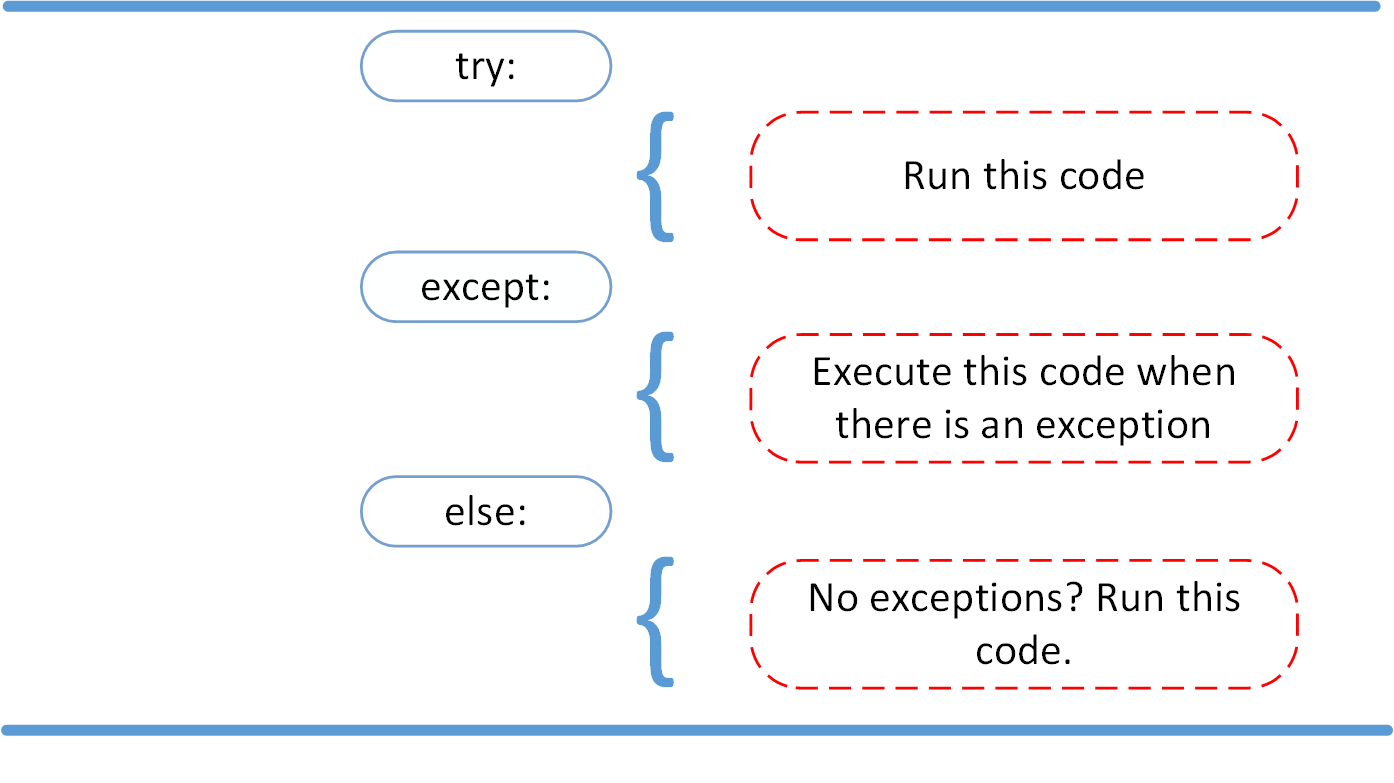
The else block is useful for successful work that should happen only after the risky operation succeeds:
def parse_priority(raw_value):
    """Return a priority from 1 to 5, or None for invalid input."""
    if not isinstance(raw_value, str):
        return None

    cleaned_value = raw_value.strip()
    if not cleaned_value:
        return None

    try:
        priority = int(cleaned_value)
    except ValueError:
        return None
    else:
        if 1 <= priority <= 5:
            return priority
        return None
This function has a deliberately narrow contract:
- It accepts text from a user-facing input field.
- It returns an integer from
1to5when valid. - It returns
Nonefor missing, non-text, non-numeric, or out-of-range input.
Notice the division of responsibilities:
ifhandles normal validation decisions, such as an empty string or a number outside the allowed range.except ValueErrorhandles the failed conversion from text to integer.elseholds logic that is meaningful only once conversion succeeded.
Avoid this pattern:
try:
    priority = int(raw_value)
    queue = choose_queue(priority)
    save_to_database(queue)
    send_notification(queue)
except Exception:
    print("Something went wrong")
This is dangerous because it catches almost anything, including programmer mistakes such as misspelled variable names or incorrect function calls. It hides useful tracebacks and makes defects much harder to diagnose.
Prefer this approach:
try:
    priority = int(raw_value)
except ValueError:
    return None

queue = choose_queue(priority)
Later in the course, your LLM and tool calls will need explicit handling for failures such as timeouts, rate limits, and invalid API responses. The same principle applies: catch the known exception you can recover from, record useful context, and do not pretend that an unknown defect was handled.
finally: cleanup that must happen either way
Python also provides finally, which runs whether the operation succeeds or fails:
try:
    connection = open_connection()
    use_connection(connection)
finally:
    connection.close()
You will more often use Python’s with statement for files, connections, and other managed resources later. For now, remember the intention: finally is for cleanup, not normal business decisions.
One Python function-default safety rule
Defaults such as strings, numbers, and False are safe:
def choose_queue(priority, is_security_issue=False):
    ...
Avoid using a mutable value such as a list or dictionary as a default parameter:
# Avoid this
def add_label(label, labels=[]):
    labels.append(label)
    return labels
Python creates that default list once, so later calls can unexpectedly share it. The safe pattern is:
def add_label(label, labels=None):
    if labels is None:
        labels = []

    labels.append(label)
    return labels
You will work with lists and dictionaries in depth in the next lesson. For now, retain the rule: use None instead of [] or {} as a function default when creating a fresh mutable value per call.
Code along: a small ticket router
Create a new file named ticket_router.py in the project from the previous lesson. This is a simplified version of input validation that a future AI support application might perform before routing a task to a workflow.
def parse_priority(raw_value):
    """Return a priority from 1 to 5, or None for invalid input."""
    if not isinstance(raw_value, str):
        return None

    cleaned_value = raw_value.strip()
    if not cleaned_value:
        return None

    try:
        priority = int(cleaned_value)
    except ValueError:
        return None
    else:
        if 1 <= priority <= 5:
            return priority
        return None


def choose_queue(priority, is_security_issue=False):
    """Choose a processing queue for a validated priority."""
    if is_security_issue:
        return "security-review"

    if priority == 5:
        return "urgent"

    if priority >= 3:
        return "priority"

    return "standard"


def route_ticket(raw_priority, is_security_issue=False):
    """Return a routing message for one incoming ticket."""
    priority = parse_priority(raw_priority)

    if priority is None:
        return "rejected: priority must be a whole number from 1 to 5"

    queue = choose_queue(
        priority,
        is_security_issue=is_security_issue,
    )
    return f"accepted: send to {queue}"


def first_urgent_priority(raw_values):
    """Find the first valid priority that requires urgent handling."""
    for raw_value in raw_values:
        priority = parse_priority(raw_value)

        if priority is None:
            continue

        if priority == 5:
            return priority

    return None


incoming_priorities = ["2", "five", " 5 ", "", "7"]

for raw_priority in incoming_priorities:
    print(route_ticket(raw_priority))

print(f"First urgent priority: {first_urgent_priority(incoming_priorities)}")
print(route_ticket("3", is_security_issue=True))
Run it from the VS Code terminal:
python ticket_router.py
You should see output broadly like this:
accepted: send to standard
rejected: priority must be a whole number from 1 to 5
accepted: send to urgent
rejected: priority must be a whole number from 1 to 5
rejected: priority must be a whole number from 1 to 5
First urgent priority: 5
accepted: send to security-review
Use this code to reinforce a simple tracing habit:
- Start with one input, such as
"five". - Enter
route_ticket(). - Observe that
parse_priority()receives"five". - Follow the
int(cleaned_value)conversion. - See the
ValueErrorenter theexceptblock. - Watch
Nonereturn toroute_ticket(). - Observe the
priority is Nonebranch return the rejection message.
If any step feels unclear, put a breakpoint on:
priority = parse_priority(raw_priority)
Then use Step Into to enter parse_priority() and inspect raw_value, cleaned_value, and priority. This is more reliable than mentally guessing which branch ran.
Key takeaways
You now have the core tools for writing small, maintainable Python functions:
- Define functions with
def, use clearsnake_casenames, and give them one focused responsibility. - Prefer
returnfrom internal functions; reserveprint()for a program’s outer boundary. - Use
if,elif,else, Boolean operators, and early returns to express decisions clearly. - Python
forloops usually iterate directly over items; usecontinueto skip an item andbreakto stop a loop. - Use
==for value comparison andis Nonefor the explicit no-value case. - Treat exceptions as signals for exceptional failures, not as replacements for ordinary
ifvalidation. - Catch narrow, expected exceptions such as
ValueError; avoid bareexcept:and broadexcept Exception:in normal application logic. - Use immutable defaults freely, but use
Nonerather than a mutable list or dictionary as a default parameter.
Next, you will work with Python’s core data structures: lists, dictionaries, sets, tuples, comprehensions, and iterators. Those structures will make the ticket-router example much more capable, because it will be able to process and organize realistic application data.
Can't find a good explanation? Sign up and we'll make it for you
Sign up