
Hello! Welcome to your next lesson.
In our last session, we looked at the Memento pattern, which provides a clean way to capture and restore an object's internal state without breaking encapsulation. This is crucial for managing the state of individual objects, which are often the "Model" part of a larger system.
Today, we take a step back to look at the bigger picture. We will move from a single design pattern to a high-level architectural pattern that organizes the entire structure of an application. The learning outcome for this lesson is to describe the Model-View-Controller (MVC) architectural pattern and its components. MVC is one of the most fundamental patterns in software engineering and is a cornerstone of many frameworks you've likely encountered, including Spring Boot. Understanding it is essential for both low-level and high-level system design.
What is MVC and Why Does It Matter?
At its core, MVC is about the Separation of Concerns. Instead of mixing data, presentation logic, and application control in one massive chunk of code, MVC splits an application into three interconnected parts:
- Model: Manages the data and business logic.
- View: Displays the data from the Model to the user.
- Controller: Handles user input and mediates between the Model and the View.
This separation makes applications easier to develop, test, and maintain. To get a quick introduction, let's start with a short video that provides a bit of history and defines these three core components.
Everything You NEED to Know About Client Architecture Patterns
This video from ByteByteGo gives a concise overview of architectural patterns, focusing on the shared components of Model and View, and the 'translator' layer like the Controller.
Watch from the beginning to 01:54. Pay attention to the definition of each part (View, Model, and the 'translator') and the simple example of how they interact when a user updates their profile picture.
Now that you have a basic idea, let's deepen that understanding with another video that explains the roles of each component using a fantastic real-world analogy.
What is MVC? Model View Controller Explained
This video from Cameron McKenzie provides a clear explanation of MVC and its benefits, along with a helpful analogy.
Please watch the following segments: The Model, Controller, and View (00:47 - 03:16): Focus on the specific responsibility of each component. The Home Heating System Analogy (04:27 - 08:36): This is a great way to build an intuitive understanding. Try to map the thermostat, the furnace, and the room temperature to the Controller, Model, and View respectively.
The Three Components in Detail
As you've seen, the power of MVC comes from the distinct roles each component plays. Let's formally define them. The article from GeeksForGeeks provides clear and concise definitions.
We'll use this article to get formal definitions and see a diagram of the components.
Read the section 'Components of the MVC Design Pattern' which contains subsections for Model, View, and Controller. This will solidify your understanding of each component's role.
To summarize the key responsibilities:
-
The Model:
- Represents the application's data and business rules. This is the "brain" of the application.
- It is not concerned with how the data will be presented.
- It manages the state of the application. The
Originatorobject from our previous lesson on the Memento pattern would reside in the Model layer. - In a Java application, this is often represented by POJOs (Plain Old Java Objects) and Service classes.
-
The View:
- This is the presentation layer—what the user sees and interacts with.
- It's responsible for rendering the data from the Model.
- It's generally considered "dumb," meaning it contains minimal logic, primarily for display purposes.
- It forwards user actions (like button clicks) to the Controller.
- In web applications, this could be a JSP, Thymeleaf template, or a frontend framework component (like in React or Angular).
-
The Controller:
- Acts as the intermediary between the Model and the View.
- It receives user input from the View.
- It processes the input, often by invoking methods on the Model to update its state.
- It selects the appropriate View to display in response.
- In a Spring application, this is your class annotated with
@Controlleror@RestController.
The Interaction Flow: A Step-by-Step Guide
Understanding the components is one thing; seeing how they communicate is another. The flow of control is key to the MVC pattern.
Here is a typical sequence for a web application:
- The user performs an action in the View (e.g., clicks a "Submit" button).
- The View sends a request to the Controller.
- The Controller receives the request and processes it. This might involve validating input and calling business logic methods on the Model.
- The Model updates its state (e.g., saves new data to a database).
- The Controller then selects the next View to display. It may pass the updated data from the Model to this View.
- The View renders the data and presents the final response to the user.
To see this flow broken down with Java code examples, let's refer to a detailed article.
What is MVC Architecture in Java? Explained
This article from upGrad provides a great step-by-step guide on how MVC works in a Java context, including code snippets that should feel familiar given your background.
Read the sections 'Core Components of MVC Architecture in Java' and 'How MVC Architecture Works in Java Applications'. Pay close attention to the code examples for the Model, Controller (UserController), and the simple data flow diagram.
A Concrete Example: MVC in Pure Java
Frameworks like Spring add a lot of "magic" that can sometimes obscure the underlying pattern. Let's look at a simple, framework-free Java example to see the raw structure of MVC. The GeeksForGeeks article provides a perfect demonstration using a Student object.
Here is the UML class diagram for the example you are about to see. It clearly shows the three classes and their relationships.
.webp)
Now, let's look at the code that implements this structure.
This section of the GeeksForGeeks article provides the complete, runnable code for the Student example.
Read the section titled 'Example of the MVC Design Pattern'. Review the code for the Student (Model), StudentView (View), and StudentController (Controller) classes. Notice how the main method in MVCPattern acts as the client that wires everything together.
Test your understanding!
Imagine you are designing a simple e-commerce website. When a user clicks the "Add to Cart" button on a product page, map the subsequent actions to the Model, View, and Controller components.
- Which component is the product page the user is looking at?
- Which component receives the "Add to Cart" click event?
- Which component contains the logic to update the shopping cart data (e.g., adding the item and recalculating the total)?
- Which component is responsible for displaying the updated cart information (e.g., the new item count in the header)?
Show answer
- View: The product page is the View, as it's presenting data (the product) to the user.
- Controller: The Controller receives the click event. The button click would trigger a request (e.g., a POST to
/cart/add) that is mapped to a method in the Controller. - Model: The Model contains the business logic. A
CartServiceorCartobject would have theaddItem()method and the logic to update the total price. - View: An updated View (or a part of it, if using AJAX) is responsible for displaying the new state of the cart to the user.
MVC and Spring Boot
Your experience with Java Spring Boot is a perfect real-world application of MVC. Spring MVC is a framework built entirely around this pattern.
@Controller/@RestController: You define Controllers to handle incoming HTTP requests.@Service/@Repository/ POJOs: These form the Model layer, encapsulating business logic and data access.- Thymeleaf / JSP / JSON response: These are the Views. In a RESTful API, the JSON payload itself is the View, as it's the representation of the data sent to the client.
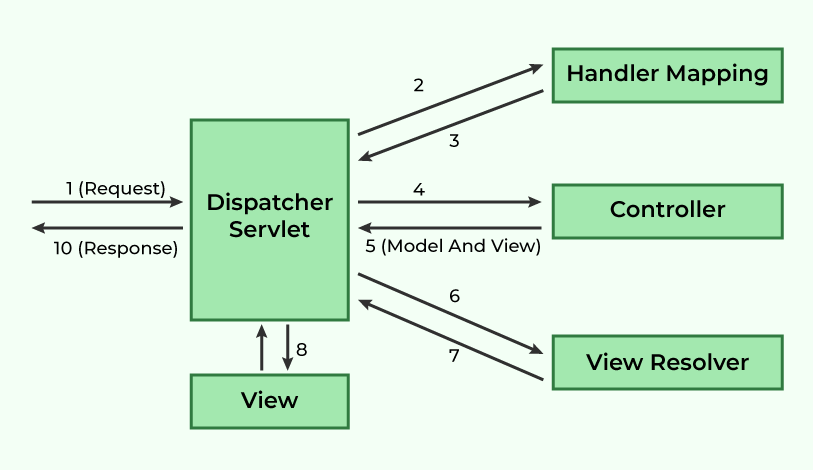
The DispatcherServlet in Spring acts as a "front controller." It's a single entry point that receives all requests and delegates them to the appropriate controller based on handler mappings (@RequestMapping, @GetMapping, etc.).
This diagram shows the detailed flow within the Spring MVC framework.
This structure provides immense benefits, including:
- Improved Maintainability: You can change the UI (View) without touching the business logic (Model).
- Parallel Development: UI designers can work on the View while backend developers work on the Model and Controller.
- Enhanced Testability: You can unit test the Model and Controller logic independently of the UI.
Conclusion
In this lesson, we've explored the Model-View-Controller architectural pattern, a fundamental concept for structuring applications.
Key Takeaways:
- Core Principle: MVC separates an application into three components: the Model (data and logic), the View (presentation), and the Controller (input handler).
- Main Goal: To achieve a Separation of Concerns, making the application more modular, maintainable, and testable.
- Interaction Flow: The Controller acts as the mediator, taking user input from the View, manipulating the Model, and selecting the next View to render.
- Practical Application: Frameworks like Spring MVC are powerful, real-world implementations of this pattern.
You've now covered a wide range of behavioral patterns, culminating in the high-level MVC architecture. This provides an excellent foundation for our next module, where we will dive into The Low-Level Design Process. We'll learn a systematic approach to tackle an LLD problem, from clarifying requirements to identifying classes and applying the design patterns and principles you've learned to create a robust solution.