
Welcome to the first lesson of our "Foundations of Scalable Systems" module. In the previous modules, we focused on honing your algorithmic problem-solving and communication skills, culminating with the UMPIRE framework. That structured approach to thinking is invaluable, not just for coding challenges, but also for dissecting the large-scale architectural problems we are about to tackle.
In this lesson, we will explore two of the most fundamental concepts in system design: latency and throughput. Understanding the distinction between these two metrics, their inherent trade-offs, and their impact on system performance is the bedrock upon which all scalable systems are built. For someone with your experience in backend development, this will formalize concepts you've likely encountered intuitively and provide the precise language needed to discuss them in high-level design interviews.
1. What are Latency and Throughput?
At their core, latency and throughput answer two different questions about a system's performance: "How fast?" and "How much?".
- Latency is about speed. It measures the time it takes for a single operation to complete. Think of it as the delay or the response time for one request. It's typically measured in milliseconds (ms) or seconds (s).
- Throughput is about capacity. It measures the number of operations a system can handle in a given time period. It's a rate, typically measured in requests per second (RPS), transactions per second (TPS), or megabits per second (Mbps).
To build a strong intuition for this distinction, a couple of analogies are extremely helpful.
System Design 101: Latency vs Throughput Explained #junior
This video by a FAANG Senior Engineer provides excellent, clear analogies for understanding the difference between latency and throughput.
Watch the first part of the video for the formal definitions and two powerful analogies: A formal definition of both terms. The water pipe analogy, which illustrates how making a pipe wider increases throughput (gallons per minute) without changing the latency (the time for a single drop to travel the pipe's length). The grocery store checkout analogy. This is particularly relevant to software systems. Notice how opening more checkout lanes (horizontal scaling) increases the store's overall throughput (customers per hour) but doesn't reduce the latency for your individual checkout (the time it takes to scan your items).
Let's formalize these ideas. When we talk about latency in a client-server system, we're considering the entire round-trip time.
Latency vs Throughput: System Design Trade-offs | Layrs
The article "Latency vs Throughput" from Layrs breaks down the components that contribute to total latency.
In the "How It Works" section, examine the diagram and the text that explains the components of latency. As you can see, end-to-end latency isn't just network travel time; it's the sum of network transmission, queueing delays, server processing time, and more.
As the article highlights, any of these components can become a bottleneck. Optimizing latency means identifying the largest contributor to this delay and reducing it.
Throughput, on the other hand, is a measure of the system's total processing power over time. It tells us how much load the system can sustain.
2. The Fundamental Trade-off
The most crucial concept to internalize is that latency and throughput are often inversely related. Optimizing for one frequently degrades the other. The most common example of this trade-off is batching.
Imagine your system needs to write a large number of small log messages to a database. You have two options:
- Low Latency Optimization: Write each log message to the database the instant it arrives. The latency for each individual message is minimal. However, the database has to handle a massive number of small, individual write operations, which is inefficient. Your overall throughput will be low, and the database might become overwhelmed.
- High Throughput Optimization: Collect log messages in memory for a short period (e.g., 1 second) or until a certain number (e.g., 1000) have accumulated. Then, write all of them to the database in a single, large "batch." This is far more efficient for the database, allowing the system to handle a much higher volume of messages per second (high throughput). However, the latency for any individual message has increased; it has to wait in the buffer for up to 1 second before being saved.
We intentionally sacrificed the speed of individual requests to increase the capacity of the entire system. This is a classic system design trade-off.
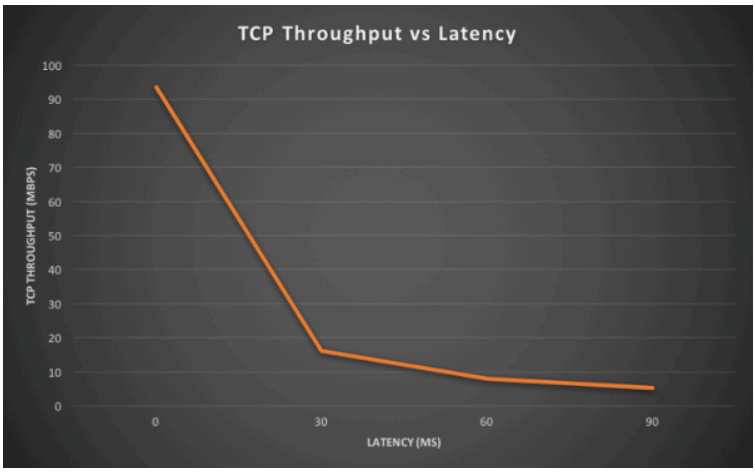
This inverse relationship is not just conceptual; it's observable in real-world protocols. For example, in TCP, as network latency increases (due to distance or congestion), the achievable throughput drops dramatically, because the protocol has to wait longer for acknowledgements before sending more data.
3. When to Optimize for Which?
Since you can't always maximize both, a key skill for a system architect is asking: "For this specific feature, what does the user care about more?"
-
Prioritize Low Latency for user-facing, interactive systems where responsiveness is key.
- Examples: Online gaming (a 200ms delay is unplayable), real-time stock trading, search engine autocompletion.
- Optimization Techniques: Caching (Redis/Memcached), using Content Delivery Networks (CDNs) to reduce physical distance, optimizing database queries with indexes, choosing efficient algorithms.
-
Prioritize High Throughput for backend, asynchronous, or non-interactive systems where processing large volumes of data is the goal.
- Examples: A video encoding pipeline (like Netflix's), an analytics data processing job, a logging system.
- Optimization Techniques: Batching, message queues (Kafka/RabbitMQ), asynchronous processing, horizontal scaling (adding more machines).
The video you watched earlier has a great segment contrasting these priorities.
System Design 101: Latency vs Throughput Explained #junior
Let's revisit the "FAANG Senior Engineer" video to see a direct comparison of two very different systems.
Watch the segment comparing a multiplayer game with Netflix. A game needs minimal latency for a few bytes of data (player position), while Netflix needs massive throughput for streaming video but can tolerate a few seconds of initial latency.
In many large systems, like Twitter, you'll find different parts of the architecture optimized for different metrics. The "read path" (loading your timeline) is optimized for low latency using caches, while the "write path" (processing incoming tweets) is optimized for high throughput using message queues and background workers.
4. How to Measure Performance and Plan Capacity
In a professional setting, and especially in an interview, using precise metrics is crucial.
Measuring Latency
Simply talking about "average" latency can be dangerously misleading. An average can hide serious problems affecting a small percentage of users. A system with an average latency of 50ms might be giving 1% of its users a terrible 5-second experience. This is why we focus on percentile latencies.
- p90, p95, p99: These metrics tell you the latency experienced by the 90th, 95th, or 99th percentile of your users. For example, a p99 latency of 200ms means that 99% of requests completed in 200ms or less, while 1% took longer. Senior engineers set Service Level Objectives (SLOs) on these percentiles, not on averages.
Latency vs Throughput | System Design Essentials
The video "Latency vs Throughput | System Design Essentials" offers a good explanation of why percentiles are a more useful way to measure latency.
Watch the section from how to measure to understand the concept of p90 and p99 latency and why they are superior to simple averages for understanding application performance.
Little's Law: Connecting Latency, Throughput, and Concurrency
There's a simple but powerful mathematical formula called Little's Law that connects these concepts. It's essential for back-of-the-envelope calculations and capacity planning.
- Concurrency: The number of requests being handled by the system at the same time.
- Throughput: The rate of requests leaving the system (e.g., in RPS).
- Latency: The average time a request spends in the system (e.g., in seconds).
This formula is incredibly useful. Let's see it in action.
Latency vs Throughput: System Design Trade-offs | Layrs
Let's return to the Layrs article, which has a great section on Little's Law with a practical example.
Read the section titled Math & Calculations. Pay close attention to the worked example for an e-commerce checkout service. It demonstrates how you can use the formula to calculate the required concurrency (e.g., number of server threads or database connections) needed to support a target throughput at a given latency.
Conclusion
You have now built a solid foundation for understanding the performance of large-scale systems. The distinction between "how fast" (latency) and "how much" (throughput) is a lens through which you should view every architectural decision.
Key Takeaways:
- Latency is the time for a single operation (response time). Throughput is the rate of operations over time (system capacity).
- They are often in an inverse relationship. Techniques like batching improve throughput at the cost of higher latency.
- The right optimization depends on the use case. Interactive applications need low latency; batch systems need high throughput.
- Measure latency using percentiles (p99), not averages, to understand the user experience.
- Use Little's Law for capacity planning to relate throughput, latency, and concurrency.
In your interviews, when an interviewer says a system is "slow," your first clarifying question should always be: "Slow in what way? Are individual requests taking too long (latency), or is the system unable to handle the total volume of requests (throughput)?" The answer determines your entire problem-solving approach.
In our next lesson, we will build directly on this by examining the two primary strategies for improving system capacity: vertical scaling (scaling up) and horizontal scaling (scaling out). You'll see that horizontal scaling is one of the most common ways to increase a system's throughput.