
Hello! Welcome to the final lesson in our module on AI and LLM integrations.
In our last session, you built a powerful multi-agent system, orchestrating specialized agents to handle complex tasks. As you've seen, this pattern can lead to many API calls, which has two direct consequences: increased cost and a higher risk of hitting API rate limits. Building robust, production-ready AI systems means managing these factors proactively.
Today's lesson directly addresses this challenge. We will focus on the learning outcome: to handle LLM API rate limits and implement strategies to optimize token usage. For a software developer, these concepts are analogous to optimizing database queries or managing API call budgets—they are essential for building scalable and efficient applications.
We'll cover two main areas:
- Reliability: Implementing strategies like delays and retries to gracefully handle API rate limits.
- Efficiency: Using techniques like batching, pre-filtering, and prompt optimization to dramatically reduce your token consumption and, therefore, your costs.
The Two Core Metrics: Tokens and Rate Limits
Before we dive into solutions, let's define the problems.
1. Tokens: LLM APIs charge based on "tokens," which are pieces of words. Your cost is determined by the number of tokens you send in your prompt (input tokens) plus the number of tokens the model generates in its response (output tokens). To optimize cost, you must minimize this total.
You can monitor your token consumption directly within n8n. After an AI node runs, the output includes usage_metadata that shows the exact token count for that call.
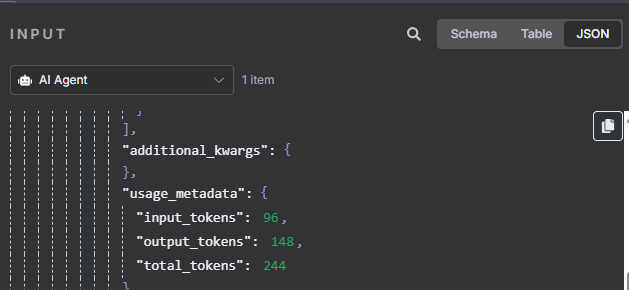
2. Rate Limits: These are rules set by the API provider to prevent abuse and ensure service stability. They might limit the number of requests per minute (RPM) or the total number of tokens per minute (TPM). Exceeding these limits will result in error responses (e.g., 429 Too Many Requests).
Part 1: Handling API Rate Limits
When your workflow processes many items in a loop, it can easily make rapid-fire API calls and hit a rate limit. Here are three strategies to manage this.
Strategy 1: Delays (The Wait Node)
The simplest way to stay under a requests-per-minute limit is to introduce a pause between calls. The Wait node is perfect for this. If you are looping through a list of items to send to an LLM, you can place a Wait node inside the loop to ensure you don't exceed the API's RPM limit.
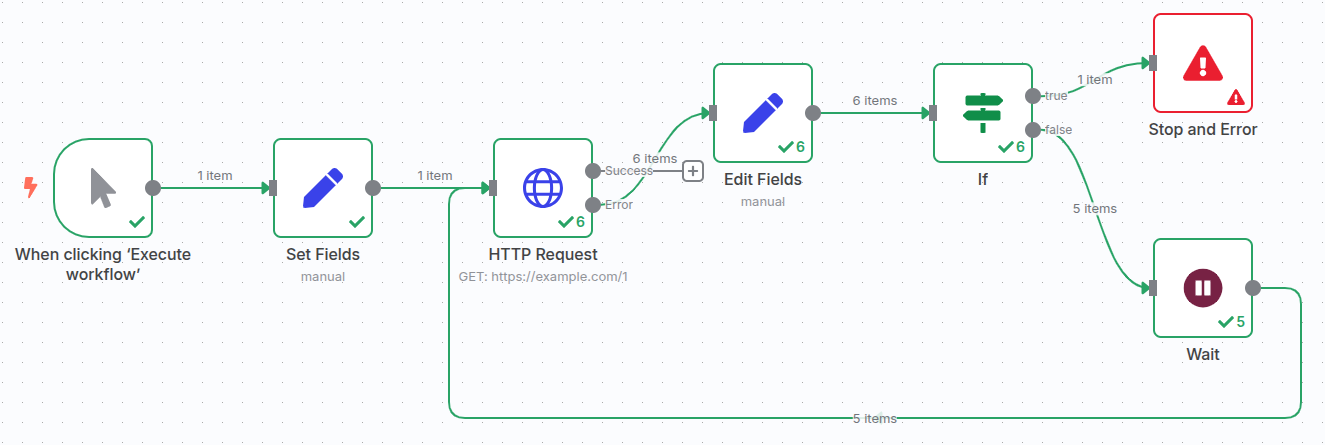
You can read more about this technique in the "Handle API Rate Limits" section of the n8n Workflow Optimization Techniques article.
Strategy 2: Automatic Retries
Sometimes, API calls fail due to transient issues, like a brief network glitch or just barely hitting a rate limit. Instead of letting the workflow fail, you can configure the node to automatically try again.
This video explains how to enable the built-in "Retry on Fail" feature for n8n nodes, which is a crucial first line of defense.
Why 97% of n8n Workflows Fail in Production (And How to Fix It)
The video 'Why 97% of n8n Workflows Fail in Production' demonstrates the 'Retry on Fail' setting, which is a simple yet powerful way to handle temporary API errors and rate limits.
Watch from 06:14 to 08:35. The speaker explains the common causes of API failures and shows how to configure the 'Retry on Fail' options in an n8n node, including the number of retries and the delay between them.
As a best practice, always enable 1-3 retries with a delay of a few seconds for any node that calls an external API, especially an LLM.
Strategy 3: Fallbacks (Advanced)
What if retries fail? For critical workflows, you can create a fallback path. If the primary LLM provider (e.g., OpenAI) fails repeatedly, the node's error output can trigger a secondary AI agent that uses a different provider (e.g., Anthropic or Google). This concept of a fallback LLM is also discussed in the video you just watched (from 08:35 to 10:10).
Part 2: Optimizing Token Usage to Reduce Costs
Handling rate limits is about reliability. Optimizing token usage is about efficiency and cost. Let's explore several powerful techniques.
Strategy 1: Batch Processing
One of the biggest sources of wasted tokens is sending the same large system prompt with every single item in a list.
The Inefficiency:
- Call 1: System Prompt (500 tokens) + Item 1 (50 tokens) = 550 tokens
- Call 2: System Prompt (500 tokens) + Item 2 (50 tokens) = 550 tokens
- Total for 100 items: 55,000 tokens
The Solution: Batching. You group multiple items into a single API call.
- Single Batch Call: System Prompt (500 tokens) + 100 Items (5000 tokens) = 5,500 tokens
- This is a 90% reduction in token usage.
This Reddit post explains the concept brilliantly.
How to Reduce n8n AI Workflow Costs: 3 Token ...
The post 'How to Reduce n8n AI Workflow Costs' clearly illustrates the problem of system prompt repetition and the massive savings from batching.
Read the sections 'The Problem: Your System Prompt Is Eating Your Budget' and 'Technique #1: Smart Input Batching'. Focus on the cost calculation and the two ways to implement batching.
There are two primary ways to implement batching in n8n:
- Node-Level Batching: Some n8n AI nodes (like the AI Agent) have a
Batch Sizesetting directly in the node's parameters. This is the easiest method. - Workflow-Level Batching: For more control, use the
SplitInBatchesnode to group your items. You can then use an expression to format the batched items into a single prompt for the LLM. The article n8n Workflow Optimization Techniques details this in "Tip 3: Optimize AI API Calls with Batch Processing".
Strategy 2: Pre-filtering and Pre-routing
Why send irrelevant data to your most powerful (and expensive) LLM in the first place? The "pre-filtering" technique uses a cheap, fast AI model as a gatekeeper.
This video provides an excellent explanation and demonstration.
How I reduced AI Automation Costs by 87% (n8n pre-filtering)
The video 'How I reduced AI Automation Costs by 87% (n8n pre-filtering)' introduces a powerful cost-saving pattern. It's like having a junior assistant screen tasks before they go to the senior expert.
This is a key resource. Please watch these sections: The Concept (01:56 - 04:55): Understand the 'geography professor' analogy and why using a flagship model for every task is wasteful. The Solution (06:26 - 11:24): See how to add a cheap LLM and a Filter node to create a pre-filter step in n8n. The Payoff (11:24 - 14:05): Follow the cost calculation that shows an 80% reduction in price for the same quality output. The Alternative (15:20 - 16:30): Briefly understand 'pre-routing' for cases where you can't discard data.
This pattern is one of the most effective ways to cut AI automation costs.
Strategy 3: Prompt & Model Optimization
In addition to workflow structure, you can optimize the call itself.
n8n Workflow Optimization Techniques 2025: Production Checklist
The article 'n8n Workflow Optimization Techniques 2025' provides several actionable tips for fine-tuning your AI calls.
Read the section titled 'Tip 7: Optimize Token Usage in AI Workflows'. It covers three crucial strategies.
Here's a summary of the key points from the article:
- Minimize Input Context: Be specific. Instead of passing an entire JSON object, use expressions to only include the exact fields the LLM needs (e.g.,
{{ $json.email }}instead of{{ $json }}). - Use Specific Models: Don't use GPT-4 Turbo when a cheaper model like GPT-4o-mini or Claude Haiku will do. Match the model to the task's complexity. This is the core principle of the pre-filtering strategy.
- Set
max_tokenson Output: If you only need a 100-token summary, don't leave themax_tokensparameter at its default of 4,096. This prevents the model from generating overly long (and expensive) responses.
Test your understanding!
You've built a workflow that processes 500 customer reviews per day to categorize them. The workflow loops through each review and calls a GPT-4-powered AI Agent. It's reliable but costs $20/day.
Based on today's lesson, outline three specific changes you would make to this workflow to drastically reduce its cost.
Show answer
Here are three high-impact changes:
- Implement Pre-filtering: Add a Basic LLM Chain node before the AI Agent. Use a cheap model (like
gpt-4o-mini) to first check if a review is substantive or just "spam" / low-effort (e.g., "ok", "good"). Use a Filter node to discard the non-substantive reviews, so the expensive agent only processes valuable input. - Implement Batching: Instead of processing reviews one-by-one, use the
SplitInBatchesnode to group them into batches of 10. Then, modify the expensive AI Agent's prompt to handle 10 reviews at once (e.g., "Here are 10 customer reviews. For each one, provide a category... Return the output as a JSON array."). This reduces system prompt token repetition by 90%. - Minimize Input & Limit Output: Modify the expression feeding the AI Agent. Instead of sending the whole review object
{{ $json.review_data }}, send only the text:{{ $json.review_data.text }}. Additionally, in the AI Agent's parameters, setmax_tokensto a reasonable limit (e.g., 50) since you only need a category name, not a long explanation.
Conclusion
You've now learned the essential techniques for making your AI workflows not just powerful, but also practical for production use. By managing API interactions intelligently, you ensure your automations are both reliable and cost-effective.
Key Takeaways:
- For Reliability: Use the
Waitnode to respect rate limits and enable theRetry on Failsetting in API nodes to handle transient errors. - For Cost-Efficiency:
- Batch your inputs to reduce system prompt repetition.
- Pre-filter data with a cheap model to protect your expensive models from irrelevant work.
- Optimize your prompts by minimizing context, choosing the right model for the job, and limiting output tokens.
- Measure Everything: Keep an eye on the
usage_metadatato understand where your tokens are being spent.
Preview of the Next Module:
With your understanding of n8n fundamentals, core concepts, and advanced AI integrations, you're now ready to take full control of your automation platform. The next module, Self-Hosting n8n with Docker, marks a major step in your journey. We will start by learning how to install and run n8n on your own local machine, giving you ultimate privacy, control, and freedom from platform limitations.