
Hello again. In the previous lesson, you worked with Python’s everyday data structures: lists, tuples, dictionaries, slicing, unpacking, and comprehensions. You can now represent a collection of text records and transform it concisely.
The next step is to turn a growing script into code that can be reused, imported, tested, and safely operated. In this lesson, you will define a focused class, split responsibilities into modules and a package, and use exceptions to distinguish invalid input from unexpected defects. These patterns will carry directly into later dataset-processing, PyTorch, and Hugging Face projects.
1. From a script to reusable design
A Python file can begin as a small script, but a single file becomes difficult to maintain when it contains:
- record definitions and validation;
- text-cleaning functions;
- command-line or application code;
- configuration;
- error handling;
- eventually, tests.
The architectural response is familiar: give each unit a clear responsibility and keep dependencies explicit.
In Python, the basic units are:
- A function groups a reusable operation.
- A class groups related state and behavior.
- A module is a Python file.
- A package is a directory that groups related modules.
Do not introduce a class merely because a language supports object-oriented programming. A function is often the right choice for a stateless transformation:
def normalize_whitespace(text: str) -> str:
    return " ".join(text.split())
A class is useful when several values form one meaningful entity and operations naturally belong with that entity. A validated text sample, tokenizer configuration, model checkpoint, or training run are all plausible class candidates.
For this lesson, we will model a text sample that has a stable identity, a dataset split, validated text, and a method for displaying a preview.
Corey Schafer’s Python OOP Tutorial 1: Classes and Instances provides a concise visual introduction to the class-instance relationship, initialization, and instance methods.
Python OOP Tutorial 1: Classes and Instances
Watch Corey Schafer’s explanation to establish the Python vocabulary: a class is a definition, while each instance holds its own data.
Watch classes and instances for the distinction between a blueprint and separate objects. Then watch initialization to see how __init__ establishes instance state. Finish with instance methods, paying particular attention to why self appears in a method definition but is not supplied when calling the method through an instance.
2. Define a class around a meaningful invariant
Here is a first version of a TextSample class:
class TextSample:
    """A validated piece of text belonging to a dataset split."""

    def __init__(
        self,
        sample_id: str,
        text: str,
        split: str = "train",
    ) -> None:
        normalized_id = sample_id.strip()
        normalized_text = " ".join(text.split())
        normalized_split = split.strip()

        if not normalized_id:
            raise ValueError("sample_id must not be empty.")

        if not normalized_text:
            raise ValueError("text must contain non-whitespace characters.")

        if not normalized_split:
            raise ValueError("split must not be empty.")

        self.sample_id = normalized_id
        self.text = normalized_text
        self.split = normalized_split

    def preview(self, limit: int = 40) -> str:
        """Return at most `limit` characters of the cleaned text."""
        return self.text[:limit]
Create and use an instance:
sample = TextSample(
    sample_id="ex-001",
    text="  Attention compares positions in a sequence.  ",
    split="train",
)

print(sample.sample_id)   # ex-001
print(sample.text)        # Attention compares positions in a sequence.
print(sample.preview(18)) # Attention compares
What happens during construction?
TextSample(...) creates an instance. Python then calls its __init__ method automatically.
Inside __init__:
sample_id,text, andsplitare ordinary local parameters.selfrefers to the newly created instance.self.sample_id,self.text, andself.splitbecome attributes belonging to that specific instance.
The conceptual correspondence to C# is close:
| Python | Approximate C# concept |
|---|---|
class TextSample: | class declaration |
__init__ | constructor-style initialization method |
self | explicit instance reference, comparable to this |
self.text | instance field or property-like attribute |
sample.preview(40) | instance method call |
One important distinction: self is explicit in a Python method definition.
def preview(self, limit: int = 40) -> str:
    return self.text[:limit]
But Python supplies it automatically when you call the method through an object:
sample.preview()
Conceptually, that call invokes the function stored on TextSample with sample as its first argument.
Constructors should establish valid state
The checks in __init__ enforce an invariant:
Every successfully created
TextSamplehas a non-empty ID, text, and split.
This gives downstream code a simpler contract. If a variable is a TextSample, other functions do not need to repeatedly ask whether its text is blank.
Notice also that normalization happens once at construction:
normalized_text = " ".join(text.split())
This removes leading and trailing whitespace and collapses repeated whitespace between words. The stored self.text is therefore already clean enough for the small example.
Instance variables versus class variables
The attributes assigned through self are per-instance values:
first = TextSample("ex-001", "First record")
second = TextSample("ex-002", "Second record")

print(first.sample_id)   # ex-001
print(second.sample_id)  # ex-002
Each object has independent attributes.
By contrast, an attribute defined directly in the class body is shared unless an instance overrides it:
class TextSample:
    default_split = "train"
A shared class attribute is suitable for an immutable constant. It is not a safe default location for a mutable list or dictionary:
class BadDataset:
    samples: list[TextSample] = []  # Do not do this.
Every BadDataset instance would refer to the same list. Initialize mutable per-instance state inside __init__ instead.
Python does not enforce private fields in the way C# does. A leading underscore is the conventional signal that an attribute or function is internal to a module or class:
def _require_string(value: object, field_name: str) -> str:
    ...
Treat an underscore-prefixed name as an implementation detail, not a public API.
3. Modules and packages: organize by responsibility
A module is simply a .py file that contains Python definitions or executable statements. Importing a module allows another file to use its public definitions without copying them.
The official Python tutorial is worth reading here because it clarifies module execution, imports, and package structure precisely.
6. Modules — Python 3.14.0 documentation
Read the official Python documentation to connect file layout with Python’s import behavior. Focus on modules as reusable files, the difference between running and importing, and package imports.
In Section 6, read the opening explanation from why scripts matter, then continue through the fibo import example. In Section 6.1, read module initialization and then Section 6.1.1, “Executing modules as scripts,” for the __name__ == "__main__" guard. Finally, read Section 6.4, “Packages,” starting at the sound-package example; use the package example to see why dotted module names prevent naming conflicts.
For our small text-ingestion package, use this layout:
text_ingest/
├── __init__.py
├── app.py
├── cleaning.py
├── errors.py
└── records.py
The responsibilities are deliberately narrow:
| Module | Responsibility |
|---|---|
errors.py | Defines exceptions that describe domain-specific invalid input |
records.py | Defines the TextSample class |
cleaning.py | Converts raw mappings into validated TextSample objects |
app.py | Coordinates the program and decides what to do with invalid records |
__init__.py | Marks and initializes the package; leave it empty for now |
Use snake_case for module names such as text_cleaning.py, and PascalCase for class names such as TextSample.
Imports should make dependencies visible
Within a package, use a relative import to refer to a sibling module:
from .records import TextSample
The dot means “from the current package.” By contrast, code outside the package would use an absolute import:
from text_ingest.records import TextSample
Avoid wildcard imports:
# Avoid in production code.
from text_ingest.records import *
They obscure where names originate and make a module’s dependencies harder to audit.
Also avoid naming your own files after standard-library or third-party packages. A local json.py, typing.py, torch.py, or transformers.py can hide the intended package during import resolution and produce confusing failures.
4. Exceptions: make invalid conditions explicit
An exception represents an abnormal condition that prevents a normal operation from completing. Python raises built-in exceptions such as:
KeyErrorwhen a required dictionary key is absent;ValueErrorwhen a value has an invalid meaning;TypeErrorwhen an operation receives an inappropriate type;FileNotFoundErrorwhen an expected file does not exist.
You should usually not allow raw low-level errors to become the whole public contract of a reusable data-processing component. Instead, define an exception meaningful to your domain.
Create text_ingest/errors.py:
class InvalidTextSampleError(ValueError):
    """Raised when raw data cannot form a valid TextSample."""
This class adds no behavior yet, but it gives your application a specific, catchable error category. It inherits from ValueError because the problem is still fundamentally an invalid value.
The key idea is to separate responsibilities:
- A reusable module detects invalid input and raises a meaningful exception.
- The application boundary decides whether to skip, report, retry, or terminate.
This is preferable to burying a print() statement inside library code, where a caller cannot choose a different policy.
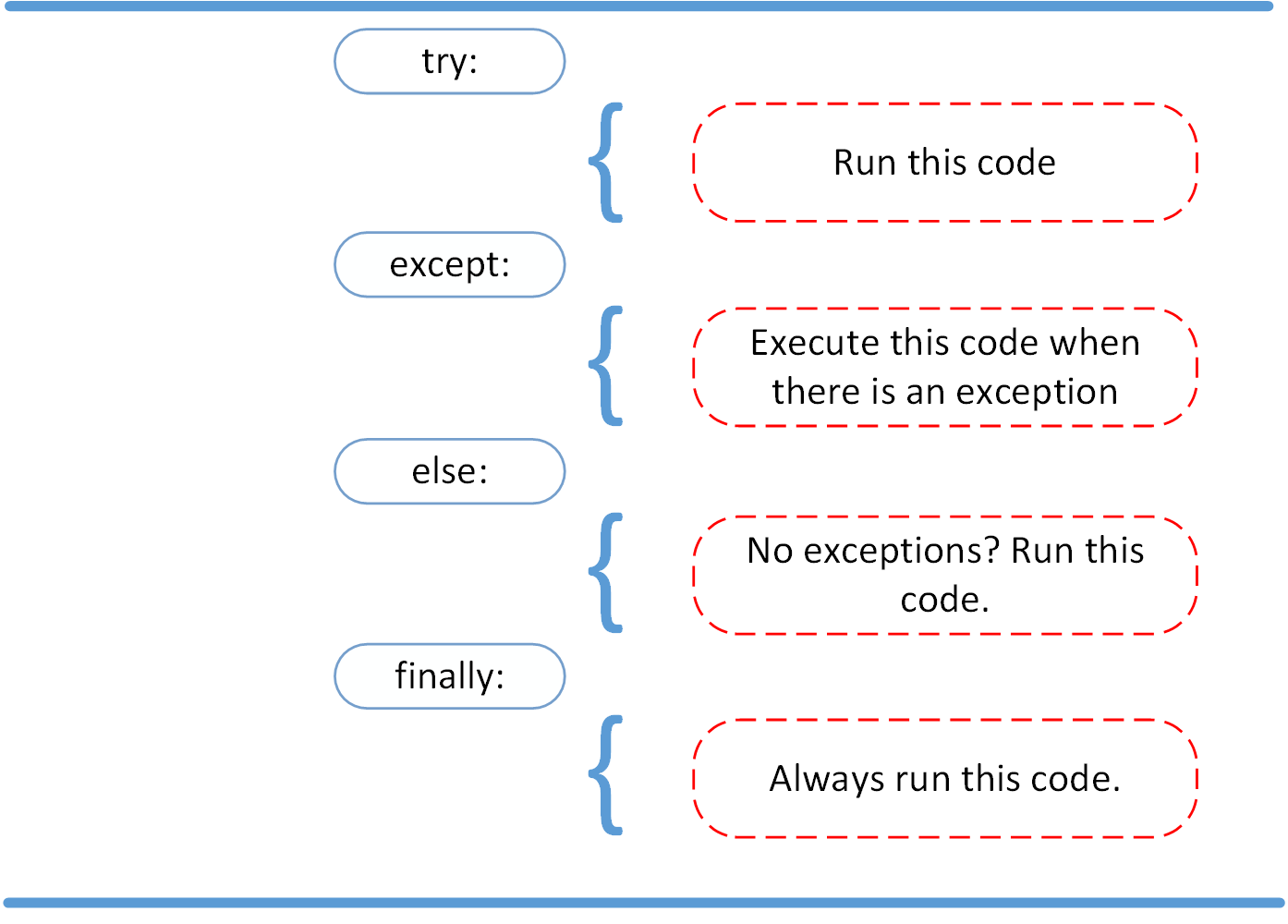
Use narrow try blocks and catch specific errors
A try block should surround only the operation expected to fail:
try:
    sample_id = raw["id"]
except KeyError as exc:
    raise InvalidTextSampleError(
        "Record is missing required field 'id'."
    ) from exc
The from exc portion creates an exception chain. The new, domain-level error is shown to the caller, while the original KeyError remains available as the underlying cause for debugging.
Avoid this pattern:
try:
    # Many unrelated lines of code
    ...
except Exception:
    print("Something went wrong")
It can hide programming defects such as a misspelled attribute, an incorrect function call, or a logic error. Catch an exception only when you can take a justified recovery action.
else and finally
Use else for code that should execute only after the try block succeeds:
try:
    sample = parse_raw_record(raw)
except InvalidTextSampleError as exc:
    print(f"Skipping invalid record: {exc}")
else:
    print(sample.preview())
Keeping the success path in else prevents an exception raised by sample.preview() from being incorrectly treated as a parsing failure.
Use finally primarily for cleanup of resources acquired before or during the operation, such as closing a connection or releasing a lock. In later lessons, you will usually prefer Python’s with statement for files and similar resources; it provides reliable cleanup without manually writing finally.
5. Build a small importable text-ingestion package
Now assemble the package. First, create an empty text_ingest/__init__.py.
Then add text_ingest/errors.py:
class InvalidTextSampleError(ValueError):
    """Raised when raw data cannot form a valid TextSample."""
Add text_ingest/records.py:
from .errors import InvalidTextSampleError


class TextSample:
    """A validated and whitespace-normalized text sample."""

    def __init__(
        self,
        sample_id: str,
        text: str,
        split: str = "train",
    ) -> None:
        normalized_id = sample_id.strip()
        normalized_text = " ".join(text.split())
        normalized_split = split.strip()

        if not normalized_id:
            raise InvalidTextSampleError("sample_id must not be empty.")

        if not normalized_text:
            raise InvalidTextSampleError(
                f"Sample {normalized_id!r} has empty text."
            )

        if not normalized_split:
            raise InvalidTextSampleError("split must not be empty.")

        self.sample_id = normalized_id
        self.text = normalized_text
        self.split = normalized_split

    def preview(self, limit: int = 40) -> str:
        """Return a short text preview."""
        return self.text[:limit]
The class owns semantic validation: fields may be present, but an empty ID or whitespace-only text is still invalid.
Next, add text_ingest/cleaning.py:
from .errors import InvalidTextSampleError
from .records import TextSample


def _require_string(value: object, field_name: str) -> str:
    """Return a string value or raise a domain-specific error."""
    if not isinstance(value, str):
        actual_type = type(value).__name__
        raise InvalidTextSampleError(
            f"Field {field_name!r} must be a string, not {actual_type}."
        )

    return value


def parse_raw_record(raw: dict[str, object]) -> TextSample:
    """Convert one raw mapping into a validated TextSample."""
    try:
        raw_id = raw["id"]
        raw_text = raw["text"]
    except KeyError as exc:
        raise InvalidTextSampleError(
            f"Record is missing required field {exc.args[0]!r}."
        ) from exc

    raw_split = raw.get("split", "train")

    return TextSample(
        sample_id=_require_string(raw_id, "id"),
        text=_require_string(raw_text, "text"),
        split=_require_string(raw_split, "split"),
    )
There are several design decisions worth noticing:
parse_raw_record()receives raw external data asdict[str, object], because incoming values are not yet trusted._require_string()validates the structural requirement that a field must be a string.TextSamplevalidates the higher-level meaning of those strings.- Missing keys are translated from
KeyErrorintoInvalidTextSampleError. - The private helper begins with
_, indicating that callers should useparse_raw_record()rather than depend on the helper.
Finally, add text_ingest/app.py:
from .cleaning import parse_raw_record
from .errors import InvalidTextSampleError


def main() -> None:
    raw_records: list[dict[str, object]] = [
        {
            "id": "ex-001",
            "split": "train",
            "text": "  Attention compares positions in a sequence.  ",
        },
        {
            "id": "ex-002",
            "split": "validation",
            "text": "Embeddings map tokens to vectors.",
        },
        {
            "id": "ex-003",
            "split": "train",
            "text": "   ",
        },
        {
            "text": "This record has no ID.",
        },
        {
            "id": "ex-005",
            "text": 42,
        },
    ]

    for raw in raw_records:
        try:
            sample = parse_raw_record(raw)
        except InvalidTextSampleError as exc:
            print(f"Skipping record: {exc}")
        else:
            print(
                f"{sample.sample_id} [{sample.split}]: "
                f"{sample.preview(35)!r}"
            )


if __name__ == "__main__":
    main()
From the directory containing text_ingest, run:
python -m text_ingest.app
The -m option runs text_ingest.app as a module. This is important because the relative imports in app.py, such as from .cleaning import ..., need Python to recognize text_ingest as a package.
The if __name__ == "__main__": guard means:
main()runs when this module is launched withpython -m text_ingest.app.main()does not run merely because another module importstext_ingest.app.
That distinction keeps reusable definitions import-safe and makes later testing straightforward.
A useful implementation check is to alter the raw data in three ways:
- Add a valid record with no
"split"field and confirm that it defaults to"train". - Add a record whose
"id"is an integer and confirm that it is skipped with a clear message. - Import
parse_raw_recordin a Python REPL and call it directly, confirming that importing the module does not executemain().
6. Design rules to retain
For the code you will write throughout this pathway, these rules form a dependable baseline:
- Use a class when data and behavior form one coherent concept. Prefer functions for stateless transformations.
- Put related definitions in modules with one clear responsibility.
- Use packages to group modules that change together.
- Keep imports explicit. Prefer named imports and avoid wildcard imports.
- Validate untrusted input near the boundary where it enters the system.
- Raise specific exceptions from reusable code; decide recovery policy at the application boundary.
- Catch only exceptions you expect and can handle appropriately.
- Use
elsefor a clean success path andfinallyfor unavoidable cleanup. - Use
if __name__ == "__main__":to keep executable entry-point code separate from importable definitions.
You can now move beyond single-file scripts: define classes that preserve useful invariants, organize them into importable modules and packages, and handle invalid data without concealing real defects.
Next, you will learn iterators and generators, which let Python process large collections and datasets incrementally rather than loading everything into memory at once.
Can't find a good explanation? Sign up and we'll make it for you
Sign up