
Welcome back. The previous lesson defined the system boundaries: Next.js presents the client workspace, FastAPI enforces product policy, Supabase holds canonical workflow data, and workers later handle durable automation. This lesson turns that architecture into a working repository.
You will create a small but production-oriented monorepo with two independently deployable applications:
- a Next.js / TypeScript command-center frontend, suitable for AWS Amplify Hosting;
- a FastAPI / Python API, suitable for an ECS Fargate service later.
By the end, both applications will run locally, the frontend will verify that it can reach the API, and the repository will have clean seams for the multi-tenant, Claude, CRM, and worker capabilities you will add in later modules.
The scaffold’s definition of done
This is a scaffold, not a premature attempt to build authentication, CRM sync, or AI features. For now, the repository is successful if it meets these conditions:
- The root Git repository contains
apps/webandapps/api. - The FastAPI application has a versioned API prefix and a public health endpoint.
- The frontend has typed code for calling the FastAPI endpoint.
- Local configuration is supplied through ignored environment files, never hard-coded secrets.
- The API structure can grow by domain without turning
main.pyinto a giant file. - Both applications can be linted or tested independently.
A single repository is appropriate here because the frontend and API are one product, share architectural documentation, and must evolve together. They remain separate deployable units: Amplify can deploy apps/web, while an eventual backend container build can target apps/api.
Choose a layout that leaves room to grow
Before creating files, take a brief look at how FastAPI applications stay modular as they gain routes.
Bigger Applications - Multiple Files - FastAPI
Read the official FastAPI guide, “Bigger Applications.” It provides the central idea behind the backend scaffold: keep route modules focused, then compose them in one application entry point.
In “An example file structure,” read the package layout. Notice the role of __init__.py files in making the application importable as a package. Then go to “The main FastAPI” and “Include the APIRouters for users and items.” Read router composition. Focus on the distinction between defining routes in a module and registering them in the application entry point. You can skip the shared-admin-router example for now.
For a complementary overview of how route, service, schema, and test boundaries work in a growing Python project, watch this short segment.
Anatomy of a Scalable Python Project (FastAPI)
Watch “Anatomy of a Scalable Python Project (FastAPI)” from ArjanCodes. It explains why thin HTTP routes and separate business logic make a codebase easier to test and extend.
Watch the structure overview, covering the recommended application folders, route layer, schema layer, and service layer. Do not copy its database choices yet; your product will use Supabase. Instead, retain the boundary: routes translate HTTP requests, while domain services will eventually hold business rules.
Your repository starts with this shape:
growth-command-center/
├── apps/
│   ├── api/
│   │   ├── app/
│   │   │   ├── api/
│   │   │   │   └── v1/
│   │   │   │       ├── routes/
│   │   │   │       │   └── health.py
│   │   │   │       └── router.py
│   │   │   ├── core/
│   │   │   │   └── config.py
│   │   │   ├── __init__.py
│   │   │   └── main.py
│   │   ├── tests/
│   │   │   └── api/
│   │   │       └── test_health.py
│   │   ├── .env.example
│   │   └── pyproject.toml
│   └── web/
│       └── src/
│           ├── app/
│           ├── components/
│           └── lib/
├── docs/
│   └── product/
│       └── reference-architecture.md
├── .gitignore
└── README.md
A few choices are intentional:
| Location | Responsibility now | What belongs there later |
|---|---|---|
apps/web | Browser-facing Next.js application | Dashboard routes, approval queues, typed API client, tenant-aware UI |
apps/api/app/api/v1/routes | HTTP endpoints only | Authenticated lead, campaign, automation, and webhook endpoints |
apps/api/app/core | Application-wide configuration | Settings, logging setup, security utilities |
apps/api/app/services | Not created yet | Domain workflows such as qualification, outreach approval, or connector orchestration |
apps/api/tests | API-level tests | Tenant-isolation, authorization, and workflow tests |
docs/product | Product decisions | Your lifecycle map, entity definitions, architecture record, and future API contracts |
Do not create empty models, services, integrations, and workers directories simply because you expect to need them. Empty organizational categories turn into vague dumping grounds. Add a directory when the first real responsibility requires it.
Understand the Next.js side of the boundary
Next.js uses its filesystem to define route structure. You will begin with the generated root layout and page, then add actual product routes when the dashboard work begins in Module 10.
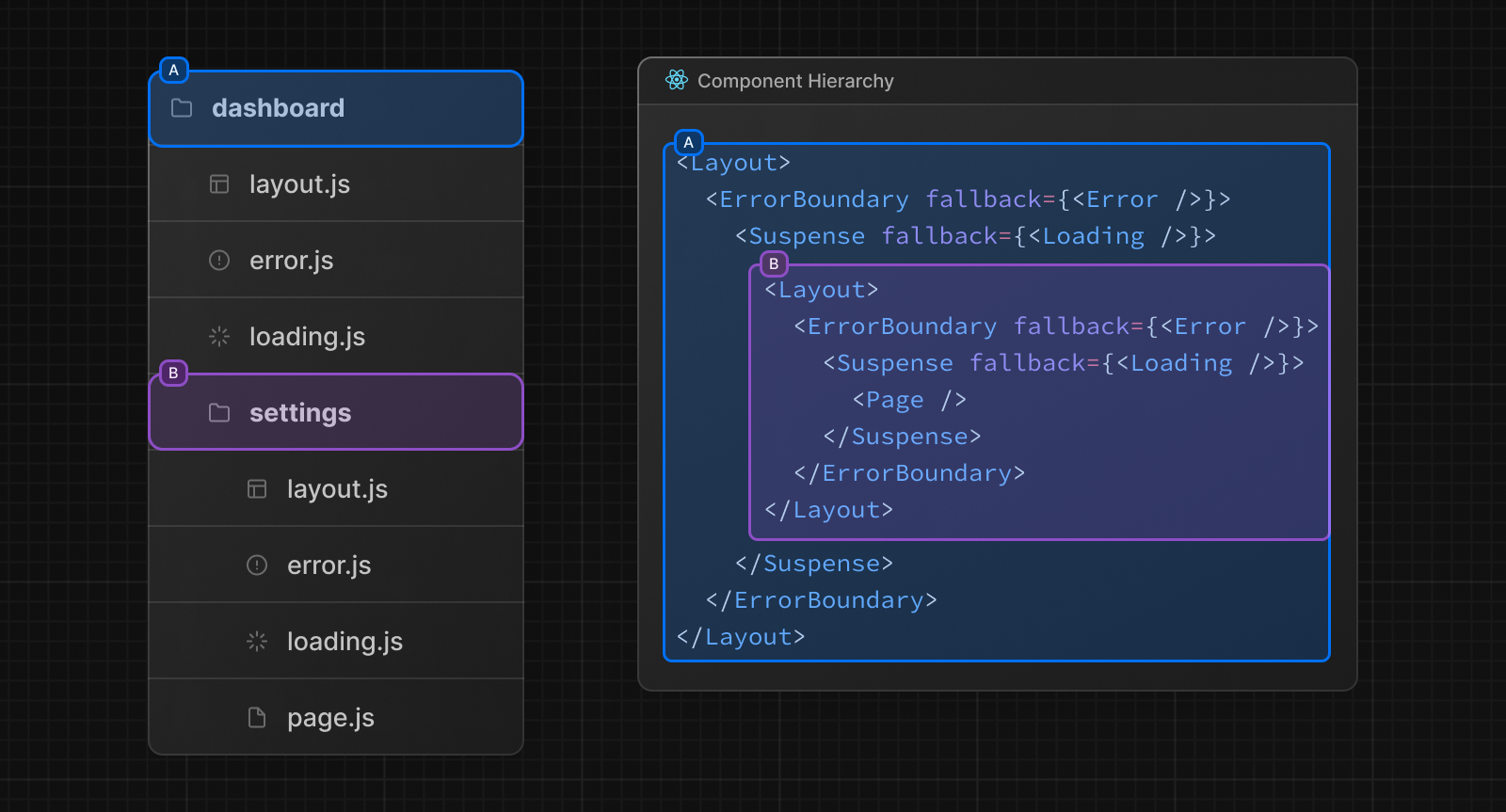
For the command center, this convention will eventually support a route structure such as:
src/app/
├── layout.tsx
├── page.tsx
└── workspace/
    ├── layout.tsx
    ├── page.tsx
    ├── leads/
    │   └── page.tsx
    ├── approvals/
    │   └── page.tsx
    └── automations/
        └── page.tsx
At this stage, keep only the root layout.tsx and page.tsx generated by Next.js. Adding placeholder loading.tsx or error.tsx files without a real behavior to design creates noise, not architecture.
The frontend is an interface to product capabilities. It is not where you will put:
- Claude API keys;
- GoHighLevel or Airtable credentials;
- Supabase service-role credentials;
- authorization decisions;
- direct CRM mutations.
The small health check you create today is deliberately public. It confirms local connectivity; it is not a model for tenant-owned product endpoints.
Create the repository and frontend
The following commands assume macOS, Linux, or WSL, with a current Node.js LTS release, Python 3.12 or later, Git, and uv installed. If you work in Windows PowerShell, create the same folders and files through your editor or equivalent PowerShell commands.
Create the root repository and generate the Next.js application:
mkdir growth-command-center
cd growth-command-center

git init
mkdir -p apps docs/product

npx create-next-app@latest apps/web \
  --typescript \
  --eslint \
  --tailwind \
  --app \
  --src-dir \
  --use-npm \
  --import-alias "@/*"
When prompted, retain the default choices unless your local standards require otherwise. The important choices are TypeScript, the App Router, and the src directory.
Next, create the backend directories:
mkdir -p apps/api/app/api/v1/routes
mkdir -p apps/api/app/core
mkdir -p apps/api/tests/api

touch apps/api/app/__init__.py
touch apps/api/app/api/__init__.py
touch apps/api/app/api/v1/__init__.py
touch apps/api/app/api/v1/routes/__init__.py
touch apps/api/app/core/__init__.py
Add root ignore rules
Create a root .gitignore:
# Python
__pycache__/
*.py[cod]
.pytest_cache/
.ruff_cache/
apps/api/.venv/

# Next.js
apps/web/node_modules/
apps/web/.next/
apps/web/out/

# Local environment files
.env
.env.*
!.env.example
!.env.local.example

# Editor and operating system files
.DS_Store
.vscode/
.idea/
Next.js generates its own .gitignore inside apps/web. Open that file and ensure this exception appears after its .env* ignore rule:
!.env.local.example
This permits a safe example configuration file to be committed while keeping the actual .env.local file private.
Build a minimal FastAPI application
Create apps/api/pyproject.toml:
[project]
name = "growth-command-center-api"
version = "0.1.0"
description = "API for the Growth Command Center"
requires-python = ">=3.12"
dependencies = [
  "fastapi[standard]>=0.115.0,<1.0.0",
  "pydantic-settings>=2.6.0,<3.0.0",
]

[dependency-groups]
dev = [
  "httpx>=0.27.0,<1.0.0",
  "pytest>=8.0.0,<9.0.0",
  "ruff>=0.8.0,<1.0.0",
]

[tool.fastapi]
entrypoint = "app.main:app"

[tool.pytest.ini_options]
testpaths = ["tests"]

[tool.ruff]
line-length = 100

[tool.uv]
package = false
The FastAPI entry point tells development tools that the ASGI application object lives at app.main:app. This convention is valuable once you add container builds, tests, and CI: every tool can locate the API consistently.
Create apps/api/.env.example:
ENVIRONMENT=development
CORS_ORIGINS=http://localhost:3000
Now create apps/api/app/core/config.py:
from functools import lru_cache

from pydantic_settings import BaseSettings, SettingsConfigDict


class Settings(BaseSettings):
    model_config = SettingsConfigDict(env_file=".env", extra="ignore")

    environment: str = "development"
    api_v1_prefix: str = "/api/v1"
    cors_origins: str = "http://localhost:3000"

    @property
    def cors_origin_list(self) -> list[str]:
        return [
            origin.strip()
            for origin in self.cors_origins.split(",")
            if origin.strip()
        ]


@lru_cache
def get_settings() -> Settings:
    return Settings()


settings = get_settings()
This configuration has two useful properties:
- Local defaults are safe and explicit. Only the local Next.js development origin is permitted to make browser requests.
- A deployment supplies values externally. When Amplify receives a real domain, you will set the exact frontend origin as deployment configuration rather than changing source code.
Now create apps/api/app/api/v1/routes/health.py:
from typing import Literal

from fastapi import APIRouter
from pydantic import BaseModel

from app.core.config import settings


router = APIRouter(prefix="/health", tags=["health"])


class HealthResponse(BaseModel):
    status: Literal["ok"]
    service: str
    environment: str


@router.get("", response_model=HealthResponse)
async def get_health() -> HealthResponse:
    return HealthResponse(
        status="ok",
        service="growth-command-center-api",
        environment=settings.environment,
    )
Then create the version-one router composition point at apps/api/app/api/v1/router.py:
from fastapi import APIRouter

from app.api.v1.routes import health


api_router = APIRouter()
api_router.include_router(health.router)
Finally, create apps/api/app/main.py:
from collections.abc import AsyncIterator
from contextlib import asynccontextmanager

from fastapi import FastAPI
from fastapi.middleware.cors import CORSMiddleware

from app.api.v1.router import api_router
from app.core.config import settings


@asynccontextmanager
async def lifespan(_: FastAPI) -> AsyncIterator[None]:
    yield


app = FastAPI(
    title="Growth Command Center API",
    version="0.1.0",
    lifespan=lifespan,
)

app.add_middleware(
    CORSMiddleware,
    allow_origins=settings.cors_origin_list,
    allow_credentials=True,
    allow_methods=["GET", "POST", "PUT", "PATCH", "DELETE", "OPTIONS"],
    allow_headers=["Authorization", "Content-Type", "Idempotency-Key"],
)

app.include_router(api_router, prefix=settings.api_v1_prefix)
The request path is now:
/api/v1/health
The prefix is a compatibility boundary. A later version-two API could exist alongside version one temporarily, allowing the web client to migrate deliberately rather than breaking every consumer at once.
The CORS middleware is a browser interoperability setting, not authentication. It permits a browser loaded from http://localhost:3000 to call the local API. It does not tell FastAPI which user is making a request, what organization they belong to, or whether they may access a record. Those controls come in the multi-tenant identity module.
Add a backend test before wiring the UI
Create apps/api/tests/api/test_health.py:
from fastapi.testclient import TestClient

from app.main import app


client = TestClient(app)


def test_health_endpoint_returns_service_status() -> None:
    response = client.get("/api/v1/health")

    assert response.status_code == 200
    assert response.json() == {
        "status": "ok",
        "service": "growth-command-center-api",
        "environment": "development",
    }
A health test may seem trivial, but it proves several important wiring decisions simultaneously:
- Python can import the application package.
- FastAPI registers the versioned router.
- The endpoint returns the response contract you declared.
- A later refactor cannot silently remove basic operational visibility.
Install and run the backend:
cd apps/api
cp .env.example .env

uv sync
uv run ruff check .
uv run pytest
uv run fastapi dev
Leave the FastAPI process running. Visit http://127.0.0.1:8000/docs in a browser and confirm that the interactive API documentation lists GET /api/v1/health.
In another terminal, verify the raw response:
curl http://127.0.0.1:8000/api/v1/health
You should receive a JSON response equivalent to:
{
  "status": "ok",
  "service": "growth-command-center-api",
  "environment": "development"
}
Give the Next.js frontend a typed API seam
The frontend needs one location responsible for constructing API requests. Do not scatter fetch("http://localhost:8000/...") throughout page components. That becomes difficult to authenticate, test, and change.
Create apps/web/.env.local.example:
NEXT_PUBLIC_API_BASE_URL=http://localhost:8000
Create apps/web/src/lib/api.ts:
const apiBaseUrl =
  process.env.NEXT_PUBLIC_API_BASE_URL ?? "http://localhost:8000";

export interface HealthResponse {
  status: "ok";
  service: string;
  environment: string;
}

export async function fetchApiHealth(): Promise<HealthResponse> {
  const response = await fetch(`${apiBaseUrl}/api/v1/health`);

  if (!response.ok) {
    throw new Error(`API health check failed with status ${response.status}`);
  }

  return (await response.json()) as HealthResponse;
}
The NEXT_PUBLIC_ prefix means this value may be bundled into browser code. That is acceptable only because an API base URL is not a secret. Use this distinction consistently:
Safe in NEXT_PUBLIC_ configuration | Never expose to browser code |
|---|---|
| API base URL | Anthropic API key |
| Supabase project URL | Supabase service-role key |
| Supabase anonymous key | GoHighLevel access token |
| Public release identifier | Airtable personal access token |
| Non-secret feature flag | Webhook signing secret |
Create apps/web/src/components/api-status.tsx:
"use client";

import { useState } from "react";

import { fetchApiHealth } from "@/lib/api";

type Status = "idle" | "checking" | "healthy" | "error";

export function ApiStatus() {
  const [status, setStatus] = useState<Status>("idle");
  const [message, setMessage] = useState(
    "The API connection has not been checked.",
  );

  async function checkApi() {
    setStatus("checking");
    setMessage("Checking API connectivity...");

    try {
      const health = await fetchApiHealth();
      setStatus("healthy");
      setMessage(
        `${health.service} is healthy in ${health.environment}.`,
      );
    } catch (error) {
      setStatus("error");
      setMessage(
        error instanceof Error
          ? error.message
          : "The API health check failed.",
      );
    }
  }

  return (
    <section className="rounded-lg border p-6">
      <h2 className="text-lg font-semibold">API connection</h2>
      <p className="mt-2 text-sm text-gray-600" aria-live="polite">
        {message}
      </p>
      <button
        className="mt-4 rounded bg-black px-4 py-2 text-sm text-white disabled:opacity-50"
        disabled={status === "checking"}
        onClick={checkApi}
        type="button"
      >
        {status === "checking" ? "Checking..." : "Check API status"}
      </button>
    </section>
  );
}
Replace the generated apps/web/src/app/page.tsx with:
import { ApiStatus } from "@/components/api-status";

export default function Home() {
  return (
    <main className="mx-auto max-w-3xl p-8">
      <p className="text-sm font-medium text-gray-600">
        Growth Command Center
      </p>
      <h1 className="mt-2 text-4xl font-bold tracking-tight">
        Client growth operations, governed by design.
      </h1>
      <p className="mt-4 max-w-2xl text-gray-700">
        This workspace will bring lead research, qualification, outreach,
        campaigns, approvals, and automation status into one tenant-aware
        command center.
      </p>
      <div className="mt-8">
        <ApiStatus />
      </div>
    </main>
  );
}
Update the metadata in apps/web/src/app/layout.tsx to identify the product:
export const metadata: Metadata = {
  title: "Growth Command Center",
  description: "A multi-tenant growth operations workspace.",
};
Now start the frontend in a separate terminal:
cd apps/web
cp .env.local.example .env.local

npm run lint
npm run dev
Open http://localhost:3000, select Check API status, and confirm that the page reports the FastAPI service as healthy.
This is a deliberately small vertical slice:
- The browser loads a Next.js page.
- A client component calls typed frontend code.
- The frontend makes an HTTP request to FastAPI.
- FastAPI applies local CORS policy and returns a typed response.
- The UI presents the result without knowing anything about API implementation details.
Later, the same frontend seam will attach a Supabase access token, and FastAPI will resolve the active organization before it returns tenant-scoped data.
Document the repository’s operating contract
Create a minimal root README.md so another developer can run the product without reconstructing your decisions:
# Growth Command Center

Multi-tenant B2B growth operations software.

## Applications

- `apps/web`: Next.js and TypeScript client application
- `apps/api`: FastAPI and Python product API

## Local development

### API

```bash
cd apps/api
cp .env.example .env
uv sync
uv run fastapi dev
API documentation is available at http://127.0.0.1:8000/docs.
Web
cd apps/web
cp .env.local.example .env.local
npm install
npm run dev
The web application runs at http://localhost:3000.
Validation
cd apps/api && uv run ruff check . && uv run pytest
cd apps/web && npm run lint
Security baseline
Never commit local environment files, API keys, provider credentials, service-role keys, or webhook secrets.
The code block nesting shown in the README is valid Markdown when placed in the file: use triple backticks for the outer markdown example only if you are copying it from this lesson manually. If your editor makes nesting inconvenient, write the headings and command blocks directly instead.

Finish the initial scaffold with a focused commit:

```bash
git add .
git status
git commit -m "chore: scaffold FastAPI and Next.js applications"
Before committing, inspect git status carefully. You should see .env.example and .env.local.example, but not .env, .env.local, virtual environments, Node modules, or build output.
Scaffold review
Your repository is ready to support the architecture from the previous lesson if all of the following are true:
-
apps/apiandapps/webare separate application roots. -
uv run pytestpasses fromapps/api. -
uv run ruff check .passes fromapps/api. -
npm run lintpasses fromapps/web. -
GET /api/v1/healthappears in FastAPI’s/docs. - The browser can successfully check API health from
localhost:3000. - CORS uses an explicit origin rather than a wildcard.
- Frontend configuration contains no credentials.
- The Git working tree contains no real environment files or secrets.
-
docs/product/reference-architecture.mdremains in the repository as the build reference.
Key takeaways
You now have the smallest useful implementation of the command center’s application boundary:
- A monorepo keeps product documentation, frontend, and backend aligned.
- Next.js lives in
apps/weband owns the client experience. - FastAPI lives in
apps/apiand owns API composition, configuration, and future policy enforcement. - A versioned
/api/v1router provides a stable growth path for the API. - A typed frontend API module prevents request logic from leaking across UI components.
- Local CORS configuration enables development without confusing browser access rules for real authorization.
- Example environment files document configuration without exposing secrets.
Next, you will define a Python connector interface that keeps GoHighLevel, Airtable, and future vendors behind a stable product-facing contract rather than allowing vendor-specific behavior to spread through the application.
Can't find a good explanation? Sign up and we'll make it for you
Sign up