
Welcome. This course will build a production-minded, multi-tenant growth command center for B2B SMB clients: lead research, qualification, outreach, CRM workflows, campaign production, reporting, and grounded recommendations. This first module establishes the product blueprint before we write services or prompts.
Today’s outcome is a lifecycle map: a shared operational contract for what it means to create a client tenant, make its workspace usable, run growth operations safely, export its data, and offboard it. If this map is vague, later decisions about database isolation, integrations, Claude usage, billing, and AWS provisioning tend to become inconsistent.
A lifecycle map is more than a signup flow
A tenant is the client organization that has a commercial and security boundary in your SaaS. For example, “Acme Industrial Supply” is one tenant. A workspace is that tenant’s usable operating environment: its users, growth configuration, connected systems, approval rules, and operational data.
Keep those concepts separate even if the first version of the UI calls both of them an “account.” A tenant can exist while its workspace is not ready; a workspace can be configured while billing or an integration is pending; and a tenant can be temporarily suspended without being deleted.
Your lifecycle needs two planes:
- The control plane manages tenants as customers of your SaaS: registration, plan, status, identity setup, provisioning policy, billing linkage, export requests, and offboarding.
- The application plane is the command center the tenant uses: prospects, opportunities, campaign drafts, approvals, automation runs, dashboards, and integrations.
The key principle is that the application plane must never decide for itself whether a tenant is allowed to operate. It receives the tenant context and the control-plane status, then enforces it.
AWS re:Invent 2022 - SaaS migration: Inside a real-world multi-tenant transformation (SAS306)
Watch “AWS re:Invent 2022 - SaaS migration: Inside a real-world multi-tenant transformation” from AWS Events for a concise explanation of why a control plane exists independently of the application features. The speaker uses Cognito and DynamoDB, whereas this course will use Supabase and FastAPI, but the lifecycle principle is the same.
Watch the control plane. Focus on the separation between onboarding, tenant management, and identity, and on why the tenant record continues to matter after initial setup.
The tenant onboarding workflow below illustrates this separation. Registration coordinates several independent responsibilities instead of one request directly creating users, infrastructure, billing records, and application data.
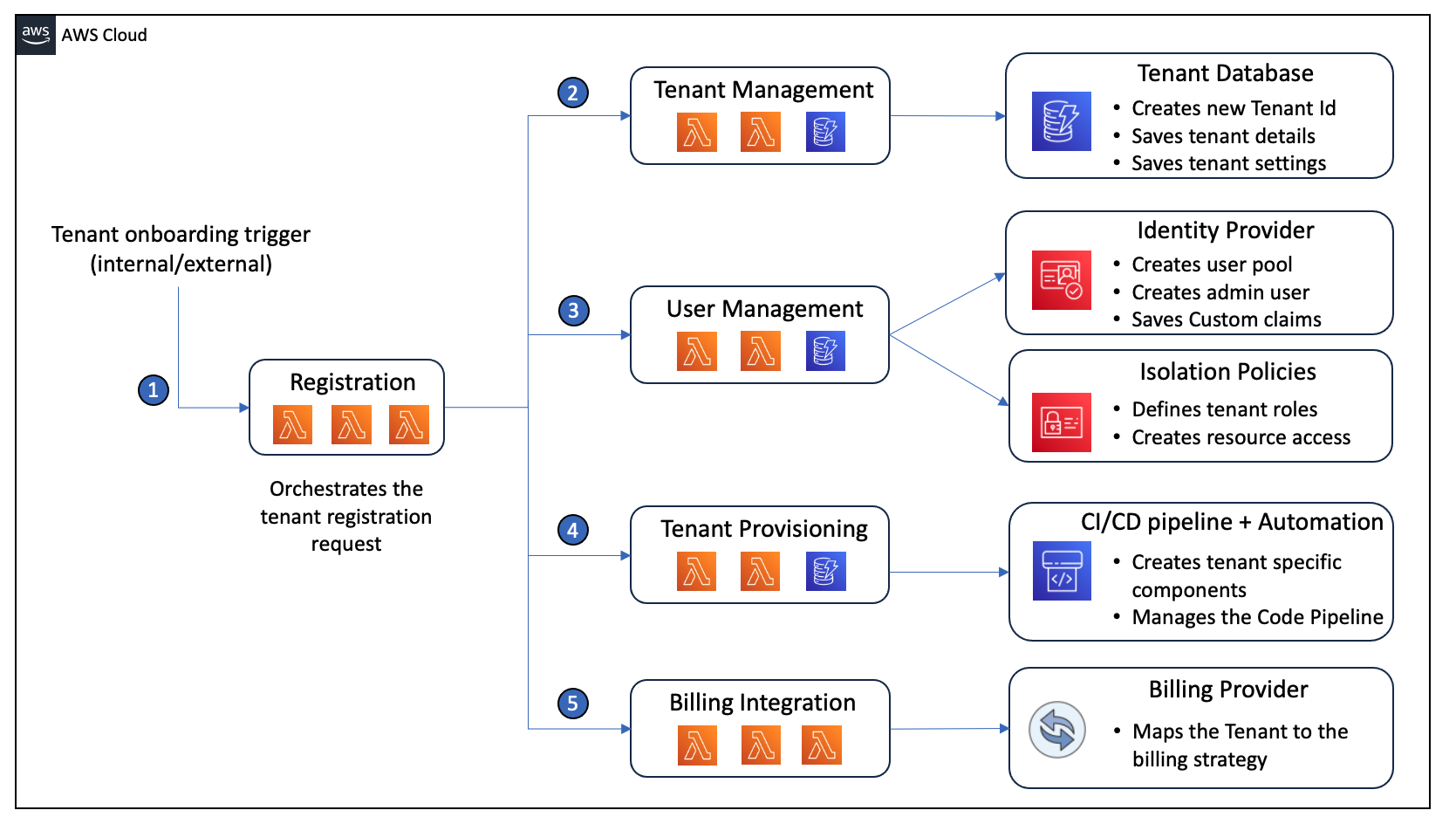
Read the AWS Partner Network article to see the responsibilities that belong in a tenant control plane and why provisioning and billing should not be treated as incidental side effects of a signup form.
In the section “Centralizing Tenant Onboarding Through a SaaS Control Plane,” read the control-plane framing, then continue through the numbered onboarding steps. Pay particular attention to the five responsibilities: registration, tenant management, user management, provisioning, and billing. Then, near the end of the article, read the final paragraph beginning the offboarding note. Treat AWS service names as examples, not requirements for your product.
For your command center, registration is an orchestration process, not merely “insert an organization row.” It should coordinate durable work while allowing some tasks, such as billing synchronization or infrastructure deployment, to complete asynchronously.
The lifecycle states to model
A useful map distinguishes tenant status, workspace readiness, and long-running operations.
Tenant status
Use tenant status to determine whether the organization may access or operate the product:
requested: a self-service signup or internal sales/admin request was received.provisioning: the platform is creating the tenant boundary, policy configuration, owner invitation, and required operational records.onboarding: the tenant exists and can complete setup, but growth automations are not yet enabled.active: the workspace has passed its minimum readiness checks and approved operations may run.suspended: access or automated actions are temporarily paused, often for a billing, security, or customer-request reason.offboarding: the tenant is being closed according to a defined schedule and retention policy.retained: live access is gone, but retained data remains during a contractual or legal retention period.deleted: tenant data and tenant-specific resources have been deleted or irreversibly anonymized, with a recorded completion result.
Workspace readiness
Workspace readiness should not be hidden inside the tenant status. A tenant can be in onboarding while its workspace moves through:
not startedconfiguringready for reviewreadyneeds attention
For example, a client may have accepted their invitation and filled in their company profile, but not connected GoHighLevel or approved outreach rules. That tenant is not ready for automated prospecting or sending.
Long-running operations
Provisioning, data export, and offboarding can take time and can be retried. Model them as durable operations with their own statuses, such as queued, running, succeeded, failed, and cancelled.
This prevents a dangerous shortcut: setting a tenant to active merely because a web request returned successfully. Instead, the control plane records a tenant status and one or more operation records whose results establish whether the next lifecycle stage is permitted.
The lifecycle map for the growth command center
The following is the working lifecycle map for your product. It is intentionally technology-aware enough to guide implementation, while remaining independent of the exact AWS topology you will choose later.
| Lifecycle stage | Trigger and accountable actor | Required control-plane actions | Workspace and growth-system actions | Exit evidence |
|---|---|---|---|---|
| 1. Tenant provisioning | Self-service registration, sales handoff, or internal admin request. The platform owns orchestration. | Create an immutable tenant ID; record legal organization name, plan, region and retention policy; create tenant status; create billing customer mapping; invite initial owner; attach the appropriate provisioning policy. | Create the tenant’s logical application boundary and default workspace configuration. For standard SMB plans, this will initially be a shared application deployment with strict tenant-scoped data access, not a dedicated AWS stack per customer. | Tenant record exists; owner invitation is issued; required policy and billing setup either succeeded or is explicitly marked pending; provisioning run has a complete audit trail. |
| 2. Workspace onboarding | Tenant owner accepts invitation and starts setup. The tenant owner supplies business context; the platform validates it. | Enforce plan entitlements and onboarding prerequisites. Record configuration versions and all changes that affect permitted automation. | Capture business profile, ICP configuration, brand voice, value proposition, consent and suppression rules, team members, approval settings, and integration connections. Validate credentials server-side. | Workspace is marked ready only after required configuration is complete and a responsible tenant user confirms the setup. |
| 3. Growth operations | An authorized user starts an approved workflow, or an approved scheduled automation is due. | Check tenant is active, within plan and usage limits, and allowed to run the requested capability. Record tenant-scoped operational telemetry and billable usage where applicable. | Import leads; enrich evidence; qualify prospects; prepare outreach and content; route approved records to CRM; collect outcomes; surface approvals and errors in the command center. | Each automation run has a tenant ID, initiator, inputs, outputs, timestamps, result, and actionable failure details. No outbound communication is activated without the required approval policy being satisfied. |
| 4. Data export | An authorized tenant owner requests an export, or the platform performs a contractual export during closure. | Authorize the request; define scope; create an export operation; log the requester, reason, data range, and expiry time. | Build a tenant-only snapshot and a manifest of included data. Deliver it through a time-limited, access-controlled method. Exclude platform secrets, other tenants’ data, and internal credentials. | Export manifest, integrity result, delivery location, expiry, and access audit are recorded. Export does not itself deactivate the tenant. |
| 5. Offboarding | Tenant cancellation, scheduled non-payment closure, or a provider-initiated security/legal decision. A human policy decision initiates irreversible deletion. | Change status to offboarding; stop entitlement to new work; cancel billing according to policy; revoke user sessions and integration access; schedule retention and deletion tasks. | Drain or cancel pending automations; prevent new outreach sends; provide final export if promised; preserve required audit evidence; delete or anonymize retained data after the retention period. Remove any tenant-specific AWS resources if the plan used them. | A closure receipt records access revocation, export completion or waiver, retention deadline, deletion outcome, integration disconnection, and resource-deprovisioning result. |
This is your first product-level contract. The important design choice is that each stage has an owner, trigger, controls, evidence, and exit condition. A happy-path diagram alone cannot answer what happens if provisioning fails midway, a client pauses billing, or an offboarding request arrives while an outreach sequence is scheduled to send.
What provisioning means for your initial product
Not every tenant needs dedicated infrastructure. For an SMB-focused SaaS, the sensible initial policy is generally:
- Standard plan: shared FastAPI services and shared Supabase infrastructure, with tenant identity and tenant-scoped database controls.
- Higher-isolation plan: selectively dedicated resources only where contractual, regulatory, scale, or performance needs justify them.
- Provider operations: centrally managed logs, alerts, deployment pipelines, billing records, and support tooling across all tenants.
AWS calls the first extreme a pool model and the dedicated-per-tenant extreme a silo model. Pooling is economically efficient, but it requires reliable runtime tenant isolation. Siloing provides stronger coarse infrastructure boundaries, but can raise provisioning and operating cost.
For this product, do not make “one AWS account, database, or ECS service per SMB tenant” the default. It would create a large operational burden before you know which customers need that level of separation. However, make provisioning policy-driven from the beginning, so a future premium plan can choose a different isolation strategy without changing the business lifecycle.
A provisioning request should establish at least these outcomes:
- A stable tenant identifier that is never derived from the customer’s display name.
- A tenant record containing plan, status, lifecycle timestamps, and policy references.
- An initial owner identity or invitation.
- A workspace configuration container, initially incomplete.
- Default security and retention settings.
- A billing relationship or an explicit “billing pending” condition.
- Tenant-aware observability context for subsequent actions.
- A durable provisioning operation record with idempotency protection.
Idempotency matters: if a signup button is clicked twice, or a worker retries after a timeout, the platform should return or resume the same provisioning operation rather than create duplicate tenants, duplicate billing customers, or multiple owner accounts.
Workspace onboarding is where the product becomes useful
Tenant provisioning creates a safe container. Workspace onboarding turns that container into a usable growth system.
For your product, onboarding should collect only what is necessary to perform reliable work. It should not immediately ask a client for every possible setting. Start with a readiness checklist built around the workflows you will automate:
| Onboarding area | Minimum information | Why it is required before operations |
|---|---|---|
| Business identity | Company name, website/domain, industry, operating region | Grounds research and prevents confusing one organization with another. |
| Ideal customer profile | Target industries, company size, geography, buyer roles, disqualifiers | Determines which prospects should be researched and qualified. |
| Brand and offer | Value proposition, proof points, prohibited claims, voice guidance | Makes generated outreach and content tenant-specific rather than generic. |
| Governance | Approval policy, consent rules, suppression sources, contact-frequency limits | Prevents the system from sending work that is non-compliant or unwanted. |
| Integrations | GoHighLevel and Airtable connections, plus desired sync direction | Enables CRM and lead-data workflows while keeping credentials server-side. |
| Team and roles | Workspace owner and initial operators/reviewers | Establishes who can approve, launch, review, and export. |
A practical readiness gate for version one is:
A workspace is ready when it has an authenticated owner, a usable business profile, an initial ICP, an approved outreach-governance configuration, and at least one configured workflow or integration path.
Notice what is not in that definition: “all possible integrations must be connected.” A tenant should be able to begin with CSV or Airtable lead intake before connecting GoHighLevel. The lifecycle must support partial adoption without accidentally enabling workflows that depend on missing configuration.
Growth operations must remain lifecycle-aware
Once active, a tenant enters an ongoing operational state. This is where your command center earns its value, but it is also where lifecycle controls are tested.
Every significant operation should carry the tenant context and check tenant status before acting. That includes:
- lead import and deduplication;
- web research and enrichment;
- Claude-powered qualification and content generation;
- approval requests;
- CRM contact and opportunity updates;
- outreach activation and follow-up sends;
- campaign publishing;
- reporting and growth recommendations.
A useful rule is:
A tenant ID scopes data; tenant status scopes permission to operate.
For example, a suspended tenant’s user might still be allowed to log in and view invoices or export data, depending on your policy. But no scheduled follow-up email, research job, Claude request, or GoHighLevel update should proceed merely because an old task exists in a queue.
This also means that an automation run should record more than “success” or “failure.” At minimum, it should identify:
- the tenant and workspace;
- who or what initiated it;
- the configuration version used;
- the input records involved;
- the external systems called;
- the outcome, failure category, and retry state;
- the resulting entities or artifacts;
- model usage and cost when Claude is involved.
These records will later support the client dashboard, troubleshooting, billing metering, and the audit trail needed for sensitive actions.
Export and offboarding are separate promises
Data export and offboarding are often incorrectly treated as a single destructive action. They should be separate.
An export is a tenant-controlled portability feature. An active tenant may export its data for reporting, backup, procurement, or migration reasons without closing its account. It should produce a tenant-scoped package with a clear manifest.
For the command center, a tenant export will eventually need to consider:
- canonical prospect, contact, opportunity, campaign, and automation-run data;
- tenant configuration such as ICP and brand profiles;
- approved content assets and review history;
- audit-relevant records that are contractually exportable;
- references or imported records from GoHighLevel and Airtable, subject to your contractual and technical access rules.
It should not include:
- another tenant’s data;
- application secrets, encrypted credentials, or Claude API keys;
- internal platform-only security material;
- data that the platform does not own or have a contractual right to redistribute.
The next lifecycle concern is offboarding, which is a controlled closure process rather than an immediate deletion button.
Tenant Life Cycle Considerations in Multitenant Solutions
Read Microsoft’s multitenant lifecycle guidance for the operational realities that continue after onboarding: scaling, moving tenants when their requirements change, temporary deactivation, retention, and deletion.
In the section beginning “After you onboard tenants,” read the operational lifecycle. Focus on why workload changes, region requirements, and plan upgrades can affect an otherwise active tenant. Then read the “Offboard tenants” and “Deactivate and reactivate tenants” material, beginning the closure guidance. Distinguish temporary deactivation from permanent offboarding.
A safe offboarding sequence
For your product, the closure process should be ordered and auditable:
- Authorize and schedule the request. Verify the tenant owner or permitted platform operator, record the reason, and communicate the final access and retention dates.
- Freeze new work. Set the tenant to
offboarding; block new automation runs, campaign activation, and new integration actions. - Drain or cancel existing work. Cancel queued research, qualification, content, and outreach tasks. For work already in progress, define whether it may finish, must stop, or needs review.
- Revoke access and integrations. Disable tenant user access according to policy, revoke refresh tokens, disconnect vendor credentials, and prevent webhooks from triggering fresh activity.
- Deliver a final export if applicable. Create it before destructive deletion and record either successful delivery or a documented waiver.
- Retain what policy requires. Preserve only the data necessary for the defined contractual, financial, legal, and security retention periods.
- Delete or anonymize. Remove live tenant data, delete tenant-specific resources, and ensure backups expire according to the documented backup policy.
- Issue a closure receipt. Record what was removed, what is retained, why it is retained, and the expected final deletion date.
A tenant with a failed payment should normally enter suspended, not immediately deleted. Suspension is reversible; offboarding is a closure workflow. Conflating the two creates support problems and can violate the retention promises you make to clients.
The lifecycle guardrails to carry forward
Use these decisions as the baseline for the remainder of the course:
- One lifecycle authority: tenant status is centrally managed by the control plane, not inferred from a frontend route or a billing page.
- Tenant context is server-verified: backend services derive the tenant from authenticated identity and membership, rather than trusting a client-supplied
tenant_id. - Every automated action is status-gated: inactive, suspended, and offboarding tenants cannot generate new growth activity.
- Operations are durable and retryable: provisioning, exports, integrations, and offboarding each have an operation record, idempotency behavior, and visible failure state.
- Data portability is a product feature: export is available independently of cancellation and has explicit scope and security controls.
- Deletion follows retention, not user-interface convenience: closing access, retaining records, deleting production data, and backup expiry are distinct milestones.
- Tiering changes provisioning policy, not tenant identity: a tenant remains the same customer whether its workload is pooled, partially dedicated, or fully isolated.
Capture this as your first blueprint artifact
Create a document such as docs/product/tenant-lifecycle.md and record the following decisions from this lesson:
- the tenant statuses and workspace readiness states;
- the five lifecycle stages in the map;
- your v1 readiness gate;
- your v1 pooled-by-default provisioning policy;
- who can request exports and offboarding;
- the retention and deletion questions that still require a business decision;
- the lifecycle guardrails above.
Mark unresolved items explicitly rather than inventing a permanent answer now. For example, you may write: “Default retention period: TBD by contract and legal policy.” What matters is that the system has a defined place for the decision and does not silently delete or retain data by accident.
You now have a lifecycle map that treats a client as a long-lived tenant, not a row created at signup. Provisioning establishes a governed tenant boundary; workspace onboarding supplies the business configuration required for reliable automation; growth operations remain tenant-scoped and status-gated; export provides controlled portability; and offboarding closes access before retention and deletion proceed.
Next, you will define the configurable ideal-customer-profile fields that let this platform serve B2B SMBs across industries without hard-coding a niche-specific sales process.
Can't find a good explanation? Sign up and we'll make it for you
Sign up