
Hello! Welcome to the first lesson of our second module, "Inter-Service Communication Patterns."
In the last module, you learned how to build a robust, self-contained microservice. We covered defining service boundaries, implementing health checks with Actuator, managing configurations with profiles, and creating a professional, centralized error-handling strategy. Your service is now well-built and production-ready in isolation.
However, the defining characteristic of a microservices architecture is that services work together. This requires them to communicate. The choices you make about how they communicate are among the most critical architectural decisions you'll face, directly impacting your system's scalability, resilience, and complexity. For the senior roles you're targeting, being able to articulate the trade-offs of these patterns is essential.
Today, we will tackle the most fundamental choice in inter-service communication. By the end of this lesson, you will be able to explain the trade-offs between synchronous and asynchronous communication patterns.
1. The Two Fundamental Communication Styles
At the highest level, communication between services falls into two categories: synchronous (blocking) and asynchronous (non-blocking).
What are the types of communication for microservices? (Intro to Microservices - Part 2) sudoCODE
To start, let's get a quick, clear definition of these two styles. The video 'What are the types of communication for microservices?' by sudoCODE provides a concise introduction.
Watch from the beginning to 01:25. Focus on the core distinction: a synchronous call waits for a response, while an asynchronous call does not.
Let's break these down in more detail.
2. Synchronous Communication: The Direct Conversation
In synchronous communication, a client service sends a request to a server service and blocks, waiting until it receives a response. The entire interaction happens within a single thread or process on the client's side.
Think of it like a phone call: you dial a number, wait for the other person to answer, have a conversation, and then hang up. You can't do anything else while you're on that call.
The most common implementation you'll encounter is using REST APIs over HTTP. Since you're familiar with Spring Boot, you've already built services that communicate this way, likely using RestTemplate or a declarative client like OpenFeign.
Advantages of Synchronous Communication
The primary benefits are its simplicity and immediacy.
Synchronous and Asynchronous Communication between Microservices
The video 'Synchronous and Asynchronous Communication between Microservices' by Arpit Bhayani offers a great explanation of these advantages.
Watch from 08:11 to 09:13. Note the two key benefits discussed: it's real-time and it's simple to implement and understand.
- Simple & Intuitive: The request-response model is straightforward to design, implement, and debug. The flow of control is linear and easy to trace.
- Immediate Feedback: The caller gets an immediate result. This is crucial for real-time interactions where the client needs a direct answer to proceed.
Disadvantages & Trade-offs
This simplicity comes at a significant cost, especially in a distributed system. The main issue is temporal coupling.
Navigating Microservices Communication: Patterns, Performance, and Technology Choices
The article 'Navigating Microservices Communication' introduces the term 'temporal coupling,' which is excellent vocabulary for an interview. Let's read a short section that defines it.
Read the section under the heading 'Pattern: Synchronous Blocking'. Pay close attention to the definition of temporal coupling: the caller must assume the downstream service is available at the exact same time.
Temporal coupling leads to several major challenges that you must be prepared to discuss:
- Reduced Availability & Cascading Failures: If a downstream service (
Service B) is slow or unavailable, the calling service (Service A) is stuck waiting. This can causeService A's resources (like threads) to be exhausted, making it unavailable to its own clients. This failure can cascade up the call chain, leading to a widespread system outage. - Increased Latency: The total response time for the initial user is the sum of the network and processing time of every service in the synchronous call chain.
- Tight Coupling: The caller and callee are tightly bound.
Service Aneeds to know the direct address ofService B. IfService B's API changes or if it has planned downtime,Service Ais directly impacted.
Synchronous and Asynchronous Communication between Microservices
Let's watch Arpit Bhayani's detailed breakdown of these disadvantages. He provides excellent visuals for concepts like cascading failures.
Watch from 09:13 to 15:49. This is a critical segment. Focus on how blocking calls impact latency, the need to provision for peak loads, the risk of cascading failures, and the strong coupling it creates.
When to Use Synchronous Communication
Despite the drawbacks, synchronous communication is the right choice for certain scenarios.
- Real-time read operations: When a UI needs data to render a page (e.g., fetching user profile details).
- Request validation: Checking if a username is already taken during registration.
- Critical transactions: Processing a payment, where you need immediate confirmation of success or failure.
In short, use it when the client must have an immediate answer to proceed.
3. Asynchronous Communication: Fire-and-Forget
In asynchronous communication, a client service sends a message or an event and then immediately moves on to other tasks. It does not wait for a response. The work is processed by the receiving service at a later time.
This is like sending an email or a text message. You send it and go about your day, confident that the recipient will see it and respond when they are available.
This pattern is typically implemented using a message broker (like Apache Kafka or RabbitMQ) that acts as an intermediary. The producer service publishes a message to the broker, and one or more consumer services subscribe to receive and process that message.
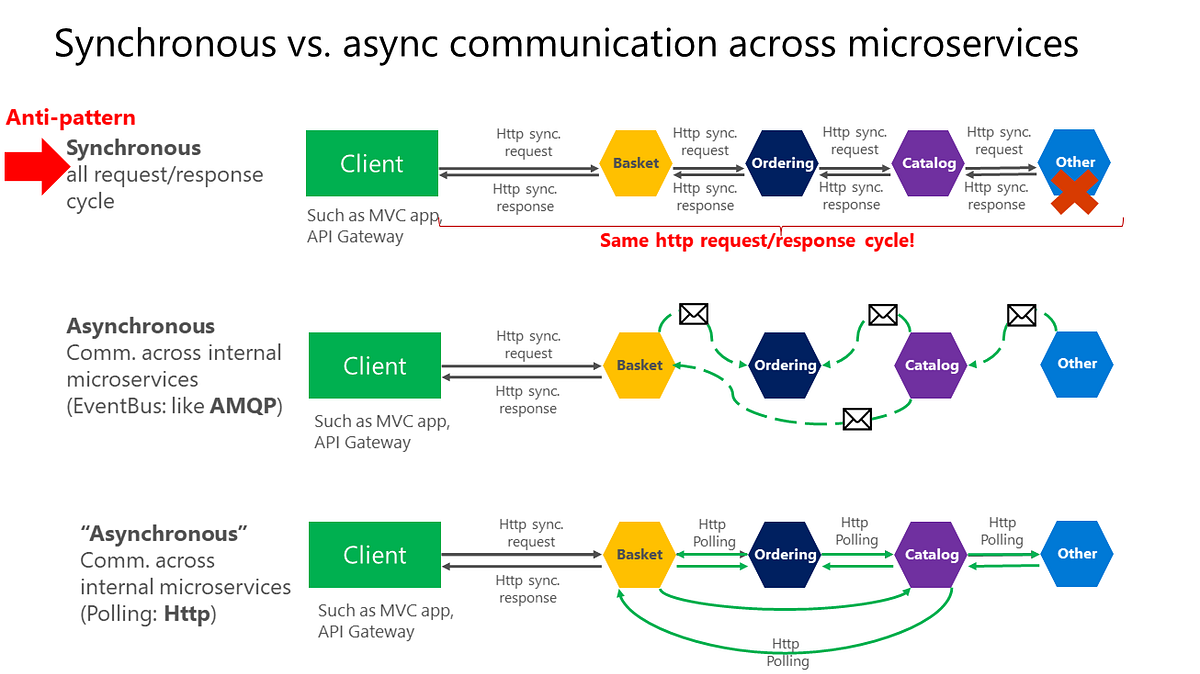
Advantages of Asynchronous Communication
This pattern directly addresses the weaknesses of the synchronous model.
- Loose Coupling: The producer and consumer services are decoupled. The producer only needs to know about the message broker, not the consumers. Consumers can be added or removed without affecting the producer.
- Improved Resilience and Fault Tolerance: If a consumer service is down, messages simply queue up in the broker. When the service comes back online, it can process the backlog. This isolates failures and prevents them from cascading.
- Enhanced Scalability and Elasticity: Services can be scaled independently based on their load. If messages are piling up in a queue, you can simply add more instances of the consumer service to process them in parallel. This makes the system more efficient and cost-effective.
- Better Responsiveness: For the end-user, the initial request is often much faster. The user-facing service just needs to publish a message, which is a very quick operation, before returning a "Request accepted" response.
Disadvantages & Trade-offs
The benefits of decoupling come with their own set of challenges.
- Increased Complexity: You must now manage an additional piece of infrastructure: the message broker. The broker itself must be made highly available and scalable, as it becomes a critical system component.
- Eventual Consistency: Since processing happens in the background, the system's state is not updated instantly. For example, after an order is placed, it might take a few seconds for it to appear in the user's order history. This is a fundamental trade-off you must accept when choosing an asynchronous model.
- Difficult Debugging and Tracing: Following a single logical request across multiple, decoupled services that communicate via a broker is much harder than tracing a single synchronous call chain. It requires specialized observability tools for distributed tracing.
Synchronous and Asynchronous Communication between Microservices
Let's explore these asynchronous concepts in more detail with Arpit Bhayani.
Watch the following three segments: 18:35 - 20:54: Understand the basic model with a message broker. 22:57 - 31:21: Focus on the significant advantages, particularly how it improves user experience and enables independent scaling. 31:21 - 34:37: Pay close attention to the disadvantages: eventual consistency, the broker as a single point of failure, and the difficulty of tracing.
When to Use Asynchronous Communication
This pattern is ideal for offloading work that doesn't need to be done immediately.
- Notifications: Sending confirmation emails, SMS alerts, or push notifications.
- Long-running jobs: Video encoding, report generation, or data backups.
- Fan-out scenarios: A single event triggers multiple independent actions (e.g., a "Product Published" event triggers services to update the search index, clear caches, and notify subscribed users).
- Data ingestion & analytics: Processing high volumes of incoming logs or analytics events.
4. Summary for Your Interview
In a real-world system, you'll almost always use a hybrid approach. You might have a synchronous REST API for the initial user request, which then publishes an asynchronous event to kick off a backend workflow.
To succeed in a system design interview, you need to confidently weigh these options.
Synchronous vs. Asynchronous Design Patterns in ...
The article 'Synchronous vs. Asynchronous Design Patterns' provides a perfect summary, including real-world case studies from Uber and Amazon.
Read the sections '3️⃣ When to Use Synchronous vs. Asynchronous Communication?' and '5️⃣ Real-World Case Studies'. These examples are excellent for illustrating your points in an interview.
Here is a summary table of the key trade-offs:
| Aspect | Synchronous (e.g., REST) | Asynchronous (e.g., Kafka/RabbitMQ) |
|---|---|---|
| Coupling | Tight (Temporal Coupling) | Loose |
| Resilience | Low (Prone to cascading failures) | High (Failures are isolated) |
| Scalability | Difficult (Must scale services together) | High (Services scale independently) |
| User Latency | High (User waits for the entire process) | Low (User gets an immediate response) |
| Data Consistency | Strong / Immediate | Eventual |
| Implementation | Simple | Complex (Requires a message broker) |
| Best For | Real-time reads, critical transactions (e.g., payment) | Deferred tasks, background jobs, fan-out (e.g., email) |
Test your understanding!
You are designing the backend for a social media platform. For each of the following features, would you choose synchronous or asynchronous communication between the relevant services? Justify your choice with one or two key trade-offs.
- A user tries to log in with their username and password.
- A user uploads a new 1-minute video to their profile.
- After the video is successfully uploaded, it needs to be processed into different resolutions (240p, 480p, 720p).
- After the video is processed, notifications are sent to all of the user's followers.
Show answer
- Login: Synchronous. The user cannot proceed without immediate validation of their credentials. This requires a direct, blocking response from an authentication service. Trade-off: Prioritizing immediate feedback over system decoupling.
- Video Upload: Synchronous. The HTTP upload itself is a synchronous operation. The user-facing API service should wait until the video file is fully received and stored in a temporary location (like an S3 bucket) before responding to the user. Trade-off: This is a long-running synchronous call, but it's necessary to confirm the upload was successful. The UI can show a progress bar.
- Video Processing: Asynchronous. Once the upload is confirmed, the API service should publish a
VideoUploadedevent to a message broker. A separate video processing service can then consume this event and start the long-running transcoding job. Trade-off: This decouples the user-facing API from the heavy processing, improving API responsiveness. It accepts eventual consistency (the different resolutions won't be available instantly). - Send Notifications: Asynchronous. The video processing service, upon completion, should publish a
VideoProcessedevent. A separate notification service can listen for this event and send notifications to followers. This is a classic "fan-out" use case where one event triggers many actions. Trade-off: This makes the system resilient. If the notification service is slow, it doesn't block the video from becoming available.
Conclusion
You now have a solid framework for analyzing and choosing between synchronous and asynchronous communication patterns. There is no universally "correct" answer; the right choice always depends on the specific requirements of the use case. Being able to articulate this—balancing simplicity vs. resilience, and immediate consistency vs. scalability—is a hallmark of a senior engineer.
Key Takeaways:
- Synchronous communication is simple and provides immediate feedback but creates tight coupling and risks cascading failures. Use it for real-time, critical interactions.
- Asynchronous communication provides loose coupling, resilience, and scalability but adds complexity and results in eventual consistency. Use it for background tasks, long-running jobs, and decoupling workflows.
- Real-world architectures are hybrid, using the right pattern for the right job.
Next Up
Now that you understand the theory, we'll dive into the practical implementation. In our next lesson, you will learn how to implement declarative synchronous communication using OpenFeign, a powerful tool in the Spring Cloud ecosystem for making REST calls feel like simple Java method invocations.
Can't find a good explanation? Sign up and we'll make it for you
Sign up