
Hello! Welcome to the first lesson in our module on AI-Powered Video Marketing.
In the last module, you created a 7-day content calendar for 'building in public' using written content on platforms like Twitter/X and LinkedIn. This is a fantastic way to build your founder brand and community. Now, we're going to layer on a more powerful medium: video.
For a SaaS founder, video is an incredible tool for demonstrating value, building trust, and educating potential customers at scale. However, creating video content is time-intensive. The biggest mistake you can make is spending hours on a video that nobody is looking for. This is where a search-driven approach becomes critical.
Your learning outcome for this lesson is to: Use VidIQ or TubeBuddy to research high-opportunity video keywords (tutorials, comparisons, reviews) for your SaaS niche. You'll learn the systematic process of finding video topics with proven demand, ensuring your content efforts generate a return. This is the foundation of a scalable and effective video marketing strategy.
YouTube as a Search Engine for SaaS
While YouTube has social features, at its core, it's the world's second-largest search engine. For a SaaS business, this is a huge advantage. People use YouTube to find solutions to specific problems. When they search for "how to do X" or "best tool for Y," they have high intent. Your goal is to create videos that show up as the answer.
This approach focuses on generating search-based traffic, which is more predictable and sustainable than hoping for a video to go viral via "browse" features (like the homepage or suggested videos). For SaaS, the most valuable search-driven video formats are:
- Tutorials: Teaching your Ideal Customer Profile (ICP) how to solve a problem that your SaaS also solves.
- Comparisons: Directly comparing your product to a competitor (e.g., "OurSaaS vs. CompetitorSaaS").
- Reviews: Reviewing a competitor's product and highlighting its weaknesses, then positioning your tool as the superior solution.
To find the exact phrases people are typing into the YouTube search bar for these topics, we'll use specialized keyword research tools.
Choosing Your Tool: VidIQ vs. TubeBuddy
The two industry-standard tools for YouTube keyword research are VidIQ and TubeBuddy. Both are browser extensions that integrate directly into YouTube, providing a layer of data and analytics.
Here’s a quick breakdown based on their keyword research features:
| Feature | VidIQ | TubeBuddy |
|---|---|---|
| Primary Strength | Provides a broad range of keyword suggestions (related, matching, questions). | Offers more granular data, including a "Weighted" score personalized to your channel's performance. |
| User Interface | Modern, clean web dashboard and browser extension. | Integrates directly into the YouTube interface, which is convenient but can feel a bit dated. |
| Key Metrics | Search Volume, Competition, Overall Score. | Search Volume, Competition, Optimization Strength, and a "Weighted" Overall Score. |
| Best For | Quickly generating a large list of content ideas and analyzing competitor tags. | Getting a personalized assessment of your channel's likelihood to rank for a specific keyword. |
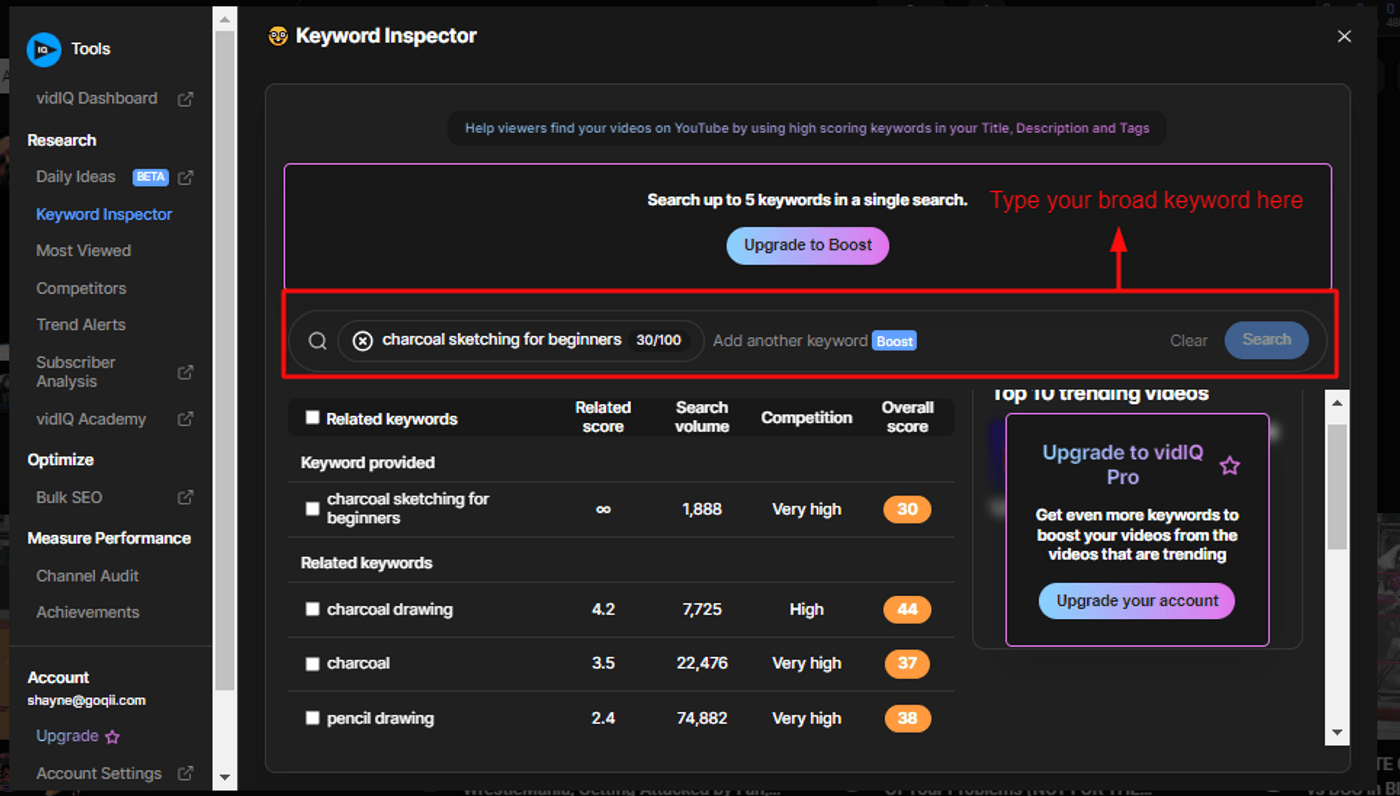
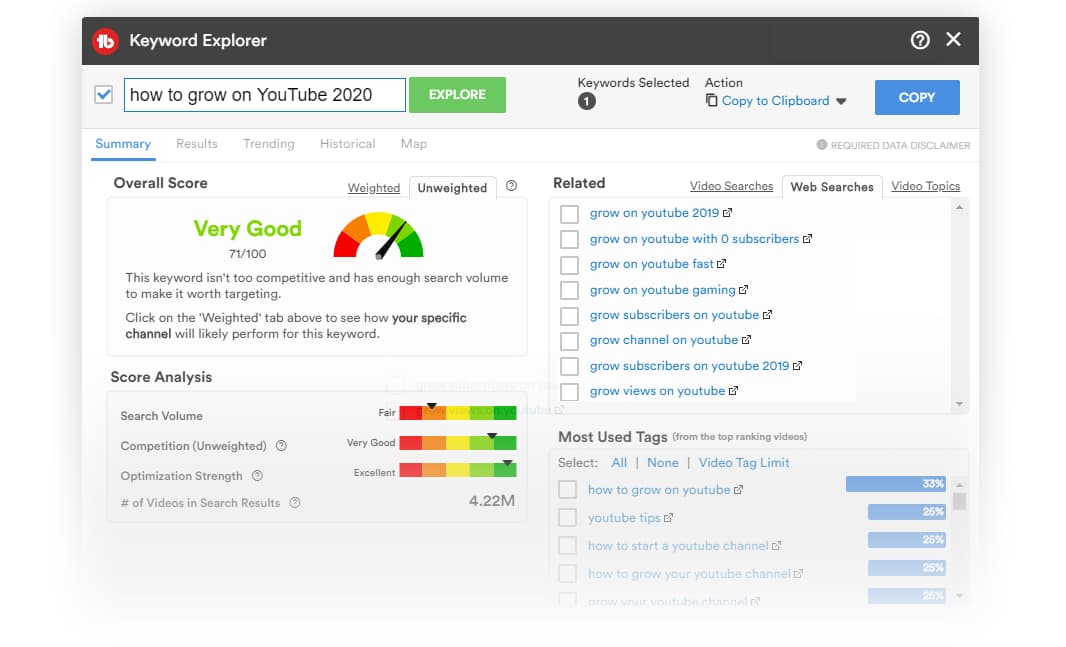
Both tools offer free versions with limited functionality and paid plans that unlock the full research capabilities. For this lesson, you can use the free version of either, but be aware that some of the more advanced metrics discussed require a paid plan (most offer a trial).
My recommendation is to pick one and stick with it to learn the core workflow. The principles are the same for both. This lesson will walk you through a process that applies to either tool.
A Step-by-Step Workflow for High-Opportunity Keywords
We'll follow a systematic process inspired by the "Rank Fast Formula," a practical and effective method for YouTube SEO.
To get a comprehensive overview of this workflow using VidIQ, I recommend watching the following video. It's incredibly detailed and provides the tactical, step-by-step guidance you prefer.
The video 'vidIQ Keyword Research' by Meteoric Money Labs provides an excellent, in-depth tutorial on a repeatable process for finding winning keywords. We will focus on the core steps of the research process.
Watch the following sections to understand the tools and the research process: Tool Interface Walkthrough (01:55 - 05:50): Familiarize yourself with the VidIQ keyword tool interface and the key metrics (Search Volume, Competition, Overall Score). Search vs. Browse Strategy (06:44 - 08:30): Pay close attention to why we are focusing on a 'search-targeted' strategy for predictable results. Finding & Validating Primary Keywords (13:00 - 20:10): This is the most critical part. Absorb the step-by-step process of finding keywords with the right metrics and, more importantly, validating them.
Now, let's break down that process into actionable steps you can follow.
Step 1: Brainstorm Seed Keywords
A seed keyword is a broad, 1-2 word topic related to your SaaS niche. This is your starting point. For example, if your SaaS is an AI tool that helps freelance writers find gigs, your seed keywords might be:
freelance writingcopywritingfind clientsAI for writers
You can use AI tools like ChatGPT to accelerate this process. As shown in the video, a simple prompt like "Give me 10 topics related to [your niche]. Then, list a max of three seed keywords for each topic." can generate your starting list in seconds.
Step 2: Analyze for a Primary Keyword
Take your seed keywords and enter them one by one into VidIQ or TubeBuddy's Keyword Explorer. Your goal is to find a more specific, long-tail keyword (3+ words) that represents a high-opportunity video topic.
As you browse the "Related," "Matching," or "Questions" tabs, look for keywords that hit a sweet spot based on these metrics:
- Search Volume: How many people are looking for this per month. For a new channel, a volume between 1,000 and 50,000 is often a good range. Too high, and it's too competitive; too low, and it's not worth the effort.
- Competition: How many other videos are competing for this term. Both tools provide a score (e.g., Very Low to Very High). Aim for "Low" or "Very Low."
- Overall Score: A proprietary score from the tool that combines volume and competition. Look for "Good," "Very Good," or "Excellent."
If you're using TubeBuddy, make sure to switch to the "Weighted" score. This gives you a personalized recommendation based on your channel's current authority, which is invaluable for a new channel.
To see how to interpret these metrics in TubeBuddy, watch this short clip.
How To Use TubeBuddy To Get MORE VIEWS On YouTube | Step-by-Step
Nick Nimmin's tutorial, 'How To Use TubeBuddy To Get MORE VIEWS', clearly explains how to read the Keyword Explorer and use the weighted score.
Watch from 02:20 to 08:05. Focus on how he analyzes the Overall Score, breaks down the components (Search Volume, Competition), and uses the tool's suggestions to find a better, less competitive keyword (NFL Schedule vs. NFL Schedule 2020).
Step 3: Validate Your Keyword Candidates (Crucial!)
The metrics from the tools are estimates. You must validate your chosen keyword with real-world YouTube data. This is the step that separates amateurs from pros.
-
YouTube Search Prediction Test: Open a private/incognito browser window and go to YouTube. Start typing your keyword. Does YouTube autocomplete the full phrase? If it does, it's a strong signal that many people are actively searching for it.
-
Small Channel Competitor Analysis: Search for the keyword on YouTube. Look at the top 10 results. Are there at least 2-3 videos from small channels (e.g., under 10,000 subscribers)? The VidIQ and TubeBuddy extensions will show you the subscriber count directly in the search results. If only huge channels are ranking, it's too competitive. Seeing small channels rank is your green light.
-
Evergreen Potential (VPH Test): For the ranking videos from small channels, use the VidIQ extension to check their Views Per Hour (VPH). Look for two things:
- The view graph shows a steady, upward trend over several months. This indicates an "evergreen" topic that gets consistent search traffic.
- The current VPH is at least
2. This may sound small, but it equates to over 1,400 views per month—a solid return for a single video. This VPH is a more realistic estimate of the views you could get than the tool's search volume metric.
A keyword that passes all three validation tests is a high-opportunity topic worth creating a video for.
Test your understanding!
You find a keyword with a "Very Good" overall score in TubeBuddy. The search volume is 20,000/month and competition is "Low". You search for it on YouTube and see the top 5 results are all from channels with over 500,000 subscribers. Is this a good keyword to target for your new channel? Why or why not?
Show answer
No, this is likely not a good keyword to target. Although the tool's metrics look promising, it fails the Small Channel Competitor Analysis validation step. If only large, established channels are ranking, it indicates the actual competition is extremely high, and a new channel will struggle to break into the top results, regardless of what the tool's "Competition" score says.
Your Assignment: Find Your First Video Keyword
It's time to put this into practice. Your task is to perform keyword research for a hypothetical SaaS product and identify one high-opportunity video topic.
- Choose a Tool: Install the browser extension for either VidIQ or TubeBuddy.
- Define Your SaaS: Let's use a consistent idea. Your SaaS is: "ScribeAI," an AI-powered tool that automatically generates documentation and tutorials from screen recordings.
- Research: Follow the 3-step workflow:
- Brainstorm 3-5 seed keywords for ScribeAI.
- Use your chosen tool to analyze those seeds and find a primary long-tail keyword with good metrics (high volume, low competition).
- Perform the 3 validation tests on your chosen keyword.
- Deliverable:
- State the high-opportunity keyword you identified.
- Provide the key metrics from the tool (Search Volume, Competition, Overall Score).
- Briefly explain why it passed your validation tests:
- Did it appear in search predictions?
- Did you find small channels ranking in the top 10?
- What was the VPH and view trend of a ranking video from a small channel?
This exercise will give you a tangible result and ensure you've mastered the foundational skill of video SEO.
Conclusion
You now have a reliable, data-driven framework for discovering video ideas that your target audience is actively looking for. This eliminates guesswork and dramatically increases the ROI of your content creation efforts.
Key Takeaways:
- For SaaS marketing, treat YouTube as a search engine to capture high-intent viewers.
- Use VidIQ or TubeBuddy to find keywords with the right balance of high search volume and low competition.
- A keyword's metrics are just a starting point; you must validate your choices by checking search predictions, analyzing the actual competitors on the results page, and verifying evergreen potential with VPH.
- Finding a keyword where small channels are already ranking is the strongest signal of opportunity.
Preview of the Next Lesson:
Once you've identified a high-opportunity keyword, the next step is to create a video that's better than the current top results. In our next lesson, you will learn to analyze top-ranking competitor videos on YouTube to deconstruct successful formats and structures. This will equip you to reverse-engineer success and plan a video that is destined to perform well.